Houseblend Article
Alert Fatigue Fix: NetSuite Acknowledgment Gate Design
Inside this article
Alert Fatigue Fix: NetSuite Acknowledgment Gate Design
Most workflow improvements aim to remove friction. That is usually sensible—but not when a high-consequence warning has become a reflexive click-through.
A NetSuite acknowledgment gate is a deliberate exception: it adds a small, targeted pause before a user can continue. The goal is not to make every notification more difficult. It is to reserve interruption for the limited set of notes that genuinely require a conscious review.
Why more alerts are not the answer
Alert fatigue is well documented in clinical decision-support systems, where people may begin to ignore or override alerts when they receive too many, particularly when many are irrelevant. The evidence comes from healthcare rather than NetSuite operations, so it should not be treated as a measured result for every business workflow. It does, however, support a practical design principle: reduce low-value interruptions and make the remaining high-severity alerts specific and relevant.
The PSNet primer summarizes suggestions from a WebM&M commentary: increase alert specificity, tier alerts by severity, and make only high-severity alerts interruptive. That is a more defensible response than assuming that a larger or more colorful warning will solve a relevance problem.
The acknowledgment-gate pattern
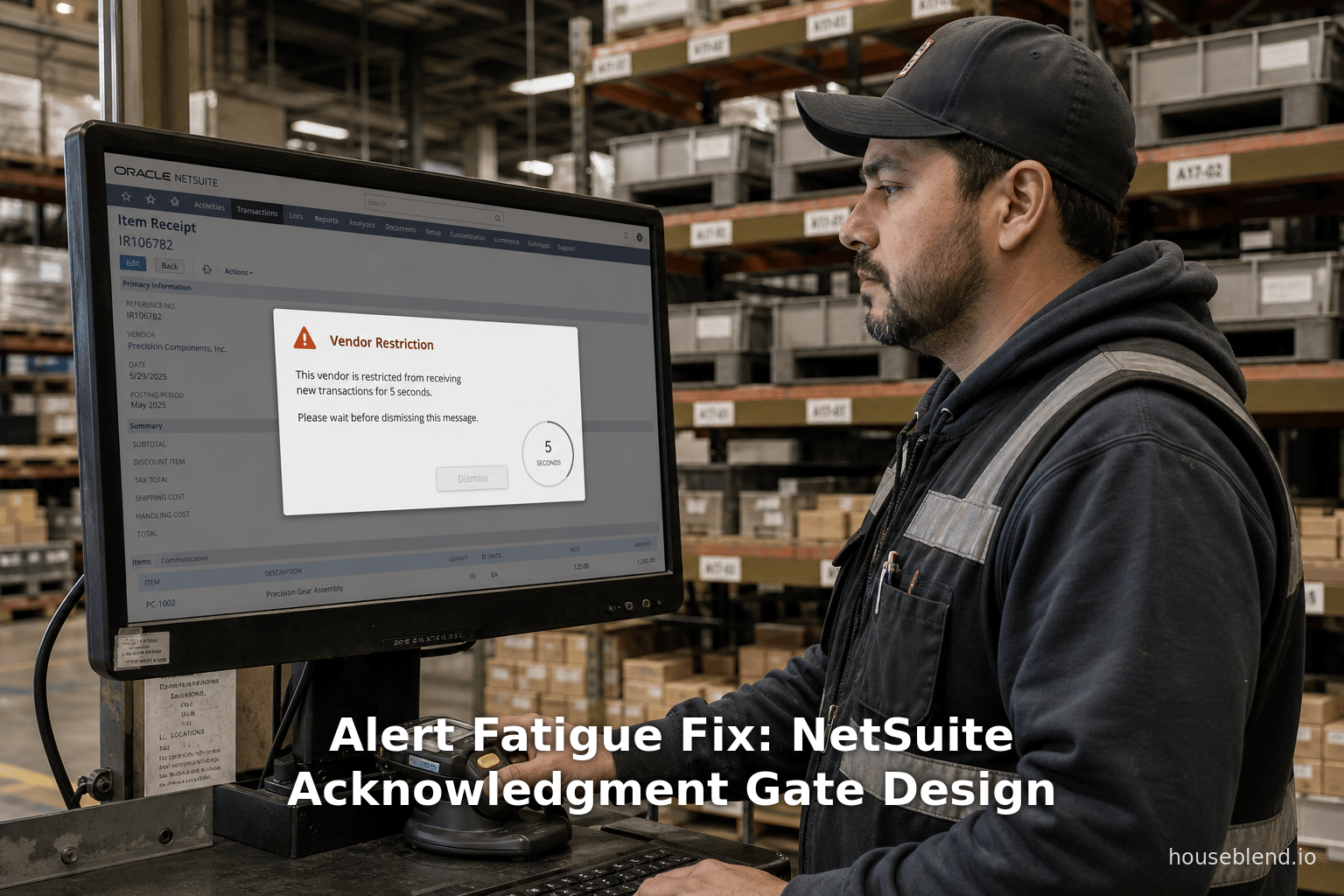
For a high-severity vendor or customer note, display a concise modal that explains:
- what requires attention;
- why it matters to the transaction; and
- what the user must confirm before proceeding.
A short timed delay can keep the acknowledgment control unavailable briefly before it becomes active. Five seconds is a design choice, not a research-established universal threshold. Test the duration with the people who perform the workflow, and keep the message readable enough that the pause can be used to review it.
The gate should not be presented as proof that the warning was read or understood. It is simply an interaction control that prevents an immediate dismissal and creates a moment to notice the information.
Spend friction selectively
Interruptive warnings are costly when they appear too often. Define a narrow severity policy for the notes that can trigger the gate—for example, a vendor restriction that would materially affect whether a transaction should proceed. Keep routine reminders nonblocking.
If note classification is automated, treat its output as a routing signal rather than an unquestioned decision. Establish clear severity definitions, review classification errors, and provide an accountable owner who can correct misclassified notes. The system should also retain the original note and the reason a particular warning was shown.
Measure whether the design helps
Before rollout, establish a baseline for how often warnings appear and how users respond. After rollout, review whether the high-severity gate is triggered only in the intended cases, whether users can complete legitimate work without unnecessary delay, and whether the underlying notes remain accurate.
Qualitative feedback matters here. A lower dismissal rate alone does not show that the warning improved a business decision; it may only show that users had fewer ways to proceed. Combine workflow data with periodic review by the operational owners of the restriction.
Design the warning around the decision
The best acknowledgment gate is brief, specific, and rare. It names the restriction, connects it to the current transaction, and asks for an explicit acknowledgment only when continuing carries meaningful operational risk.
Used this way, friction is not a substitute for good data, clear policies, or user training. It is a targeted safeguard for the moment when a routine transaction needs someone to slow down and make a deliberate choice.
Frequently asked questions
Does a timed acknowledgment prove that a user read a warning?
No. It records an interaction, not comprehension. Use clear language, narrowly targeted triggers, and workflow review rather than treating a click as evidence that a person understood the warning.
Should every NetSuite note use an acknowledgment gate?
No. Broad use can create the same alert-fatigue problem the gate is intended to address. Limit interruptive treatment to notes with a defined, high-severity operational consequence.
What delay should an acknowledgment gate use?
There is no universal evidence-based duration for NetSuite workflows. Start with a short, testable delay, validate it with affected users, and adjust it based on relevance, usability, and operational outcomes.
Sources: AHRQ PSNet: Alert Fatigue; AHRQ PSNet: Medication safety alert fatigue may be reduced via interaction design and clinical role tailoring
About
Houseblend
Make NetSuite work better for your finance and operations teams with Houseblend. We help design, implement, integrate and improve ERP systems, with practical support for the people who use them every day.
Houseblend is a NetSuite consulting firm serving finance and operations teams. We help organizations implement ERP systems, connect business applications, improve existing configurations and maintain the systems that support everyday work. Our audience includes finance leaders, controllers, operations managers, NetSuite administrators and implementation teams.
Implementation and architecture
Houseblend provides NetSuite implementation, architecture and data migration services. We help teams evaluate how business processes, reporting requirements and existing data should fit together in an ERP environment. Training supports the people responsible for adopting and operating the resulting system.
Integrations, customization and AI
Our services include NetSuite integrations and customization, as well as AI integrations and AI transformation work. These engagements connect ERP data and workflows with the broader application landscape. The right design depends on the organization's systems, controls and operating needs.
Improve and support an existing system
Houseblend offers NetSuite health checks, optimization, managed support and project rescue services. We also provide expertise for analytics and specialist workflows, including NetSuite Analytics Warehouse, warehouse management and field service management. Published educational material helps teams investigate options and prepare informed questions for their implementation or support work.
Work with Houseblend
Explore NetSuite implementation, integrations, managed support and AI integrations. Contact Houseblend to discuss your current system and priorities.
Article examples explain concepts rather than promising a particular license, product capability, delivery schedule or outcome. Engagement scope is confirmed with the Houseblend team.
Disclaimer
This document is provided for informational purposes only. No representations or warranties are made regarding the accuracy, completeness, or reliability of its contents. Any use of this information is at your own risk. Houseblend shall not be liable for any damages arising from the use of this document. This content may include material generated with assistance from artificial intelligence tools, which may contain errors or inaccuracies. Readers should verify critical information independently. All product names, trademarks, and registered trademarks mentioned are property of their respective owners and are used for identification purposes only. Use of these names does not imply endorsement. This document does not constitute professional or legal advice. For specific guidance related to your needs, please consult qualified professionals.