Houseblend Article
NetSuite AI Canvas: Natural Language vs. Saved Searches
Inside this article
- 01Executive Summary
- 02Introduction and Background
- 03NetSuite Saved Searches: Role and Limitations
- 04Evolution of AI in NetSuite
- 05Natural Language Queries vs. Saved Searches
- 06Case Studies and Real-World Perspectives
- 07Technical Underpinnings: N/LLM and Retrieving NetSuite Data
- 08Implications and Future Directions
- 09Conclusion
Executive Summary
NetSuite, a leading cloud-based ERP platform with tens of thousands of global users [1] [2], has historically relied on Saved Searches as its primary method for querying and reporting on data. Saved Searches are powerful, reusable query definitions that allow complex filtering and formula-based analysis, and they are fundamental to NetSuite’s reporting and analytics capabilities [3]. However, as data volumes and user expectations grow, enterprise software is shifting toward more intuitive, AI-driven interfaces. In 2024–2025, Oracle NetSuite unveiled a suite of AI features (collectively known as NetSuite Next) that dramatically change how users interact with data. Chief among these are Ask Oracle, a conversational natural-language assistant, and AI Canvas, a collaborative simulation and visualization workspace [4] (Source: ecommercenews.co.nz). These innovations allow users to ask questions in plain language and get immediate, context-aware answers (often including charts and summaries), effectively reducing the need to construct traditional saved searches for many common queries (Source: ecommercenews.co.nz) [5].
This research report examines this transition in depth. It provides background on NetSuite’s saved search functionality and its role in enterprise data analysis, explains the newly introduced AI-powered capabilities, and analyzes how natural language querying is gradually replacing (or complementing) older reporting methods. We survey multiple perspectives—technical, business, and user-focused—and present evidence from product documentation, expert commentary, and case scenarios. We highlight technical underpinnings (such as NetSuite’s SuiteScript N/LLM module and SuiteQL), and draw on industry context (e.g. the broader trend toward conversational analytics [6]). The report also includes comparative tables, case examples, and a discussion of implications for businesses, including efficiency gains and potential challenges. Ultimately, we conclude that NetSuite’s AI Canvas and Ask Oracle represent a significant shift from manual, form-based queries to a more conversational, AI-augmented approach, reorienting NetSuite from a “system of record” into a “system of reasoning” [7].
Introduction and Background
Enterprise resource planning (ERP) systems like NetSuite have traditionally relied on structured query interfaces to help users find data. In NetSuite, Saved Searches have long been the primary mechanism by which users define and run custom queries and reports [3]. A saved search combines filter criteria and result columns into a reusable query that can be shared, scheduled, or embedded in dashboards [3] [8]. For example, a financial analyst might create a saved search that lists all open invoices over 60 days past due, or a sales manager might build one to rank top-selling products. As Oracle’s documentation notes, saved searches are “reusable search definitions” that are central to “reporting, tracking, business analysis, and strategic decision-making” [3].
However, saved searches come with limitations. To define complex queries, users often must know the exact field names and relationships in NetSuite’s data model, and may need to write SQL-style formulas. As one industry commentator observes, powerful saved searches frequently require fluency in Oracle’s PL/SQL syntax to write formula criteria or result columns [9] [10]. In practice, organizations often need specialized NetSuite administrators or consultants to build advanced saved searches, especially when they involve multiple record types or custom joins [10] [9]. Casual business users—such as sales reps or mid-level managers—typically rely on prebuilt searches or require help from IT teams. Moreover, saved searches produce static tabular results; further analysis often involves exporting data to Excel or visualization tools. This process can be time-consuming and error-prone, especially when data must be exported, manipulated, and re-imported for report generation.
In parallel, the broader business intelligence (BI) and analytics landscape has been evolving toward more natural and interactive interfaces. By the early 2020s, research and industry reports noted the emergence of natural language interfaces to data. Large Language Models (LLMs) like ChatGPT have demonstrated that users can get accurate, conversational answers to questions about complex data when combined with retrieval techniques [6]. In an O’Reilly analysis, this shift is described as a “search revolution” combining chatbots and search engines. Instead of the traditional keyword-based search (or manual query building), modern systems can use Retrieval-Augmented Generation (RAG) to fetch relevant data and have an AI generate answers [6]. The result is an experience that feels like “talking to the librarian of Alexandria” rather than rifling through a catalog [6].
For NetSuite customers, this evolution in data access coincided with growing pressures: exploding data volumes, more diverse user roles, and heightened expectations for on-demand insights. Many organizations have struggled with the burden of maintaining hundreds or thousands of saved searches across departments. At the same time, users outside of IT increasingly demanded easier ways to get answers. In response, Oracle began embedding AI features throughout the NetSuite platform. Early steps included AI-driven exception detection and predictive insights in financials (for example, identifying anomalies, forecasting crunches) and a 2024 release that introduced SuiteAnalytics Assistant – a natural-language AI companion for workbook data [1], as well as new Generative AI SuiteScript APIs [1] for custom apps.These developments set the stage for NetSuite’s most ambitious overhaul in its 27-year history: the suite of features unveiled at SuiteWorld 2025 under the banner of NetSuite Next (Source: ecommercenews.co.nz).
In summary, the stage is set: Saved Searches have been the cornerstone of data querying in NetSuite, but the advent of integrated AI (LLMs, RAG, conversational assistants) is fundamentally changing user expectations. The remainder of this report delves into how NetSuite’s new AI Canvas and Ask Oracle features leverage natural language to augment or replace saved searches, and what that means for organizations.
NetSuite Saved Searches: Role and Limitations
Definition and Use Cases
A Saved Search in NetSuite is essentially a preset query: users specify filter criteria (e.g. date ranges, field conditions) and choose which fields to display. Once saved, it becomes a reusable report that can be accessed on demand or scheduled (e.g. emailed to stakeholders daily). According to Oracle documentation, saved searches are “reusable search definitions” that support advanced filtering and customized result sets [3]. Typical uses include:
- Reporting and KPIs: Financial and operational metrics (e.g. monthly revenue by region, inventory aging reports) are often built as saved searches. The results can be published to dashboards or linked to portlets [3].
- Alerts and Workflows: Saved searches can be set to trigger email alerts or automated actions when criteria are met (e.g. notify if a customer’s balance exceeds a credit limit) [3].
- Data Views: Saved searches can serve as “preferred search forms” on record pages, showing only relevant records (for example, a salesperson’s saved search showing their customer orders) [3].
The user-defined nature of saved searches makes them very flexible. In the NetSuite UI, a user picks a record type (e.g. Transactions, Customers) and then configures filters and columns using checkboxes, dropdowns, and a field picker. In addition, there is support for Formula fields, where users can enter SQL expressions to calculate values or conditional logic in results. The Saved Search interface even links to an Analytics Workbook conversion guide [8], and provides examples for common searches like bin numbers or average items per order.
Because saved searches are so central, NetSuite allows them to be embedded in dashboards, portlets, reminders, and even published externally [3]. Administrators can create search templates for others, and set permissions so certain roles can run or subscribe to searches [3]. In short, saved searches form NetSuite’s legacy “query language”, accessible to power users and admins alike.
Limitations of Traditional Saved Searches
Despite their power, saved searches have well-known drawbacks:
-
Technical Complexity: As noted, advanced saved searches often require PL/SQL knowledge. Consultants observe that if you need sophisticated criteria (e.g. combining fields, conditional logic), you must either master Oracle’s internal SQL or commission an expert [9] [10]. For example, to duplicate two date fields in one column or to sum only “Billable” hours, a user might manually craft SQL formulas (see Case Study below). This steep learning curve is a hurdle for non-technical users.
-
Iterative Process: Running a saved search is often an iterative, manual task. A user might run a search and then tweak the filters, output, or formula if the results aren’t correct, repeating until satisfied. This “trial and error” can be time-consuming, especially for complex queries. If an answer requires drilling deeper (e.g., filtering by an additional criteria discovered after seeing results), the user has to manually modify and re-run another search – a completely separate action requiring new inputs.
-
Static Output: Typical saved search results are displayed as a table of values. While users can add charts or summary totals, the output itself is fixed once the search is defined. Summaries (e.g. totals, counts) have to be manually enabled (using NetSuite’s “Show Totals” checkbox) and may not cover nuanced insights. Any narrative context or explanation for why the data looks the way it does must be inferred by the user. There is no built-in narrative or reasoning: the search yields what the data is, but not why.
-
Limited Workflow Integration: To take action on data, users often need to export search results to spreadsheets or other systems. For example, if a series of findings from a saved search should trigger downstream tasks (like adjusting stock levels or initiating communications), each step is manual unless separate workflow rules or scripts are set up outside the search. In other words, saved searches are great for analysis, but they do not themselves automate multi-step processes across modules.
-
Maintenance Overhead: In large accounts, hundreds of saved searches proliferate over time, each requiring maintenance. Business rule changes (new taxes, reorganized department codes, new custom fields) often necessitate updating many saved searches. Meanwhile, the audit log shows that each saved search has usage history and needs to be reviewed periodically for performance. Slow searches are flagged, but debugging or optimizing them requires a DB-savvy admin [3].
These limitations have real consequences. Several NetSuite consultants have documented how everyday scenarios (stacking values in one column, conditional CASE statements, date arithmetic) typically require heavy formula work [9]. For example, in multiple blog case studies, AI tools (notably ChatGPT) are used to help generate the SQL needed for complex filters and results [9] [10], underscoring how saved search formulas can become quite intricate. In summary, while saved searches are indispensable, they impose technical burdens and largely serve as a point-solution querying tool rather than a conversational, insight-driven interface.
Table 1: Saved Searches vs. Natural Language Querying
| Aspect | NetSuite Saved Search | Natural Language Query (Ask Oracle) |
|---|---|---|
| User Interface | Graphical query builder: point-and-click filters, field picker [3] | Conversational chat interface: ask questions in plain English (Source: ecommercenews.co.nz) [5] |
| Query Formulation | Manual: define each criterion and result column; formula fields for advanced logic [3] [9] | Automatic: AI translates language into search logic (often via SuiteQL/RAG) (Source: ecommercenews.co.nz) [5] |
| Knowledge Required | High: user must know NetSuite schema, field IDs, PL/SQL for formulas [9] [10] | Low: minimal data-model knowledge; phrases like “sales in Q1” suffice [7] (Source: ecommercenews.co.nz) |
| Results Output | Tabular results listed; user interprets data values [3] | Contextual answers with charts and narrative; AI explains “how” and “why” (Source: ecommercenews.co.nz) [7] |
| Interactivity | Static: must reconfigure and rerun to get new views; no follow-up in same session | Interactive conversation: follow-up questions and drill-down are seamless (Source: ecommercenews.co.nz) |
| Collaboration | Shared only by saving/search sharing; spreadsheets must be sent to others | Real-time collaborative workspace (AI Canvas); multi-team scenario analysis [4] (Source: ecommercenews.co.nz) |
| Automation | Can trigger emails; minimal built-in action; separate workflows needed | Integrated AI agents and workflows: requests can spawn actions within ERP (Source: ecommercenews.co.nz) [4] |
This comparison highlights how Ask Oracle and associated AI tools fundamentally shift the interaction. Instead of constructing rigid queries line-by-line, users simply ask NetSuite questions; the system handles the logic behind the scenes. As one recap noted, Ask Oracle “allows users to query NetSuite in natural language and get context-aware responses” and even chaining (one question leading to another) becomes natural (Source: ecommercenews.co.nz). Likewise, AI Canvas introduces a collaborative, dynamic layer over data that saved searches alone cannot provide [4] (Source: ecommercenews.co.nz).
Evolution of AI in NetSuite
To understand the context of these new features, it is useful to trace NetSuite’s AI journey. Oracle has been infusing AI and machine learning into NetSuite for several years, initially focusing on specific domains:
-
Predictive and analytical insights: NetSuite introduced predictive analytics in areas like revenue forecasting and cash management, using machine learning models behind the scenes to suggest trends. For example, Smart Financials could flag anomalies or auto-detect financial exceptions.
-
SuiteAnalytics and Workbooks: Over time, NetSuite enhanced its SuiteAnalytics engine. In 2024, it unveiled the SuiteAnalytics Assistant, an AI/ML-powered assistant for analyzing workbook (BI) data via natural language [1]. With it, business users could ask questions about analytics datasets (“What are the top 5 accounts receivable by aging bucket?”) and get generative AI-driven summaries and charts. This was an early step toward conversational BI; specifically, Oracle noted users can “retrieve information” and receive generative summaries about accounts or customers through an NL interface [1]. This signaled Oracle’s move from static tables to narrative insights.
-
Generative AI APIs: Also in 2024, Oracle expanded capabilities for developers. It introduced Generative AI for SuiteScript, meaning developers could embed generative LLM calls (via Oracle’s cloud and frameworks) directly into SuiteApps. An Oracle press release described this (in Spanish) as enabling “customers to quickly complement NetSuite’s built-in AI with generative-AI-based SuiteApps” [1]. Complementing on-platform work, the SuiteCloud platform added an N/LLM module (published in early 2025) that gave SuiteScript 2.1 code native LLM access [5]. In practice, this lets a suitelet script gather context documents from NetSuite, send them to an LLM, and show the answer – essentially reconstructing an “Ask Oracle” type experience in custom code.
-
Generative Pricing and Content: Features like TextEnhance (a writing assistant for emails and records) appeared, letting users draft descriptions with generative AI. While not directly related to queries, these enhancements signaled that generative AI was becoming a mainstream tool in the suite.
By late 2024, NetSuite’s focus had shifted from isolated AI bits to a platform-wide AI strategy. Oracle CEO Evan Goldberg noted at Oracle CloudWorld 2024 that embedded AI would be pervasive: “We’re incorporating AI capabilities throughout the suite so customers benefit as soon as they log in” [1]. The 2024 update also introduced Financial Exception Management (AI to auto-detect anomalies in accounting) and Oracle Code Assist for SuiteScript (AI code assist) [1], all pointing toward automation and AI augmentation of ordinary tasks.
NetSuite Next (SuiteWorld 2025)
The watershed came at SuiteWorld 2025 (October 2025). There, Oracle launched NetSuite Next, describing it as a reimagined suite where AI is not just an add-on but the “engine” of the ERP [7]. NetSuite Next was touted as the biggest platform shift yet (27 years of history) (Source: ecommercenews.co.nz). Under this umbrella came the key features:
-
Ask Oracle: A natural language AI assistant that is directly embedded across NetSuite’s interface. According to NetSuite materials, Ask Oracle lets users “search, analyze, and act” using conversational prompts [4]. It is context-aware (sensitive to the user’s role, permissions, and data scope) and can present answers in a rich, actionable form – including dashboards and narratives [7] (Source: ecommercenews.co.nz). In demonstrations, users simply ask questions like “Show me which products had declining sales last quarter” or “Why is our inventory turnover slowing down?”, and the system returns answers with evidence [11] (interview citations in O’Reilly style). Notably, it also integrates across NetSuite customizations: one demo showed Ask Oracle reading an uploaded invoice, interpreting it, and triggering the correct workflow (Source: ecommercenews.co.nz). That goes far beyond what a saved search can do, as it blends computer vision, AI reasoning, and workflow triggers.
-
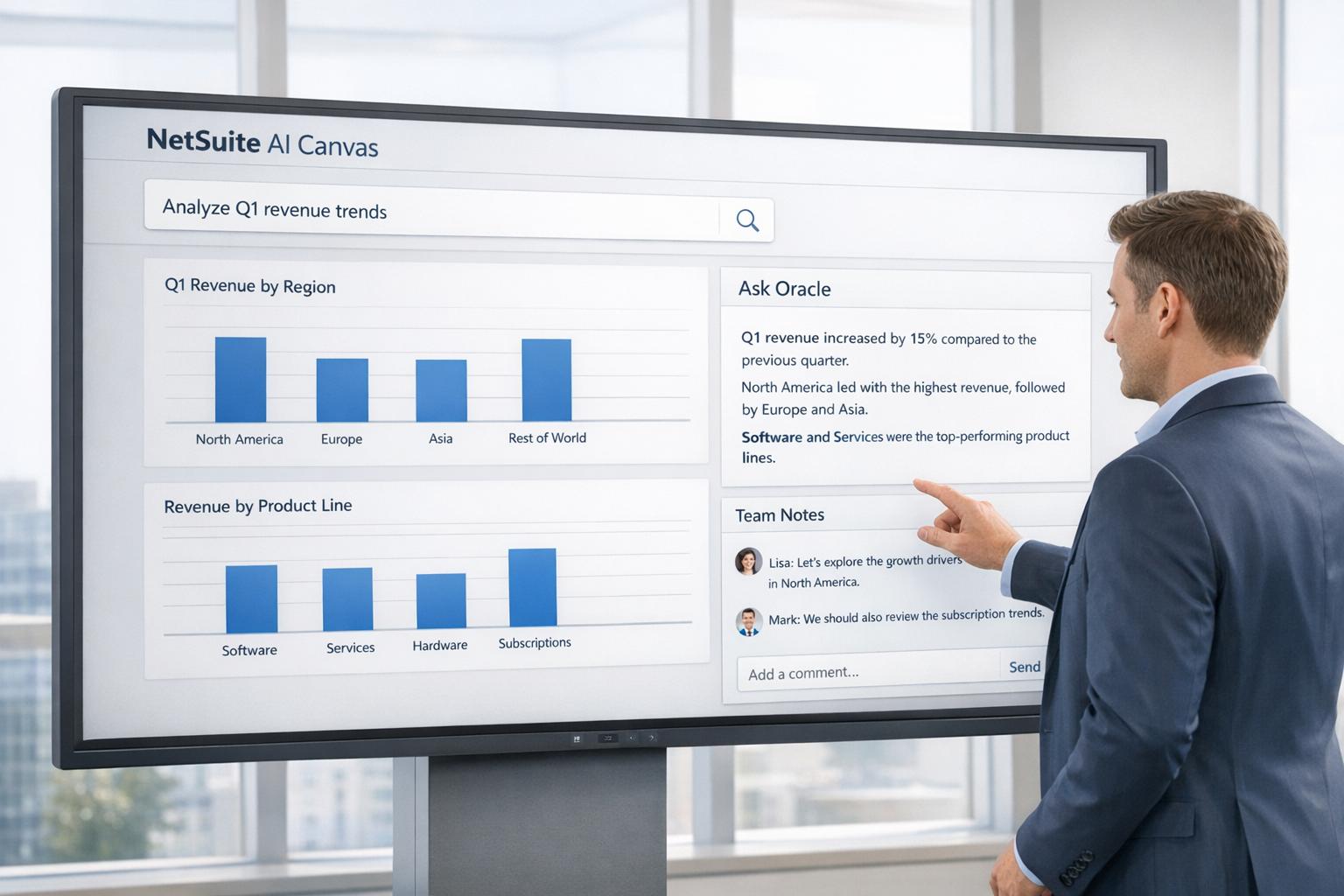
AI Canvas: A new interactive workspace inside NetSuite for collaborative planning and scenario analysis [4] (Source: ecommercenews.co.nz). Marketing materials describe it as a “whiteboard” where data and imagination meet [11]. In concrete terms, teams can pull real-time NetSuite data into the Canvas, create charts, and build hypothetical scenarios without exporting data out of the ERP (Source: ecommercenews.co.nz). For example, users might adjust sales forecasts, simulate a change in pricing, or shift resource plans, and immediately see the impact on key metrics like margin, supply chain, and cash flow (Source: ecommercenews.co.nz). AI Canvas smoothly bridges analysis and action: once a scenario is vetted, users can kick off automated tasks (via SuiteAgents) directly from the canvas, rather than manually executing them. Oracle claims that Canvas’s dynamic dashboards and narrative summaries (AI-generated) help leaders make decisions “minutes not days” after analysis [11] (Source: ecommercenews.co.nz).
-
Agentic Workflows (SuiteAgents and AI Connector): More deeply, NetSuite announced “SuiteAgents” – essentially user-defined AI bots built on the AI Connector framework. These agents can run domain-specific tasks (e.g. credit approvals, procurement decisions) using the new AI Connector Service and an MCP (Model Context Protocol) to securely integrate external AI models (Source: ecommercenews.co.nz) [12]. This means the platform can actually respond to queries by performing complex cross-module actions on the user’s behalf. For example, one could instruct NetSuite (via Ask Oracle) to compile and email a custom financial report, and the system would autonomously carry out all the steps. In short, analysis and execution begin to merge: AI “not only tells you the answer, but can act on it” [7] [13]. (Oracle’s vision is akin to an airplane “autopilot” rather than just a copilot, integrating deeply into every function [12].)
Together, these features signal NetSuite’s new paradigm: a conversational, AI-augmented enterprise environment. NetSuite Next does not replace the underlying data model; customers keep their data and customizations, and the upgrade is optional (not a forced migration) [7]. Instead of clicking through dozens of menu items or building hundreds of saved searches, users will ask Oracle for insights and actions. As one partner blog summarizes: “With Ask Oracle and embedded AI, NetSuite is shifting from a system you navigate...to one you converse with” [2]. Early access to NetSuite Next features (including AI Canvas) is being rolled out to select customers (for example, a few North American clients in late 2025) [7], with full global availability following into 2026–2027.
Natural Language Queries vs. Saved Searches
Ask Oracle: Always-On Business Q&A
Ask Oracle represents a fundamental shift. Instead of manually building a saved search, a user can pose a question in plain language. The system then internally performs a Retrieval-Augmented Generation (RAG) process: it translates the request into queries (often SuiteQL under the hood) to fetch relevant NetSuite data, and then invokes an LLM to craft an answer. Oracle’s documentation on N/LLM describes exactly this RAG pattern, where a suitelet builds a set of context documents (e.g. summaries of sales data) and feeds them to the LLM, which returns an answer with citations back to the data [5]. The result is an answer that is both data-driven and conversational.
For example, an Ask Oracle prompt might be as simple as: “What item generated the most revenue in Boston last year?” [5]. The system would group transaction data by item and location and compute sums using SuiteQL (as shown in the developer blog) [5]. The AI then produces an answer like: “Widget A generated $X in Boston in 2025, which is Y% more than the next highest item. This indicates a strong market demand. (See attached revenue chart.)” The user can then naturally ask follow-ups (“What about in New York?”), to which Ask Oracle will run new queries with context. Each response is accompanied by charts or dashboards and a written narrative explaining the reasoning (Source: ecommercenews.co.nz) [7], a level of insight that traditional saved search outputs do not provide on their own.
Because Ask Oracle can see the context (user role, record type in view, etc.), two users can ask the same question and get different answers relevant to their domain [7]. For instance, a CFO asking about “top customers” will see a profitability-focused breakdown, while a sales rep asking the same will see a sales-volume view. Oracle explicitly describes it as “role-aware” and providing “context-aware answers” [7] [4]. This personalization contrasts with saved searches, which deliver the same result to all run by default (unless filters are applied).
Crucially, Ask Oracle can operate across custom records, SuiteCloud extensions, and even partner apps – meaning the entire NetSuite data model is within its reach (Source: ecommercenews.co.nz). In demonstration, the assistant was shown reading an uploaded invoice PDF, extracting data, and initiating the correct accounts-payable workflow (Source: ecommercenews.co.nz). A saved search would not even be triggered by that scenario, let alone take action. Similarly, AI agents built on the AI Connector can execute tasks on the user’s instruction, making the dialogue truly “actionable.”
The overarching effect is that natural language querying replaces a large portion of use-cases previously solved by saved searches. Day-to-day questions that once required building or tweaking saved searches can now often be answered instantly by asking. Instead of learning which fields to combine, the user relies on language (“show me declining sales”, “who are our risk customers?”) and trusts the AI to form the proper query behind the scenes. This dramatically lowers the barrier for end-users. One NetSuite community expert summarizes: “Ask Oracle is like having a business-savvy Siri who actually knows what she’s talking about” [11] (a partner-friendly quote, albeit informal). Unlike a static report, Ask Oracle is always on, listening. It “shows its work” by providing reasoning, so the user can trust and verify it.
At a technical level, the move to natural language also reflects a change in how queries are written under-the-hood. Historically, NetSuite’s scripting API included an N/search module for saved-search-type queries. In contrast, the new code example is using N/query with raw SuiteQL SQL for performance and flexibility [5]. Oracle even encourages developers to prefer SuiteAnalytics Query (SuiteQL) over the older search API for heavy queries [5]. This suggests that the AI backend will generally rely on SuiteQL queries given a prompt from Ask Oracle or AI Canvas. SuiteQL can handle complex joins and large datasets more efficiently than a point-and-click search, which may improve the responsiveness of Ask Oracle queries.
AI Canvas: Scenario Modeling and Collaboration
While Ask Oracle focuses on conversational querying, AI Canvas addresses planning and analysis. It is a new integrated workspace (a “Canvas”) where teams collaborate. In the Canvas, dynamic data panels and visuals are driven live by NetSuite’s data model (Source: ecommercenews.co.nz). The key innovation is interactive scenario simulation. Traditional analysis often involves copying data to Excel or BI tools, manually adjusting assumptions, and then reimporting results. With AI Canvas, business users can directly manipulate models in NetSuite. For instance, a supply chain analyst can immediately test “What happens if we increase component costs by 10%?” by simply entering that change into the Canvas. Instantly, all charts, metrics and forecasts on the page update using live calculations (Source: ecommercenews.co.nz). There is no need to build a new saved search or wait for a scheduled report – the Canvas is the pane where data stays contextual and interactive.
Moreover, AI Canvas fosters team connectivity. Sales, operations, and finance can work together on one Canvas rather than sending static files back and forth. As Oracle’s description highlights, it “brings supply chain, operations, and finance teams together in a single interface” with shared data [7]. This collaborative planning is far beyond the capability of any single saved search; it transforms analysis into a choreographed session. After exploring “what-if” scenarios, users can directly execute decisions from the Canvas. For example, if a scenario shows a revenue shortfall under certain conditions, the team might trigger an AI agent to launch a targeted marketing campaign or adjust pricing automatically (Source: ecommercenews.co.nz) [4].
Notably, AI Canvas is designed to generate not just visuals but AI-driven insights. It produces narrative summaries and next-step suggestions based on the scenario [7]. Instead of the user having to manually interpret charts, the software can say “Demand fall in East region, consider boosting promotions” or “Margin risk is X; here’s an action plan,” using generative AI behind the scenes. This turns the analytics session into a guided conversation, again replacing the manual interpretation step.
In essence, AI Canvas shifts the paradigm from static reporting to dynamic simulation. A saved search might answer “What were sales last year?” once. AI Canvas, on the other hand, lets you fluidly ask “How would sales change if we enter market Y?” and see real-time answers and suggestions. It is yet another example of replacing rigid, one-shot queries with flexible, interactive exploration.
Retrieval-Augmented Generation (RAG) and Accuracy
An important technical foundation of Ask Oracle (and by extension AI Canvas’s AI features) is Retrieval-Augmented Generation (RAG) [5] [6]. RAG ensures that the AI’s answers are grounded in actual NetSuite data. For instance, the N/LLM suitelet example explicitly fetches relevant documents (individual item sales) and then passes them to the LLM, which produces a response pointing back to those documents [5]. Oracle’s blog explains that RAG “keeps outputs factually grounded, domain-specific, and reduces hallucinations” [5]. In other words, while large language models could be prone to making up facts, NetSuite’s approach ties answers to the real transactional data in the account. Each response even includes “citations” to the supporting data [5]. This aspect is vital for enterprise adoption: CFOs and auditors need trust. According to Oracle, the AI content is “used to make suggestions” but the user must “assume responsibility for validating” them [14].
Furthermore, Oracle has taken steps to protect data privacy. The AI services run on Oracle Cloud Infrastructure (OCI), and customer data is not shared with outside LLM vendors [1]. Role-based security in NetSuite controls what data the AI can access, ensuring answers respect permissions [1]. This means that, even though Ask Oracle feels like talking to a super-intelligent assistant, it is tightly confined to the given NetSuite account’s data and the user’s access rights.
Case Study: AI-Accelerated Saved Search Creation
While NetSuite’s official narrative is about replacing saved searches with natural queries, many organizations currently inhabit a hybrid state. In the field, consultants have reported using AI (like ChatGPT) to make saved searches better or faster. For example, Graybox Consulting demonstrated creating complex search formulas via ChatGPT prompts [9]. In one example, a user wanted to stack two date fields into one column. They simply asked ChatGPT for the PL/SQL formula, and got {custentity_orig_start_date}||’<br>’||{custentity_orig_end_date} [9]. Another example used ChatGPT to write a CASE statement that sums only billable hours in a timesheet search [9]. These incremental AI assists save hours of expert SQL writing. However, they still rely on building a saved search in the first place.
Contrast this with Ask Oracle: instead of manually building those columns, a user could ask “Combine the planned start and end dates for each project” in plain English, and the AI would handle the logic. The Graybox examples highlight both the potency of saved searches (they can solve almost any query given enough SQL) and their usability challenges (most users can’t write the needed queries unaided) [9]. AI Canvas and Ask Oracle are effectively removing that middle layer: with AI, users no longer need to know the syntax or even that there are separate fields; they just describe what they want.
Table 2: Traditional Analysis Methods vs. AI Canvas
| Feature | Traditional Method (e.g. Excel/BI) | NetSuite AI Canvas |
|---|---|---|
| Data Freshness | Manual exports/imports; data can become outdated between updates | Real-time, live data from NetSuite’s records (Source: ecommercenews.co.nz) |
| Collaboration | Separate files cause version confusion; siloed team views | Shared interactive workspace connecting finance, ops, etc. [4] (Source: ecommercenews.co.nz) |
| Scenario Modeling | Hand-built “what-if” models in spreadsheets; manual recalculations | Built-in “what-if” simulations; change parameters and see instant impact (Source: ecommercenews.co.nz) |
| Action Integration | Analysis output must be manually interpreted and actions manually executed | Integrated workflows: trigger AI agents and tasks directly from the Canvas [4] (Source: ecommercenews.co.nz) |
| Insights & Reporting | Static charts/tables and narrative written by analysts | AI-generated visualization and narrative; suggestions based on outcomes [7] [4] |
This table illustrates how AI Canvas extends beyond mere querying. For example, instead of the “data export → analysis → report” cycle, Canvas keeps data in-context and continuously updated (Source: ecommercenews.co.nz). Its built-in charts and text summaries (powered by generative AI) eliminate the manual crafting of presentations; the system even surfaces recommended next steps from modeled scenarios [7]. In essence, AI Canvas converts traditional planning tasks into a native NetSuite experience.
Case Studies and Real-World Perspectives
While formal published case studies on Ask Oracle or AI Canvas are not yet available, various industry commentators and user communities have reflected on the implications.
-
Early Adopters and Pilots: Oracle indicated that a select few North American companies would test AI Canvas later in 2025 [7]. These customers span industries and likely use-cases (e.g. CFO offices, sales ops teams). Though their identities aren’t public, early feedback suggests enthusiasm. One observer noted that teams at SuiteWorld were “wide-eyed” about Canvas’s ability to replace their Excel models [7]. As these pilots progress, companies expect significant savings in modeling time.
-
Consulting Firms: Firms like Crowe and Ernst & Young (EY) have synthesized the SuiteWorld announcements for clients. EY noted that NL AI in business intelligence can provide “instant answers to high-level questions without…. complicated data feeds” and that a single corporate question can now elicit different perspective-based answers (e.g., “the CFO asks the same question as the warehouse manager and gets different, pertinent dashboards” [7]). They also highlighted “governance and control” steps being taken as AI rolls out, reflecting customer wariness [2]. Overall, consultancies view Ask Oracle as making everyday NetSuite use dramatically easier.
-
Business Leaders: From the executive mindset, this shift is often framed as moving from reactive reporting to proactive insight. Oracle’s Evan Goldberg remarked, “Businesses that build AI into the core of how they operate…will set themselves up to outperform for years to come” [12]. Industry analysis echoes this, comparing Ask Oracle to an always-on “business navigator” that shortens decision cycles [11]. Sale managers, for instance, now strongly desire real-time answers (“Who are my top customers in the SW region?”) without pulling rats of queries. Customers of AI-ready ERPs often cite faster month-end closes and better forecasting as top benefits.
-
IT and Developers: The introduction of N/LLM and suite-level AI also changes the developer role. Devs must now manage prompts, context documents, and integration with LLM services. The N/LLM blog shows how a suitelet can bundle NetSuite data into AI prompts [5] and handle citations [5]. Security and governance implications arise too: IT teams have to ensure the AI connectors and data permissions align with policies. Some fear loss of control, but Oracle emphasizes that users “remain in control” of any AI-initiated actions [11]. Indeed, every AI recommendation is configurable; admins can approve or refine workflows suggested by the Canvas.
-
End Users: Perhaps the most immediate beneficiaries are end-users. Non-technical staff can ask business questions in everyday language. A warehouse manager could ask, “Need list of items where stockouts occurred in last quarter” and get results without touching saved search screens. Customer service reps can query the Order Management system via chat about specific cases. The user experience shifts from learning NetSuite’s interface to learning to ask effective questions. One community member quipped that with Ask Oracle, NetSuite “no longer feels like wrestling with software but working with a colleague” [11] (paraphrased from the Medium blog). Surveys in similar contexts show that faster insights translate directly to more timely decisions and high user satisfaction.
-
Comparative Context: NetSuite’s approach mirrors broader trends. Besides consulting examples above, major BI vendors have rolled out NL features (e.g., Tableau’s Ask Data, Power BI’s Q&A) to allow conversational queries on reports. NetSuite’s unique advantage is embedding these capabilities directly in the transactional system, rather than a separate analytical silo. Unlike generic tools, Ask Oracle spans real-time transactional data and ERP workflows. Consequently, departments that live in NetSuite (finance, distribution, project services) don’t have to build external dashboards or data warehouses for this functionality.
Overall, stakeholder perspectives converge on one point: natural language querying in NetSuite drastically lowers the barrier to data access. Users no longer need to be trained in the intricacies of saved search syntax. Business queries become democratized. At the same time, by keeping operations on the same platform, the findings and actions remain secure and governable.
Technical Underpinnings: N/LLM and Retrieving NetSuite Data
The mechanics of Ask Oracle and AI Canvas rely on new SuiteCloud capabilities. Important components include:
-
SuiteScript N/LLM Module: Published in 2025, the N/LLM module gives SuiteScript (NetSuite’s JavaScript API) built-in LLM functions [5]. Developers can invoke
llm.generateText()with a prompt and supporting documents. They can create “documents” from NetSuite data (via SuiteQL queries) to provide factual context. For example, in the developer blog’s suitelet, each type of data (item sales, location breakdowns, etc.) was assembled into text documents and passed to the LLM [5]. The blog emphasizes that LLM results come with citations pointing back to the documents, ensuring traceability [5]. Crucially, any LLM output the system produces can be linked exactly to the underlying NetSuite records or documents. -
SuiteAnalytics Query (SuiteQL): Internally, the LLM-powered interface uses SuiteQL (the NetSuite variant of ANSI SQL) rather than the older
searchmodules. The developer guide explicitly shows usingquery.runSuiteQL()to fetch data for analysis [5]. SuiteQL offers greater flexibility (e.g. joins across transactions and items) and performance benefits. This suggests that when Ask Oracle is asked a question, it likely composes one or more SuiteQL queries behind the scenes to retrieve the necessary data snippets. [5] -
Retrieval-Augmented Generation (RAG): As explained earlier, NetSuite’s AI tools implement RAG. That means a two-step process: retrieve the relevant business data and generate an answer. By constraining the LLM with company-specific records, NetSuite ensures factual accuracy. This method is akin to simply replacing a search engine’s keyword scan with a brief library lookup, then asking the LLM to summarize. The O’Reilly explanation of RAG applies directly here: combining fast retrieval with an LLM reduces hallucinations and yields more accurate, context-aware answers [6] [5].
-
AI Connector and SuiteAgents: For external AI models and custom agents, NetSuite uses the Model Context Protocol (MCP) and AI Connector Service. This is a suite-wide framework that allows an Oracle Cloud instance of NetSuite to securely call third-party AI (e.g. Claude, GPT models) on demand [12]. These models can execute “tools” or actions exposed by NetSuite. In practice, this means if Ask Oracle or Canvas needs a capability beyond NetSuite’s native stack, it can route through this connector. Administrators maintain control over which models and which data scopes are allowed, integrating governance into the AI flow [12] [1].
Together, these technologies blur the line between data storage and data intelligence. The ERP’s databases become a living knowledge base, dynamically queried by AI agents. This is a stark contrast to the old model of static, periodic querying via saved search.
Implications and Future Directions
Business and Operational Impacts
The shift to AI Canvas and conversational queries has broad implications:
-
Increased Efficiency: By cutting down manual query building, tasks that once took hours can be done in minutes. Routine report generation becomes trivial, freeing analysts to focus on interpretation rather than data gathering. Month-end closing processes (long a bottleneck) can be highly automated, as Oracle demonstrated with the “Intelligent Close” workflow [7].
-
Democratization of Data: Non-technical staff (salespeople, managers, etc.) can obtain insights themselves without IT’s help. This speeds up decision-making and reduces “analysis paralysis.” Gates are lifted: anyone with a NetSuite login and the right role can explore data conversationally. For example, a customer service rep might find answers about a client’s order history without needing to file an IT request for a custom search.
-
Smaller Backlogs for IT: IT and admins will spend less time building and updating saved searches. Instead, their role shifts toward curating the AI environment: ensuring data quality, tuning AI prompts/templates, and managing governance. The saved searches that remain will be those that support niche or highly structured reports, while many ad-hoc questions are handled by AI. This may change staffing needs – fewer dashboard-builders might be needed, replaced by AI-savvy solution architects.
-
Enhanced Insights: The narrative and visual format means businesses may uncover patterns they otherwise missed. Instead of digging through tables, executives get concise explanations. For example, AI Canvas’s narrative might highlight that a projected shortfall is largely due to one underperforming product line, something a raw search table wouldn’t call out.
-
Data Governance and Compliance: Integrating AI raises new considerations. The organization must establish policies for how users phrase queries, how AI responses are audited, and how sensitive data is protected. Oracle’s built-in role checks and OCI’s closed data handling help, but companies will still need to monitor outputs to ensure compliance with regulatory requirements (e.g. no unauthorized data is surfaced).
Challenges and Risks
-
Accuracy and Trust: Even with RAG grounding, some AI answers may be imperfect. Users must continue to validate critical answers. Overreliance without oversight could lead to business errors if, for example, the AI misinterpreted a question. Companies will likely maintain manual checks (for example, cross-verifying AI outputs with a saved search or report) until confidence is high.
-
User Training: While natural language is easier than syntax, users may need guidance on how to phrase questions effectively. There may be a learning curve around prompts (e.g. “What’s a good way to ask for X to get Y”). Oracle may provide training or built-in help tips (as seen in the example prompt list [5]), but organizations should plan user adoption programs.
-
System Load and Performance: Conversational querying may generate many more ad-hoc reports than scheduled batch jobs did. NetSuite’s infrastructure must handle this load. Fortunately, built-in use quotas and monitoring (developers can see “LLM usage remaining” [5]) help manage costs and performance. Still, very complex or voluminous queries may need to be controlled.
-
Saved Search Stake: Some legacy processes and integrations still rely on saved search results (for analytics or third-party connectors). Transition planning is required to ensure that replacing saved searches with AI does not break automations. In the short term, the tools will likely coexist: saved searches for fully automated pipelines, and AI for user-driven querying.
Future Directions
The path ahead is expansive. NetSuite’s AI Canvas and Ask Oracle are just the start of embedding AI design into enterprise workflows. Next steps may include:
- Broader AI Agents: The SuiteAgents concept hints that industry-specific bots (e.g. a manufacturing optimization agent) could be built and shared. We may see marketplaces of NetSuite AI agents akin to AppExchange.
- Cross-Application Integration: NetSuite is working on “MCP apps” that let users interact with NetSuite via other AI assistants (like having NetSuite as a skill in Alexa or Siri) [12]. This could further remove the interface barrier.
- Advanced RAG Capabilities: The developer APIs suggest continuous improvements in how data is fed to LLMs. Future advances (like vector search enhancements or multi-modal inputs) could make answers even more robust.
- Autonomous Close and Beyond: Already, “Autonomous Close” is slated to largely automate the month-end financial close [7]. Similar “lights-out” goals may emerge for other processes (procurement, inventory replanning, etc.), enabled by agentic workflows.
From a strategic standpoint, organizations are effectively transitioning from reporting after the fact to operating in real time on insights. This aligns with broader trends: Gartner and IDC have predicted that AI-driven analytics will be a key differentiator for digital businesses. As NetSuite themselves summarize, embedding AI into core operations is not just a productivity play, but an evolution to a “completely different altitude” of business [12].
Conclusion
NetSuite’s introduction of the AI Canvas and conversational querying marks a major innovation in ERP usability. Natural language interfaces are rapidly changing how business users access data: rather than wrestling with search filters or building SQL queries, users can ask questions and get immediate, intelligent responses. AI Canvas further bridges the gap between analysis and action, allowing teams to simulate scenarios together on live data. These advances do not wholly obsolete the saved search feature – there will always be niche, perfunctory or highly controlled reporting needs – but for many day-to-day queries saved searches will be supplanted by AI.
In summary, the NetSuite AI initiative is repositioning the platform from a “system of record” to a “system of reasoning” [7]. Saved searches still exist, but many of their functions are now accessible via plain-language queries and AI workflows. For businesses, this means faster insights, lower training costs, and more agile decision-making. For administrators, it means a shift from query-building to AI oversight. And for customers, it should mean getting the answers they need more quickly. If executed well, this new paradigm could dramatically raise the value users get from NetSuite. As industry watchers note, organizations that integrate AI at the core of their operations “will set themselves up to outperform for years to come” [12].
Keywords: NetSuite, AI Canvas, Ask Oracle, natural language query, saved search, ERP, conversational analytics, generative AI, SuiteQL, AI agents, role-aware assistance, enterprise search.
External Sources (14)
About
Houseblend
Make NetSuite work better for your finance and operations teams with Houseblend. We help design, implement, integrate and improve ERP systems, with practical support for the people who use them every day.
Houseblend is a NetSuite consulting firm serving finance and operations teams. We help organizations implement ERP systems, connect business applications, improve existing configurations and maintain the systems that support everyday work. Our audience includes finance leaders, controllers, operations managers, NetSuite administrators and implementation teams.
Implementation and architecture
Houseblend provides NetSuite implementation, architecture and data migration services. We help teams evaluate how business processes, reporting requirements and existing data should fit together in an ERP environment. Training supports the people responsible for adopting and operating the resulting system.
Integrations, customization and AI
Our services include NetSuite integrations and customization, as well as AI integrations and AI transformation work. These engagements connect ERP data and workflows with the broader application landscape. The right design depends on the organization's systems, controls and operating needs.
Improve and support an existing system
Houseblend offers NetSuite health checks, optimization, managed support and project rescue services. We also provide expertise for analytics and specialist workflows, including NetSuite Analytics Warehouse, warehouse management and field service management. Published educational material helps teams investigate options and prepare informed questions for their implementation or support work.
Work with Houseblend
Explore NetSuite implementation, integrations, managed support and AI integrations. Contact Houseblend to discuss your current system and priorities.
Article examples explain concepts rather than promising a particular license, product capability, delivery schedule or outcome. Engagement scope is confirmed with the Houseblend team.
Disclaimer
This document is provided for informational purposes only. No representations or warranties are made regarding the accuracy, completeness, or reliability of its contents. Any use of this information is at your own risk. Houseblend shall not be liable for any damages arising from the use of this document. This content was generated with assistance from artificial intelligence tools, which may contain errors or inaccuracies. Readers should verify critical information independently. All product names, trademarks, and registered trademarks mentioned are property of their respective owners and are used for identification purposes only. Use of these names does not imply endorsement. This document does not constitute professional or legal advice. For specific guidance related to your needs, please consult qualified professionals.