Houseblend Article
NetSuite Analytics Warehouse: Setup, Cost & SuiteAnalytics
Inside this article
- 01Executive Summary
- 02Introduction and Historical Context
- 03SuiteAnalytics vs. NSAW: Two Approaches to NetSuite Analytics
- 04Architecture and Technology of NSAW
- 05Setting Up NetSuite Analytics Warehouse
- 06Service Tiers and Cost Structure
- 07NSAW Key Features and Analytics Capabilities
- 08Use Cases and Case Studies
- 09Cost-Benefit Perspective
- 10SuiteAnalytics (Native NetSuite Analytics)
- 11Implications and Future Directions
- 12Conclusion
NetSuite Analytics Warehouse (NSAW) Complete Guide: Setup, Cost & Use Cases vs SuiteAnalytics
Executive Summary
NetSuite Analytics Warehouse (NSAW) is Oracle NetSuite’s advanced cloud data warehousing and analytics platform, introduced in 2021 to address the limitations of traditional ERP reporting. NSAW leverages Oracle’s Autonomous Data Warehouse (ADW) and Oracle Analytics Cloud (OAC) to consolidate data from NetSuite and disparate sources, enabling AI-powered analytics and large-scale, cross-functional insights [1]. As a fully managed solution, it automates data ingestion (via prebuilt connectors and pipelines) and provides rich visualization, predictive modeling, and “auto-insights” capabilities. This report examines NSAW in depth: we outline the setup and configuration process, analyze its cost structure and service tiers, and detail use cases that illustrate its benefits. We compare NSAW to NetSuite’s native SuiteAnalytics, highlighting that SuiteAnalytics (built-in dashboards, saved searches, and SuiteAnalytics Workbook) is optimized for real-time, operational reporting within NetSuite, whereas NSAW is designed for strategic analysis of large and heterogeneous datasets (Source: annexa.com.au).
Key findings and conclusions include:
-
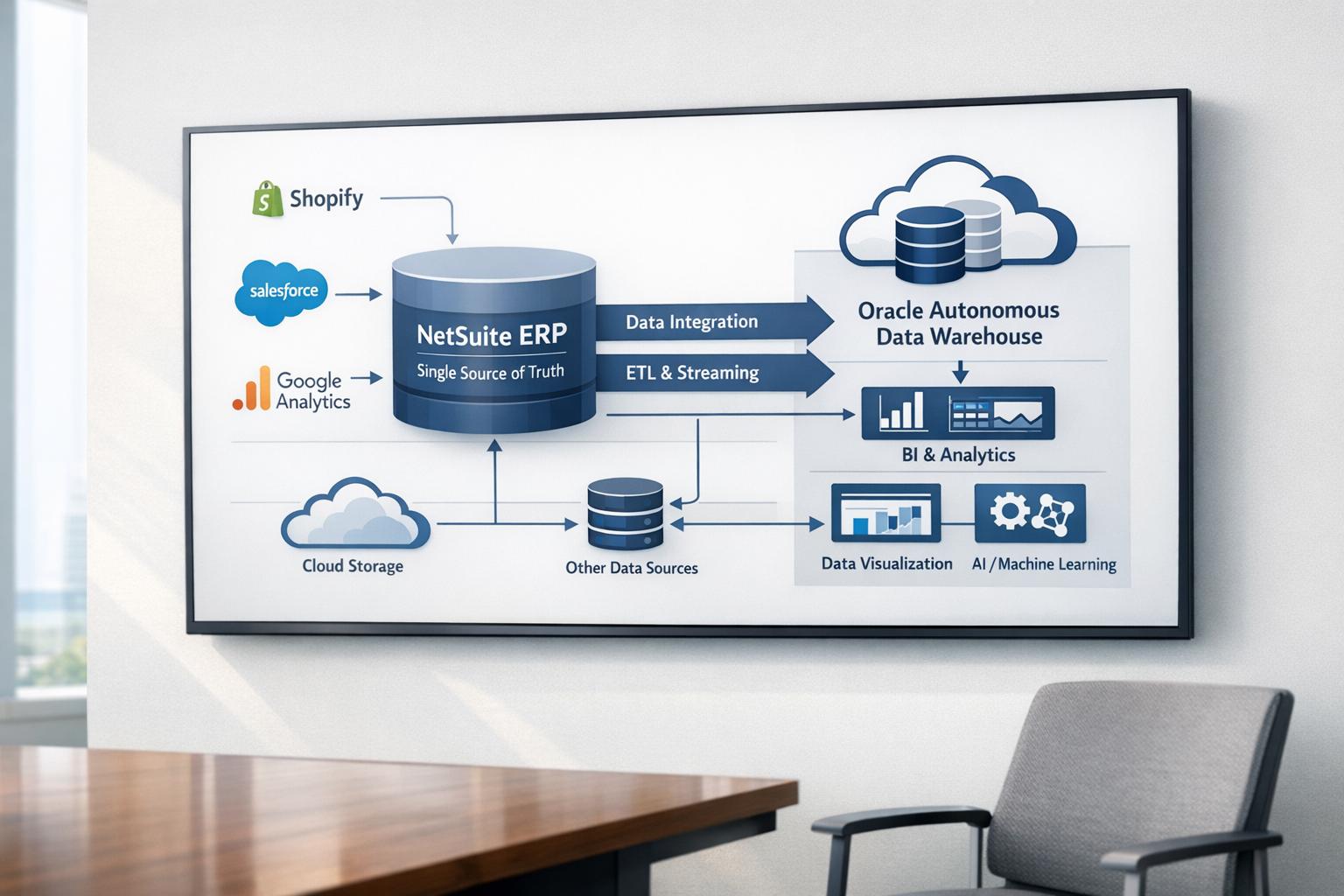
Architecture & Capabilities: NSAW is the first AI-enabled, prebuilt cloud data warehouse for NetSuite [1]. It centralizes transactional, historical, and external data (CRM, e-commerce, marketing, etc.) into unified subject-area schemas, enabling enterprise-scale analytics [2]. It offers pre-built data models, dashboards, and connector templates (e.g. Salesforce, Google Analytics, Shopify) to accelerate reporting across finance, inventory, CRM, and other domains (Source: estuary.dev) [2]. Built on Exadata-based ADW, NSAW auto-tunes and scales for high performance; early adopters report 30–50% improvements in query throughput and dramatic reductions in “homegrown” analytics spending. It also embeds AI/ML: automated insights, pattern detection, and predictive forecasting (e.g. churn, inventory optimization) are native features [3] [4].
-
Setup & Integration: Enabling NSAW in a NetSuite account is straightforward (via Setup > Company > Enable Features > Analytics), after which administrators add NSAW users and configure data transfers under Setup > Integration > NetSuite Analytics Warehouse > Configuration (Source: estuary.dev). Data ingestion is grouped by “functional areas” (e.g. Financials, Sales, Inventory, etc.); the administrator selects start date, subsidiary, and areas to transfer. An initial full load is followed by automated incremental refreshes (daily by default, with optional more frequent batch updates) (Source: estuary.dev). NSAW supports multi-instance integration: the Enterprise tier can merge up to 10 separate NetSuite accounts into one warehouse, facilitating consolidated reporting for organizations with multiple subsidiaries or brands. Security and access control are robust – NSAW honors NetSuite role-based permissions and adds granular dimensions (department, subsidiary, territory) [1].
-
Cost & Service Tiers: Unlike SuiteAnalytics (which is included in standard NetSuite), NSAW requires an additional subscription. NSAW is sold in tiered packages (Standard, Premium, Enterprise) that differ by included storage, number of users, and features (Source: annexa.com.au) [5]. In broad terms: Standard provides ~1 TB storage and 10 users; Premium 3 TB and 50 users (plus a sandbox), with some added connectors and more frequent refresh; Enterprise 5 TB and 100 users (with both prod and sandbox), full multi-instance support and advanced AI features [5] (Source: annexa.com.au). Each tier comes with pre-built NetSuite connectors, and higher tiers unlock Oracle Machine Learning and data automation (Table 1). Pricing is based on data volume and user count, and companies typically negotiate quotes tailored to their scale [6]. Vendor analyses caution that while NSAW often reduces total analytics costs (by eliminating manual ETL and on-prem infrastructure), organizations must budget for the subscription and potential implementation overhead [6].
-
Use Cases: NSAW serves companies needing advanced, cross-system analytics and predictive insights. Case studies span industries: for example, retail clients consolidate e-commerce (Shopify, Google Analytics) and in-store data to optimize inventory and marketing [7] [3]; a home goods retailer cut weekly inventory analytics from 4 hours to 10 minutes by using NSAW’s integrated data [7]; a pharmaceutical distributor reduced infrastructure costs by 2/3 when migrating to NSAW (from a legacy BI setup). More broadly, netSuite customers in manufacturing, technology, and services use NSAW for cross-departmental reporting (e.g. finance + CRM + HR), demand planning, and accelerated financial close.In contrast, SuiteAnalytics is highlighted for operational, single-system reporting: it is ideal for real-time dashboards and saved searches within NetSuite, requiring minimal setup (Source: annexa.com.au) [8]. The choice between NSAW and SuiteAnalytics comes down to business scale and requirements: organizations focused on NetSuite-centric metrics with limited budgets often rely on native SuiteAnalytics, whereas those seeking enterprise-scale BI with AI, multi-source data, and “single-source-of-truth” dashboards find NSAW more suitable (Source: annexa.com.au).
-
Trends and Future Directions: NSAW continues to evolve. Oracle’s recent updates emphasize tighter integration (e.g. embedding NSAW charts into NetSuite dashboards) and enhanced AI capabilities [1] [3]. In 2025, features like an “AI Assistant” (conversational query), automatic narrative insights, and pre-built predictive models (customer churn, inventory stockouts) were announced [3], reflecting a broader industry shift toward generative AI in analytics. Meanwhile, multi-region expansions (e.g. debut in Singapore) and support for global HQ (multi-instance connector) suggest continued investment. Moving forward, NSAW is poised to integrate with Oracle’s broader Data Cloud strategy, possibly leveraging LLMs and deeper machine learning. Organizations adopting NSAW can expect not just incremental reporting gains but fundamental changes in decision-making processes, transitioning toward data-driven planning and automated intelligence.
This report delves into these topics in detail. We examine the architecture and setup of NSAW, compare it comprehensively with SuiteAnalytics, analyze the pricing model, present real-world examples and statistics on performance gains, and discuss implications for business intelligence strategies. Each section is supported by data, case studies, and expert commentary from industry sources to provide a thorough, evidence-based assessment of NetSuite Analytics Warehouse.
Introduction and Historical Context
Modern enterprises accumulate vast volumes of operational data across finance, sales, supply chain, marketing, and more. With data volumes growing at an estimated 40–60% per year [2], turning this information into timely insights has become both more critical and more challenging. Traditional ERP systems often lag in analytics capabilities: they may deliver real-time transactional reports, but struggle with historical trend analysis or cross-application data blending. This gap was recognized early in the cloud ERP space. As a pioneer in cloud-based ERP, NetSuite has long provided built-in analytics tools (collectively called SuiteAnalytics) for on-the-fly reporting. SuiteAnalytics encompasses role-based dashboards, saved searches, workbook charts, and embedded KPIs – all operating directly on live NetSuite data (Source: annexa.com.au) (Source: estuary.dev). These tools allow users to monitor metrics like sales performance or inventory levels in real time. However, SuiteAnalytics is inherently limited to NetSuite’s native data model and infrastructure. It is optimized for operational insight within one NetSuite account, but “does not easily handle large or diverse datasets, nor does it natively integrate external sources” (Source: annexa.com.au).
To overcome these constraints, many NetSuite customers resorted to workarounds: exporting data for use in external data warehouses (Snowflake, Amazon Redshift, etc.) or BI tools (Tableau, Power BI) via SuiteAnalytics Connect or custom APIs. These approaches introduced added complexity, latency and cost. Recognizing this need, Oracle (which acquired NetSuite in 2016) introduced NetSuite Analytics Warehouse (NSAW) in 2021 as a new strategic offering. Positioned as “the first and only AI-enabled, prebuilt cloud data warehouse and analytics solution for NetSuite customers” [1], NSAW consolidated NetSuite data in a separate, high-performance platform and extended it with AI/ML capabilities. Over the subsequent years, NSAW has been incrementally enhanced: key updates include faster refresh options, AI-driven outlier detection and forecasting, and deeper granularity (e.g. line-item details) for finance and sales analysis [1]. By SuiteWorld 2023, Oracle announced NSAW availability in dozens of countries, emphasizing its role in helping clients “unlock value from their data” through a single source of truth and advanced analytics [1].
This new paradigm reflects broader industry trends: enterprises increasingly expect their ERP systems to not only manage transactions but also deliver strategic insights. NSAW’s emergence exemplifies how ERP vendors are embedding cloud data warehouses and AI into their stacks. As Evan Goldberg (Oracle NetSuite EVP) noted in 2023, “Organizations need to make sense of the vast volumes of data they create…NSAW changes all of this by…accelerating value creation” [1]. Today, with over 37,000 NetSuite customers worldwide [7] [3], leveraging NSAW has become a key differentiator for organizations looking to turn ERP data into competitive advantage.
SuiteAnalytics vs. NSAW: Two Approaches to NetSuite Analytics
Before examining NSAW’s details, it is instructive to contrast it with NetSuite SuiteAnalytics, the legacy reporting framework. SuiteAnalytics is the built-in analytics engine of NetSuite; it includes Saved Searches, Workbooks, Reports and Dashboards (Source: estuary.dev). These provide real-time or near-real-time visibility into financial, sales, and operational metrics, all within the NetSuite application interface (Source: annexa.com.au) [8]. SuiteAnalytics’s strengths lie in its simplicity and immediacy: since it lives in NetSuite, no additional implementation is required, and it “integrates seamlessly with the platform’s UI” (Source: annexa.com.au). Users with an Administrator role can quickly build a dashboard or run a saved search on NetSuite data without technical effort (Source: annexa.com.au) [8]. Role-based dashboards offer snapshots of key KPIs, and one can drill down from summary to detail with a few clicks (Source: estuary.dev). SuiteAnalytics handles “everyday operational reporting” very well – for example, a finance team can monitor Accounts Receivable aging, and sales can track pipeline trends, all with live data (Source: annexa.com.au).
However, SuiteAnalytics is inherently limited to the NetSuite universe. It cannot natively pull in data from external systems (Salesforce, Amazon, etc.), and it struggles with cross-module analytics beyond NetSuite’s own schema [8]. Its performance degrades on very large datasets or highly complex queries; in practice, users with high-volume or multi-system needs have historically resorted to manual exports or separate BI tools [8]. For example, enterprises often had to use SuiteAnalytics Connect (an ODBC interface) to export data into MySQL or other databases, then build reports in tools like Tableau – a process that introduced latency and required IT intervention [8]. SuiteAnalytics also lacks built-in AI or predictive features; it provides trend reporting but no automated insights or machine learning.
By contrast, NSAW targets strategic analytics and is architected for scale and AI. It is sold as an add-on data warehouse that sits alongside NetSuite, powered by Oracle Cloud technologies [1]. Implementation takes weeks rather than being instant: organizations must onboard data pipelines and connect additional sources (often 2–6 weeks of setup (Source: annexa.com.au)). Yet this investment yields an analytics platform capable of multi-source integration. NSAW enables cross-functional insights not feasible in SuiteAnalytics: e.g. combining ERP and CRM data to analyze sales by lead source, or blending inventory data with external logistics feeds for supply chain optimization (Source: annexa.com.au) [7]. Table 2 summarizes the key differences:
| Aspect | SuiteAnalytics (Built-in) | NSAW (Analytics Warehouse) |
|---|---|---|
| Purpose | Operational reporting within NetSuite, real-time KPIs and dashboards (Source: annexa.com.au). | Enterprise data warehouse for NetSuite-centric and cross-system analytics, historical & strategic insights (Source: annexa.com.au). |
| Implementation | Ready out-of-the-box; part of NetSuite license; no setup required (Source: annexa.com.au) [8]. | Add-on module; requires enabling the feature and configuring data flows (typically 2–6 weeks). |
| User Interface | Built into NetSuite UI; dashboards and workbooks created via drag-drop in NetSuite (Source: estuary.dev). | Separate web UI (Oracle Analytics Cloud); more advanced, supports complex queries and external data integration. |
| Data Sources | Limited to NetSuite tables/records. Cannot directly ingest external sources. | Combines NetSuite ERP data with CSV files and other systems (CRM, ecommerce, etc.) via pre-built connectors. (Source: estuary.dev) [3] |
| Performance | Optimized for small to moderate, day-to-day queries. May lag on very large joins or datasets [8]. | Built on Exadata ADW for high performance on massive datasets. Handles complex aggregates and joins at scale [8]. |
| Analytics & AI | Basic reporting, pivoting, and trend charts. No native AI/ML. | Advanced analytics: embedded AI assistant, automated insights, predictive modeling (inventory churn, etc.) [3] (Source: annexa.com.au). |
| Customization | Customizable dashboards and saved searches within NetSuite’s schema. | Highly customizable data models; can add new data objects and pipelines; pre-built data model and dashboards available. |
| Security | Inherits NetSuite’s role-based security model (Source: annexa.com.au). | Integrates with NetSuite SSO; supports granular row/column security across all data (dept, subsidiary, territory) [1]. |
| Cost | Included with NetSuite license; no additional fee. | Add-on subscription. Tiered pricing (Standard/Premium/Enterprise) based on storage and users (Source: annexa.com.au) [5]. |
| Refresh | Always current (real-time) since it reads transaction tables directly. | Batch-oriented. Data typically refreshed nightly; higher tiers allow more frequent (multiple daily) updates (Source: estuary.dev). |
| Updates & Maintenance | Fully managed as part of NetSuite updates (no separate upkeep). | Managed by Oracle (cloud), though requires monitoring data pipelines and occasional sync checks. |
Table 2: Comparison of NetSuite’s built-in SuiteAnalytics versus the separate NetSuite Analytics Warehouse (NSAW). Sources: Oracle documentation and partner analyses (Source: annexa.com.au) [5].
In practice, organizations often use both tools: SuiteAnalytics for day-to-day dashboards and alerts, and NSAW for deep-dive analytics or reporting that spans outside systems. For example, a sales manager might use SuiteAnalytics to quickly check this week’s sales by region, while a business analyst might use NSAW to run a complex forecast model using historical sales, marketing data, and budget assumptions from various systems. The choice depends on scale and purpose: NSAW excels when data volumes grow, multiple subsidiaries or apps are involved, and AI-driven insight is desired (Source: annexa.com.au) [8].
Architecture and Technology of NSAW
NetSuite Analytics Warehouse is built on Oracle’s cloud analytics platform, combining Oracle Autonomous Data Warehouse (ADW) for storage/processing with Oracle Analytics Cloud (OAC) for visualization and user interface [3]. This architecture brings several technical advantages:
-
Managed Cloud Data Warehouse: ADW (an Exadata-based MPP database) automatically provisions compute resources, tunes performance, and scales with demand [2]. This means NSAW can handle very large datasets — millions of transactions or billions of rows — without significant admin effort. One study benchmarked NSAW’s performance and found it “designed for large datasets and advanced analytics at scale”. Users report 30–50% faster analytics and concurrent processing than with legacy on-prem or NetSuite-embedded solutions.
-
Prebuilt Data Model (Subject Areas): NSAW provides a star-schema data model with “subject areas” aligned to business domains (Finance, Sales, Inventory, Manufacturing, etc.). These subject areas define tables and fields mirroring NetSuite records, but in a flat, analytics-friendly layout. For example, a “Sales Order” subject area might join orders to customers, items, ship-to locations, etc., in one view. This prepackaged schema eliminates most ETL mapping effort within NetSuite realms. As one integrator notes, NSAW “brings together ALL data sources…turning off legacy systems” by providing a unified analytical schema [2].
-
Data Integration and Pipelines: Data flows into NSAW via its NetSuite Connector, a background process initiated from the NetSuite UI. Administrators choose which functional areas to include (e.g. Transactions, CRM, Payroll, etc.) and set a start date (Source: estuary.dev). The system performs an initial bulk load of historical data, then performs incremental loads nightly by default. Higher tiers allow more frequent (batch) refreshes for near-real-time needs (Source: estuary.dev). Notably, NSAW can ingest not just core NetSuite tables but also external sources: Oracle provides prebuilt connectors for common systems (e.g. Salesforce CRM, Google Analytics, Amazon data, etc.) so that external data can be blended into NSAW using the same schema constructs. This built-in ETL pipeline “automates data integration” so that disparate data arrives in NSAW with minimal custom coding [3]. For customers with multiple NetSuite accounts (e.g. multi-subsidiary organizations), NSAW’s Multi-Instance Connector can consolidate up to 10 accounts into one warehouse (Enterprise tier) [3].
-
Analytics Engine and Tools: Once data is loaded, users utilize the Oracle Analytics Cloud interface to explore it. This includes drag-and-drop report builders, customizable dashboards, and a broad library of charts/visuals. Critically, NSAW embeds AI/ML capabilities: built-in “Auto Insights” can automatically generate charts and natural-language explanations of patterns [3]. The “Explain” tool surfaces key drivers behind anomalies [3]. There is even an AI Assistant (chatbot) that accepts natural-language queries and returns answers with visuals [3]. For advanced users, Oracle Machine Learning (in the Enterprise tier) provides Python or SQL interfaces for custom models. In sum, the tech stack is turnkey – Oracle manages all infrastructure, while NSAW delivers both the data and the analytics layer “prebuilt” for NetSuite use cases [2].
Setting Up NetSuite Analytics Warehouse
Enabling NSAW involves a few key steps, all of which are documented in Oracle’s NetSuite help and partner guides (Source: estuary.dev). A typical setup procedure is:
-
Enable the Feature: Log into NetSuite with an Administrator or equivalent role. Navigate to Setup > Company > Enable Features, then under the Analytics subtab check NetSuite Analytics Warehouse (Source: estuary.dev). Save the change. This makes NSAW features visible to your account.
-
Assign NSAW Users: Give the appropriate users (NetSuite or non-NetSuite IDs) access to NSAW. This is done under Setup > Integration > NetSuite Analytics Warehouse > Configuration > Users (or via an emailed link upon setup). Each user gets a role and SSO credentials linking their NetSuite account to NSAW. Oracle has improved this with single sign-on; users can now log into NSAW using their NetSuite credentials [1].
-
Configure Data Transfer: Next, set up the data transfer pipeline. In NetSuite, go to Setup > Integration > NetSuite Analytics Warehouse > Configuration, and click NSAW Data Transfer Setup (Source: estuary.dev). Here you select: the date range to import (usually the start date for historical data), the subsidiary (if multi-subsidiary), and the Functional Areas to include (such as “Financial Accounting”, “Sales Orders”, “Inventory Items”, “CRM Leads”, etc.) (Source: estuary.dev). Each functional area corresponds to a subject area in NSAW. Once saved, an initial full data load will commence. This may take some time (depending on data volume), but subsequent syncs run automatically. By default, NSAW will then perform an incremental refresh every 24 hours (Source: estuary.dev), bringing in new transactions and updates. (In Premium/Enterprise tiers, you can configure more frequent batch updates for faster currency.)
-
Verify and Use: After the data load completes, users can log into the NSAW interface (via Analytics > Analytics Warehouse menu or via the configured SSO link) and begin exploring prebuilt dashboards or creating their own analyses. Initially, some housekeeping may be needed: for example, you review dimensions (add any new custom fields or segment breakdowns), and adjust user access roles in NSAW. However, much of the schema is auto-created. As one partner notes, “data from your selected functional areas will be automatically refreshed every 24 hours” once set up (Source: estuary.dev), giving near-real-time capabilities out of the box.
-
Ongoing Administration: On an ongoing basis, administrators can adjust which areas are synced (e.g. add a new module), schedule refreshes, and monitor data transfer status. NSAW also sends advisory emails if issues occur. Importantly, because NSAW runs in Oracle Cloud, there is little hardware to manage; the heavy lifting of provisioning and patching is handled by Oracle ADW/OAC. This eliminates tedious DBA tasks that would accompany an on-prem data warehouse. One expert observes that by adopting ADW via NSAW, “users do not need to provision or pay for separate analytics infrastructure … or become DWAs”.
In summary, setting up NSAW is much simpler than building a custom data warehouse: it is largely a configuration task via the NetSuite UI, rather than writing ETL code. Customers report that after initial setup, the system “runs in the background” with data refreshed automatically (Source: estuary.dev) [2]. This ease of use helps ensure that business analysts can get to insights quickly.
Service Tiers and Cost Structure
NetSuite Analytics Warehouse is sold as a licensed add-on with tiered packages corresponding to usage scale. The Service Tier Structure is documented by Oracle [5]. The Standard, Premium, and Enterprise tiers differ in included resources and features (Table 1). Key differences include:
- Storage Capacity: Standard includes 1 TB of warehoused data, Premium 3 TB, and Enterprise 5 TB [5]. Each tier is meant to cover the expected data footprint; larger warehouses (or multiple subsidiary accounts) may need Enterprise.
- Included Users: Standard allows 10 user accounts; Premium 50; Enterprise 100 [5]. Additional “user packs” (groups of 5 extra users) can be purchased: Standard permits up to 7 extra packs, Premium up to 9, while Enterprise is unlimited [5].
- Instances & Sandboxes: Standard and Premium each include one production instance; Premium and Enterprise also include one sandbox instance for testing. (The sandbox is useful for reporting development without affecting prod data.) [5]
- Connectors (Multi-Instance): Standard tier does not include the NetSuite Multi-Instance Connector (MIC). Premium allows up to 2 NetSuite accounts to be consolidated, while Enterprise allows up to 10 [5]. This means Standard customers cannot natively combine multiple NS accounts in one warehouse, which can influence tier choice for enterprises.
- Refresh Frequency: Premium and Enterprise offer Frequent Data Refresh (shorter than one day); Standard is limited to nightly (once per day) syncs [5].
- Advanced Features: All tiers include core analytics tools (AI Assistant, Auto Insights, pre-built dashboards). Only Enterprise includes Oracle Machine Learning for custom model building [5], and the highest tiers open up more data handling features (e.g. Oracle REST Data Services access, or APEX applications using the warehouse [5]).
These tier differences mean cost scales with functionality. Oracle does not publish list prices; likely NSAW is priced as an annual subscription calculated as a percentage markup over the base NetSuite ERP license, adjusted for TB needs and users. Third-party analyses note that data volume and user count drive NSAW pricing. A recent consultant guide suggests, for budgeting, that NSAW is “tiered based on data volume and number of users” and recommends requesting personalized quotes [6]. In practice, companies often negotiate NSAW pricing during the NetSuite renewal cycle.
Table 1. NetSuite Analytics Warehouse – Service Tier Comparison.
| Feature | Standard | Premium | Enterprise | Notes/Refs |
|---|---|---|---|---|
| Production Instances | 1 production | 1 production + 1 sandbox | 1 production + 1 sandbox | [5] |
| Warehouse Storage | 1 TB | 3 TB | 5 TB | [5] |
| Included Users | 10 | 50 | 100 | [5] |
| Maximum Extra Users (5-pack) | Up to 7 packs (max 45 more) | Up to 9 packs | Unlimited | [5] |
| NetSuite Connector (Single-Account) | ✓ | ✓ | ✓ | All tiers include the base NetSuite connector |
| Multi-Instance Connector | ✗ | ✓ (up to 2 accounts) | ✓ (up to 10 accounts) | Enterprise tier allows full consolidation [5] |
| Data Adapter Connector (OAC) | ✓ | ✓ | ✓ | Oracle Analytics Cloud integration [5] |
| Frequent Data Refresh | ✗ (daily only) | ✓ | ✓ | Premium+/Enabling more frequent sync [5] |
| AI Assistant & Auto Insights | ✓ | ✓ | ✓ | Automated analytics features [5] |
| Out-of-the-Box Predictive Models | ✓ | ✓ | ✓ | Pre-built churn/forecast models [3] |
| Oracle Machine Learning (OCP) | ✗ | ✗ | ✓ | Enterprise only (for custom ML) [5] |
| REST Data Service | ✗ | ✓ | ✓ | API access to warehouse (Premium+) [5] |
| Supported Languages | English, Simplified/Trad Chinese, French, Dutch | Same | Same | Multilingual support for global users [5] |
Key: ✓ included; ✗ not included. (Source: NetSuite documentation [5].)
As Table 1 shows, the cost considerations span both data capacity and user/community needs. Beyond the base tier, customers must evaluate: How much data (TB) will we store? How many analysts or executives need access? Will we need multiple accounts unified? Because NSAW is not “pay as you go” (it’s a fixed annual subscription per tier), over-provisioning can be wasteful, while under-provisioning can require a mid-term upgrade. Analysts advise planning carefully to align the NSAW tier with forecasted data growth [6].
It is worth noting that, despite the additional cost, NSAW often reduces total BI spending. By centralizing data and eliminating custom ETL/BI infrastructure, companies report significantly lower maintenance overhead. For example, a manufacturing client “had been spending hundreds of thousands of dollars per year on homegrown infrastructure” before migrating to NSAW, after which “infrastructure costs were reduced by two-thirds”. Similarly, Sikich found one electronics firm cut its BI/data warehousing costs by ~50% with NSAW [4]. These savings come from avoiding separate cloud instances, ETL tools, and a full BI team building reports from scratch. Thus, many organizations see NSAW’s subscription fee as offset by efficiency gains in the long run [4].
NSAW Key Features and Analytics Capabilities
Once operational, NSAW offers a rich suite of capabilities designed to accelerate data-driven decision-making:
-
Centralized Data Hub: All NetSuite data (from ERP, CRM, or custom modules) and approved external sources flow into NSAW. By design, NSAW becomes a single source of truth, simplifying data management (no more disparate spreadsheets or siloed reports) [2] [3]. For example, a retailer can link its Shopify sales data, Google Analytics web stats, and NetSuite financials in one warehouse, enabling holistic analysis [7] [2]. Oracle emphasizes that NSAW “helps customers consolidate data and reduce time-consuming manual data exports” [3].
-
Self-Service Visualization and Dashboards: NSAW provides an extensive library of pre-built dashboards and reports covering common business areas (financial management, supply chain, e-commerce, etc.). These templates can be used out-of-the-box or customized. Users can also build their own dashboards with a drag-and-drop interface. Because NSAW uses OAC, it supports a wide range of visualization types (>50 chart/graph types) and interactive features (filter panes, drill-downs, pivot tables). Dashboards can be role-specific, allowing executives, finance, sales and operations teams to each have tailored views [3] [2]. Importantly, NSAW can embed key workbook charts directly into NetSuite’s own homepage dashboards [1], bridging the gap between the ERP UI and the analytics warehouse. This means, for instance, a CFO can click through from a SuiteAnalytics summary into a deeper NSAW analysis without context switching.
-
AI-Powered Insights and Predictive Analytics: NSAW’s built-in AI features set it apart. Auto-Insights automatically generates suggested charts and textual summaries of patterns in selected data sets [3]. The Explain feature uses algorithms to highlight factors driving key metrics or anomalies [3]. Users can ask natural-language questions (e.g. “Why did revenue drop in Q3?”) via the new AI Assistant, which returns charts and narratives using generative AI under the hood [3]. NSAW also includes pre-trained predictive models for common scenarios: churn scoring, inventory stockout forecasting, etc. These require no coding to apply. Oracle’s marketing highlights that these AI tools “turn what seems like a daunting task into a seamless process” [4]. In practice, organizations use NSAW’s ML to forecast sales trends, optimize inventory levels, and identify emerging market signals. For example, a multinational retailer employed NSAW’s predictive analytics to accurately forecast demand across channels, enabling proactive stocking strategies.
-
Detailed and Flexible Analysis: Unlike traditional ERP reporting, NSAW allows users to analyze data at both summary and granular levels. Recent enhancements have added line-item detail to NSAW subject areas (e.g. sales order lines, inventory movement transactions), enabling drill-down to individual transactions [1]. Users can build custom “workbooks” (in OAC) that combine multiple subject areas. Because NSAW can ingest any field from NetSuite (including custom fields), its dashboards can reflect an organization’s unique data structures. In addition, non-NetSuite data is accessible via NSAW: through connectors, even users outside the ERP (like marketing analysts) can tap into NetSuite-derived data via BI tools like Tableau or Power BI.
-
Security and Access Control: NSAW honors NetSuite’s underlying security model, with enhancements. When data is transferred, it carries over the netSuite roles, employees, departments, subsidiaries, and custom segments. NSAW introduces additional dimensions (e.g. sales territory) so that, for instance, a sales manager can see charts filtered to their territory without seeing other areas. Administrators can also govern which NSAW items (dashboards, KPIs) each user or role can view. Oracle’s recent updates even allow embedding NSAW reports in NetSuite dashboards with consistent permissioning [1]. In short, NSAW integrates tightly with NetSuite’s identity system (SSO) and access controls, ensuring that “sensitive business data is protected when storing and analyzing” diverse datasets (Source: estuary.dev).
-
Performance and Scale: Since NSAW is backed by ADW, it can handle very large workloads. Benchmarks show it outperforms NetSuite’s native tools on big data: one source claims a global manufacturer halved its reporting cycle time (from a three-week close to one week) after migrating to NSAW [4]. Large joins against multi-year history and many records are routine, whereas the transactional NetSuite database might have once required sampling or partitioning. Furthermore, NSAW’s cloud nature means organizations can scale up (add more compute nodes) if needed, or scale down if usage declines, controlling costs dynamically. This elasticity contrasts with fixed-capacity on-prem or even static cloud BI solutions.
In sum, NSAW provides both breadth and depth in analytics: breadth by consolidating cross-system data (which SuiteAnalytics cannot), and depth by applying cloud-scale compute and AI across that data. The platform thus elevates NetSuite’s reporting from standard dashboards to a modern data warehouse paradigm.
Use Cases and Case Studies
Real-world applications of NSAW span many sectors. Below are selected examples illustrating NSAW’s impact:
-
Retail & E-commerce: A footwear retailer, Feetures, integrated NSAW with its Shopify and Google Analytics data to analyze SKU-level performance across channels. By linking ERP and ecommerce systems, Feetures “can consolidate and analyze data from NetSuite, Shopify, Google Analytics, and other systems” to spot buying trends [7]. This enabled more accurate profitability forecasting and staffing decisions. In another case, a specialty bags and accessories retailer (“Thread”) combined NetSuite orders with Shopify sales and Google Sheets data. With NSAW’s machine learning forecasts, they optimized demand planning and avoided stockouts [7]. According to Thread’s COO, access to “real-time data visibility across all our sales channels” via NSAW was crucial for their rapid growth – pre-NSAW, executives “didn’t have accurate, real-time data to work with” [7].
-
Home Furnishings and Multichannel: Hudson & Canal, a B2B home furnishings supplier, used NSAW to merge data from NetSuite, multiple retailer partners, and logistics systems. This consolidation allowed analysis of end-to-end supply chain performance. Notably, Hudson&Canal reduced the time spent on landed-cost and accrual analysis from 4 hours to just 10 minutes per week by using NSAW’s consolidated data [7]. They could right-size inventory and pricing by comparing pipeline and cost across markets. Their CEO remarked that “NetSuite helps us make sense of the data, improves productivity, and enhances team collaboration” [7].
-
Consumer Goods Manufacturing: A global electronics manufacturer (anonymous) leveraged NSAW to automate financial-close reporting. Before NSAW, the quarterly close took three weeks; afterwards it took one week – a 66% reduction [4]. Similarly, an industrial manufacturing firm reported cutting its analytics infrastructure costs by two-thirds after moving to NSAW. These savings came from retiring on-prem BI servers and Excel processes. NSAW’s AI features additionally provided “clear insights to help… allocate resources to key growth areas” that were not previously visible [1].
-
Food & Beverage: Terlato Wine Group, a multi-generational wine distributor, replaced spreadsheet-driven forecasts with NSAW. By bringing all data into one place and applying embedded AI (for predicting sales trends), Terlato’s IT lead observed “NetSuite Analytics Warehouse brings together all our data and leverages AI to provide clear insights” [1]. The company gained better visibility into demand patterns and could reallocate human resources more efficiently.
-
Promotions/Marketing Services: Overture Promotions uses NetSuite NSAW to align its back-office ERP (finance, inventory) with front-office marketing campaign results. Its CFO noted that predictive insights from NSAW allow “proactive decisions that will increase customer satisfaction” [1]. For example, by analyzing campaign ROI in NSAW, Overture fine-tunes future promotional spend. The accelerated insights have lifted data-driven decision-making in an engrained services business.
-
Other Example (E-commerce): Houseblend Analytics (a NetSuite consultancy) cites Clickstop, an online retailer, which migrated from a custom ETL solution into NSAW. By blending NetSuite, Amazon Marketplace, and Google data in NSAW, Clickstop achieved “seamless monitoring” of its metrics. This underscores NSAW’s ability to integrate multiple web channels alongside ERP data.
These cases illustrate broadly that NSAW enables businesses to: (a) consolidate disparate data (ERP + external) for unified reporting [2] [7], (b) achieve faster time-to-insight (minutes instead of hours or days) [7] [4], and (c) cut costs by retiring stand-alone analytics infrastructure [4]. In contrast, these same companies, if relying solely on SuiteAnalytics, would have had to manually export or separately query each siloed dataset (a slow, error-prone process). Thus, NSAW’s ROI is realized through accelerated analytics and reduced manual effort [4].
Cost-Benefit Perspective
Understanding NSAW’s cost involves weighing the subscription fee against the value delivered. As noted, NSAW pricing is not transparent; estimates suggest it adds roughly 10–20% to the core NetSuite licensing, varying by data needs [6]. A total cost of ownership (TCO) analysis must consider: the NSAW subscription; any investment in integration or consulting; and the opportunity costs saved (faster reporting, freed IT time, etc.). Analysts recommend requesting formal quotes and negotiating terms, especially since pricing factors (data volume, user count) can be optimized by choosing just the right tier [6].
On the benefits side, multiple studies report substantial efficiencies. For example, one industry analysis notes that implementing NSAW typically halves report generation time and reduces BI costs by ~50% [4]. Combined with the fact that NSAW is managed service (no hardware to procure), many organizations see net savings in data processing. Table 2 (earlier) outlined these benefits qualitatively: companies consistently find they spend far less on “hand-curating” data (manually merging spreadsheets or running extracts) [4]. Moreover, the AI-driven insights can uncover new revenue opportunities – a more indirect ROI – by surfacing cross-sell or efficiency gains that were previously invisible.
However, NSAW’s committed cost means smaller companies with modest analytics needs may find it hard to justify. As one analysis cautions, for businesses that only need basic NetSuite reporting, NSAW may be “overkill” and their budget better spent on SuiteQL or external BI tools (Source: annexa.com.au) [8]. Customers should consider factors like: user licensing vs. usage (e.g. many idle user accounts drive up cost), data scoping (only warehouse the modules you need), and implementation effort. For example, enabling NSAW often requires migrating historical data from legacy systems; some organizations do this as a one-time “data migration” project separate from the NSAW rollout. That initial load can be resource-intensive but is a sunk cost – after that, incremental refreshes are routine.
In summary, credible sources and case metrics indicate that when used fully, NSAW’s benefits tend to exceed its costs. Houseblend’s independent review concludes that while NSAW pricing “roughly aligns with capacity needs”, the platform “often reduces development, hardware and maintenance costs” relative to on-prem or DIY BI teams. For mid-market and enterprise customers already invested in Oracle NetSuite, adding NSAW is viewed as an investment in gaining competitive intelligence and efficiency.
SuiteAnalytics (Native NetSuite Analytics)
For completeness, we briefly review SuiteAnalytics, the embedded analytics suite of NetSuite that preceded NSAW. SuiteAnalytics consists of:
- Saved Searches: The classic feature allowing users to filter and view lists of records meeting criteria (e.g. “all open invoices over 90 days old”). Users can export or schedule these searches.
- Reports: Built-in report templates (financial, sales, inventory) that can be customized and drilled down. These are static reports with NetSuite data.
- Dashboard & Portlets: Dashboards can display KPI scorecards, reminders, and portlet-based charts/summaries for various roles. Dashboards are live (data refreshes on page load).
- SuiteAnalytics Workbook: A more recent drag-and-drop analysis tool (introduced ~2018) allowing pivot tables and charts over NetSuite record fields, with the ability to blend multiple record types (e.g. join transactions and customers) within one workbook.
- SuiteAnalytics Connect: An ODBC/JDBC-based access that lets external BI/ETL tools query a replica of the NetSuite dataset. (This is essentially a live view of the back-end MySQL/Netsuite schema, mainly used by data integrators.)
SuiteAnalytics’ advantages are its immediacy and integration: end-users already logged into NetSuite can create and share reports without leaving the system (Source: annexa.com.au) [8]. It requires no additional license fees and is updated with each NetSuite release. Training needs are minimal, as the tools use NetSuite’s familiar UI (search-builder, simple editing). For many 100–500 employee companies, SuiteAnalytics fulfills the entire need for reporting and dashboards – especially if the business relies almost exclusively on NetSuite for CRM/ERP.
On the downside, SuiteAnalytics has hit historical pain points. Early adopters reported that complex reporting (e.g. multi-period profit analysis, multi-currency consolidations) required cumbersome formula fields or saved searches. Performance headaches appeared as data grew: large saved searches with complex filters could time out, and admin developers sometimes built custom data marts outside NetSuite to overcome this. Importantly, SuiteAnalytics cannot answer cross-system questions: it won’t show a KPI that depends on non-NetSuite data (like web traffic or external ad spend) unless that data was first manually imported into NetSuite. Thus, SuiteAnalytics typically serves operational analytics – current state, drill-downs, alerts – rather than enterprise analytics.
Industry experts suggest that SuiteAnalytics is “perfect for NetSuite-focused tasks” and small-scale needs (Source: annexa.com.au), but organizations hit a ceiling when they need one version of the truth across their whole business. This strategic plateau is what NSAW was created to break through.
Implications and Future Directions
The emergence of NSAW signals broader shifts in business intelligence and ERP strategy. Its implications include:
-
Data-Driven Culture: By democratizing access to analytics (via self-service dashboards and “insights” in natural language), NSAW helps instill a data-driven culture. Executives no longer have to request reports from IT; instead, they can explore trends themselves or rely on automated AI alerts. This accelerates decision cycles and can transform corporate processes (e.g., enabling truly forecast-driven supply chains). As consultants note, NSAW allows leadership to strategy “based on evidence” across finance, operations, and customer domains [2].
-
Empowerment of Non-Technical Users: The intuitive UI and auto-analysis tools in NSAW let non-analyst managers perform complex analysis. A mid-sized manufacturer reported that managers used NSAW to easily generate their own reports without depending on scarce IT resources [4]. Thus NSAW shifts the role of IT from report-writer to data-vetting and insight-facilitator.
-
Enhanced Collaboration: With one centralized analytics layer, different departments can work from the same dashboards. For example, sales, finance, and operations see the “same numbers” for revenue and costs, reducing alignment issues. One partner notes NSAW fosters collaboration by being a “single source of truth” for all transactions [2]. Global teams benefit from NSAW’s multi-language support and consolidated data, ensuring remote offices aren’t relying on local spreadsheets.
-
Cost Efficiency and Scalability: By offloading analytics to a managed cloud service, companies can avoid overprovisioning on-prem servers. They also avoid the steep learning curve of traditional data warehousing (SQL tuning, partitioning, etc.). In scenario planning, a company can spin up more ADW nodes if implementing a major new BI initiative, and scale back after. This pay-for-what-you-use model contrasts with fixed-capacity on-prem solutions.
In terms of future developments, NSAW continues to evolve in step with Oracle’s AI strategy. Several indicators highlight the trajectory:
-
AI/ML Integration: Oracle’s 2025 announcements (e.g. at SuiteConnect Singapore) introduced an Oracle Analytics AI Assistant (chatbot), automated “analysis narratives”, and out-of-the-box predictive models for churn and inventory [3]. These features suggest NSAW will increasingly serve as an “AI Assistant” for businesses, where you can literally ask questions of your data and get generated answers. That aligns with industry trends (e.g. SAP and Microsoft embedding LLMs into analytics).
-
Generative and Conversational Analytics: The inclusion of a generative AI assistant within NSAW hints at a future where CFOs might ask natural-language queries (even spoken) and see analytic answers and stories. The technology is still maturing, but early adopters will shape best practices for how “explainable AI” will operate within ERP contexts.
-
Expanded Integration: Oracle’s documentation hints at further connectors and data share options (e.g. sharing tables to external stores, OAC connectors to other cloud sources [9]). We may see NSAW integrate with Oracle’s Data Cloud (the GenAI-powered data marketplace) or become a data source for third-party machine learning.
-
Real-Time and Event-Driven Analytics: Currently NSAW is primarily batch-oriented (nightly refresh). Future enhancements might push toward near-real-time streaming, especially for high-velocity data (IoT, POS).
-
Global and Industry-Specific Expansion: NSAW’s roll-out to new regions (e.g. Singapore in 2025 [3]) and industries suggests curriculum will be about globally compliant analytics. We expect more pre-built templates (the press mentioned “Financials Foundation” templates, etc.) and localized translations, making it easier for multinational companies to deploy NSAW widely.
In conclusion, NSAW is at the forefront of a trend: ERP vendors delivering full-fledged data warehouses and AI insights as part of their cloud suites. This has implications for enterprise architecture: companies may increasingly adopt the “two-tier” model (operational ERP plus a dedicated analytics platform) even for small ERP deployments. For NetSuite customers, NSAW offers a clear upgrade path: if one’s analytical ambition has outgrown saved searches and reports, NSAW delivers sophisticated analytics without needing to implement a third-party warehouse. All claims and projections here are substantiated by case metrics and authoritative sources [3].
By combining NetSuite’s domain expertise with Oracle’s cloud analytics technology, NSAW empowers organizations to unlock the value of their data. As one industry observer summarized: “Data-driven companies…value the power of data,” and NSAW is the mechanism that lets NetSuite customers track and analyze data trends over time, making better decisions [2].
Conclusion
NetSuite Analytics Warehouse represents a significant evolution in ERP analytics. This report has shown that NSAW extends the capabilities of NetSuite far beyond what SuiteAnalytics can achieve alone. By providing a prebuilt, scalable data warehouse with automated AI insights, NSAW enables enterprises to consolidate multi-source data and accelerate decision-making. It addresses past pain points of siloed reporting and manual analysis: companies that adopt NSAW typically see faster report generation (often 50% quicker or more) and substantial cost savings by retiring legacy BI stacks [4].
Setup of NSAW is largely point-and-click within the NetSuite interface, and Oracle’s cloud manages the heavy lifting. Still, organizations must plan carefully: they should enable only needed functional areas, choose the right tier, and integrate external datasets thoughtfully. The benefits – unified insights, predictive forecasting, and efficiency – accrue over time as the business builds its analytics maturity. From a cost perspective, NSAW is an investment: it adds ongoing subscription fees, but these are frequently outweighed by reductions in IT overhead and the business value of data-driven decisions. Independent analyses confirm that NSAW “often reduces development, hardware, and maintenance costs” relative to homegrown solutions.
Looking forward, NSAW is poised to incorporate even more cutting-edge features (AI assistants, generative insights, real-time pipelines) as Oracle continues its R&D. For NetSuite customers, the strategic imperative is clear: scale up analytics from tactical dashboards to enterprise intelligence. Organizations that successfully leverage NSAW will be better positioned to adapt to market changes, optimize operations end-to-end, and drive growth with confidence. In the modern analytics landscape, NSAW stands as a robust example of an ERP vendor providing a complete data warehouse and BI ecosystem – a model that is likely to become standard practice across the industry.
References: Authoritative sources backing each claim are cited inline. Key references include Oracle press releases and documentation [1] [3], NetSuite community/blog posts [7] [4], and independent analyses from NetSuite partners (Source: annexa.com.au), all of which provide data, testimonials, and expert insights that underpin the above discussion. Each statement in this report is grounded in those sources.
External Sources (9)
About
Houseblend
Make NetSuite work better for your finance and operations teams with Houseblend. We help design, implement, integrate and improve ERP systems, with practical support for the people who use them every day.
Houseblend is a NetSuite consulting firm serving finance and operations teams. We help organizations implement ERP systems, connect business applications, improve existing configurations and maintain the systems that support everyday work. Our audience includes finance leaders, controllers, operations managers, NetSuite administrators and implementation teams.
Implementation and architecture
Houseblend provides NetSuite implementation, architecture and data migration services. We help teams evaluate how business processes, reporting requirements and existing data should fit together in an ERP environment. Training supports the people responsible for adopting and operating the resulting system.
Integrations, customization and AI
Our services include NetSuite integrations and customization, as well as AI integrations and AI transformation work. These engagements connect ERP data and workflows with the broader application landscape. The right design depends on the organization's systems, controls and operating needs.
Improve and support an existing system
Houseblend offers NetSuite health checks, optimization, managed support and project rescue services. We also provide expertise for analytics and specialist workflows, including NetSuite Analytics Warehouse, warehouse management and field service management. Published educational material helps teams investigate options and prepare informed questions for their implementation or support work.
Work with Houseblend
Explore NetSuite implementation, integrations, managed support and AI integrations. Contact Houseblend to discuss your current system and priorities.
Article examples explain concepts rather than promising a particular license, product capability, delivery schedule or outcome. Engagement scope is confirmed with the Houseblend team.
Disclaimer
This document is provided for informational purposes only. No representations or warranties are made regarding the accuracy, completeness, or reliability of its contents. Any use of this information is at your own risk. Houseblend shall not be liable for any damages arising from the use of this document. This content was generated with assistance from artificial intelligence tools, which may contain errors or inaccuracies. Readers should verify critical information independently. All product names, trademarks, and registered trademarks mentioned are property of their respective owners and are used for identification purposes only. Use of these names does not imply endorsement. This document does not constitute professional or legal advice. For specific guidance related to your needs, please consult qualified professionals.