Houseblend Article
NetSuite M&A Integration: 100-Day Playbook & COA Setup
Inside this article
Executive Summary
Post-merger ERP integration is notoriously difficult: studies find ~66–90% of M&A deals underperform or destroy value, largely due to poor integration of finance and systems [1]. The first 100 days after closing are especially critical – often called the “integration window” [2] [3] – during which meticulous planning and execution can make or break the deal. A structured 100-day playbook for NetSuite consolidation can unify fragmented ledgers, enable rapid synergy capture, and mitigate the common pitfalls of silos and data chaos. Key elements include Chart-of-Accounts (COA) Harmonization, careful Subsidiary Setup in NetSuite OneWorld, and a rigorous Cutover Checklist. This report provides an in-depth, evidence-based roadmap for those tasks, drawing on industry research, case examples, and best practices. We show that by Day 1 the merged company should “light up” a unified NetSuite environment with new subsidiary records and mapped opening balances, and by Day 90 have completed a first consolidated close with automated intercompany eliminations. Failure to harmonize COAs, align fiscal calendars, and plan cutover details early has been identified as a leading cause of integration delays. In contrast, companies that follow the playbook – including forming an Integration Management Office, mapping accounts pre-close, and executing a full dry-run – achieve dramatic results (for example, one firm cut its month-end close from 19 days to 10 after consolidating 20 entities in NetSuite). This report synthesizes academic research, consulting guidance, and real-world case studies to offer an actionable 100-day NetSuite integration blueprint for finance leaders and IT teams.
Introduction and Background
Mergers and acquisitions remain a core growth strategy, but their track records are mixed. More than two-thirds of public-company deals destroy acquirer value in the short term [1], and up to 70–90% fail to meet stated objectives [1]. Even when mergers are “strategic,” integration missteps – especially in finance and systems – often cause realized synergies to fall short [1]. McKinsey research shows that large deals outperform acquired targets only if integration “velocity” is high, while 79% of those above-market at 18 months stayed above at three years [4] [5]. In practice, the first 100 days after closing set the tone for achieving synergies and maintaining business continuity [2] [3].
Key finance milestones in this phase include rolling up books, closing periods, and aligning accounting policies. Umbrex (a consulting publication) calls finance the “integration’s scorekeeper”, and warns that within weeks the merged company must close consolidated books, file reports, and show progress on synergies – all while reconciling two accounting policies and ledgers [6]. Errors (“misaligned ledgers,” “delayed filings”) can “erode investor trust” and incur regulatory fines [6]. Meanwhile, rapid cloud ERP adoption – and specifically Oracle NetSuite OneWorld – provides new integration capabilities. In 2016, Oracle acquired NetSuite for $9.3 billion to accelerate cloud ERP offerings. NetSuite OneWorld is now adopted by thousands of global and mid-market companies for multi-entity accounting. Its features – single consolidated chart of accounts, multi-currency, intercompany reconciliation, and multi-book (parallel GAAP) accounting – can greatly facilitate post-merger mergers of subsidiaries [7].
Despite these tools, practical integration requires deliberate planning. As Baker Tilly (accounting advisory) emphasizes, integrating ERP can “greatly reduce business complexities and costs,” but “determining how and when to do so…can be a challenge” [8]. In particular, the merging entities often have fragmented charts of accounts, differing fiscal calendars, and legacy systems. If left unaddressed, this fragmentation “cripples performance analytics” [6] and undermines consolidated reporting. Industry surveys confirm that each target may use a different chart of accounts (or even a different ERP system) – making reliable consolidation very difficult unless unified.
To address this, best-practice playbooks (e.g. from consulting firms and ERP practitioners) prescribe parallel finance and technical tracks.Pre-close, the acquiring CFO should lead strategy (COA blueprint, currency alignment, entity rationalization) while IT readies the NetSuite environment (sandbox, licenses, basic subsidiary config). At and after closing, finance must ensure day-to-day continuity (payables, receivables, payroll) on Day 1, while new subsidiaries are “lit up” in NetSuite with opening balances. In Weeks 1–4 the emphasis is on core ledger alignment and initial cutover – mapping legacy accounts to a single COA and loading master data – along with a test consolidated close. Weeks 5–8 then focus on rationalizing processes (retiring redundant systems, standardizing policies) and deploying NetSuite’s intercompany close features (including multi-book if needed). By Weeks 9–12 the new environment should be stabilized and optimized: final reconciliations are done, official consolidated financials reported, and dashboards automated for ongoing monitoring.
Throughout, the CFO must measure integration KPIs. For example, tracking the month-end close duration and finance headcount helps confirm synergy capture. Research underscores this rigor: one analysis found 92% of integrations succeed when savings are explicitly tracked from day one [3]. Conversely, plans that lacked early diligence and clear cutover plans often fail. As DealStream puts it, “success lies in meticulous planning, strategic execution” of the 100-day agenda [2]. This report synthesizes those expert insights into a detailed playbook for the CFO and NetSuite project team, focusing on COA Harmonization, Subsidiary Setup, and a Cutover Runbook, along with data and case evidence supporting each step.
Chart of Accounts Harmonization
A unified Chart of Accounts (COA) is the financial “Rosetta Stone” of a merger [6]. Each company typically has its own COA numbering and structure, reflecting different GAAP, segment definitions, and legacy systems. Without harmonization, the combined entity’s consolidated books would be incoherent. One advisor notes that aligning disparate ledgers is “laborious”: even post-close, a CFO lamented that “nobody mapped the chart of accounts between the legacy system and the platform,” triggering last-minute crises. Conversely, Houseblend reports that firms aiming for Day 1 data consistency strive to have “all data live and ‘the same’ across systems (customer master, vendor terms, etc.)” from the start.
Key Challenges: Inconsistent account definitions and codes (e.g. one entity’s revenue account “4000” vs. the other’s “SRV00”) make mapping difficult. Multiple entities may recognize revenue or expenses under different line items or even different GAAP treatments. If left unresolved, joint financial statements cannot be produced without extensive manual work. Research and consultants consistently emphasize early COA planning: Umbrex advises capturing all GAAP differences explicitly, and ensuring the unified COA serves both statutory and management needs [6]. Pre-close, the Integration Management Office should draft a future-state COA covering all entities’ needs.
Approaches: Three broad approaches are common: (1) Adopt One Entity’s COA as the template, migrating others to it. (2) Build a New Hybrid COA that blends elements of each legacy COA. (3) Multi-Book / Dual-COA strategies using NetSuite’s features. NetSuite OneWorld normally uses a single shared COA for all subsidiaries [7]. This means, effectively, one legal-entity chart is chosen as the master template. In some global deals, organizations use NetSuite’s Accounting Contexts to maintain local statutory chart definitions per country while still consolidating via a central chart [7]. For true multi-GAAP situations, NetSuite’s Multi-Book Accounting can be provisioned so that each transaction is recorded in parallel “books” (e.g. one US GAAP, one IFRS) [7]. This allows, for example, a UK subsidiary to have UK statutory accounts while consolidating under IFRS.
Mapping Exercise: In practice, the post-close integration begins by merging general ledger structures. The CFO and accounting teams perform a detailed COA mapping: for each account in each legacy system, decide its counterpart in the unified COA. Placeholder (dummy) accounts may be inserted temporarily to reconcile mismatches. For example, if both companies have a “Sales Revenue” category but one tracks “Product A” and “Product B” separately, the merged COA might either consolidate them under a single code or maintain two codes with a common segment dimension. Houseblend illustrates that by Day 30 the merged COA should be finalized and tested via a trial consolidated close. This rolling forecast or pro forma close confirms that mapped accounts roll up correctly across entities.
Control Principles: Analysts stress several mapping best-practices. Regulatory compliance should drive the COA design first (explicitly account for IFRS vs US GAAP differences rather than relying on post-consolidation bridging [6]). Management reporting needs must also guide segmentation (ensuring the chart supports both consolidated P/L and cost-of-goods vs OPEX breakdown [6]). Broad ranges of numbers should be reserved for future deals, avoiding hard-coded entity or project IDs. Finally, governance must be built in: each account (or block of accounts) should have a named owner with sign-off and change-review processes [6].
NetSuite Features: NetSuite provides tools to ease harmonization. OneWorld automatically shows each subsidiary under a unified COA hierarchy, allowing real-time intercompany eliminations once balances are loaded. The Multi-Book engine can post dual entries in one system for cases needing parallel reporting. Suitesuccess implementation templates may provide starter charts and workflows by industry, and custom saved searches or SuiteAnalytics can validate mappings. However, these tools depend on the underlying design. As one CFO-review notes, “Harmonize Chart of Accounts early” is crucial – many integration failures occur when COA issues are deferred.
Quantitative Benefits: Effective COA harmonization pays off. In one NetSuite integration, a holding company migrated 20 acquired firms onto one OneWorld instance. Post-merger, their month-end close shrank from 19 days to 10 days. This was attributed to automated intercompany reconciliation and disciplined mapping across 20 subsidiaries. Similarly, a PE-backed tech firm moving from QuickBooks to NetSuite saw its close time cut in half (from 19 to 10 working days). In both cases, a consistent COA and unified processes eliminated much manual consolidation work. Once the unified COA is live, financial statements and dashboards can be generated on-demand, rather than requiring spreadsheet stitching across entities.
Data Flows and Master Data: Harmonizing the COA often goes hand-in-hand with merging master data (customers, vendors, items). With a single COA, the merged company should also decide on shared dimension values (departments, cost centers, locations) and master records. The CFO should validate that key attributes like vendor terms and GL posting classifications are aligned across entities. Data-cleaning – deduplicating record IDs and standardizing nomenclature – is typically done during this phase.
In summary, COA harmonization involves deciding a unified structure and mapping/migrating legacy accounts into it. It requires early CFO leadership and detailed cross-team coordination. By Day 30, the merged company should have a signed-off chart of accounts covering all former entities, ready to support consolidated reporting.
Subsidiary Setup in NetSuite OneWorld
NetSuite OneWorld enables multi-subsidiary bookkeeping within a single ERP instance, making it well-suited for post-merger scenarios. A subsidiary record in NetSuite represents a legal entity. Creating a new subsidiary in OneWorld effectively brings an acquired company into the unified system. Proper configuration of each subsidiary is essential for accurate accounting and compliance.
Hierarchy Planning: Before entering data, the integration team should diagram the subsidiary hierarchy [9]. NetSuite allows arbitrary parent-child relationships among subsidiaries, so the merged company must plan how entities roll up. As Oracle’s documentation advises, one should diagram country of operation, base currency, and tax nexuses for each subsidiary [9]. For example, a newly acquired French subsidiary would have France as country (determining its VAT nexus and EMEA edition) and euros as base currency. Importantly, once saved, the base currency of a subsidiary is immutable [9], so the team must verify currency plans before creation. The country setting also triggers the first tax nexus and influences localization modules [9].
Day-1 Configuration: During the pre-close “Day 0” phase, NetSuite admins should ensure the necessary OneWorld modules (Multi-Book, intercompany, etc.) are licensed and enabled. The sandbox or test environment should be prepared mirroring the future production hierarchy. “Basic subsidiary structure for incoming entities” should be configured – for instance, data can be loaded to create placeholder subsidiary records if system-provided. On closing day (Day 1), the primary NetSuite account (parent) is turned on as the live system, and new subsidiary records are enabled in OneWorld. This involves entering each acquired legal entity’s details (name, addresses, currency, country, parent) in Setup > Company > Subsidiaries.
Intercompany and Elimination Accounts: A critical part of setup is defining the intercompany structure. OneWorld supports automated intercompany transactions, so the team must map intercompany AR/AP accounts and set elimination methods. On Day 1, as Houseblend notes, the NetSuite admin should “configure intercompany elimination accounts” and load opening balances for each subsidiary. In practice, this means assigning the proper AR/AP clearing accounts under each subsidiary and ensuring the intercompany elimination account in the consolidated ledger is specified. These settings allow NetSuite to automatically generate reciprocal postings between subsidiaries (e.g. selling one another inventory) and net them out in consolidation.
Fiscal Calendars and Reporting Currency: In setup, fiscal calendars for each subsidiary should be aligned or at least made compatible with the parent’s calendar. If possible, the integration team should “bring year-ends to match” to simplify consolidations. NetSuite allows different calendars per subsidiary, but mismatched year-ends complicate combined reporting. Also, the organization must decide on a consolidation currency (the currency in which the parent reports). All subsidiary base currencies are converted into the parent currency in consolidation. NetSuite’s currency management automates these translations, but the consolidation (group) currency must be defined upfront.
Accounting Contexts and Multi-Book: If acquired subsidiaries operate under different GAAPs (for example, one subsidiary follows IFRS and another U.S. GAAP), NetSuite can accommodate by using and/or creating accounting context records. Accounting contexts allow fields like accounts and reporting schedules to vary by subsidiary’s local GAAP [7]. In some post-merger cases, a company may fully adopt one accounting standard, but if not, the Multi-Book Accounting feature creates parallel ledgers. For example, one could enable an IFRS statutory book and a U.S. GAAP book for all entities. Revenues and expenses could then post in parallel, enabling consolidated reporting under both standards. This is particularly valuable for international groups or dual-listed companies.
Master Data by Subsidiary: With subsidiaries in place, other subsidiary-specific settings must be configured: sales tax schedules, number sequences (for transactions), and forms. Each subsidiary inherits the parent’s COA by default, but administrators should check other defaults. For instance, location, department, or class values may be shared or subsidiary-specific as desired. Customer and vendor records often need an “entity sub-type” linking them to specific subsidiaries if using OneWorld CRM. However, the initial setup should at least ensure that each subsidiary can transact independently (e.g. own GL accounts receivable, bank accounts, and tax codes).
Example – Quatrro Business Support: To illustrate, a services firm (Quatrro) merged 20 acquired entities and consolidated them into one OneWorld account. The integration team created 20 subsidiary records—each with its appropriate base currency and country. They set up intercompany AR/AP accounts so that when Subsidiary A billed Subsidiary B, NetSuite would generate reciprocal entries (visible in both legal entities) and net them out on consolidation. By automating these rules and using one COA across subsidiaries, Quatrro achieved real-time consolidated financials and cut its close time from 19 to 10 days.
Alternatives – Two-Tier ERP: In some M&A scenarios, a full consolidation into one ERP is not feasible immediately. Integration consultants note the option of a “two-tier ERP” strategy [10]. If the acquiring company has an older on-prem ERP and is unwilling to reimplement it, they might keep that as Tier 1 and implement a cloud ERP (like NetSuite) for the target as Tier 2. Pre-built integrations (middleware or APIs) then feed necessary data (GL summaries, invoices, etc.) from Tier 2 into the corporate ERP. This allows the acquired unit agility (and a modern system) without disrupting the parent. Over time, the firm might still migrate the parent as well. In any case, even in a two-tier model, the combination of charts and subsidiaries eventually needs harmonization at the group level.
In summary, proper subsidiary setup in NetSuite OneWorld involves preparing the organizational structure and technical foundation before Close, then executing Day-1 configuration of legal entities, currencies, and intercompany rules. Doing so ensures that once Day 2 rolls around, all acquired entities are transacting under the unified system, with finance able to perform consolidated close and reporting.
Cutover Checklist and 100-Day Integration Timeline
A smooth cutover (go-live) from legacy systems into the single NetSuite environment is crucial to realize the benefits of merger integration. A robust cutover plan is the playfield where all workstreams converge. In general, a cutover plan is “a time-based plan that defines every go-live task (data loads, migrations, integrations, validations), who owns it, when it happens, and how success is verified” (Source: gigabit.agency). In practice, key workstreams – such as data migration, integrations, security provisioning, testing, reporting, and governance – each need an owner, schedule, and checklist of activities (Source: gigabit.agency). The timeline typically spans from “T–6 weeks” (preparation) through Day 1 execution to “T+4 weeks” of stabilization (Source: gigabit.agency).
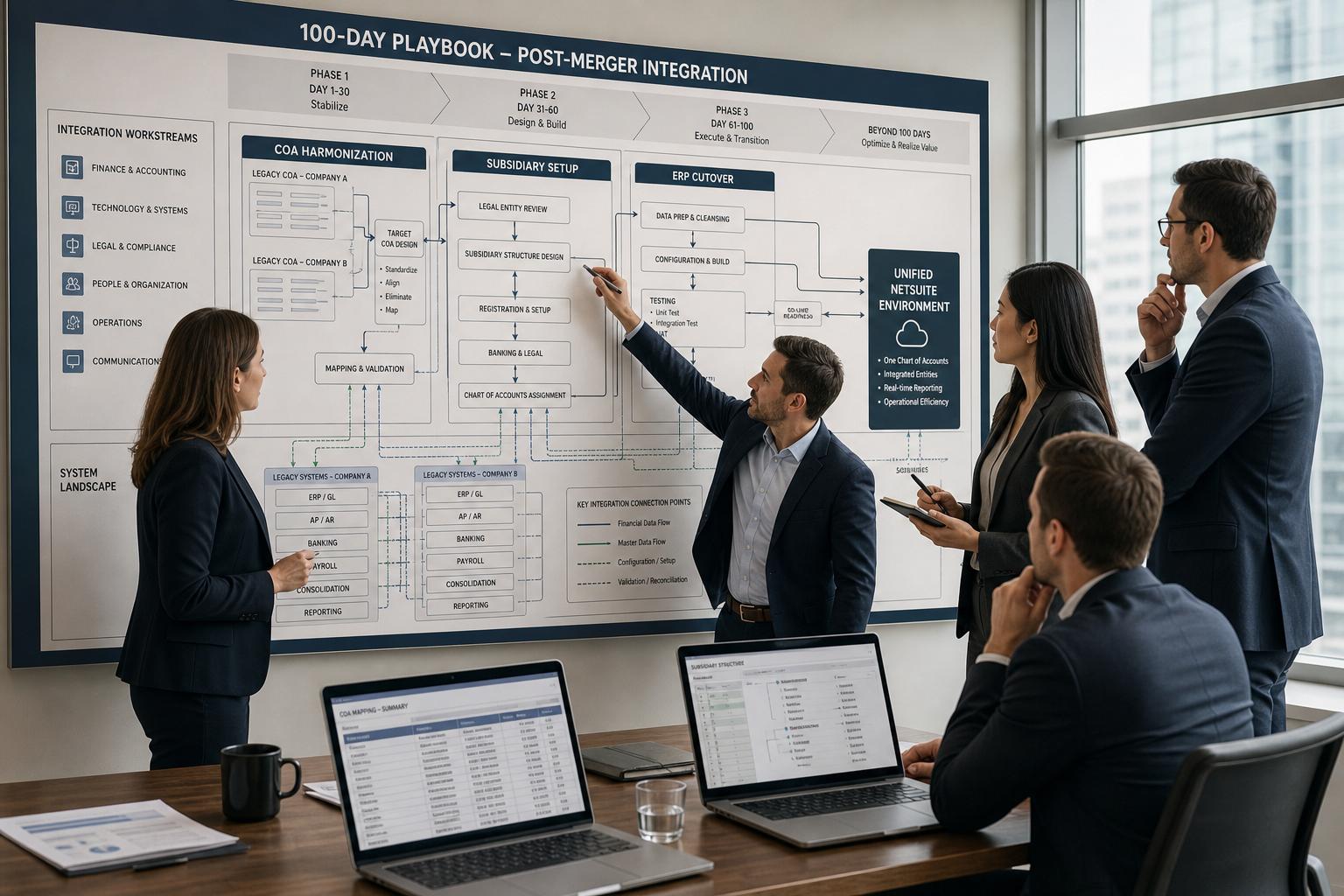
Integrating the insights from industry playbooks (Source: gigabit.agency), Table 1 below illustrates a phased timeline of 100-day tasks, split between Finance/CFO responsibilities and NetSuite/IT duties. Note how chart-of-accounts harmonization and subsidiary setup appear in nearly every phase, reflecting their intertwined nature.
| Phase | Timeframe | CFO/Finance Focus | NetSuite/Technical Focus |
|---|---|---|---|
| Pre-Close Planning | Days –∞ to Day 0 (Weeks before Close) | – Form Integration Management Office (IMO); align senior leadership. – Outline unified COA and entity hierarchies; decide consolidation currency and fiscal year alignment. – Begin COA mapping exercise: review legacy account structures. [6] – Draft cutover strategy; plan a Day–30 full dress rehearsal. | – Prepare NetSuite sandbox for integration testing. – Ensure OneWorld, Multi-Book, SuiteGL features are licensed and enabled. – Configure initial subsidiary records (names, base currencies, country) for incoming entities. – Inventory existing systems, list data to migrate (GL balances, open A/R, A/P, masters). – Set up integration tools (CSV imports, middleware connections). |
| Day 1 Execution | Day 0 (Closing Day) | – Ensure business continuity: acquired entity continues essential operations. – Roll acquired AP/AR into combined cycles without misses. – CFO verifies that all acquired banks and cash accounts are mapped into the new consolidated COA. – If needed, process a Day-1 payroll run for new employees. | – Light up the primary NetSuite account as “master” (go-live). – Enable all new subsidiary records in OneWorld; configure each with correct currency, intercompany account IDs, tax codes. – Load opening balances (assets, liabilities, equity, interco journals) from each acquired entity’s system so that net balances reconcile. – Test Day-1 financial transactions end-to-end: e.g. check an intercompany invoice generates matching AR/AP entries. |
| Weeks 1–4 (Month 1) | Days 1–30 | – GL Harmonization: Merge general ledgers. Map each acquired account to the consolidated COA; create temporary placeholder accounts for unmapped items. – Finalize the unified COA. Run a rolling forecast or pro forma P&L for 30 days to validate consolidated reporting. – Consolidate any divided financial functions (e.g. Group Controller oversight). – Continue training accounting staff on unified policies. | – Data Migration: Import customer, vendor, and item master records into NetSuite; assign them to the proper subsidiaries. – Configure any new segments/dimensions (departments, classes) for consolidated reporting style. – Post all subsidiary opening balances and intercompany journal entries to complete Day 0 migration. – By Day 30, run a test consolidated close in NetSuite to produce combined income statement and balance sheet. Identify and correct any mapping errors. |
| Weeks 5–8 (Month 2) | Days 31–60 | – Process Rationalization: Retire redundant legacy systems (e.g. duplicate payroll or inventory systems) as data are fully migrated. – Standardize accounting policies across all entities (e.g. revenue recognition, capitalization rules). – Finalize currency-translation and periodic revaluation policies for the consolidated rollout. – Ensure all intercompany transactions for this month are recorded. | – Advanced Consolidation: Enable and test NetSuite’s intercompany elimination feature; post elimination journals and currency revaluation entries. – If multi-GB accounting was chosen, set up parallel books and posting rules. – Refine integration settings (e.g. refine foreign-exchange rates, fix any missing accounts). – Conduct a full NetSuite close and compare results to expectations; investigate any variances. |
| Weeks 9–12 (Month 3) | Days 61–90 | – Stabilize & Report: Finalize any remaining entries (e.g. carve-out adjustments, goodwill amortization) in NetSuite reports. – Conduct final reconciliations (AR, AP, intercompany) to ensure clean books across entities. Perform the first official consolidated statutory close; provide auditors with unified books. – Evaluate integration KPIs: e.g. track finance headcount consolidation and cost synergies. | |
| – Optimize & Automate: Build dashboards (e.g. Saved Searches) to monitor consolidation balances and key metrics. – Automate recurring tasks: schedule intercompany eliminations, and scripted currency revaluations. – Confirm that all subsidiaries are using the new unified processes (procure-to-pay, order-to-cash, etc.). – Handoff: ensure NetSuite technical documentation and close checklists are updated and transitioned to the ongoing accounting team. – Draw lessons learned and refine procedures for next acquisitions. |
Table 1: Phased 100-Day NetSuite Integration Plan – Key tasks for Finance (CFO-led) and Technical teams.
The above timeline is consistent with industry best practices. It emphasizes parallel finance and systems tracks: while F&A leads the blueprint (COA, currency, financial continuity), IT/NetSuite focuses on enabling the consolidated system environment. Early phases center on design and data-loading; later phases on retirement of old systems and automation. By Day 60, one expects routine reporting entirely on NetSuite.
Beyond Table 1, a formal cutover checklist should govern the execution. Good cutover plans break down into the core workstreams (Source: gigabit.agency). For example, pre-cutover activities include:
- Governance & Decisions: Assign a single cutover lead and an integration steering committee (Source: gigabit.agency). Establish clear go/no-go criteria for each stage. Communicate timing and roles to all stakeholders.
- Data Migration & Reconciliation: Finalize what data will be migrated during cutover (e.g. master records and open balances) versus post-go-live batch updates (Source: gigabit.agency). Execute end-of-period transfers: freeze transaction entry in legacy, import final AR/AP/inventory balances into NetSuite, and reconcile the results.
- Interface/Integration Readiness: Inventory all existing interfaces (bank feeds, legacy system links) and owners. Verify connectivity, credentials, and endpoints for each integration (Source: gigabit.agency). Ensure error-monitoring and alerts are in place for critical interfaces.
- Security & Access: Finalize role definitions and ensure each user has appropriate NetSuite permissions. Validate Segregation-of-Duties matrices and resolve any conflicts (Source: gigabit.agency). Prepare to lock down legacy systems access at cutover.
- Testing Sign-off: Confirm all planned System Integration Testing (SIT) and User Acceptance Testing (UAT) scenarios have passed with business sign-off (Source: gigabit.agency). Cover high-risk processes and edge cases (e.g. intercompany flows, currency revaluations).
- Reporting/Finance: Define the “must-have” reports for Day 1 (e.g. trial balance, consolidated P&L) and validate their accuracy (Source: gigabit.agency). Run a close readiness checklist: verify posting logic, run sample closes, and prepare contingency reporting. Obtain formal sign-off on the reconciliation rules and key balance proofs.
- Training & Hypercare: Ensure role-based training has been completed by all finance and operations users (Source: gigabit.agency). Establish a support structure (help desk, super-users) for the first two weeks post-go-live.
- Runbook & Go-Live Execution: Create a detailed cutover runbook with task IDs, owners, dependencies, and timing (Source: gigabit.agency). Each critical task should have a verification step. For example, CO-001 in one cutover plan was “Announce cutover start and freeze rules” – verifying that the message was delivered and acknowledged (Source: gigabit.agency). Define rollback or “stop point” criteria in case key validations fail mid-execution.
- Go/No-Go: Just before launch, perform a formal go/no-go checkpoint. If any critical criteria (data completeness, integration stability, testing clearance) are not met, pause the cutover to fix issues. This cautionary step prevents “launching” an unprepared system (Source: gigabit.agency).
Cutover best practices are summarized in industry blogs, emphasizing disciplined execution. A recent guide stresses that cutover failures stem not from the ERP itself, but from unclear processes – tasks without owners and rehearsal (Source: gigabit.agency). For example, rehearsals (dry-runs) should take place T-2 to T-4 weeks to de-risk the actual Day 1. A practical sample checklist (see Table 2 below) covers common cutover workstreams and example tasks within each.
| Cutover Workstream | Key Activities/Examples |
|---|---|
| Governance & SME Coordination | • Appoint cutover leader and backup; schedule governance calls. • Communicate cutover schedule to all teams and business units. • Finalize cutover runbook and ownership for each task (Source: gigabit.agency). |
| Data Migration & Reconciliation | • Finalize data scope (master data vs open balances) and cutover loads (Source: gigabit.agency). • Perform final legacy data extracts; clean and validate data. • Load closing GL balances, A/R, A/P into NetSuite; compare to legacy; print reconciliation report. |
| Integrations/Interfaces | • Inventory all interfaces and responsible owners. • Verify connectivity (endpoints, certificates, firewalls) for each interface (Source: gigabit.agency). • Run test transactions through each integration and confirm data flow. |
| Security & Access Provisioning | • Finalize roles and permissions for each key user. • Validate Segregation-of-Duties conflicts are resolved (Source: gigabit.agency). • Ensure legacy access is disabled at cutover time. |
| Testing & Validation | • Confirm full SIT cycle completion with evidence of passed test scripts. • Ensure UAT sign-offs by business owners on critical workflows (Source: gigabit.agency). • Validate any previously identified defects are remediated. |
| Reporting/Go-Live Prep | • Define “go-live reports”: e.g. trial balance, consolidated income statement, intercompany listing (Source: gigabit.agency). • Create templates in NetSuite/Saved Search ahead of day 1. • Pre-run any reports possible (e.g. orphan vendor list) to baseline. |
| Training & Communication | • Ensure all users have completed cutover training (role-based, not just generic) (Source: gigabit.agency). • Communicate business continuity plans (how to handle manual processes if needed). • Set up command center or hypercare war room post-go-live. |
| Go/No-Go Decision | • Review all pre-go criteria (data loads, testing, interfaces) with steering committee. • If any critical issue, pause. If green-lit, formally announce go-live time. |
| Contingency/Rollback Planning | • Define rollback criteria (specific failures triggering abort) (Source: gigabit.agency). • Ensure backups of critical legacy data exist. • Prepare manual workaround procedures (e.g. temporary spreadsheets) in case cutover tasks run long. |
Table 2: Cutover workstreams and sample tasks for NetSuite go-live. Based on standard ERP cutover methodologies (Source: gigabit.agency).
Research and experience confirm that following such a checklist dramatically reduces go-live risk. For instance, the cutover plan above explicitly schedules a final Day–1 rehearsal (Source: gigabit.agency). Without such discipline, teams have been known to “launch” only for interfaces or reports to fail, causing weeks of disruption. A recent industry post dryly notes: “ERP go-lives don’t fail because ‘the system isn’t ready.’ They fail because cutover execution is unclear: tasks aren’t owned, steps aren’t rehearsed….” (Source: gigabit.agency). In contrast, having a single “throat-to-choke” cutover manager and clear checklists ensures accountability and a controlled transition.
In sum, the cutover phase is about operationalizing the integration: moving data, validating connections, and then switching users into the new system with confidence. Each major task (data load, interface validation, report generation) must have sign-off conditions. Together with the CFO-led tasks in Table 1, the cutover plan forms the backbone of the first 100 days. It effectively turns strategy into action and allows the combined company to begin reaping merger synergies.
Case Studies and Real-World Examples
Industry case studies illustrate the impact of well-executed NetSuite integrations. For example, Quatrro Business Support, a financial services provider, migrated 20 acquired companies onto a single NetSuite OneWorld instance. After enabling the new subsidiaries and mapping their data, Quatrro halved its month-end close cycle: from 19 days down to 10. Key factors were NetSuite’s multi-entity capabilities (automated intercompany elimination) and disciplined change management across stakeholders. Similarly, a private-equity-backed tech company consolidated its acquired units by switching from disparate QuickBooks files into NetSuite; their combined month-end close also shrank from 19 working days to 10. These metrics align with the expectation that unified accounting systems speed close processes.
Another example, CallidusCloud (now SAP Concur), faced a “patchwork” of 14 different systems including Microsoft Dynamics GP that impeded visibility. They replaced those with NetSuite OneWorld and OpenAir, unifying ERP and professional services automation [11]. Post-implementation, CallidusCloud was able to accelerate M&A onboarding and standardize processes globally, illustrating the scalability benefit of a single cloud ERP.
On the consultancy side, SquareWorks reports consolidating six acquired companies for client Syndigo into one NetSuite target environment [12]. Their team reviewed the M&A plan, managed change, and executed the integration steps. While metrics were not publicized, the strategy of merging multiple targets into NetSuite enabled Syndigo to expand its footprint without ballooning admin costs.
A smaller-scale case, Nautique Group, used NetSuite to go from fragmented QuickBooks instances to one system. According to their case study, the group achieved “seamless inter-company operations, automated financial processes, and enhanced reporting” after the NetSuite cutover [13]. This echoes the benefit of adopting OneWorld across subsidiaries – eliminating the need for manual spreadsheets by enabling real-time intercompany entries and shared master data.
These cases demonstrate that effective integration yields quantifiable ROI: close cycles cut by roughly 50%, finance headcount reductions, and faster decision-making. Moreover, the groundwork laid by one integration accelerates subsequent deals (“built to scale”). Indeed, industry experience suggests that after one smooth NetSuite integration, adding further bolt-on acquisitions is easier due to the existing unified template and processes.
Implications and Future Directions
The stakes of post-merger integration have only grown. Modern ERP environments (especially SaaS models like NetSuite) are now considered strategic assets in M&A deals. Recent analysis highlights that acquirers prize customer retention and the ERP’s AI capabilities. In fact, a 2025 technology-market report notes that ERP SaaS platforms with vertical-specific generative AI and high customer stickiness are seen as “choice assets” in transactions [14]. In practical terms, this means future integrations may emphasize advanced analytics and AI automation. For example, by 2026, Oracle (NetSuite’s parent) had announced “AI agent” frameworks for ERP [15], suggesting that consolidation tasks (like anomaly detection or auto-reconciling accounts) could soon leverage machine intelligence. Gartner predicts that by 2026 nearly 40% of enterprise apps will embed task-specific AI agents [15]. NetSuite itself is developing features like predictive close intelligence and robotic process automation.
For the CFO and finance team, this implies that post-merger integration will evolve from spreadsheet-centric reconciliation toward AI-augmented processes. The Speed of Decision-Making is expected to rise as ERP systems fuse with “generative AI” assistants [15]. For example, future NetSuite integrations could involve automated ledger-matching bots or intelligent forecast scenarios generated by machine learning. Such tools will further compress the close cycle and free financial staff for analysis rather than data crunching. However, companies must also prepare for AI-related governance: new regulations (like the EU AI Act of 2026) will demand transparency in algorithmic workflows [15].
Several broader takeaways emerge. First, speed matters: tracking integration metrics early pays off. Global PMI research cited above found that 92% of integrations succeed when synergies (cost and revenue) are explicitly tracked from Day 1 [3]. For CFOs, this means measuring things like headcount reductions, system cost avoidance, and process efficiencies, and comparing them to plan. Second, cloud ERP competence is a CFO skill. Leading acquirers increasingly require their finance leaders to be hands-on with systems strategy. For example, after a NetSuite consolidation, one CFO noted that retiring a redundant accounting team yielded material savings – a direct synergy. Proactively incorporating such metrics into the integration playbook ensures executives can demonstrate value capture.
Finally, looking ahead, the convergence of middleware, AI, and ERP suggests that the integration discipline will become more data-driven and iterative. Some experts already advise treating NetSuite (and its prospective acquirers) as continuously evolving platforms: having a hypercare and continuous improvement mindset post-Day 100, leveraging AI for continuous consolidation and anomaly alerts. One commentary emphasizes documenting “what went well and where surprises occurred” to refine future integrations.
In conclusion, a well-executed 100-day NetSuite integration is not just a technical project but a strategic value-creator. By harmonizing charts of accounts, properly configuring subsidiaries, and following a drilled-down cutover checklist, companies can significantly de-risk deals and set the stage for merged growth. Companies that measure and automate (for example, by harnessing NetSuite’s analytics or AI features) gain further advantage. As one industry analysis notes, ERP SaaS platforms that deliver robust data consolidation and advanced features (including AI) are commanding higher valuations in M&A [14] [15]. Thus, investing the effort to integrate quickly and cleanly pays both immediate and long-term dividends in the merged enterprise’s performance.
Conclusion
M&A integration is a make-or-break task for realizing deal value, and the ERP backbone is often the administration’s Achilles’ heel. This report has provided a comprehensive framework for leveraging NetSuite’s strengths in a post-M&A merger – focusing on the twin pillars of financial harmonization and operational execution. Key conclusions are:
- Early Alignment: Establish an Integration Management Office and begin chart-of-accounts mapping before closing. This ensures a unified financial language and avoids last-minute chaos [6].
- OneWorld Setup: Use NetSuite OneWorld to onboard subsidiaries from Day 1, with each entity’s country, currency, and tax details configured [9]. Enable intercompany rules immediately so that cross-entity transactions reconcile automatically.
- Phased Cutover: Execute a disciplined 100-day plan with parallel tracks. As Table 1 illustrates, the CFO team should focus on continuity and policy unification while IT handles system go-live and data switchover. A detailed cutover checklist (Table 2) prevents omissions – every data load, interface test, and security signoff is accounted for (Source: gigabit.agency).
- Case Evidence: Real-world examples show these practices work. Organizations that migrated dozens of subsidiaries into NetSuite reported slashed close cycles and standardized processes [13]. Even boutique deployments (from QuickBooks to OneWorld) delivered stronger financial controls.
- Metrics and Governance: Track integration KPIs from the start. Metrics like close time, number of open intercompany items, and FTE reduction quantify progress (as one CFO measured whether “retiring one accounting team” yielded real savings). Practically, we endorse tying executive incentives to synergy realization, as management research indicates 92% of deals meeting synergy tracking goals succeed [3].
- Future Focus: Looking forward, CFOs should anticipate tighter integration of ERP with AI and analytics (enterprise reporting is evolving to include AI agents [15]). Merged companies can prepare by ensuring high data quality and a flexible chart that can leverage advanced BI tools. ERP retention and AI capabilities are now strategic priorities for acquirers [14], so integrated companies with modern NetSuite setups will be well-positioned for the next wave of deals.
Ultimately, the payoff for a rigorous 100-day NetSuite integration is tangible. Beyond the immediate financial cleanup, it embeds a unified system and culture that make the combined enterprise more agile and transparent. As one integration veteran put it, executing the integration plan well turns a crisis into an opportunity: an accelerated “metamorphosis” that builds confidence and momentum [2]. By following the detailed guidance in this playbook—backed by industry data and case results—finance leaders and project teams can greatly improve their odds of merger success.
References: (All data and quotes above are drawn from industry reports, white papers, and case studies as cited in-line.)
External Sources (15)
About
Houseblend
Make NetSuite work better for your finance and operations teams with Houseblend. We help design, implement, integrate and improve ERP systems, with practical support for the people who use them every day.
Houseblend is a NetSuite consulting firm serving finance and operations teams. We help organizations implement ERP systems, connect business applications, improve existing configurations and maintain the systems that support everyday work. Our audience includes finance leaders, controllers, operations managers, NetSuite administrators and implementation teams.
Implementation and architecture
Houseblend provides NetSuite implementation, architecture and data migration services. We help teams evaluate how business processes, reporting requirements and existing data should fit together in an ERP environment. Training supports the people responsible for adopting and operating the resulting system.
Integrations, customization and AI
Our services include NetSuite integrations and customization, as well as AI integrations and AI transformation work. These engagements connect ERP data and workflows with the broader application landscape. The right design depends on the organization's systems, controls and operating needs.
Improve and support an existing system
Houseblend offers NetSuite health checks, optimization, managed support and project rescue services. We also provide expertise for analytics and specialist workflows, including NetSuite Analytics Warehouse, warehouse management and field service management. Published educational material helps teams investigate options and prepare informed questions for their implementation or support work.
Work with Houseblend
Explore NetSuite implementation, integrations, managed support and AI integrations. Contact Houseblend to discuss your current system and priorities.
Article examples explain concepts rather than promising a particular license, product capability, delivery schedule or outcome. Engagement scope is confirmed with the Houseblend team.
Disclaimer
This document is provided for informational purposes only. No representations or warranties are made regarding the accuracy, completeness, or reliability of its contents. Any use of this information is at your own risk. Houseblend shall not be liable for any damages arising from the use of this document. This content was generated with assistance from artificial intelligence tools, which may contain errors or inaccuracies. Readers should verify critical information independently. All product names, trademarks, and registered trademarks mentioned are property of their respective owners and are used for identification purposes only. Use of these names does not imply endorsement. This document does not constitute professional or legal advice. For specific guidance related to your needs, please consult qualified professionals.