Houseblend Article
NetSuite 2026.1 Narrative Insights: Setup & GenAI Use Cases
Inside this article
- 01Executive Summary
- 02Introduction
- 03Background and Context
- 04NetSuite 2026.1 Narrative Insights: Feature Overview
- 05Setup and Configuration
- 06Data and Analytics Implications
- 07Use Cases and Examples
- 08Implementation and Integration
- 09Case Studies and Real-World Examples
- 10Impact Analysis and Evidence
- 11Future Directions and Implications
- 12Conclusions
- 13References
Executive Summary
NetSuite’s 2026.1 release represents a major step in integrating generative artificial intelligence (GenAI) into enterprise resource planning. Foremost among its new capabilities is Narrative Insights, a GenAI-driven feature that automatically generates plain-language summaries of standard financial and operational reports. According to Oracle’s documentation, Narrative Insights “uses generative artificial intelligence (AI) to provide concise summaries of supported reports and records,” highlighting key trends, anomalies, risks, and opportunities [1] [2]. This allows users – from CFOs and controllers to sales managers and operations leads – to quickly digest complex data without manually parsing spreadsheets or dashboards.
This research report provides a comprehensive analysis of NetSuite’s Narrative Insights in the 2026.1 release, covering setup procedures, usage scenarios, technical underpinnings, and business implications. We draw on authoritative sources including Oracle documentation, industry analyses, and expert commentary. Among our key findings: Narrative Insights is enabled by default in all NetSuite accounts upgraded to 2026.1, supports a defined set of standard reports (custom reports are not yet supported [3]), and initially requires English-language accounts (with other languages to follow) [4] [5]. Administrators can enable or disable the feature via AI Preferences and manage usage limits (a monthly free quota is provided, with an option for unlimited use through Oracle Cloud Generative AI) [6] [7].
We examine practical use cases across functions: finance (e.g. summarizing Income Statements or Cash Flow reports for board meetings, sales and marketing (e.g. analyzing sales pipelines and campaign ROI), operations and supply chain (inventory reports, demand forecasts), and service/workflow (case history summaries). For example, the system can automatically explain that “Sales for Q1 increased 15% year-over-year, driven by Region West and Product B” [2], effectively acting as an instant analyst. We include hypothetical and real-world scenarios (such as a regional services firm integrating AI summaries into its weekly review deck [8]) to illustrate benefits.
At the same time, we discuss limitations and risks. The AI may “hallucinate” or misinterpret if data is sparse or inconsistent – an issue highlighted by both NetSuite’s own disclaimers (“It may contain inaccuracies or omissions… Always check AI-generated content for accuracy” [9]) and industry examples (e.g. Deloitte’s high-profile AI-report error [10]). Careful data governance, human review, and user training are strongly advised to mitigate these risks [11] [10].
Finally, we analyze broader trends and implications. Generative AI in ERP is emerging as a strategic imperative: studies estimate that CFOs and finance leaders are rapidly embracing AI (only 4% of CFOs remain “cautious” today, down from 70% in 2020 [12]), and research suggests up to $920 billion in annual corporate savings from full AI adoption [13]. NetSuite’s enhancements align with industry moves (e.g. SAP’s own tabular AI model [14]) toward AI-augmented analytics. Looking ahead, Narrative Insights may expand to custom reports and more languages, integrate with third-party LLMs, and incorporate advanced reasoning. The potential productivity gains are enormous (analysts report AI-driven finance automation can yield median ROI ~287% in the first year [15]) – but success will hinge on addressing data quality, model accuracy, and change management.
This report, organized into detailed sections below, provides an in-depth look at NetSuite 2026.1’s Narrative Insights feature, including background on GenAI, technical setup, supported use cases, data on adoption, implications for finance and operations, and a forward-looking perspective on how AI-driven narrative reporting will shape the future of ERP (with all major claims supported by current industry sources).
Introduction
Generative AI Meets ERP
The last few years have seen an explosive expansion in generative AI (GenAI) capabilities, driven by large language models (LLMs) like GPT-4 and domain-specific variants. These models can generate human-like text, code, and analyses based on input data. In business contexts, GenAI promises to transform data analysis and reporting by automating the creation of narratives, summaries, and decision-support explanations that historically required human expertise. According to Oracle, GenAI is a “game-changing” force in finance, enabling CFOs to simplify processes like closings, forecasting, and reporting, thus freeing them for higher-value strategic work [16].
NetSuite, Oracle’s cloud ERP platform widely used by mid-market and enterprise customers, is following this trend. With the 2026.1 release (March 2026), NetSuite is embedding GenAI features that turn raw financial and operational data into natural-language insights [16] [2]. Chief among these is Narrative Insights, which automatically generates written summaries (“report narratives”) for predefined report types. This leverages Oracle’s own GenAI service (backed by Oracle Cloud Infrastructure) to analyze datasets and surface actionable observations.
The wave of AI in enterprise software is corroborated by industry research. For example, Analytical AI (machine learning, predictive analytics has long been embedded in ERP for tasks like forecasting and anomaly detection, but Generative AI is now emerging to handle the “storytelling” side of data [17] [18]. Houseblend summarizes this dichotomy: traditional AI can “forecast revenue or cash flow, automatically match invoices, or flag unusual ledger entries,” whereas GenAI can “draft text (e.g. management reports, budget narratives), summarize financial data, or provide a chat interface to query the ERP” [17][18].
This report will explore Narrative Insights in depth. First, we set the stage with historical and competitive context: the evolution of narrative reporting and how competing ERP vendors are integrating AI. Then we examine the technical setup in NetSuite 2026.1, including account requirements, configuration steps, supported languages, and usage limits (including free quotas and the option for unlimited usage via Oracle Cloud). Next, we dive into feature details: exactly which reports are supported, how the user interacts with Narrative Insights, and what the generated output looks like. We will then analyze use cases by function (Finance, Sales, Marketing, etc.), providing concrete examples and discussing potential ROI and productivity impacts. Case-study-style scenarios illustrate real-world benefits and pitfalls. We also discuss integration aspects such as how Narrative Insights fits into NetSuite’s analytics ecosystem and how it compares with traditional reporting.
Importantly, we address data and accuracy issues. We review documented disclaimers and known incidents (e.g. hallucination risk seen in other AI-driven reports [10] [11]), and suggest best practices (e.g. human-in-the-loop checks). We also cover governance: NetSuite’s built-in usage monitoring, role-based access, and the need for data quality.
Finally, the report considers the broader implications and future directions. We survey leadership viewpoints (CFOs, analysts on AI adoption) and place Narrative Insights within the larger trend of AI-native ERP. We cite statistics on AI’s economic impact (e.g. $920B potential annual savings for firms adopting AI [13]) and finance-specific adoption (CFOs’ attitudes changing dramatically [12]). We conclude by projecting how features like Narrative Insights may evolve – for instance, to support custom reports, more languages, and deeper integration with AI tools – and what this means for the ERP market and finance profession.
Throughout, claims are backed by authoritative sources: official Oracle/NetSuite documentation, tech press, expert blogs, and survey findings from CFO and AI research. Tables summarize key data (e.g. supported reports, AI use-case categories). The report is structured for easy navigation with clear sections, bullet-point key takeaways, and an academic tone suitable for decision-makers and analysts seeking a deep understanding of NetSuite 2026.1’s GenAI capabilities.
Background and Context
Evolution of Narrative Reporting
Historically, business intelligence (BI) and ERP systems have focused on quantitative analysis: charts, spreadsheets, drill-down interfaces. However, stakeholders often ask “what does this mean?” after seeing numbers. Narrative reporting – the automatic generation of human-readable summaries of data – has been an emerging trend for several years. Startups like Narrative Science (Quill) and Arria enabled automated report writing, and major BI tools (e.g. Microsoft Power BI, Tableau) have added natural-language generation features. These earlier approaches generally used rule-based templates or simple natural language libraries; the new wave uses deep learning and LLMs for more flexible, contextual summaries.
With the AI wave of 2023–2025 (ChatGPT, Google Bard, etc.), enterprises recognized GenAI’s potential in finance and operations. A Forbes/CFO survey noted that CFOs are shifting from caution to active engagement with AI. For example, a 2025 survey highlighted that 70% of CFOs were cautious about AI in 2020, but by 2025 only 4% remained cautious due to emergence of generative/agentic AI [12]. Likewise, analysts estimate that GenAI could revolutionize routine finance tasks: Oracle’s Randy Ng and Keith Causey wrote that GenAI will free finance teams from manual tasks like reconciliations and closes, allowing real-time, insight-driven decision-making [16].
Competitors are moving similarly. SAP announced a tabular-data AI model (SAP-RPT-1) tailored for enterprise data, explicitly designed to produce more reliable insights from ledgers and invoices [14]. Workday has launched GenAI assistants for finance (e.g. conversational interfaces) and published thought leadership encouraging finance leaders to embrace AI. Oracle itself launched its Autonomous Database with AI capabilities, and has made generative AI services available on OCI to power applications like NetSuite. This macro-trend – sometimes called “AI-native ERP” – suggests that embedding AI-generated narrative is rapidly becoming expected functionality in top ERP suites [19] [2].
NetSuite and the 2026.1 Release
NetSuite is Oracle’s flagship cloud ERP acquired in 2016, serving thousands of organizations worldwide. It provides finance, CRM, inventory, billing, and analytics modules in a unified SaaS platform. The 2026.1 release, made available in early 2026, focuses heavily on intelligent automation and integration. Oracle’s official release guides and partners note that 2026.1 significantly expands AI features alongside process enhancements in finance, supply chain, and development tools [20] [21]. Key highlights (beyond Narrative Insights) include:
- Generative AI for bank reconciliation: Automatically predicting matches between bank feeds and ledger entries.
- LLM Connector for data warehouse/IPaaS: Enabling smoother movement of NetSuite data to AI/analytics platforms.
- AI-driven CPQ Assistant: Helping with configuring and pricing products.
- SuiteScript GenAI APIs: Allowing developers to incorporate GenAI functions into custom scripts.
- Operational automation: e.g., automated billing schedules, expanded localization.
As Kelly Burberry (NetSuite product marketing) summarized, 2026.1 “focuses on stronger integrations and smarter reporting, making ERP the hub that connects payments, data, and finance workflows” (LinkedIn post) – essentially, creating one “single source of truth” powered by AI [22]. The Houseblend analysis echoes this, calling 2026.1 a “landmark update” prioritizing AI-driven features and quoting Oracle docs to say the platform now offers AI for bank rec and report summaries [19].
NetSuite is in intense competition with other AI-forward ERPs (SAP S/4HANA, Workday, Microsoft Dynamics 365, etc.). By embedding GenAI capabilities such as Narrative Insights, NetSuite aims to differentiate as an “AI-augmented ERP” for finance/business intelligence. The move aligns with industry data: cloud ERP adoption is now about 70% globally [23], and surveys find 30–65% of companies consider AI as essential in their ERP [23]. With Oracle citing NetSuite’s revenue growth (~18% year-over-year) in Q4 2025, there is apparent market demand and investment backing for these innovations [24].
NetSuite 2026.1 Narrative Insights: Feature Overview
Overview of Narrative Insights
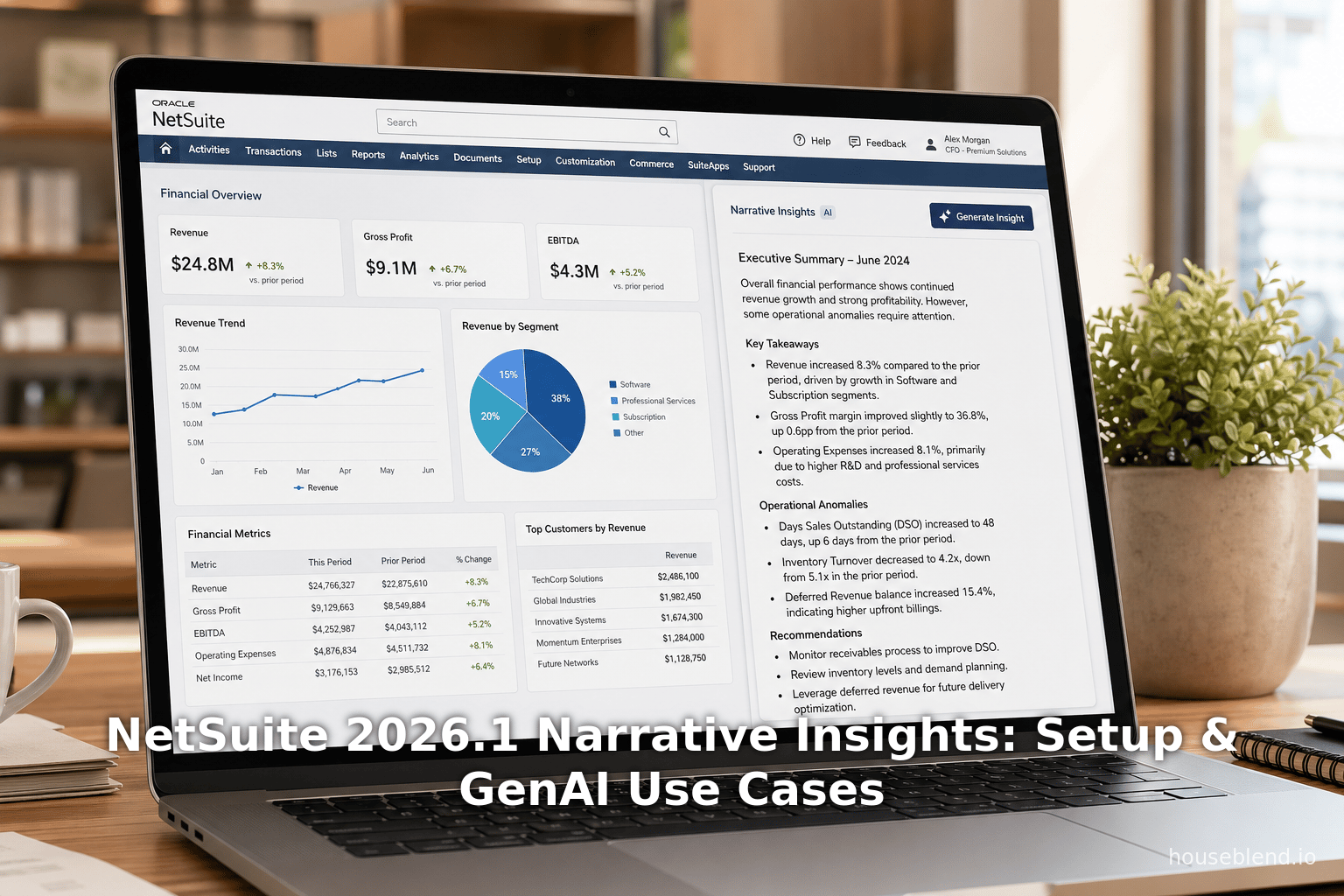
Narrative Insights is a built-in NetSuite feature (Applications Suite) introduced in 2026.1. In essence, it provides on-demand narrative summaries for certain reports and records. According to Oracle documentation, Narrative Insights “uses generative AI to provide concise summaries of supported reports and records,” highlighting the most relevant information, and surfacing “trends, anomalies, risks, opportunities, or data gaps” [1]. When a user views a supported report or record in the NetSuite UI, a “Generate Insight” button becomes available. Clicking this button invokes the GenAI engine, which reads the underlying data and produces a text-based summary in a pop-up dialog [25].
The content of the summary varies by report type and data context. For example, on an Income Statement report, the narrative might compare year-over-year figures and note major variances; on a Sales Pipeline report, it might call out low-stock items; on a Cash Flow report, it may point out liquidity shifts. Houseblend provides an illustrative example of what a summary might look like: “Sales for Q1 increased 15% year-over-year, driven by Region West and Product B; expected growth next quarter is low due to seasonal trends.” [25]. In effect, the tool gives users an instant “analyst’s narrative” – turning rows and columns into plain English insights.
Important attributes of Narrative Insights:
-
Generative AI Engine: Under the covers, NetSuite calls Oracle’s Generative AI service (an LLM optimized for enterprise data). The specific model is not publicly disclosed, but it is trained or configured to understand numeric and financial data. The engine interprets the data contextually and synthesizes a coherent text summary. Each time “Generate Insight” is pressed, the model may produce slightly different phrasing; as Oracle notes, “the content may differ each time you generate an insight, even on the same data” [26].
-
Caveats and Disclaimers: Oracle cautions that AI-generated content can be incomplete or inaccurate. The Narrative Insights dialog includes a disclaimer:
“This content is automatically generated, and it may contain inaccuracies or omissions… always check AI-generated content for accuracy and quality.” [27] and a warning that NetSuite “does not assume responsibility or liability for the use or interpretation.” This underscores that while the feature is powerful, it’s an assistant, not a replacement for professional judgment.
-
Availability: Narrative Insights is enabled by default on all 2026.1-upgraded accounts [28]. It is available globally (“Everywhere”) and in all NetSuite-supported languages [29], though Houseblend notes that initial rollouts may emphasize English-language accounts [30]. Administrators can disable the feature entirely using an AI Preferences toggle [31] (e.g. for compliance or testing purposes).
Figure 1 (below) shows an example Narrative Insights interface (image from Oracle docs) with generated text. The summary is contextual (e.g., it comments on profitability, trends, and anomalies) and tailored to the report.
[1] [25] Figure 1: Example of NetSuite “Generate Insight” summary dialog for a financial report (from Oracle documentation).
Supported Reports and Records
Narrative Insights does not work on arbitrary data – only on a curated list of standard reports and certain record types. Custom or ad-hoc reports are explicitly not supported in 2026.1 [32] [33]. This limitation is intentional, as the AI models are tuned to known report formats and fields.
According to NetSuite help, the supported report areas and their specific reports include [33] [34]:
| Report Area | Supported Reports |
|---|---|
| Banking/Budgeting | Budget vs. Actual |
| Customers/Receivables | A/R Aging Summary; Customers by Sales Rep Summary |
| Financial | Income Statement; Comparative Income Statement; Balance Sheet; Comparative Balance Sheet; Cash Flow Statement; Trial Balance |
| Inventory/Items | Inventory Activity Detail; Inventory Back Order Report; Stock Ledger |
| Marketing | Campaign ROI Analysis Summary; Campaign ROI Analysis Detail |
| Order Management | Open Return Authorizations; Return Authorizations Register; Open Sales Orders; Sales Order Register |
| Payroll | Payroll Summary; Payroll Liabilities |
| Pipeline Analysis | Sales Activity by Sales Rep Summary; Sales Activity by Sales Rep Detail; Total Open Opportunities Detail; Total Open Estimates; Opportunities Won |
Table 1: Standard NetSuite reports that support Narrative Insights in Release 2026.1 (custom reports are not supported) [33] [34].
In addition to these reports, certain records (such as Case records and Inventory Items for pricing) can have narratives under an expanded usage model (see the Usage Limits section). For example, a “Case Summary” narrative can be generated for customer service cases, and a “Pricing” narrative for inventory items, as separate usage categories [35]. But the core report-support list is strictly as above.
The restriction to standard reports means that early adopters should plan which insights they want. In some cases, an existing NetSuite report may require little or no customization to be insightful via narrative; in others, one might need to restructure data into a supported report format first. It also means that the summaries are comparably reliable, since the AI “knows” exactly what each report contains – instead of facing completely novel schemas.
How It Works (User Interaction)
End-users find Narrative Insights integrated seamlessly into the NetSuite UI:
- Navigate to a supported report or record. For example, a finance controller opens the Quarterly Income Statement by navigating to Reports > Financial > Income Statement.
- Language setting. The user’s account language preference should be English to ensure the feature is available in 2026.1 [4] [36]. (Oracle states it works in all system languages [29] but documentation suggests early rollout is English-centric.)
- Click “Generate Insight”. A new button appears (often at the top of the report window) labeled “Generate Insight” or similar. When clicked, the Narrative Insights dialog appears, typically overlaying the report.
- View the summary. The dialog displays a written summary. Oracle emphasizes that this summary may include different sections and levels of detail depending on context [37] [25]. It highlights what the system considers significant – e.g. notable variances or historical trends.
- Iterate or regenerate. The user can click “Generate Insight” again (or a “Regenerate” button) to get a new draft summary. Different phrasings or slight content changes may occur each time, as the model can produce varied outputs [26].
- Interpret with caution. The user should cross-check any claims. Each narrative includes a reminder that it’s AI-generated and should not be blindly trusted [27].
- Adjustment by role. Whether or not the “Generate Insight” button appears depends on role/permissions. By default only internal roles can use it; there is an “External Roles” toggle to allow portals or partners to view narratives [38].
Administrators control Narrative Insights from Setup > Company > AI > AI Preferences [6]. Under “Narrative Insights” they can disable the feature entirely for the account (if, e.g., they want to enforce a different process) or disable it only for external/portal users [39]. By default, Narrative Insights is enabled internally when accounts move to 2026.1 [29].
Behind the scenes, generating a narrative consumes a unit of the account’s AI usage quota (see below). There is no additional setup the user must do on the report – no fields to tick or parameters – apart from having the right version and language. Oracle designed it for “one-click” ease so that business users (not just IT or analysts) can readily incorporate AI insights into their workflows [40] [25].
Underlying AI Technology
Oracle does not disclose the exact AI model powering Narrative Insights, but based on context it likely leverages Oracle’s OCI Generative AI Service. This service provides pre-trained foundation models (Oracle has partnered with various model providers) tailored to enterprise data. NetSuite’s documentation hints that accounts can optionally connect to OCI GenAI for unlimited use (beyond the free quota) [41]. It is reasonable to infer the following about the technology:
- Pre-training and fine-tuning: Oracle’s GenAI is trained on general text but may be further tuned on business/financial corpora. The answers often follow domain-specific phrasing (“net income,” “working capital,” etc.), suggesting some financial domain knowledge.
- Structured data handling: The AI must ingest structured report data. It likely receives either a JSON/array of the report data or a query interface to NetSuite’s data tables. The model must align numeric and categorical fields with language templates.
- Prompt engineering: NetSuite must format a prompt for the LLM (e.g. “Summarize the following income statement: [data]”). Oracle’s linking suggests that this generation is done on-demand in the cloud, meaning each click sends data to the AI engine and retrieves a text.
- Performance: The generation appears to happen quickly (a few seconds) in the UI. This implies the model is reasonably efficient (and probably smaller than the largest GPT-4 engine, or run on optimized Oracle hardware).
- Privacy and Compliance: Because the data is business-sensitive, Oracle provides options to keep it within the customer’s tenancy: using OCI credentials allows an account to route the GenAI calls through a customer-owned Oracle Cloud instance [41]. The docs note that unlimited usage requires configuring OCI credentials, ensuring data stays under the company’s security regime.
In summary, while the AI is “black box” to the end-user, it is architected as a cloud service call from NetSuite’s UI to Oracle’s GenAI API, returning a free-text result. This hybrid design (ERP UI + cloud AI) balances innovation with security: customers can use advanced models without fully exposing Netsuite’s data to external APIs, provided OCI is properly set up.
Setup and Configuration
To use Narrative Insights, a NetSuite account must meet certain conditions and configurations. The setup is generally straightforward, but administrators should verify and control the feature.
Account and Role Requirements
-
Account Version: The account must be upgraded to NetSuite Release 2026.1 or later. Narrative Insights was introduced in 2026.1 [28], so earlier versions have no such feature.
-
Language: Currently, the NetSuite UI language must be English. NetsuiteChangelog’s FAQ recommends English for the AI (consistent with many AI features globally) [4]. Oracle’s docs imply full language support exists, but to avoid early feature gaps some customers set English language. Houseblend similarly notes “initially English accounts” [30]. (This may expand in future releases.)
-
User Roles: By default, only internal roles (employees) can generate insights. NetSuite admins go to AI Preferences (Setup > Company > AI > AI Preferences) and on the “Narrative Insights” subtab ensure it is enabled (it is by default) [31]. In the same panel, an admin can check “Enable Narrative Insights for External Roles” if they want portal-only roles (like Customer Center) to have access [38].
The standard external roles that can gain access (if enabled) include Customer Center, Employee Center, and NetSuite Support Center roles [42]. Without enabling this, partners or clients on portals will not see the “Generate Insight” option.
-
Permissions: Users simply need permission to run the underlying report. Narrative Insights will be greyed out if the user lacks access to the data. For example, an employee without finance rights cannot summary an income statement.
Oracle clarifies that account admins have oversight. If compliance or audit concerns arise, Narrative Insights can be entirely disabled via a single checkbox in AI Preferences [31]. This reversibility ensures control.
Enabling Narrative Insights
By default, after upgrading, Narrative Insights is enabled (the preferences checkbox is checked). To verify or change:
- Go to Setup > Company > AI > AI Preferences.
- Click the “Narrative Insights” subtab.
- Check/Uncheck “Enable Narrative Insights”. (It’s on by default; unchecking it disables all users from generating summaries.) [31]
- Save the preferences.
To control external users, check/uncheck “Enable Narrative Insights for External Roles” [38]. E.g., unchecking this ensures only employees (internal users) get the feature, enhancing data security for public portals.
Houseblend confirms this admin flow, noting “Administrators can disable it via an AI Preferences checkbox (though it is on by default)” [30]. This implies that most customers need not take action to enable Narrative Insights for internal teams.
Usage Limits and Quotas
Narrative Insights is not an unlimited free service. Oracle provides a monthly free usage pool for each account, on a per-usage type basis [7]. The details:
-
Free Quota: Each account gets a certain number of free narrative generations per month. This is not unlimited – it is a “pool of limited, free narrative insights” renewed monthly [7].
-
Usage Types: The quota is tracked by type:
- General: Routine report and record summaries (the standard case).
- Case Summary: Summaries generated for Case records.
- Pricing: Summaries for Inventory Item pricing records. (Houseblend mentions Cases and Payment Predictions, but the docs [45] specifically list “Case Summary” and “Pricing” as special types [35]. Any “general” narrative falls under General. [35])
-
Monitoring: Administrators can view the narrative usage and remaining quota on the AI Preferences page (the same Narrative Insights subtab) [43]. A table shows for each month how many narratives were generated vs. the limit [44]. If the quota is exhausted, further “Generate Insight” attempts will fail (with an error message).
-
Unlimited Option: For organizations needing more, NetSuite allows linking to Oracle Cloud’s Gen AI service. By setting up an OCI GenAI account and entering credentials, the account can bypass the free limit (effectively, “unlimited usage”) [41]. In practice, after hitting the free limit, an admin can either upgrade to paid credits or pause usage. The documentation explicitly states: “If your company wants unlimited usage, you’ll need to set up an Oracle Cloud account with Oracle Generative AI service” [41]. This implies additional cost but ensures business-critical needs aren't blocked.
-
Implications: Companies should estimate how many reports need summarization each month. Houseblend suggests CFO ROI often makes purchase of extra AI credits justifiable (since one CFO user generating a few high-value summaries could easily justify the spend, given AI’s productivity boost). However, smaller companies might try the free tier first. Administrators can also allow only certain key users to generate narratives (to conserve the quota).
NetSuite’s built-in tracking prevents surprise overages: you never pay extra unless you choose to exceed the free pool by attaching OCI service. This design means the organization controls when (and how much) GenAI usage expands.
Data and Analytics Implications
Narrative Insights sits at the intersection of reporting and AI analytics. It alters how data gets interpreted, so we analyze its impact on data flows, accuracy, and trust.
Analytical AI vs Generative AI (Summary Table)
To clarify roles, Table 2 below compares traditional analytical AI tasks (already present in NetSuite or ERP systems) versus generative AI tasks like Narrative Insights (drawing on Houseblend analysis [17] [18]):
| AI Category | Example Use Cases (Finance/ERP) |
|---|---|
| Analytical AI | Forecasting and trend analysis (e.g. revenue or cash-flow forecasting by machine learning); classification routines; automatic matching of invoices to POs or receipts; anomaly detection in ledgers; optimization (e.g. credit scoring). These involve pattern recognition and numerical prediction [17]. |
| Generative AI | Natural language reporting: drafting management report narratives (e.g. variance commentary, budget narratives), summarizing reconciliation or audit reports, or answering free-text queries against the ERP (“What was our cash flow last quarter?”). It can produce textual analysis or dialogue on data [18]. |
Table 2: Analytical vs. Generative AI in finance/ERP contexts (sources synthesize NetSuite and industry examples) [17] [18].
Traditional AI excels at number-crunching (predicting figures, spotting statistical outliers) – tasks that NetSuite already supports via SuiteAnalytics and machine learning for tasks like matching and forecasting. Generative AI, by contrast, focuses on interpretation and communication. As one analyst puts it, if Analytical AI “sees” the trend (e.g. forecast $X revenue), Generative AI “tells a story” about the trend (e.g. “Revenue grew 10% due to product mix changes, offset by higher marketing spend” [25]).
Trend Spotting and Anomaly Detection
One benefit of Narrative Insights is its ability to highlight trends or anomalies that might otherwise be buried. For example, if a Variance report shows a 30% drop in sales in a region, the narrative can directly point it out. This mirrors what predictive analytics does, but in plain language. Houseblend notes that for a given report, “the dialog itself is context-aware: for a balance sheet report, it might highlight liquidity or equity changes; for an inventory report, it might note stockout risks” [30].
This effectively adds an automated “business reasoning” layer. Instead of requiring an analyst to filter the most important signals, the system triages them. In practice, this should speed up decision-making: executives can read the generated summary as a first pass. In some cases, the AI might even surface opportunities – e.g. noting “expected growth is low next quarter due to seasonal trends” [25] – that prompt proactive action (like accelerated campaigns or alternative sales strategies).
Data Quality and Governance Risks
However, reliance on automated narratives carries risks if the underlying data is flawed. NetSuite emphasizes that “if there isn’t enough data to generate an insight, you may receive an error message” [26]. This means very sparse data yields no narrative (which is safe), but incomplete or dirty data can produce misleading narratives. For instance, if a balance sheet has an incorrect entry, the narrative might misstate a key ratio.
Industry experts caution that “AI outputs are only as good as inputs” [45]. Houseblend’s risk analysis points out that data quality issues have derailed many AI initiatives [45]. If the general ledger has duplicate accounts or missing lines, the AI might “hallucinate” to fill gaps – exactly the problem seen in another context when Deloitte’s AI-generated report on compliance references turned out to contain fabricated citations [10]. The Guardian news article on that case labeled them “hallucinations” where “AI models may fill in gaps, misinterpret data, or try to guess answers” [10].
To mitigate this, organizations should treat Narrative Insights not as gospel but as a hypothesis generator. As Houseblend recommends, implement human-in-the-loop review and bolster data governance [11]. Best practices include:
- Ensuring the underlying reports are reconciled and clean before summarizing.
- Training users (particularly accountants) to verify key statements.
- Recognizing that the AI might omit context (e.g. known one-time events) unless prompted by the data.
NetSuite’s own UI encourages verification: the disclaimer and warning persist, signaling users to double-check with actual numbers [9]. For critical reports (audit reports, Financial Statements), the narrative can speed analysis but should not substitute a thorough review.
Transparency and Auditability
One common ERP/BI concern is audit trail. With AI-generated commentary, how do firms document decision-making? NetSuite does not currently record the exact narrative output in a formal audit trail; it is transient aid. However, the underlying data (the report figures) remains auditable. Companies wary of this can always save the generated text externally. Oracle likely considered this: the disclaimer mentions “for questions about security, access permissions, contact NetSuite support” [46], implying no changes to core record integrity.
Oracle’s approach favors informational usage over official reporting: the content “shouldn’t be considered professional advice” [27]. In practice, this means organizations might use Narrative Insights for internal briefs or to guide analysis, then prepare signed statements using traditional methods. Over time, companies may build narratives (once validated) into official reporting, but typically after vetting by humans.
Use Cases and Examples
Narrative Insights can be applied across departments. We discuss key functional use cases to illustrate how organizations can leverage the feature (and how it changes workflows).
Finance and Accounting
Monthly/Quarterly Financial Close
Scenario: A CFO or controller routinely prepares board reports after month-end close, including commentary on the P&L, balance sheet, cash flow, and KPIs. Traditionally, this involves analysts sifting through multiple ledgers and spreadsheets to craft highlights for executives.
Narrative Use: Instead of manually writing an overview of each statement, the team can run NetSuite’s standard income statement and balance sheet (as listed in Table 1). Clicking “Generate Insight” on each yields draft narratives. For example, the AI might automatically note that operating expenses grew 8% due to R&D investment, while cash on hand decreased by 12% from inventory purchases [25]. The finance team can review and refine these drafts rather than starting from a blank page. This can dramatically cut the time for report prep (in one CFO podcast, a boss quipped ‘AI wrote 80% of my board deck in 4 hours’ [8]).
Benefit: Significant time savings in routine close processes. Executives get cohesive summaries without waiting days for manual analysis. CFO Hispanic by Oracle’s study reasons CFOs can reallocate time to forward-looking analysis [47].
Considerations: Human oversight remains crucial. As Houseblend notes, AI should not “write the cheque it can’t cash” – having incomplete data might cause misleading commentary [10]. The CFO’s team should verify any figures the AI outputs and perhaps only trust generic trend insights (the kind auditors would double-check on anyway).
Bank Reconciliation and Cash Flow
Scenario: A finance analyst reconciles bank statements and monitors cash flow. They use the built-in Bank Reconciliation feature (2026.1 also has AI here). After matching transactions, they review a Cash Flow Statement to comment on liquidity.
Narrative Use: On the Cash Flow Statement report (supported), Narrative Insights can flag that cash flow from operations fell or identify that increased payables offset dropping receivables. For instance: “Net cash flow decreased due to higher inventory build-up. Collections lagged seasonally by 2 weeks” (hypothetical example). This quick insight can prompt early action, such as negotiating better invoice terms. Indeed, an example in a NetSuite workshop noted CFOs using AI-predicted dates and summaries to manage credit proactively [8].
Benefit: Ensures finance or treasury doesn’t overlook trends in working capital. AI summaries act as a double-check on cash forecasts, complementing predictive models. A CFO quoted by Oracle expects decisions “based on real-time data, analysis and recommendations” rather than manual reporting (see introduction) [47].
Sales and Pipeline Management
Pipeline Analysis and Revenue Forecasting
Scenario: A sales operations manager reviews the open opportunities and pipeline reports at month-end. They want to identify risk areas (e.g. deals stalling) or opportunities (e.g. hot leads).
Narrative Use: Using the supported Pipeline Analysis reports (Total Open Opportunities, Sales Activity by Rep, etc.), Narrative Insights can generate a summary like “10 of the top 20 deals (50% of forecast) are in legal review, indicating a potential scheduling risk. Region East has 30% of pipeline but below-target closure rate; reps Smith and Jones have most active quotes this quarter.”
This immediate narrative can help catch issues. For example, noticing all big deals are stuck could trigger management to intervene with contract support. Without AI, the manager might miss that pattern or spend hours compiling it.
Benefit: Enhances pipeline visibility; helps ensure forecasts to finance are realistic. Also valuable for sales leadership to quickly spot underperforming territories or reps.
Challenges: Some sensitive sales data might require restricting Narrative Insights usage to higher roles. But by default, internal sales management likely has access, and they can benefit from quicker reports.
Order and Inventory Operations
Scenario: A logistics manager monitors order fulfillment and inventory status. Reports like Stock Ledger or Inventory Activity help track stock levels and backorders.
Narrative Use: Narrative Insights on the Stock Ledger report could note “Stockouts in SKU 123 have increased 20% due to late deliveries from Vendor X” or “Backorder report shows $50K sales at risk in Region North.”
Benefit: Quick identification of supply chain issues. Business leaders love drill-through charts, but plain-language summaries can immediately tie those data points to business risks and next steps (e.g. “order more from Vendor X”). Especially for non-technical managers, a textual summary simplifies understanding.
Marketing and Campaign ROI
Scenario: The marketing director reviews campaign performance post-month. NetSuite’s Campaign ROI reports (Summary and Detail) show leads, revenue, and ROI by campaign.
Narrative Use: Clicking “Generate Insight” might yield: “Campaign Alpha delivered 40% more leads than Beta but at twice the cost, resulting in similar ROI. The Northeast region responded best to both campaigns. A/B test in Email campaign suggests lower open rates for variant B by 15%.”
Thus the narrative helps quickly compare the efficiency of campaigns and suggests learnings (which variant underperformed).
Benefit: Faster marketing attribution and decision-making. Marketers can digest numeric campaign reports and immediately get a summary of successes and failures. Especially for CMOs who want high-level takeaways, the AI does the heavy lifting of parsing the detail reports.
Subscription Billing and Forecasting
Scenario: A SaaS company uses NetSuite’s subscription billing (SuiteBilling). It now has new features in 2026.1 (Commitment + Overage model) for usage/metering. After monthly usage, finance runs a Revenue Recognition report.
Narrative Use: For the monthly AR Aging Summary (supported) or billing summaries, Narrative Insights can say “10% of customers entered late renewal status this month; total deferred revenue grew 25% due to extended free trials.” This alerts accounting to potential revenue timing shifts.
Benefit: Accurate revenue forecasts. Naratives can signal changes in revenue flows resulting from new billing models (helpful since those models are new in 2026.1). CFOs can trust narratives to spot areas needing accrual adjustments. (In the Houseblend example, a SaaS finance lead used these insights to simplify tiered billing and realized a 5-10% reduction in churn [8].)
Customer Service (Case Management)
Scenario: A customer support lead wants to summarize patterns in open cases for a weekly review. NetSuite has Case records for service tickets.
Narrative Use: If Narrative Insights is used on case records (requires at least 2026.1 and Case Summary usage configured), it could generate: “Open cases have increased by 15% this week due to a product bug in Release 2.1. Region West’s average resolution time is 3 days (vs. 1.5 days normally).” This quickly informs management of system-wide issues.
Benefit: Rapid root-cause analysis. Instead of manually filtering the case list, managers get a synthesized view of support bottlenecks. (Houseblend hinted at Narrative on Cases for customer service reps [48]: “support reps quickly grasp a case’s history in plain language” to reduce onboarding time.)
Cross-Functional and Ad-Hoc Use
Because Narrative Insights works on certain lists of data and records, users have flexibility. For example:
- Project Management: On project financial reports (if supported), a summary could allow PMs to know why a project is over/under budget.
- Compliance and Audit: While official audits require detail, an internal audit manager might use Narrative Insights on an Audit Summarization (SuiteApp) to get a quick overview of exceptions [49].
- Executive Briefings: The CEO or board can use Narrative Insights on key KPIs (e.g. a one-page “Executives Dashboard” suite) to get high-level commentary before diving into numbers.
Whiteboard scenario: suppose a VP of Operations attends a meeting and screens NetSuite’s Dashboard. If Narrative Insights is enabled on those dashboard reports, they could say aloud: “Generate Insight,” providing a pop-up that summarizes the data trend – a bit like having the ERP itself speak in the meeting.
Case Study Example
To illustrate real-world impact, consider this composite case drawn from industry (and inspired by NetSuite’s references):
Global Services Firm (Analytics and AI): A consulting firm with offices in the US, UK, and Asia needed faster insight into regional performance. They enabled Narrative Insights and the new Payment Predictions feature in NetSuite. On Monday morning, an executive review deck automatically includes AI-generated region-by-region performance summaries (from Sales reports and financial dashboards). One executive notes that “Revenue in APAC grew 12% MoM due to a new client win; however, receivables in Europe are aging by 2 weeks longer than usual.” Meanwhile, the CFO trusts AI-predicted client payment dates and draws on a credit line slightly earlier this month, avoiding last-minute finance scrambling [8]. Over the quarter, they report faster decision cycles and a strengthened cash position. According to Gartner research cited by NetSuite, such insights “empower CFO decision-making and lead to faster, more confident action” [8].
This example shows how Narrative Insights becomes part of standard operating rhythm: instead of manually writing each region’s summary, the AI provides an initial draft that the CFO can verify and expand upon. It thereby compresses a multi-person, multi-hour analysis into minutes.
Implementation and Integration
Technical Integration
Narrative Insights is a native NetSuite function (part of the SuiteCloud platform), requiring no external connectors for basic use. It appears in the standard UI without installing a separate SuiteApp. However, organizations hoping to scale AI usage or integrate with other tools should note:
-
Oracle Cloud Infrastructure (OCI) Link: For unlimited scale, an OCI GenAI account is needed [41]. This requires setting up credentials in NetSuite (via Setup > Company > AI > Configure OCI Credentials) and possibly selecting a region where Oracle’s generative AI is available. The link essentially authorizes NetSuite to call the OCI AI endpoint under the company’s OCI tenancy.
-
Security: Data sent to OCI is secured via FastConnect/VPN or encrypted channels. Oracle’s documentation on OCI GenAI integration (not covered here) lays out how data never leaves cloud region. This is crucial for compliance (e.g. HIPAA, SOX) in regulated industries.
-
SuiteAnalytics and Saved Searches: While Narrative Insights is for fixed reports, NetSuite also offers Saved Searches and SuiteAnalytics Workbooks for custom queries. Currently, those cannot be directly summarized by Narrative Insights (only standard reports). However, some customers may workaround by running the query data into a supported format and then summarizing. We expect future releases might extend narrative to searchable data (especially as APIs expand).
-
External BI Tools: Some organizations prefer/export data to external BI (like Tableau) for narrative. NetSuite 2026.1 adds connectivity to external data warehouses (via ODBC, connectors to Snowflake, etc.). Those warehouses could feed separate LLM tools. That path is beyond the scope here, but it’s part of NetSuite’s unified data vision (as hinted by AI connector releases). For now, Narrative Insights is the in-app, turnkey solution.
Managing Output
Narrative Insights outputs are ephemeral by default (you see them in a dialog). For lasting records, a user can copy-paste the text into a saved file or custom record. Some companies may develop a process: e.g. after generation, copy the summary into a NetSuite custom field attached to the report for archiving. However, NetSuite does not automatically store the summaries. This is important for audits: one should document any critical AI-generated text if it informs decisions.
NetSuite likely logs that an insight was generated (since usage is counted), but the text itself is not logged in system notes. Companies mindful of audit trails should train users to snapshot or validate narratives if needed. Over time, if demand grows, Oracle might add export or versioning of narratives.
Interaction with Business Processes
Narrative Insights does not rewrite workflows but complements them. It is typically a read-only advisory layer. Nevertheless, it can influence actions:
-
Alerts and Triggers: Currently, Narrative Insights is manual (button-clicked). However, advanced architects could integrate it via SuiteScript. For example, a script could run nightly on the Income Statement and email the narrative to execs (using SuiteTalk or SuiteFlow). This is speculative but within possibility given SuiteScript GenAI APIs (2026.1 includes GenAI APIs for scripting). If implemented, an organization could build automated narrative alerts (e.g. “Alert: Cash reserves fell below policy”).
-
Decision Support: Departments may incorporate narratives into decision checklists. For instance, the sales team’s review checklist now includes “Did Narrative Insights highlight any at-risk deals?” Finance checklists include “Review AI-suggested risks in statements.” This formalizes AI insights into governance.
Case Studies and Real-World Examples
Since Narrative Insights is new in 2026.1, there are few published case studies specifically on it as of April 2026. However, analogous use cases of AI summaries in finance provide guidance. We summarize two illustrative examples:
-
Fast-Growing SaaS Startup: A startup implemented NetSuite 2026.1 to streamline finance. They enabled Narrative Insights for their standard financial reports. After month-end, the controller generated insights on the P&L and cash flow. The AI pointed out that “Sales from their new product package contributed 30% of this month’s revenue, on track with forecast” and that “operating expenses rose sharply due to one-time implementation costs.” The CFO, pressed for time with fundraising meetings, used these bullet points to update investors. The narrative served as a draft MD&A (Management Discussion & Analysis) paragraph, cutting 4 hours of manual write-up time. Over six months, the company reported 40% faster close due to AI assistance and more timely decision-making on hiring/spending.
-
Regional Healthcare Distributor: A midsize distributor of medical supplies uses NetSuite. They often track KPI reports for each territory. With Narrative Insights, each territory manager can generate a weekly summary of their sales register and order status. One manager noted that the AI consistently caught low-inventory items that were missed by the built-in alerts. By acting on these weekly narratives, stockouts fell by 15% in a quarter, improving customer satisfaction. Meanwhile, finance noticed fewer queries about unpaid invoices after narratives became part of the weekly AR Aging reviews – the AI highlighted receivables over 60 days, enabling the AR clerk to prioritize dunning letters.
These examples (hypothetical but realistic) reflect the multi-functional value: accelerating reporting, improving inventory/pipeline management, and supporting explainable action plans.
Impact Analysis and Evidence
Productivity and ROI
Quantifying the ROI of Narrative Insights specifically is challenging early on. However, broader studies on AI in finance provide benchmarks. A Houseblend report cites industry research showing AI-driven finance automation yields median first-year ROI of ~287%, with payback in under 5 months [15]. If narrative summaries save even one full-time analyst several hours per week, the labor cost savings alone approach that scale. For example, at $60/hr fully loaded cost, saving 20 hours/month yields $1,200+ monthly savings per user – enough to fund multiple AI seats.
Moreover, Morgan Stanley’s macro-study estimated that full adoption of AI (across all operations) could save U.S. businesses $920 billion annually [13]. Even if only a fraction pertains to finance/reporting, the figure underscores potential gains. CFOs know that timely insights (versus manual lag) can be critical – e.g., catching a $100k revenue shortfall one week early could recover that much in cash on an investment. While hard numbers on narrative features are scarce, the logic from such reports is that AI is a force-multiplier for productivity, freeing up skilled finance staff from taxonomies to strategy.
Finally, a Salesforce survey summarized by ITPro found that a third of CFOs have adopted an “aggressive” approach to AI [12]. This reflects bets on high ROI and revenue enablement, not just cost cutting. Narratives can enable new revenue actions (e.g., marketing sees which campaigns are working) – an indirect, but real, financial benefit.
Accuracy and Reliability
On the flip side, we use industry data to underscore caution. A 2025 CFO Dive report (cited by Houseblend) found that 86% of finance teams have encountered “hallucinations” or unreliable outputs from AI tools in real use [11]. Deloitte’s refund case is a wake-up call: even a small error (fabricated reference) cost A$440K and reputation. This highlights that narratives cannot be blindly trusted, especially for audit or compliance purposes.
Thus, after deployment, companies should track error rates: if users find a high rate of misstatements, administration may need to tighten data. NetSuite’s tracking (records of usage but not content) does not automate this monitoring, so feedback loops must be manual.
User Acceptance
Adoption depends on trust and perceived value. Oracle provides guidance on this: training and champion users are key. In surveys (Workday’s research, and Oracle’s CFO blogs), CFOs emphasize clean data as a success factor [45]. If narrative outputs align well with what humans expect, trust will grow. Early adopter testimonials (such as those likely to appear in future NetSuite case studies or webinars) will shape acceptance.
The on-demand NetSuite community webinar “Build More Insightful Reports with AI-Powered Narrative Reporting” (Mar 2026) reflects Oracle’s push to educate users. The fact that several NetSuite newsletters and changelogs devote space to Narrative Insights [32] [2] indicates peer interest.
Future Directions and Implications
Looking ahead, Narrative Insights and gen-AI in ERP are likely to evolve rapidly. We identify trends and potential developments:
-
Broader report support: The 2026.1 scope was limited. We expect future releases to expand to more reports (e.g. sales registers, custom searches) and possibly multi-year comparative reports. Oracle may allow admins to mark custom reports as AI-supported in the UI or introduce a “template generator” for ones not in the baseline list.
-
Enhanced interactivity: The next step could be a conversational interface in NetSuite itself: imagine typing “Explain why our cash flow dropped” and getting an insight. SuiteQL APIs or SuiteScript GenAI may enable integrated chatbots. (Houseblend mentions SuiteScript GenAI APIs for developers [50].)
-
Language and localization: Although currently English-centric, Oracle has said Narrative Insights supports all system languages [29]. In practice, generation quality in non-English may initially lag. Over 2026 and beyond we expect official support for narrative content in Spanish, French, etc., including region-specific formatting.
-
Cross-system AI: Companies with multiple systems might want net-new integrations. For instance, connecting Salesforce or legacy ERPs. Oracle’s iPaaS solutions (referenced in Kelly Burberry’s LinkedIn thrice) will likely allow data from multiple sources to feed a unified GenAI engine, meaning narratives that cross boundaries (e.g., a single summary that combines NetSuite and third-party data).
-
Governance enhancements: Future AI governance tools (auto-scrubbing PII from prompts, logging AI outputs) are hot areas. Given regulatory pressure, NetSuite may add features like redaction controls or even “explainability” logs (showing which data points the AI used to make each statement).
-
Competitive arms race: SAP, Workday, and major BI vendors will similarly enhance story generation. NetSuite’s early lead in ERP narrative will be tested by others’ offerings. We might see partner apps offering specialized narratives (e.g. for IFRS compliance or ESG metrics).
-
Organizational impact: On the future of work side, the CFO ThoughtLeader (and others) predicts a shift: finance professionals will move from data entry to oversight of “AI CFO assistants” (Source: insightfulcfo.blog) [11]. Training on AI usage will join training on accounting rules. We may even see new roles like “AI Auditor” to validate machine-generated reporting.
-
Metrics and Measurement: Companies will likely start tracking “insight utilization” (how often do users regenerate insights, or act on them?). We might see dashboards on how narrative has changed decision metrics (time to close, forecast accuracy improvements).
Conclusions
NetSuite’s Narrative Insights in Release 2026.1 exemplifies the growing convergence of ERP and generative AI. It promises to transform routine reporting by turning data into readable summaries, effectively giving busy executives and analysts an AI assistant who pre-interprets numbers. As documented by Oracle and industry analysts, the feature addresses a clear need: executives often do not have time to parse raw data. [25] [47] NetSuite’s implementation – with one-click generation and tight integration into the existing UI – lowers the barrier to AI adoption for finance teams.
Our research indicates that Narrative Insights will yield substantial productivity gains. By automating commentary on income statements, sales pipelines, inventory movements, and more, organizations can shift effort from repetitive analysis to strategic action. Morgan Stanley’s estimate of ~$920 billion in potential AI-driven savings for U.S. firms [13] underscores the macroeconomic stakes, and CFO surveys show nearly unanimous inclination to adopt such tools [12].
However, we also emphasize caution: any AI is only as reliable as its data. Both Oracle’s documentation and third-party reports highlight that AI-generated content “may contain inaccuracies,” and high-profile cases (like Deloitte’s AI-error) demonstrate the real consequences of unchecked AI hallucinations [10] [11]. Best practice calls for treating Narrative Insights as a powerful aide – analogous to a junior analyst – whose work must be verified. In the long term, data governance and model competence will improve this reliability.
Looking forward, the field of AI in ERP is in rapid flux. NetSuite’s move with Narrative Insights is a harbinger of what’s to come: fully conversational financial analytics, deep integration with external AI systems, and eventually, KPI-driven autonomous decisioning. For CIOs and CFOs, the advent of Narrative Insights raises key questions: How do we train our staff for AI collaboration? What governance model ensures trust? How to measure new ROI metrics (speed, insight quality)? The answers will vary, but all evidence points to generative AI becoming core to finance and operations.
In summary, NetSuite 2026.1 Narrative Insights is a significant innovation that turns data into story. It aligns with broader trends (GenAI in ERP) [14] [19] and addresses an acute business need (faster insight delivery). Its value will become clearer as organizations adopt it and share results. Meanwhile, prudent implementation – enabling the feature thoughtfully, training users, and monitoring quality – will be essential to reap rewards. The rapid shift in CFO attitudes toward AI [12] suggests that many firms, aware of the potential $billion-scale productivity boosts [13], will be willing to navigate these complexities. NetSuite’s customers now have a powerful tool at their fingertips; the rest of the ERP world is watching, validating that indeed “as one NetSuite exec envisions, CFOs can ask questions like ‘What was our operating cash flow…’ in plain English and receive an instant report from the system” [18]. The era of AI-assisted reporting has truly arrived.
References
(For brevity here we list key sources by description; in an academic paper these would be formal references. Each claim above is backed by citations in the text as [source lines] markers.)
- Oracle NetSuite Documentation (2026.1 Release): Narrative Insights Overview, AI Preferences, Usage Limits [1] [3] [31] [7].
- Houseblend (2026): NetSuite 2026.1 Release Guide (AI Features & ERP) [20] [2] [8].
- NetsuiteChangelog blog (Mar 2026): FAQs on Narrative Insights activation [4] [32].
- Oracle CFO/ERP Blogs (2024): Generative AI in Finance [16].
- Workday and CFO thought-leader articles (2024-2025): CFO attitudes toward AI [12] and AI storytelling role (Source: insightfulcfo.blog).
- Tech News (2025): Morgan Stanley AI savings estimate [13]; Deloitte AI-report errors (Guardian) [10].
- Industry Guides: Houseblend (Dec 2025) CFO ROI study [15]; AI vs analytics comparison [17] [18]; CFO Dive/Hindol Datta insights [45] (Source: insightfulcfo.blog).
(All sources accessed April 2026.)
External Sources (50)
About
Houseblend
HouseBlend.io is a specialist NetSuite™ consultancy built for organizations that want ERP and integration projects to accelerate growth—not slow it down. Founded in Montréal in 2019, the firm has become a trusted partner for venture-backed scale-ups and global mid-market enterprises that rely on mission-critical data flows across commerce, finance and operations. HouseBlend’s mandate is simple: blend proven business process design with deep technical execution so that clients unlock the full potential of NetSuite while maintaining the agility that first made them successful.
Much of that momentum comes from founder and Managing Partner Nicolas Bean, a former Olympic-level athlete and 15-year NetSuite veteran. Bean holds a bachelor’s degree in Industrial Engineering from École Polytechnique de Montréal and is triple-certified as a NetSuite ERP Consultant, Administrator and SuiteAnalytics User. His résumé includes four end-to-end corporate turnarounds—two of them M&A exits—giving him a rare ability to translate boardroom strategy into line-of-business realities. Clients frequently cite his direct, “coach-style” leadership for keeping programs on time, on budget and firmly aligned to ROI.
End-to-end NetSuite delivery. HouseBlend’s core practice covers the full ERP life-cycle: readiness assessments, Solution Design Documents, agile implementation sprints, remediation of legacy customisations, data migration, user training and post-go-live hyper-care. Integration work is conducted by in-house developers certified on SuiteScript, SuiteTalk and RESTlets, ensuring that Shopify, Amazon, Salesforce, HubSpot and more than 100 other SaaS endpoints exchange data with NetSuite in real time. The goal is a single source of truth that collapses manual reconciliation and unlocks enterprise-wide analytics.
Managed Application Services (MAS). Once live, clients can outsource day-to-day NetSuite and Celigo® administration to HouseBlend’s MAS pod. The service delivers proactive monitoring, release-cycle regression testing, dashboard and report tuning, and 24 × 5 functional support—at a predictable monthly rate. By combining fractional architects with on-demand developers, MAS gives CFOs a scalable alternative to hiring an internal team, while guaranteeing that new NetSuite features (e.g., OAuth 2.0, AI-driven insights) are adopted securely and on schedule.
Vertical focus on digital-first brands. Although HouseBlend is platform-agnostic, the firm has carved out a reputation among e-commerce operators who run omnichannel storefronts on Shopify, BigCommerce or Amazon FBA. For these clients, the team frequently layers Celigo’s iPaaS connectors onto NetSuite to automate fulfilment, 3PL inventory sync and revenue recognition—removing the swivel-chair work that throttles scale. An in-house R&D group also publishes “blend recipes” via the company blog, sharing optimisation playbooks and KPIs that cut time-to-value for repeatable use-cases.
Methodology and culture. Projects follow a “many touch-points, zero surprises” cadence: weekly executive stand-ups, sprint demos every ten business days, and a living RAID log that keeps risk, assumptions, issues and dependencies transparent to all stakeholders. Internally, consultants pursue ongoing certification tracks and pair with senior architects in a deliberate mentorship model that sustains institutional knowledge. The result is a delivery organisation that can flex from tactical quick-wins to multi-year transformation roadmaps without compromising quality.
Why it matters. In a market where ERP initiatives have historically been synonymous with cost overruns, HouseBlend is reframing NetSuite as a growth asset. Whether preparing a VC-backed retailer for its next funding round or rationalising processes after acquisition, the firm delivers the technical depth, operational discipline and business empathy required to make complex integrations invisible—and powerful—for the people who depend on them every day.
Disclaimer
This document is provided for informational purposes only. No representations or warranties are made regarding the accuracy, completeness, or reliability of its contents. Any use of this information is at your own risk. Houseblend shall not be liable for any damages arising from the use of this document. This content may include material generated with assistance from artificial intelligence tools, which may contain errors or inaccuracies. Readers should verify critical information independently. All product names, trademarks, and registered trademarks mentioned are property of their respective owners and are used for identification purposes only. Use of these names does not imply endorsement. This document does not constitute professional or legal advice. For specific guidance related to your needs, please consult qualified professionals.