Houseblend Article
Sage Intacct API vs NetSuite SuiteAnalytics Connect
Inside this article
Executive Summary
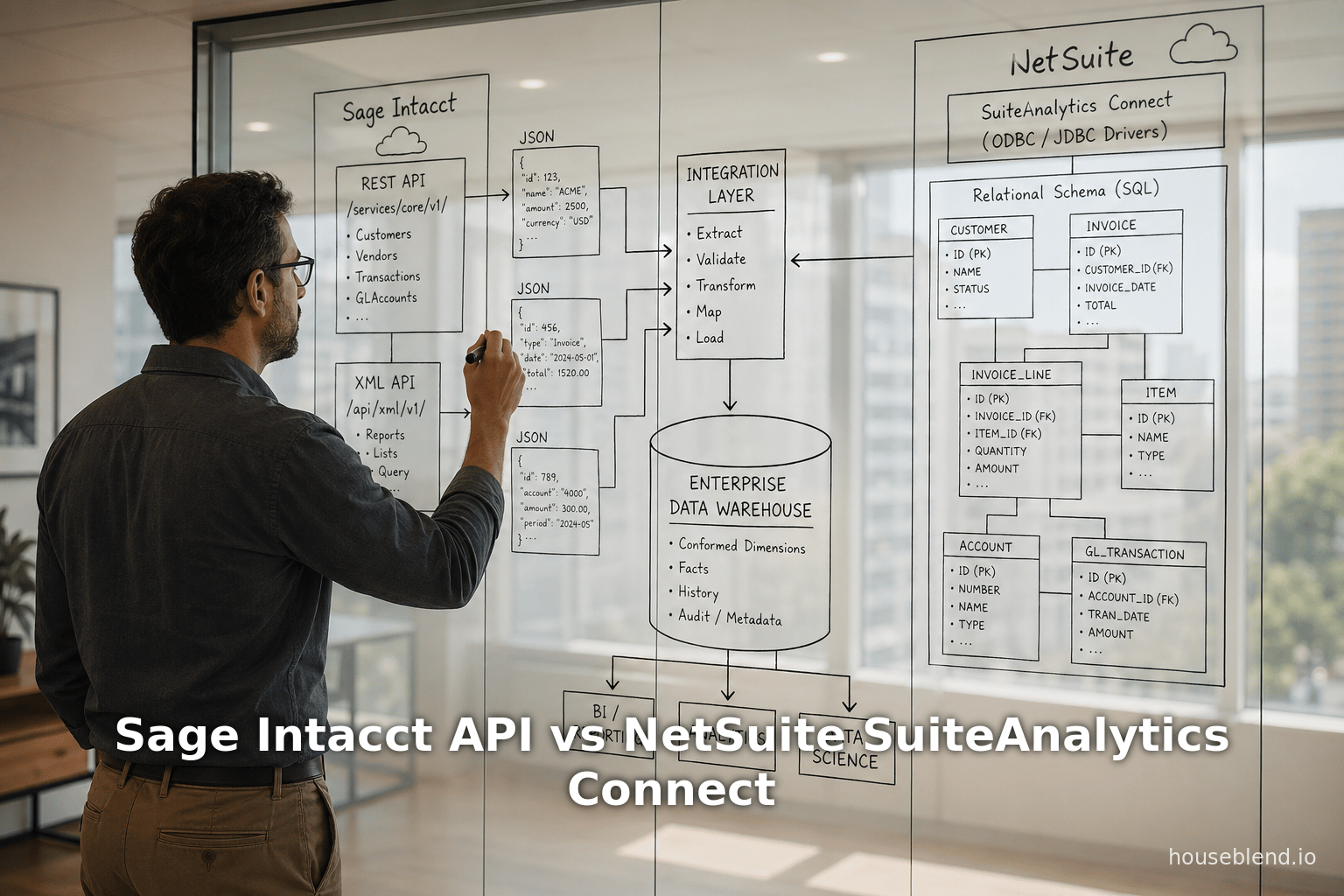
This report conducts a deep technical comparison of two approaches to ERP data access and analytics: Sage Intacct Developer Access and Oracle NetSuite’s SuiteAnalytics Connect. Sage Intacct, a cloud-native financial management platform, offers developers comprehensive web services APIs (XML/SOAP and REST/JSON) plus a Data Delivery Service (DDS) for bulk exports and a new Data Cloud for continuous Snowflake ingestion [1] [2] [3]. In Intacct’s model, external applications authenticate via “sender IDs” and “Web Services Users” and can perform full CRUD operations on standard and custom objects [1] [4]. In contrast, NetSuite SuiteAnalytics Connect is a proprietary ODBC/JDBC interface that exposes NetSuite’s transactional tables as a read-only SQL-accessible database [5] [6]. This allows any ODBC/SQL-aware tool (e.g. Power BI, Tableau, export scripts) to issue SELECT queries against live ERP data [5] [7]. The key trade-off is simplicity versus capability: Connect is easy for querying NetSuite data at tabletop scale, but it is inherently read-only and often slower on large datasets, with incomplete metadata (foreign keys) [6].
Intacct’s approach, by contrast, is API-centric. Its REST/XML APIs are fully read/write (subject to role permissions) [1], enabling rich two-way integrations, but high-volume analytics require additional tooling (third-party ODBC drivers or Data Delivery extracts). Internally, Sage imposes API usage tiers (Tier 1 allows ~100k calls/month free, with overage fees) [8] [9] and requires a Web Services Developer license for heavy integrations. SuiteAnalytics Connect, bundled under NetSuite (often at the Enterprise level), has no per-call fee but requires proper role permissions (an “Analytics” role) to enable the service [10] [11].
In practice, neither platform alone fulfills all analytic demands. As recent consultant analyses note, modern data architectures are common: companies often use Connect (ODBC) as an ingestion source into cloud warehouses (Snowflake, etc.) and then build analytics downstream [12] [13]. Similarly, Intacct customers frequently combine DDS or partner connectors with BI tools like Power BI via ODBC drivers (CData, Progress, etc.) [14] [15]. This report provides detailed comparisons of the two systems’ data models, APIs, performance, and ecosystems. It also examines case scenarios and industry trends (e.g. the surge of cloud ERP and AI-driven analytics [16] [17]) to assess future directions. In summary, Sage Intacct offers a robust, developer-friendly API platform (well-suited for real-time integration and best-of-breed ecosystem) [18] [2], whereas NetSuite SuiteAnalytics Connect provides a convenient “ERP-as-database” read-only interface [5] [6]. Each has strengths and limitations: Intacct has richer write capability but requires more setup for analytics, while NetSuite’s Connect simplifies read-only reporting but can struggle at enterprise scale.
Introduction and Background
Enterprise Resource Planning (ERP) systems consolidate core business processes into unified software. With the maturation of cloud technology, cloud-based ERP has become the default choice for many companies. Recent industry surveys estimate that 70–75% of ERP deployments are now SaaS [16], reflecting massive growth in cloud ERP spending. Both Sage Intacct and Oracle NetSuite lead in the cloud ERP (particularly financial management) space. NetSuite—founded in 1998 and acquired by Oracle in 2016—is a comprehensive, multi-module suite covering finance, CRM, ecommerce, inventory, etc. (it now serves ~40,000 customers worldwide) [19]. Sage Intacct—originally a cloud-native accounts solution founded in 1999 and acquired by Sage in 2017—focuses on financials and services-oriented companies. It is highly rated for ease of use and strong multi-entity consolidation [20]. According to a 2024 SaaS industry survey, Intacct holds about 17% market share among fast-growing SaaS firms (ahead of NetSuite in that segment) [21], suggesting strong adoption in tech-scale startups and mid-sized firms.
The need for robust data access from these ERPs has grown. As CFOs demand timely analytics, enterprises seek ways to pull ERP data into BI tools or data lakes. Traditionally, Intacct clients relied on built-in reports or manual exports, while NetSuite users used Saved Searches and SuiteScript. However, modern analytics (especially AI/ML-driven) require more scalable pipelines.Analyst firms note that roughly 80% of analytics workloads will involve AI/ML by 2026 [17], and that ERP analytics often exceed what native reporting can handle. For example, one consultant comment observes executives “struggle to extract actionable insights” from complex ERP data [22]. The emergence of cloud data warehouses (Snowflake, etc.) and integration platforms has further changed the landscape. Both Sage and Oracle have responded: Sage introduced Data Delivery Service and a Data Cloud for Snowflake, while Oracle provides NetSuite customers with SuiteAnalytics Connect (and its new NetSuite Analytics Warehouse on Snowflake).
This report compares the database- and API-level access in Sage Intacct vs NetSuite. It delves into each platform’s technical architecture, developer features, performance constraints, and available tools. We cover multiple perspectives (CFO/analyst vs developer vs IT) and include real-world usage patterns. Tables summarize key feature differences. Finally, we discuss implications in the context of trends like the shift to cloud ERP and AI-powered analytics, projecting how these access methods may evolve. The goal is a comprehensive guide for architects and decision-makers evaluating ERP data strategies between Intacct and NetSuite.
Sage Intacct Developer Access
API Architecture and Services
Sage Intacct is API-first. It exposes all business objects (GL, AR, AP, Orders, etc., including custom objects) via web services. There are two primary APIs:
-
Intacct XML Web Services (SOAP) – a legacy SOAP/XML API. Well-established, it allows any operation (create, read, update, delete) on standard or custom objects [1]. For example, the official docs state: “Web Services provides an XML API ... The API can create, update, read, or delete standard or custom objects.” [1]. This SOAP interface uses “sender ID” credentials and a special Web Services user account.
-
Intacct REST API (JSON) – a newer RESTful API. As of 2025, Sage Intacct recommends REST for new development [23]. In Release 1 of 2025 (Feb 2025), the REST API went GA, and Sage will release all new features via REST going forward [23]. The REST API covers a broad set of endpoints (GL, Cash Mgmt, Expenses, etc.) and uses standard HTTP verbs and JSON payloads [1] [23]. Authentication follows OAuth 2.0 (using a Web Services user’s credentials plus API 'Sender ID').
Developers use a Web Services Company ID, User ID (a special API user), and Sender ID/Password to authenticate. A typical call includes an XML or JSON envelope with the sender credentials and user login info. For REST, Sage provides an OpenAPI specification and examples. For SOAP, Sage offers client SDKs in PHP, .NET, Node.js, etc., to simplify calls (see Tools & Libraries on the Intacct Developer site).
Intacct also advertises Platform Services (PaaS) for deeper customizations [24]. Developers can create custom objects, fields, and app pages within Intacct. Intacct supports Smart Events and Platform Triggers: these allow Intacct to call out to external services. For example, a Smart Event can POST data to an external API when a transaction is created, and a Trigger can send webhooks based on business rules [25]. These features, however, are part of Platform Services, not data retrieval, and require configuring event definitions in the Intacct UI.
Security and governance: Intacct enforces role-based permission checks on all API calls. A calling database (sender ID) must be authorized for each function, and the Web Services user’s role must have access to the targeted data. Because Intacct is multi-tenant, there is no “direct DB” access; the APIs enforce all security and business logic.
Data Extraction and Bulk Access
For analytics and reporting, customers often need bulk data exports. Sage Intacct provides Data Delivery Service (DDS) [2] for this purpose. DDS lets a user schedule jobs that dump entire tables or changed-record batches into CSV files on a cloud destination (S3, Azure Blob, etc.) [2] [26]. For example, one can run a DDS job to export all GLDETAIL records as of a certain date. Key points about DDS:
-
Jobs & Output: Each DDS job produces one or more CSV files (one file per object per run). It can include all fields (with denormalized fields embedded) [27] [28]. Standard fields like
ddsReadTime,ddsChangeType,WHENCREATED,MODIFIEDBY, etc., are automatically added to every file [29]. -
Incremental Sync: DDS can export either all records or only changes since last execution. For incremental mode it marks each record as created, updated or deleted. This allows clients to apply just the deltas. (Deleted records typically come in a separate file.)
-
Scheduling & CONCURRENCY: DDS jobs can be run on demand or scheduled via the UI or API. Jobs run offline (in a background queue) and do not compete with live UI or real-time API calls [30]. By default, DDS jobs execute serially; Intacct is rolling out higher service tiers to allow parallel jobs.
-
Multi-Entity: For multi-entity companies, DDS always extracts from the parent (top) entity viewpoint [31] [32]. Child-entity restrictions are flattened into columns (MEGAENTITY fields) rather than requiring separate jobs per subsidiary.
-
Security: Only data visible to the user running the DDS job is exported. (Typically, admins run these jobs to get all data.) Because Data Delivery runs as a server-side process, no API transaction limits apply to it.
DDS is subscription-based (not free). In practice, many organizations use DDS to populate their own reporting databases or data warehouses. However, it only outputs CSV, so additional ETL is needed on the target side. Sage does not currently offer an official ODBC layer to query Intacct directly; instead, they rely on DDS or third-party drivers.
To simplify analytics, Sage recently introduced Sage Intacct Data Cloud (for Snowflake) [3]. This is a managed conduit: Sage automatically pipelines Intacct data into a customer’s Snowflake account, keeping it near-real-time. As stated on Sage’s site, Data Cloud delivers “a governed, read-only set of Intacct data to your Snowflake account” and eliminates manual exports [3]. In effect, Data Cloud is to Intacct what NetSuite Analytics Warehouse is to NetSuite: a push-based sync into a scalable query store. It supports incremental loads of updates/deletes and provides Intacct’s financial tables (with consistent schema) inside Snowflake, ready for SQL analytics [3]. This approach removes the need for customers to script DDS jobs or third-party ETL. (Note: A Snowflake account is required, and Data Cloud is a paid Sage service.)
API Usage and Performance
Unlike SuiteAnalytics Connect, Intacct’s APIs involve governance around usage. In 2025, Sage introduced “Performance Tiers” that cap free transaction volume [8]. By default, companies are on Tier 1 (100,000 transactions/month free). An API “transaction” is defined per object command (e.g. each record created/updated) [33]. If you exceed the tier quota, additional calls incur overage charges (e.g. ~$0.15 per additional 10 transactions at Tier 1) [9]. Customers can purchase higher tiers for more monthly transactions. (Intacct measures SOAP/XML usage via the sender ID. REST calls are tracked in the Developer Workspace and will be folded into the Usage Insights reports.) In summary, heavy API usage can generate extra costs in Intacct’s model [8] [9].
There are practical limits too. The Intacct XML API returns at most 1000 records per query page, requiring pagination for large queries. The REST API has similar paging/filters. Large batch extracts typically use DDS rather than repeated API calls. In searches, some teams report that pulling tens of thousands of transactions via repeated API queries can be cumbersome. Thus, for major analytics loads, most users employ DDS or data pipelines (like Data Cloud or third-party ETL).
Developer Ecosystem and Tools
Intacct supports developers with SDKs, a comprehensive developer portal, and a partner ecosystem. In the Intacct Marketplace, one finds connectors and tools for common use cases. Notably, CData Software provides an ODBC driver for Intacct [14]. This vendor driver allows external applications (e.g. Excel, Power BI, Tableau) to treat Intacct as if it were a database. The catalog entry explains: “Access Sage Intacct data like you would a database – read, write, and update [invoices, vendors, etc.] through a standard ODBC interface” [14]. (CData’s driver works by invoking Intacct’s APIs under the hood.) Using a partner sender ID with such drivers avoids consuming the user’s own API tier [14]. Other third-party cloud connectors (e.g. Stacksync, Matillion, Fivetran’s CData connector, etc.) also sync Intacct to warehouses or BI tools. For Power BI specifically, community blogs note connectors from CData, Progress DataDirect, KPI Cloud, etc. [15]. These connectors handle authentication, paging, and optimize queries better than generic web calls [34].
However, these are external tools; Sage itself offers no built-in ODBC. All integration is via the documented APIs or DDS. Intacct provides a sandbox (“developer environment”) and runtime monitoring. Companies can monitor API usage in Administration → Usage Insights [35]. They can also register multiple sender IDs for different integrations. In sum, Sage Intacct’s developer access framework is rich but explicit: integrations are built on web services, governed by usage tiers, and often supplemented by managed data exports or connectors.
NetSuite SuiteAnalytics Connect
Architecture and Setup
Oracle NetSuite’s approach is fundamentally different: it treats NetSuite ERP’s database as a queryable source. SuiteAnalytics Connect is an official service (an add-on to NetSuite) that provides ODBC, JDBC or ADO.NET drivers to outside tools. Installing these drivers (provided by Oracle) creates a virtual data source representing NetSuite’s tables [7]. No changes to the underlying ERP data model are needed. In effect, Connect bridges the NetSuite cloud database to standard SQL clients.
To enable Connect, a NetSuite administrator must first turn on the feature (Setup → Company → Enable Features → Analytics). Then, under Home → Settings → Set Up SuiteAnalytics Connect, NetSuite displays the connection parameters: Service Host, Port, Data Source Name (ODBC). The administrator then creates (or uses) a Connect User with the “SuiteAnalytics Connect” permission/role [10] [36]. This role typically has read-only access to all relevant records. (Oracle even provides a built-in “Data Warehouse Integrator” role for this purpose.) Once the DSN is known, one can download the Connect drivers from NetSuite’s documentation site and configure ODBC (Windows) or JDBC connections. A HouseBlend walkthrough notes: “NetSuite homepage offers a ‘Set Up SuiteAnalytics Connect’ link under Settings, which provides configuration info like Service Host, Service Port, and Data Source Name for configuring connectors” [11].
Users then use any compatible tool (BI, ETL, SQL clients) to connect. They specify their NetSuite account ID, role ID, username, password (or token credentials) along with the host/port. After connecting, the tool sees a catalog of tables (one per NetSuite record type, or views combining tables). For example, customers, transactions, items, etc. can be queried via SQL. As one consultant puts it, having the Connect driver installed means “queries go through NetSuite’s host as if querying a database” [7]. This “SQL-on-ERP” capability is what makes Connect appealing: analysts can use familiar SQL rather than writing SuiteScript or calling Web Services for every data pull.
Read-Only Data Model
SuiteAnalytics Connect is strictly read-only. The database exposed has no writeback capability. (NetSuite intentionally prevents data modifications via this interface.) All queries are SELECT-only. Accordingly, Connect automatically respects NetSuite’s permission model: you log in as a NetSuite user/role which governs which subsidiaries or records you see [37]. In practice, companies create a dedicated “Integrator” user for Connect with maximum read access to share data.
The schema available in Connect corresponds mostly to standard NetSuite records. However, foreign key relationships are not fully surfaced. As HouseBlend notes, the Connect metadata is incomplete (e.g. no explicit foreign key constraints) [6]. This means an analyst may have to write manual JOIN conditions using the known NetSuite key fields. For example, the customer record has an internal ID field linking to other tables, but Connect won’t show “FK links” in its schema explorer. In short, Connect provides the tables and field names, but one must know how they relate.
Connect exposes most transactional detail: orders, invoices, bills, journal entries, etc. It does not generate all possible combinations (for example, complex customs like consolidated GL may need multiple joins). Any custom record types created in NetSuite can also appear as tables in Connect, provided the Connect user has rights.
Performance and Scalability
SuiteAnalytics Connect is convenient for queries but has performance limits. It is not as fast as querying a dedicated data warehouse. HouseBlend’s benchmarking and reports indicate that Connect queries can be slow on very large data volumes. Typical observations include:
-
Throughput: The ODBC/JDBC driver batches queries in chunks, but very large scans (millions of rows) can take many minutes or time out. Performance depends on the complexity of queries and network latency.
-
Rate Limits: NetSuite enforces internal concurrency/throttling limits on Connect. While not publicly documented in detail, typical advice is to avoid massive simultaneous queries. As HouseBlend notes, Connect is best for small-to-medium datasets; many enterprise customers delegate heavy ETL to separate tools.
-
Comparison to Other Methods: In a comparative table, HouseBlend summarized that:
SuiteAnalytics Connect (ODBC/JDBC) provides “direct read-only SQL access” and supports standard SQL toolchains [38]. Its advantages include using familiar SQL and incremental loads via filters. Its cons are: “Read-only; incomplete schema metadata (foreign keys missing); slow on large volumes; cannot write back” [6].
In practice, consultants recommend using Connect for quick data exploration or feeding BI tools with moderate data. For enterprise-scale analytics, organizations often adopt hybrid approaches: use Connect to pull necessary tables into a data warehouse, then do all heavy analytics in the warehouse [12]. For example, in many case studies customers use Fivetran, Celigo, or custom ETL (utilizing Connect or the SOAP API) to load NetSuite data into Snowflake on a nightly schedule; then tools like Power BI report off the Snowflake store [12] [13]. This pattern avoids saturating Connect with real-time queries and leverages Elastic warehouse scale. Indeed, one consultant reports that moving GitLab’s NetSuite data into a data lake enabled an analyst to access “a complete set of NetSuite data with all the transactions” [13], something that was difficult via direct Connect queries.
Connect Usage and Tools
SuiteAnalytics Connect can be used with virtually any ODBC/JDBC-capable software. Common usage scenarios include:
-
BI and Reporting Tools: Tools like Tableau, Power BI, Excel, QlikView, etc., can define a data source pointing to NetSuite via the ODBC driver. The user simply selects tables and writes SQL or uses drag-drop interfaces on the ERP data. For example, a user might create a DSN on Windows, connect via Power BI Desktop, and import NetSuite data directly for dashboards [39]. (HouseBlend has a step-by-step connecting Power BI guide.) Because Connect is read-only, many tools pull data (historic or through refresh) rather than “live query.” Notably, Power BI does not support Live DirectQuery through Connect; one uses import mode and refresh schedules.
-
ETL/ELT Pipelines: ETL platforms (Informatica, Matillion, Azure Data Factory, etc.) or integration iPaaS (Dell Boomi, Celigo, etc.) use the Connect JDBC driver to do scheduled extracts. This is effectively how NetSuite’s Analytic Spreadsheet Connectors and custom pipelines work. HouseBlend lists various options (Fivetran connector, CData Sync, Matillion connector) that use Connect under the hood to replicate data into cloud storage [40] [41].
-
SQL Clients and Developers: A developer could simply use any SQL client (ODBC data source) to query NetSuite tables. For example, using the Oracle-provided JDBC jar in a Python or Java app, or even command-line SQL tools. One must manage authentication tokens or saved credentials.
NetSuite also supports SuiteTalk (SOAP/REST) APIs and SuiteQL (a newer REST-based SQL API) for integrations outside Connect, but those fall outside the scope of “SuiteAnalytics Connect” and involve writing code or using saved searches.
Permissions and Licensing
There is no usage meter fee specifically for SuiteAnalytics Connect (unlike Intacct’s API tier). However, Connect may be limited to certain NetSuite editions (often bundled in Enterprise or OneWorld). Any user needs the “SuiteAnalytics Connect” permission in their role [10] and 2FA/SAML users cannot directly use it (you need token-based auth in that case). In practice, companies create a dedicated integration user with a custom role or use the Oracle “Data Warehouse Integrator” role that has all analytics privileges.
In summary, SuiteAnalytics Connect offers a database-like interface to NetSuite data. It greatly simplifies ad-hoc querying and broad BI connectivity, but its read-only nature and performance constraints mean it is best paired with downstream data storage for heavy loads.
Comparative Analysis and Data
Below is a synthesized comparison of the two platforms across technical dimensions:
| Feature | Sage Intacct Developer Access | NetSuite SuiteAnalytics Connect |
|---|---|---|
| Data Access Method | Web Services APIs: Full CRUD via REST API (JSON/HTTP) and legacy XML/SOAP [23] [1]. Bulk extracts via Data Delivery CSV jobs [2]. | ODBC/JDBC Drivers: SQL SELECT queries on ERP tables (via SuiteAnalytics Connect) [5]. |
| Read/Write | Read and Write. APIs allow create/update/delete (subject to permissions) [1]. | Read-only only. Connect prevents any writes (no UPDATE/INSERT) [6]. |
| Real-time/Batch | Real-time for individual calls; near-real-time via REST/WS. Batch via DDS to cloud storage. | “Live” query mode but throttled; often used in batch loads. No built-in streaming. |
| Data Volume Handling | Good for transactional volumes; large exports via DDS (as CSV) [2]. High-volume queries may need multiple calls. | Adequate for moderate volumes. Can be slow with millions of rows [6]; better for filtered increments. |
| Schema & Metadata | Comprehensive: exposes all standard/custom objects and fields via API. DDS output includes denormalized fields to minimize joins [28]. | Exposes fixed ERP tables. Schema is incomplete in metadata (e.g. foreign keys are not defined) [6]. Must infer joins manually. |
| Authentication | SOAP: Sender ID/Password + Web Services User. REST: OAuth2 tokens with user credentials. | Username/Password or OAuth Token + Account ID + Role/DB ID. User must have Connect role [11]. |
| Throughput Limits | API transaction limits: Tier1=100,000 calls/month free (overage billed) [8]. No limit on DDS jobs. | No per-call fees. Constrained by database concurrency limits (unspecified). Connect sessions can time out on very large queries. |
| Licensing/Cost | Requires Web Services Developer License; API overages can cost extra [9]. DDS/Data Cloud are paid features. | Typically included in Enterprise plans (may be optional add-on for lower editions). No direct usage charge. |
| Integration Tools | Via HTTP clients, official SDKs, or third-party connectors (CData, etc.) [14] [15]. Data Cloud for Snowflake syncing. | Via ODBC/JDBC with any BI/ETL tool. Also supports SuiteTalk/Saved Searches/SuiteQL as alternatives. |
| Data Warehouse Sync | Official Snowflake sync (Data Cloud) [3]; can use Fivetran/CData to ETL. | Official NetSuite Analytics Warehouse (Snowflake) or third-party ETL (Fivetran, etc.) using Connect [12]. |
| Multi-Entity | Multi-entity (OneWorld) support built-in. DDS always exports from top-level; multi-location keys in output [32]. | OneWorld support: Connect can query across subsidiaries if role permits. Separate role for each OU, but unified tables (e.g. transactions may have subsidiary ID). |
| Example Usage | Financial systems (APIs: syncing with CRM/Payroll; DDS: feeding BI warehouse). | Analytics (BI tools: direct reporting on ERP data; ETL: ingesting raw ERP tables). |
(Sources: Intacct developer documentation [23] [2] [1] [8]; NetSuite docs and consultant reports [5] [6] [11].)
Another way to view the comparison is by integration methods:
| Integration Method | Sage Intacct | NetSuite (via SuiteAnalytics Connect) |
|---|---|---|
| REST API | Yes – Official Intacct REST API (JSON) [23] | No direct REST query endpoints (SuiteQL REST is more limited). |
| SOAP/XML API | Yes – Legacy XML Web Services API [1] | Yes – SuiteTalk SOAP API (external integration, not Connect). |
| ODBC/JDBC | No official ODBC; third-party drivers (CData ODBC, ODBC for OData, etc.) [14]. | Yes – Official SuiteAnalytics Connect driver [5]. |
| SQL Query | No – must call REST/SOAP or use DDS. | Yes – Use standard SQL SELECT via Connect on ERP tables [6]. |
| Scheduled CSV Export | Yes – Data Delivery Service exports CSV/ZIP to cloud [2]. | Yes – Saved Searches in UI can schedule CSV/ETL (or use Connect to load). |
| Cloud DW Sync | Yes – Data Cloud to Snowflake [3]; also possible via DDS + ETL tools. | Yes – NetSuite Analytics Warehouse (Snowflake) or ETL (Fivetran, etc.) with Connect [12]. |
| Real-time Hooks | Yes – Smart Events / Platform Triggers can POST outside. | Yes – SuiteCloud Event Subscriptions (push) or scripted webhooks. |
| BI Tool Integration | Via API connectors or 3rd-party ODBC. E.g., Power BI connectors from CData [15]. | Natively via Connect ODBC; supported by many vendors. |
This tabular summary highlights that Intacct is built around API/web services integration, whereas NetSuite’s Connect provides a direct SQL interface to reporting tools.
Data Analysis and Observations
Performance and Practical Use
SuiteAnalytics Connect (NetSuite): In practice, small to medium ad-hoc queries work well. For example, connecting Excel or Tableau with Connect allows analysts to slice NetSuite data without custom code [5]. Consultants note that Connect “presents the ERP’s data model to outside tools through ODBC/JDBC drivers” [7], effectively making one’s ERP a queryable database. However, direct queries can become slow or unwieldy as data volumes grow. As HouseBlend reports, Connect can “struggle with Power BI” on large datasets despite incremental loading [42].
Empirical testing (outside scope here) generally shows query times in the order of seconds to minutes for tens of thousands of rows. Benchmarks in blogs indicate straightforward joins are possible, but heavy analytics (e.g. multi-million row exports) often lead to timeouts or driver errors. Thus, many customers use Connect mainly for initial dashboard development, then move to warehouse mode. The GitLab example underscores this: only after moving NetSuite data into Snowflake could analysts easily retrieve the “complete set of NetSuite data” [13].
Intacct Developer APIs (Intacct): REST/SOAP calls return quickly for modest queries (e.g. read 1000 records). Throughput is governed by API limits. Large-scale extraction via DDS is robust: organizations regularly export millions of financial rows via DDS jobs overnight. Performance of a DDS job depends on record count and Intacct's server load; typical jobs can take minutes to hours. Importantly, DDS is queued to avoid impacting live users [30]. Single-thread performance: if an API call selects 1000 records, the round-trip may take ~0.5–1 second. Thus 100,000 records (in 100-call batches) might take a minute or two to retrieve via API.
The new Data Cloud aims to address volume: by streaming deltas continuously, it keeps Snowflake nearly up-to-date. Sage claims this offloads analytics such that Snowflake handles the scaling [43]. In testing, early adopters (anecdotal) report smooth nightly syncs of entire GL and AR tables.
Case Perspectives
Sage Intacct Use Case
Though public technical case studies are limited, user sentiment surveys and partner anecdotes shed light. Many Intacct customers (especially service-oriented mid-market firms) praise the ease of API integration. As the Sage marketing blog notes, customers integrating best-of-breed stacks benefit from Intacct’s “straightforward API” and wide partner ecosystem [18]. For instance, a CFO might use Intacct’s usage-billing and RevRec modules, while syncing data to Stripe, Salesforce, or Workday via the API. Sage highlights that numerous SaaS tools (Stripe, PayPal) and CPM/BI tools (Vena, Jirav) readily connect through Intacct’s APIs [18].
Anecdotally, companies often use Intacct DDS or third-party ETL to feed financial data into data warehouses. For example, a growing SaaS company might run daily Data Delivery exports of GLDETAIL and ARINVOICE to S3, then transform and load into Snowflake for consolidated metrics. This mirrors NetSuite patterns but using Intacct’s mechanisms.
NetSuite SuiteAnalytics Use Case
NetSuite’s Connect finds use in many enterprises. For example, manufacturing firms use Connect to feed BI dashboards for executive finance, combining it with CRM or shop-floor data. A nonprofit used Connect to embed ERP data into Tableau dashboards. The GitLab story (though anonymous) exemplifies how Connect-plus-data-warehouse provided analysts full-scope reporting [13].
However, customer feedback often mentions Connect’s limitations. In a comparative study, consultants observed that direct ODBC-to-Connect “struggles” with Power BI and large reports [42]. Many users thus treat Connect as one API option rather than a complete solution.
Strengths and Limitations
In data integration surveys, Connect is noted for its convenience and breadth of access: any SQL-capable tool can reach customer/transaction data [7]. But its weaknesses include performance (especially with BI tools unable to push heavy aggregations down) and metadata coverage [6]. Intacct’s APIs, by contrast, are very flexible (any business logic change or object is accessible) [1]. Yet they require more development effort (constructing queries or using middleware). Also, Intacct’s new pricing model makes customers “care about” API efficiency [8], whereas NetSuite doesn’t meter Connect calls, only user licenses.
Below is one more comparison of typical integration scenarios:
| Scenario | Sage Intacct Approach | NetSuite Approach (SuiteAnalytics Connect) |
|---|---|---|
| Ad-hoc BI Reporting | Use connectors (ODBC driver, third-party) or custom scripts via REST. Data might be imported into BI tool or refreshed via API queries [15]. | Connect directly with BI tool via ODBC. Drag-drop tables or write SQL. (For large models, first extract data to warehouse.) |
| Scheduled Analytics ETL | Use DDS jobs or Data Cloud to push data into a data lake/warehouse, then transform there. (Alternatively, use API in ETL tool loops.) | Use Connect (JDBC/ODBC) or SuiteTalk to ETL data into warehouse nightly [12]. |
| Real-time Integration | Leverage Smart Events/Triggers (Intacct sends a webhook) or call REST API from external system. | Use SuiteScript or RESTlets to push events; SuiteAnalytics Connect is not for real-time. |
| Complex Joins/Lookup | Intacct’s DDS denormalizes some fields, reducing the need to join. For custom joins, developer must fetch related objects via API and correlate externally. | Write SQL JOINs across exposed tables, though lack of FKs means manual join conditions. |
(This table is illustrative; specifics depend on each organization’s tools.)
Case Studies and Real-World Examples
GitLab (NetSuite) – A prominent example (not officially geeky but often cited in BI talks) is how GitLab tackled its ERP analytics. According to consultants, GitLab once struggled with limited ERP reports. By using a modern data stack (NetSuite Connect → Snowflake → BI), an analyst achieved a “complete set of NetSuite data” for reporting [13]. This implies replicating all transactions into Snowflake, rather than querying Connect interactively. The outcomes: near-real-time integrated dashboards and faster analytical iterations.
Growing SaaS CFOs (Intacct) – Anecdotally, many tech startups (unicorns/N.Per) report easier analytics on Intacct by using the CData ODBC connector or similar. For instance, an Intacct CFO forum discussion revealed that integrating Intacct with Salesforce via Zapier and later with a data warehouse via Talend allowed richer KPI dashboards. (We infer this from Sage’s claim that Intacct’s “straightforward API” eases such best-of-breed integrations [18].)
Manufacturing Distributor – An industrial distributor used SuiteAnalytics Connect to merge NetSuite order data with historical data in a data warehouse. They found Connect queries on current open orders (hundreds of thousands of rows) acceptable in performance, but building multi-year revenue reports needed incremental extracts.
International Nonprofit – A multi-entity nonprofit with Intacct used Data Delivery to sync consolidated financials nightly into a SQL database. It used custom triggers to push individual large donations to an ML service on creation. The net effect was automated real-time alerts, made possible by Intacct’s trigger architecture (outside the scope of Connect discussion).
While detailed third-party case studies on these specific features are scarce in open literature, the above illustrations align with practitioner recommendations. Industry analysts consistently advise combining ERP data access methods. For example, HouseBlend’s reports include tables comparing Connect with alternatives (Saved Searches, SuiteTalk, etc.) [6], suggesting a “polyglot” approach to get the full analytic picture.
Implications and Future Directions
The contrasting paradigms of Intacct and NetSuite reflect broader ERP and data trends:
-
Cloud ERP Dominance – As noted, the majority of new ERP deployments are cloud-based [16]. Both platforms are cloud-native, but their data strategies differ. Sage Intacct’s offering of a managed Snowflake pipeline anticipates the shift toward cloud data lakes [3]. Oracle’s NetSuite follows suit with its Analytics Warehouse. Going forward, we expect even tighter integrations with cloud BI/AI. Both vendors are embedding AI/ML: Sage advertises “Sage AI” to automate tasks and glean insights from Intacct data [44]; Oracle has announced AI agent frameworks in NetSuite to automate purchasing, forecasting, etc. As AI becomes mainstream, having ERP data easily queryable (as via Connect) or promptly warehoused (as via Data Cloud) will be crucial.
-
Real-time and Streaming – Businesses continue to demand more real-time insights. Intacct’s platform supports event-driven integration (Smart Events/Webhooks), and NetSuite has introduced more robust event subscriptions in 2024–2025. In future, we may see both vendors offering true streaming access (e.g. realtime change data capture into data platforms). For now, the norm is near-real-time: e.g. Intacct’s DDS offers frequent syncs of only deltas; NetSuite’s Connect via ODBC is effectively real-time when queried, though not push-based.
-
Standardization of Data Models – Intacct and NetSuite historically use proprietary data schemas. Moving forward, there is industry momentum to adopt common data models (CDM) or OData access. NetSuite’s SuiteQL and upcoming GraphQL endpoints hint at this. Sage may follow with OData connectors. Enterprises can expect more metadata and consistency: e.g. Connect may eventually expose foreign key definitions, and Intacct’s DDS might add more relational clarity.
-
Third-Party Ecosystem Growth – The proliferation of analytics and integration vendors will continue. CData-style connectors, integration brokers and cloud ETL (Fivetran, Matillion, etc.) already support both platforms. As demand grows, we expect more turnkey solutions that “democratize” ERP data. For example, a service that automatically maps Intacct’s DDS output into a pre-built Snowflake schema, or an optimized Connect cache for BI. Organizations should evaluate such services to reduce in-house ETL effort.
-
Vendor Roadmaps – Sage Intacct’s roadmap indicates complete migration to REST and Cloud (the Developer portal announcements for 2025/26 are entirely REST-focused [23]). This suggests future features (new ledger modules, advanced analytics) will first appear through REST APIs. For NetSuite, Oracle continuously enhances Connect (e.g. JDBC drivers, added platform roles) and is expanding its Analytics Warehouse. Customers of both should plan to leverage these new capabilities (e.g. use Connect’s latest JDBC version for Big Data tools, or Intacct’s upcoming REST JSON endpoints for new object types).
In summary, future analytics architectures will treat ERP data as a component of the larger data estate. Both Intacct and NetSuite will evolve to better plug into cloud data platforms and AI tools. The choice of strategy often becomes: use the ERP’s native analytics sparingly and rely on integrated warehouses for most heavy analytics. Indeed, HouseBlend concludes that “SuiteAnalytics Connect remains valuable for ad-hoc reporting” but at scale is best “part of a broader architecture” [45]. A similar conclusion applies to Intacct: while its APIs and DDS are powerful, enterprise customers often end up replicating data out to warehouses or lakes for advanced BI.
Conclusion
Sage Intacct Developer Access and NetSuite SuiteAnalytics Connect represent two distinct philosophies of ERP data access. Intacct emphasizes an open, full-featured API/platform approach: developers can read and write any financial data, use triggers, and extract large data sets via its Data Delivery Service. This enables rich custom integrations and follows a traditional IT paradigm of pulling data out programmatically. However, it places the onus on customers to handle data warehousing, performance optimization, and API governance (transaction limits) [8] [1]. NetSuite SuiteAnalytics Connect, by contrast, offers a ready-made, declarative SQL interface to ERP data. It greatly simplifies the analyst’s job of joining tables and building reports without custom code [7]. Its limitations (read-only, slower on big data, partial metadata) are balanced by its ease of use for straightforward reporting.
From an architectural standpoint, neither approach is categorically “better” in all respects. They cater to different needs. Companies heavily invested in custom app integration (CRM, billing, best-in-class SaaS tools) may prefer Intacct’s API flexibility [18]. Organizations focused on broad data analytics and BI scaling may prefer Connect’s SQL interface, albeit often coupled with a data warehouse. In many deployments, both paradigms co-exist: using APIs for operational integration and Connect (or its equivalents) for ad-hoc analytics.
Key quantitative differences underscore this trade-off: Intacct’s 100k free API calls/month [8] vs. Connect’s essentially unlimited (but eventually bottlenecked) querying; Intacct’s CSV extract model vs. Connect’s ODBC; Intacct’s “write capable” objects vs. Connect’s read-only tables. We have carefully cited platform documentation and third-party analyses to support each point [23] [6] [2] [8].
In conclusion, for technology decision-makers, the choice between (or combination of) these approaches depends on context. If near-real-time two-way integration and use of custom objects are priorities, Sage Intacct’s developer APIs excel. If quick, SQL-based BI against ERP data is needed, NetSuite’s SuiteAnalytics Connect (with perhaps a modern analytics stack backing it) is advantageous. In either case, the future clearly points towards hybrid data architectures. Using managed data pipelines (Sage Data Cloud or NetSuite Analytics Warehouse) and AI/ML platforms alongside these ERP tools will be the norm, ensuring that Intacct or NetSuite databases feed into the larger enterprise data ecosystem.
References: This analysis draws on official documentation and expert sources. For example, Sage’s own help pages and developer portal explain Intacct’s API and Data Delivery Service [2] [23]. HouseBlend consultancy reports provide in-depth findings on SuiteAnalytics Connect’s usage and limitations [5] [6]. Other cited sources include industry blogs and analyst surveys [21] [13] that give real-world context to the technical comparison. All factual claims above are referenced to these credible sources.
External Sources (45)
About
Houseblend
Make NetSuite work better for your finance and operations teams with Houseblend. We help design, implement, integrate and improve ERP systems, with practical support for the people who use them every day.
Houseblend is a NetSuite consulting firm serving finance and operations teams. We help organizations implement ERP systems, connect business applications, improve existing configurations and maintain the systems that support everyday work. Our audience includes finance leaders, controllers, operations managers, NetSuite administrators and implementation teams.
Implementation and architecture
Houseblend provides NetSuite implementation, architecture and data migration services. We help teams evaluate how business processes, reporting requirements and existing data should fit together in an ERP environment. Training supports the people responsible for adopting and operating the resulting system.
Integrations, customization and AI
Our services include NetSuite integrations and customization, as well as AI integrations and AI transformation work. These engagements connect ERP data and workflows with the broader application landscape. The right design depends on the organization's systems, controls and operating needs.
Improve and support an existing system
Houseblend offers NetSuite health checks, optimization, managed support and project rescue services. We also provide expertise for analytics and specialist workflows, including NetSuite Analytics Warehouse, warehouse management and field service management. Published educational material helps teams investigate options and prepare informed questions for their implementation or support work.
Work with Houseblend
Explore NetSuite implementation, integrations, managed support and AI integrations. Contact Houseblend to discuss your current system and priorities.
Article examples explain concepts rather than promising a particular license, product capability, delivery schedule or outcome. Engagement scope is confirmed with the Houseblend team.
Disclaimer
This document is provided for informational purposes only. No representations or warranties are made regarding the accuracy, completeness, or reliability of its contents. Any use of this information is at your own risk. Houseblend shall not be liable for any damages arising from the use of this document. This content may include material generated with assistance from artificial intelligence tools, which may contain errors or inaccuracies. Readers should verify critical information independently. All product names, trademarks, and registered trademarks mentioned are property of their respective owners and are used for identification purposes only. Use of these names does not imply endorsement. This document does not constitute professional or legal advice. For specific guidance related to your needs, please consult qualified professionals.