Houseblend Article
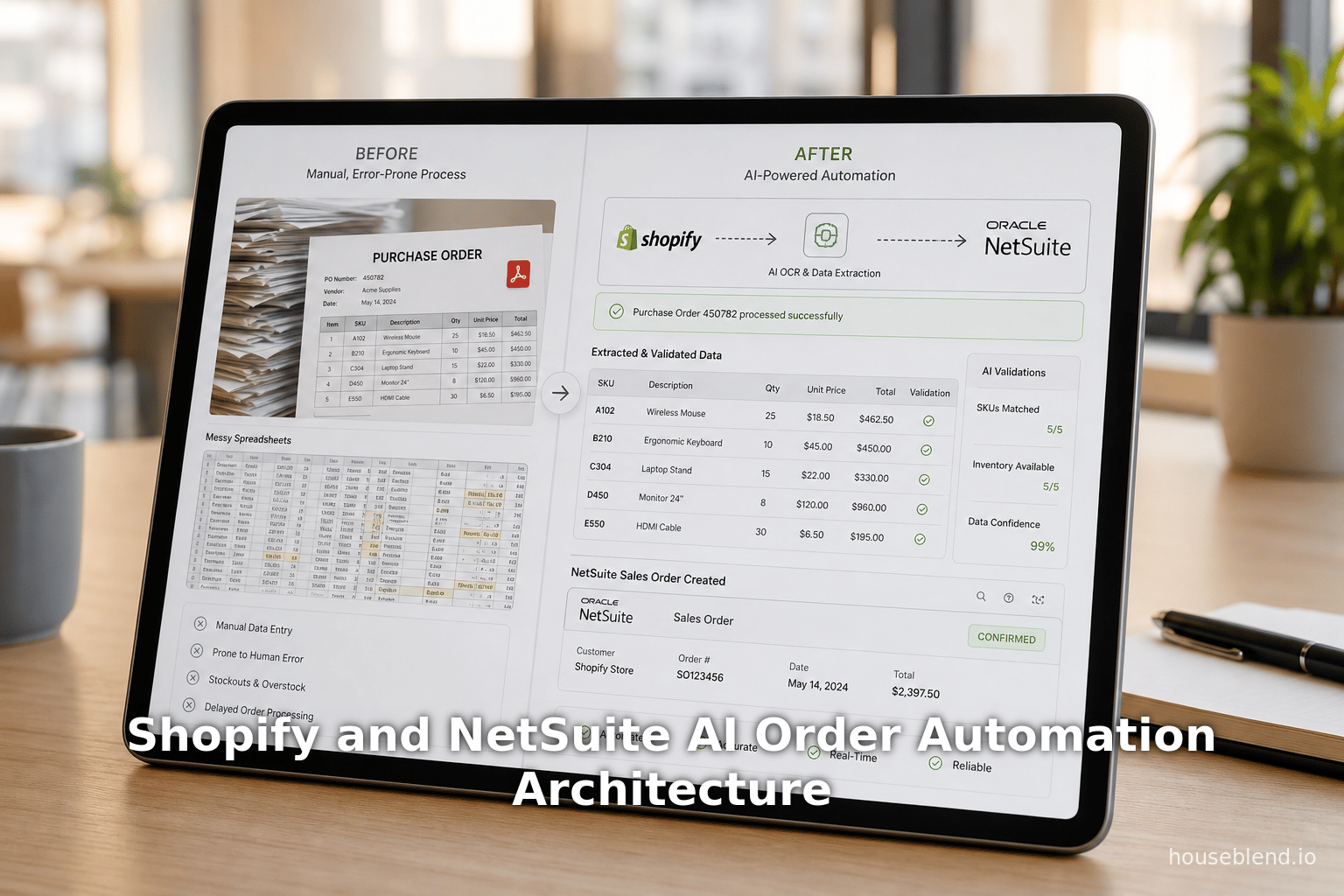
Shopify and NetSuite AI Order Automation Architecture
Inside this article
- 01Executive Summary
- 02Introduction and Background
- 03Shopify and NetSuite Platforms
- 04Challenges in Manual Order Entry and Integration
- 05AI-Powered Order Entry Automation Technologies
- 06Integration Architecture and Setup
- 07AI Order Processing Pipeline: Example Flow
- 08Case Studies and Real-World Examples
- 09Implementation Considerations
- 10Implications and Benefits
- 11Future Directions
- 12Conclusion
Executive Summary
As e-commerce ecosystems mature, businesses increasingly rely on integrated systems to streamline operations. In particular, combining a Shopify storefront with a NetSuite ERP can eliminate manual order entry, synchronize inventory, and accelerate order-to-cash cycles. This report examines AI-powered order entry automation as an advanced approach to integrating Shopify and NetSuite. By using technologies such as OCR, NLP, and machine learning to ingest and process orders automatically, companies can drastically reduce labor, error rates, and processing time [1] [2]. For example, case studies show businesses saving hundreds of thousands of dollars annually by automating order entry [3] [4]. We will survey the historical context and current state of Shopify–NetSuite integration, describe architecture patterns (including AI modules), and outline a detailed setup with data flows and mappings. Real-world examples (e.g. Eyebobs, Perfect Keto, a medical distributor) quantify the benefits: >70% orders processed fully automatically and major labor savings [2] [3]. Finally, we discuss future trends (such as AI orchestrators and generative interfaces) and broader implications for commerce operations. All claims and recommendations are supported by up-to-date industry data and expert sources.
Introduction and Background
E-commerce has exploded in scale and complexity. Global online retail sales are projected to reach nearly $6.48 trillion by 2029 (about a 9.5% CAGR) [5]. This rapid growth strains traditional manual processes. Organizations often find that “hours of spreadsheet work” and repetitive data entry become growth bottlenecks [6]. In particular, when a Shopify e-commerce storefront is used for sales, orders must be reconciled with back-office inventory and finance systems such as Oracle NetSuite. Manually entering thousands of orders each month into NetSuite is time-consuming and error-prone: industry surveys indicate retailers spend 15–20% of staff time on manual order/inventory reconciliation, and suffer 3–5% of revenue losses from such errors [1]. By contrast, integrating Shopify and NetSuite can provide a unified commerce architecture: Shopify “owns the storefront, checkout, and customer experience” while NetSuite “holds the financial records, operational inventory, [and] fulfillment logic” [7]. When connected properly, “orders flow automatically, inventory stays in sync across channels, and returns settle without manual reconciliation” [8]. This reduces errors and scales operations far beyond what manual methods allow [1] [2].
Over 3,700 merchants today use Shopify and NetSuite together to grow their businesses [7] [9]. According to Shopify, these joint retailers have scaled from $1 million to over $100 million in sales without replacing their systems [10] [7]. Integrating the two systems is therefore a proven strategy for high-growth e-commerce companies. Numerous case studies (e.g. Eyebobs, Sol de Janeiro, Diamond Foundry, Perfect Keto, and Good American) highlight tangible benefits: Eyebobs saved at least $200K/year in labor by automating order entry [3] [11], and Perfect Keto reclaimed 10–15 person-days per month plus ~$3–4K monthly in contractor costs [4]. In sum, automated Shopify–NetSuite integration is widely regarded as a best practice to eliminate data silos and free team members from low-value tasks [6] [12].
This report provides a comprehensive technical guide and analysis of AI-powered order entry automation for Shopify and NetSuite. We first present historical and market context, then describe the two platforms in detail. Next, we examine integration methods: from native connectors and iPaaS tools to custom code. We then introduce AI-driven automation – specifically, using machine learning and OCR to parse purchase orders (including email/PDF-based POs) and automatically create orders. An architecture blueprint outlines components such as data ingestion, AI engines, integration interfaces, and exception handlers. Implementation considerations are detailed (API calls, data mapping tables, security, testing). We include real-world examples and case study metrics, and we compare vendor solutions and platforms in feature tables. Finally, we discuss operational implications (efficiency, ROI, reliability) and outlook (AI orchestration, generative interfaces, hyperautomation). All claims are supported by authoritative sources throughout.
Shopify and NetSuite Platforms
Shopify is a leading cloud e-commerce platform handling storefronts, checkout, product catalogs, and customer interactions. It supports B2C and multi-channel (POS, mobile, B2B wholesale) commerce. As of 2025, Salesforce reports Shopify powers about 4.8 million active stores globally (roughly 29% U.S. market share) [13]. Shopify provides rich APIs (REST and GraphQL Admin APIs) for integration: merchants can programmatically retrieve and create orders, products, inventory, customers, and more. Notably, starting October 2024 Shopify deprecated its legacy REST Admin API and requires new apps (April 2025 onward) to use the GraphQL Admin API (Source: shopify.dev). A Shopify Order object typically includes order ID, customer reference, line items (product SKUs, quantities, prices, taxes), billing and shipping addresses, payment status, fulfillment status, and metadata like tags or notes.
NetSuite (an Oracle company) is a comprehensive cloud ERP system covering financials, inventory, CRM, and supply chain management. It supports complex businesses (multi-currency, multi-subsidiary and thousands of customers worldwide [14]. In NetSuite, customer orders from sales channels are represented as Sales Order records (or sometimes Cash Sales/Invoices depending on payment).A sales order in NetSuite includes fields for customer, items (linked to an internal item catalogue), quantities, rates, tax codes, addresses, and financial terms. NetSuite offers SuiteScript (JavaScript-based scripting) and SuiteTalk Web Services APIs for external integration. Most modern projects use NetSuite’s REST Web Services (SuiteTalk REST) or RESTlets for automation, though a mature SOAP API still exists.
When a Shopify order is fully paid at checkout, it can be modeled in NetSuite as a Cash Sale (immediately recognized revenue), whereas unpaid or B2B orders may be imported as Sales Orders for later invoicing. Integration logic must handle this nuance. In some cases, Shopify’s shipping and payment details (including gift cards, tax, and fulfillment) are also pushed into NetSuite for complete sales records [15].
Shopify and NetSuite complement each other: “Shopify owns the storefront, checkout, and the entire customer experience” while NetSuite “holds the [back-office] financial records, inventory, and fulfillment logic” [7]. Proper integration ensures that when an order is placed on Shopify, the corresponding data (customer info, items, totals, taxes) flows automatically into NetSuite, and inventory levels are updated for both systems simultaneously. Without this bridge, operational “friction directly impacts revenue”: one report found that 3–5% of revenue can be lost to inventory inconsistencies and fulfillment errors caused by data silos [1].
Challenges in Manual Order Entry and Integration
Before the widespread use of connectors and AI, many businesses relied on manual or semi-manual processes. This introduced significant inefficiencies:
- High Labor Costs: Staff would often spend hours typing or copying each order from Shopify (or incoming POs) into NetSuite. Houseblend’s analysis notes that manual reconciliation and data entry can consume 15–20% of staff time [1]. This ties up accountants or customer service reps doing low-value tasks.
- Errors and Discrepancies: Manual entry is error-prone. Even small typos in SKU, quantity, or price can lead to mis-shipments or billing mistakes. Gartner and industry analyses warn that legacy point-to-point processes are fragile under growth, and data mismatches can cause stockouts, oversells, or incorrect financial reports [1].
- Slow Order-to-Cash: With manual processes, order fulfillment and invoicing are delayed. Businesses “close the books long after the fact” and cannot respond quickly to demand spikes [16]. According to Perfect Keto’s finance director, disjointed systems left them “flying blind” in planning, unable to pivot within the month [16].
- Scaling Limitations: Manual systems do not scale cheaply. As order volumes grow, companies often need to hire more order-entry/temp staff, incurring linear labor costs. Perfect Keto removed 5 data-entry temps after automation [17], and Eyebobs eliminated “at least two-and-a-half people” worth of labor [3].
- Delayed Visibility: Fragmented data means reports are out-of-date. Perfect Keto noted they used to close books 30 days after month-end [16]. Automated integration, by contrast, offers near real-time visibility of sales and inventory [16].
Industry studies underscore the upside of automation: APQC surveyed high-volume operators and found that automating the sales order process significantly lowers labor costs, improves customer experience, and increases revenue [12]. The case for AI-driven automation is thus clear: eliminate repetitive data entry, reduce errors, and free teams for strategic work.
AI-Powered Order Entry Automation Technologies
AI-powered order automation refers to using advanced analytics and machine learning to ingest, interpret, and process order data from unstructured or semi-structured sources. Key technologies include:
- Optical Character Recognition (OCR): Converts images or PDFs (e.g. emailed purchase orders) into text. Modern OCR engines, often enhanced with machine learning, can decode typed and even handwritten documents. For example, Azure’s Document Intelligence or Google’s Cloud Vision can extract tables and fields from PDFs [18]. SuiteWorks Tech’s solution, for instance, “reads PDF purchase orders and extracts structured data including Customer Name, PO Number, Line Items, Quantities, Rates, Totals” using an “advanced NetSuite OCR” engine [19].
- Natural Language Processing (NLP) / Machine Learning: After OCR, NLP techniques parse the text to identify entities (like product SKUs, quantities, addresses). Machine learning models can be trained to recognize common invoice/order layouts and improve with exposure to exceptions. For example, Apridata’s solution used a hybrid approach of rules and AI to achieve “high-accuracy data extraction from both structured and unstructured formats” [2]. The AI component can learn to associate abbreviations, guess missing values, or adapt to new document formats over time.
- Business Rules and Matching Engines: AI pairs with rules to validate and match data. For instance, Eliro’s system “auto-match[s] customer part numbers to your SKUs, apply[s] current pricing from the ERP, and flag[s] exceptions” [20]. Machine learning can be embedded to improve matching efficiency (e.g. fuzzy matching of item names to SKU codes, learning from past verified matches).
- RPA (Robotic Process Automation): While not AI per se, RPA bots can be used where APIs are lacking. For NetSuite integration, if a direct API is unavailable for some data, RPA scripts can simulate user input. Apridata’s case study shows using a blend of “API-driven and UI-based bots” to post orders into SAP [21]. In our context, we expect NetSuite’s APIs to be sufficient, but RPA remains an option for fallbacks (e.g. legacy middleware or on-prem components).
- AI-Assisted Orchestration: Emerging tools allow users to design workflows by "conversational AI". For example, platforms like MESA let users “ask your AI assistant to build workflows conversationally” between Shopify and other apps [22]. Patchworks’ recent “Model Context Protocol” even enables agents like ChatGPT or Claude to interact with integration flows – querying status or triggering actions by natural language [23]. This point-and-click plus AI-centric tooling can accelerate development of automation pipelines.
These AI capabilities enable a “touchless” order processing pipeline. As described by SuiteWorks Tech (a NetSuite ISV), their email-to-order SuiteApp will “transform incoming customer emails and PDF purchase orders into structured Sales Orders directly inside NetSuite using advanced NetSuite AI and OCR technology” [19]. Similarly, PO2Order (by IntuitionLabs) promises to “instantly convert emailed Purchase Orders into Shopify Orders with AI precision” [24]. The common pattern is: capture → extract → validate → create order:
- Capture: Ingest orders from various channels. For Shopify, order data may arrive via Shopify webhooks/API or a batch export. For B2B scenarios, orders may come as emailed PDF attachments, CSV files, or EDI feeds. AI solutions provide connectors for email inboxes or SFTP uploads (PO2Order supports Email/SFTP/API ingestion [25]).
- Extract: Use OCR/NLP to parse the document. Determine order metadata (order number, date), customer, shipping address, line items (SKU, qty, price), payment terms, etc. Validate fields against business rules (e.g. required fields). Apridata notes a “hybrid approach combining rule-based templates and AI models” for high extraction accuracy [2].
- Match & Validate: Cross-reference extracted data with master records. Map the customer name/email to a NetSuite customer record; map each extracted SKU to the corresponding item in the SKU catalog. Check availability/pricing by calling Shopify/NetSuite for each item. Machine learning can help correct minor discrepancies. Eliro’s platform, for instance, reports “no manual lookup required” after auto-matching SKUs and pricing [20]. Exceptions (e.g. unmatched SKU or out-of-stock) are flagged.
- Create Order: Call the integration layer to push a completed order into the target system. In Shopify→NetSuite flows this means creating a Sales Order (or Cash Sale) record in NetSuite via its API. In the case of PO2Order, the pipeline ends by generating a Draft Order in Shopify, which the user can review and invoice [26] (allowing a human sanity check). SuiteWorks Tech’s NetSuite app automatically creates a Sales Order from the parsed data [19].
- Monitor & Feedback: The system logs every step, with dashboards for metrics. Apridata implemented real-time monitoring of “order volumes, automation rates, exception frequency” to continuously improve process flow [27]. Any orders that fail validation route to a manual review portal [28]. Once corrected, rules/ML models can learn the fix so similar errors auto-resolve in future.
By automating “the boring stuff” (as one vendor puts it [29]), businesses dramatically cut costs. AI steers the pipeline end-to-end: Einstein to data capture and classification, ML to order matching and anomaly detection, and even AI “agents” to orchestrate multi-step workflows between systems [2] [23].
Integration Architecture and Setup
An effective AI-powered order automation system typically consists of five key components:
-
Data Ingestion: A front-end interface or connector that receives orders. For Shopify orders, this might be a webhook-triggered process or a scheduled fetch from the Shopify API. For incoming purchase orders (e.g. wholesale B2B), it may involve an email inbox or SFTP folder where customers send POs (PDF, Excel, etc). The system must handle multiple input formats (email bodies, PDF attachments, scanned images).
-
AI Processing Layer: This comprises the OCR and NLP modules. Documents/images are fed into an OCR engine (such as Azure Document Intelligence or Amazon Textract) to extract text and tabular data [2]. A parsing script (often using machine learning models) then interprets the extracted text: it identifies entities like customer name, shipping address, line items, etc. Named-entity recognition or template-based extraction can convert the raw OCR output into a structured order format. Business rules (e.g. validating required fields, checking numeric formats) run at this stage too.
-
Validation & Matching Engine: The structured data is cross-checked against master data stores. For example, customer names/emails are matched to the NetSuite customer list to obtain an internal ID. Item SKUs from the order are matched to NetSuite inventory items or Shopify products. Discrepancies (e.g. an unrecognized SKU) trigger an exception. Machine learning components can improve matching over time by analyzing past exceptions.
-
Integration Layer: This module takes the validated order data and calls the APIs or tools to create the order in the target system(s). In a Shopify→NetSuite flow, the integration layer uses the NetSuite API (SuiteTalk REST) to create a Sales Order record with all details. Alternatively, for NetSuite→Shopify scenarios, it might create a Shopify order via the Shopify GraphQL Admin API. If needed, a decision point here converts a fully paid Shopify order into a NetSuite Cash Sale record (recognizing it as revenue received) [15]. Depending on volume, this integration can run synchronously (real-time API calls upon each event) or batch (queued messages processed periodically). In the Apridata case, a mix of API calls and RPA bots was used to interface with the ERP [21]; in modern cloud setups, direct REST integration is preferred where possible.
-
Exception Handling & Dashboard: Any order that cannot be fully auto-processed is flagged for human review. For example, if the AI parser could not confidently identify an item or address, the order is sent to a workflow portal where a CSR can correct the issues [28]. The system also provides real-time dashboards of key metrics (orders ingested, success rate, exception count, processing time) [27]. Monitoring ensures stakeholders can quickly spot problems (e.g. a spike in parsing failures) and improve the models or data sources accordingly.
These components can be deployed using a variety of architectures. A typical cloud-based pattern might use serverless microservices and managed AI services: e.g., an email-to-text service (like an Azure Logic App or AWS Lambda triggered by SES), followed by an Azure Form Recognizer OCR, then a Python/Node NLP microservice to parse content, and finally AWS Lambda calling NetSuite’s REST API (authenticated via OAuth). Alternatively, some vendors provide turnkey solutions. For instance, “OrderPilot” (Airbricks) is a SuiteApp that plugs directly into NetSuite to automate order intake [30]; PO2Order offers an all-in-one pipeline from incoming documents to Shopify Draft Orders [26]. However, the architectural principles remain comparable.
Key Data Flows: Integration entails several bidirectional flows between Shopify and NetSuite:
- From Shopify to NetSuite: Order data (customer, items, totals) flows into NetSuite as Sales Orders/Cash Sales. Payment and fulfillment status may sync back to Shopify (e.g. mark order “fulfilled” once shipped in NetSuite WMS).
- From NetSuite to Shopify: Inventory levels and pricing updates in NetSuite need to propagate to Shopify (via product/inventory sync flows) to avoid oversells. Customer account data (e.g. NetSuite customer record) may feed into Shopify or vice versa.
- Supporting Master Data: Products (SKUs), customers, currencies, and tax setups must be synchronized. For example, the Shopify item SKUs must match NetSuite Item records. Any new products added in Shopify require either pre-creation in NetSuite or real-time creation via the integration.
We summarize the prerequisites/setup steps:
- Shopify Setup: Create a private or public app with appropriate API scopes (orders, products, customers, inventory, etc). Note that Shopify mandates using GraphQL for new apps (as of 2025) (Source: shopify.dev). Set up webhooks (or schedule polling) for order events. Ensure products and SKUs in Shopify align exactly (same case, identifiers) with NetSuite SKUs.
- NetSuite Setup: Enable SuiteTalk REST Web Services (or install a SuiteApp connector). Set up authentication (OAuth credentials or token). Import any missing customers/products into NetSuite so integration can match them. Configure the NetSuite currency and tax settings to accept orders in the expected currencies. If using the native connector (FarApp or similar), adapt the field mappings to any custom fields.
- AI/OCR Configuration: Provision an AI service account (e.g. Azure Form Recognizer key). If receiving PDFs by email, set up an email automation to route POs to the AI pipeline. Provide sample orders for initial model training (some solutions offer out-of-box templates for common PO formats; others may require custom labeling).
- Mapping and Transformation: Define how Shopify data fields map to NetSuite fields. For example (see Table 1), the Shopify order number may populate NetSuite’s external ID or memo, Shopify line-item SKUs go to NetSuite Item references, etc. Pricing and tax must match the NetSuite tax code logic. This mapping is crucial to configure in connectors or middleware.
- Testing/Staging: First deploy in sandbox environments. Test with a variety of orders (simple single-item, multi-line with discounts, large corporate PO screens, etc). Confirm data in the target system (NetSuite) matches intent. Validate exception paths by sending malformed orders.
Overall, the architecture is a data pipeline that transforms incoming orders (in any format) into structured ERP records through AI stages. It can be implemented with off-the-shelf connectors (augmented by AI modules) or built custom on cloud platforms. Hybrid integration (combining iPaaS with AI) is common: for example, using Celigo integrator.io for Shopify–NetSuite syncing of standard flows, plus an OCR microservice for any legacy email POs.
Table 1. Comparison of Key Shopify–NetSuite Integration Solutions
| Tool / Platform | Type / Focus | Key Features | Approx. Cost & Use Case |
|---|---|---|---|
| Celigo Integrator.io | iPaaS (connector) | Prebuilt Shopify–NetSuite flows (orders, inventory, customers, fulfillment); highly customizable with scripting; real-time API sync. | ~~$16.5K/year (varies by volume) [31]; widely used in mid-market. |
| Jitterbit Harmony | iPaaS (enterprise) | Enterprise integration; advanced mapping, custom APIs, templates for faster deployment [32]. Supports large data volumes. | ~~$19.6K/year estimate [32]; suited for complex orgs with heavy data. |
| Dell Boomi | iPaaS (enterprise) | Cloud-native drag-drop integration; extensive connectors (Shopify, NetSuite, etc); good for large IT stacks. | ~ $300/user/month (enterprise tier) [33]; for multicloud environments. |
| Patchworks | Cloud integration app | E-commerce–focused; quick setup, live support; orders/inventory/customers sync; SMB-friendly. | Custom quote (entry-level SMB); emphasizes simplicity and real-time sync [34]. |
| FarApp (NetSuite) | SuiteApp (Oracle) | Native Oracle NetSuite connector; built for multi-channel retail; syncs Shopify & other channels natively via SuiteBundler [35]. | Contract pricing (often per store); enterprise retail use cases. |
| eBridge Connections | Enterprise iPaaS | High-volume, multi-channel; handles batch imports, custom field mapping, global setups; hybrid (cloud/on-prem). | ~ $300/user/month (enterprise); suited for international enterprises [36]. |
This table summarizes major integration options (sourced from industry analyses [31]). Each solution generally covers core needs (product/customer/order sync) but varies in flexibility and cost. For AI-powered order entry, an important consideration is whether the tool supports custom preprocessing. iPaaS platforms like Celigo or Boomi are extensible (e.g. custom scripting or APIs can call AI services), whereas turnkey Shopify apps may lack an AI OCR component out-of-box.
AI Order Processing Pipeline: Example Flow
To make the architecture concrete, consider a B2B scenario where wholesale customers send purchase orders as PDFs to [email protected]. PO2Order or a similar pipeline processes each email as follows [37]:
- Email Capture: An automated workflow monitors the inbox. When a new PO email arrives, the system downloads the PDF attachment.
- AI Extraction: The PDF is sent to an OCR and NLP engine. The AI analyzes the document layout, “extracting line items, quantities, and PO numbers” [26], as well as customer details and header info.
- Product/Customer Matching: Extracted SKUs are matched against the Shopify product catalog. If a SKU is discontinued, the system can suggest replacements (per PO2Order “Smart Replacements” feature) [38]. The customer email/domain is used to identify or create a matching Shopify Customer.
- Order Creation: A Draft Order is created in Shopify via its API, populated with the validated line items and quantities. PO2Order specifically allows a human to review and click “Send Invoice” to finalize [39]. Alternatively, if fully automated, the system could directly create a NetSuite Sales Order instead of a Shopify draft (like the SuiteWorks Tech app does).
- Sync to ERP: If needed, the Shopify order (now in draft or final form) is synchronized to NetSuite. For example, after the Shopify draft is paid and fulfilled, the integration sync would create a corresponding NetSuite Sales Order/Cash Sale. In other workflows, the AI system might post directly to NetSuite without Shopify intermediary (e.g. using NetSuite’s API directly from the pipeline).
This example illustrates how AI can “visualize and verify every step” of the pipeline [29]. The system doesn’t just parse text; it checks stock (“Stock Checks”), validates pricing (“Error Prevention”), and even updates the ERP, all in real time [29]. By contrast, traditional EDI would require standardized feeds; here AI “intake[s] emailed POs in various formats” for processing [40].
Table 2. Sample Field Mapping: Shopify → NetSuite
| Shopify Order Field | NetSuite Field | Notes/Mapping |
|---|---|---|
| Order Number (Shopify Name) | Sales Order: Other Ref. or tranId | Map Shopify’s order identifier to NetSuite’s order reference / transaction ID for traceability. |
| Customer (Name, Email) | Sales Order: Customer (entity) | Match shop customer to NetSuite Customer record (often by email). Create new NetSuite Customer if needed. |
| Shipping Address | Sales Order: Ship To | Map street, city, state, ZIP, country to the NetSuite shipping address subfields on the order record. |
| Billing Address | Sales Order: Bill To | Map billing address fields; if not provided, default to shipping address. |
| Line Item SKU | Sales Order: Item (Inventory Item) | Shopify line-item SKU must correspond to a NetSuite Item record. Quantity/Lot Assembly resolved here. |
| Line Item Quantity | Sales Order: Quantity | Direct quantity map (ensure same UoM). |
| Line Item Price (unit) | Sales Order: Rate | Unit price maps to NetSuite item rate. Tax-inclusive vs exclusive must be handled per account settings. |
| Discounts (if any) | Sales Order: Discount (Adjustments) | If order has discounts/coupons, apply as line discounts or adjust order total with memo. |
| Tax and Shipping Charges | Sales Order: Tax / Shipping $ | Map Shopify tax line to NetSuite tax fields (using corresponding tax code). Map shipping to expense or use shipping items. |
| Payment Status ('Paid') | Record Type: Cash Sale | If Shopify marks order as paid, import as NetSuite Cash Sale (a Sales Order with payment) [15]. |
| Currency | Sales Order: Currency | Ensure the currency code matches; NetSuite may require exchange rate if not base currency. |
Table 2: Typical data field mapping from Shopify orders into NetSuite sales orders. Proper mapping must be configured in the integration. For example, Shopify’s digital payments (Stripe/PayPal) result in a “paid” status, so the flow might create a Cash Sale (NetSuite’s paid-order type) instead of a normal Sales Order [15]. All line items must reference established Inventory Item records in NetSuite using the same SKU. Errors in mapping (e.g. unmatched SKU) will trigger exceptions.
Case Studies and Real-World Examples
Concrete examples highlight the impact of AI-driven order automation in Shopify/NetSuite contexts:
- Eyebobs (Retail Eyewear Brand): Eyebobs integrated Shopify and NetSuite using Celigo’s integrator.io platform. According to Eyebobs’ Senior Revenue Manager Chris Peterson, Celigo’s automation “saved at least two-and-a-half people and $90,000, but I’d say it’s probably in the neighborhood of over $200,000.” By eliminating manual order entry and sync errors, Eyebobs can run big sales confidently without data hiccups [3].
- Perfect Keto (Nutritionals E-Commerce): Perfect Keto used Celigo for multi-store sales syncing (Shopify, Amazon) to NetSuite. Its Finance Director reported: “With Celigo, our accounting team got back 10 to 15 days a month that was previously spent on manual tasks. We’re also seeing a cost savings of at least three or four grand a month that we previously spent on contractors performing manual financial processes” [4]. In other words, roughly $3–4K/month saved, plus enabling on-time financial reporting (closing books in days instead of a month) [16].
- Medical Device Distributor (Apridata): A UK healthcare distributor processing >10,000 orders/month deployed an AI/RPA solution on Azure. After implementation, 70% of orders became fully straight-through automated, drastically reducing manual effort [41] [2]. The solution captured POs by email, extracted data via Azure Document Intelligence, used ML to validate product/tax codes, and then posted orders to SAP via APIs/UI bots [2] [21]. Benefits included over 70% fewer human touches per order, faster processing (minutes instead of hours), and no added headcount as volumes grew [42] [43]. They also gained dashboards showing automation metrics [27].
- Sol de Janeiro (Beauty Brand): In a NetSuite partner case, manually exported CSV routines were replaced by Celigo connectors. After go-live, “manual data reconciliations vanished” [44]. This freed their team to focus on commerce expansions. (Exact savings are not disclosed, but the qualitative improvement underscores elimination of repetitive work.)
- Good American (Apparel): According to industry analysis, Good American scaled from startup to >$100M revenue using Shopify–NetSuite integration [10]. Their inventory accuracy improved by up to 65% with synchronized systems [45], reducing stockouts and lost sales.
These examples consistently show two outcomes: massive labor/time savings and improved data accuracy/visibility. Eyebobs saved ~$200K/year [3]; Perfect Keto reclaimed >2 workweeks per month [4]; the medical distributor cut manual touches by 70% [42]. Additionally, employee satisfaction improves when entry work is eliminated (finance teams can focus on strategy rather than data cleanup [46]).
Implementation Considerations
Data Quality: A key challenge is ensuring master data is clean. AI can only match reliably if customers and items are pre-registered. Upfront cleansing of the Shopify and NetSuite databases (correct SKUs, merged duplicate customers, standardized addresses) prevents mismatches during automation [47]. The SheroCommerce guide notes that many integration failures stem from “data that wasn’t clean” or “wrong integration method” choices [48].
API Rate Limits and Batches: High-volume merchants should watch API rate limits on Shopify and NetSuite. Real-time sync is ideal but may need throttling. An iPaaS might batch orders (e.g. hourly) if load is too bursty. Monitoring tools (e.g. logging API usage) are crucial.
Error Handling: System design must account for inevitable exceptions. For example, the Apridata case built a “custom workflow portal” where any flagged order (due to missing/ambiguous data) is reviewed by CSRs [28]. After humans intervene, the system learns from the fix. Ensuring seamless round-trip (error flagged → human fix → order retried) is essential for operational continuity.
Security and Compliance: Automated pipelines must handle sensitive data (customer PII, financials). Use authenticated API calls (OAuth, API keys) and encrypted transport. For Email-to-Order, use secure mailboxes. Ensure that the AI services comply with data governance (e.g. Azure/Google/AWS compliance certifications) and that NetSuite roles restrict import users to only orders creation as needed.
Performance: System latency should be optimized so that orders appear in NetSuite within minutes of receipt (for customer experience and inventory correctness). Parallel processing (multiple OCR instances) may be needed for peak periods. Apridata’s solution emphasized “speed and accuracy” to maintain rapid fulfillment [49].
Maintenance: AI models and templates require occasional retraining or updates, especially if vendors change PO formats. The pipeline should allow admin adjustments (e.g. mapping a new customer alias). Many iPaaS solutions offer monitoring dashboards and alerting (e.g. Celigo’s Integrator.io monitoring, or custom Grafana dashboards on cloud logs).
Implications and Benefits
Adopting AI-driven order automation in a Shopify–NetSuite environment yields multiple strategic benefits:
- Cost Savings: Direct labor cost reductions are substantial. As noted, Eyebobs and Perfect Keto saw 3-5 figure monthly savings [3] [4]. A Forrester study (not cited here) generally finds automation projects often pay for themselves in 6-12 months, especially in high-volume contexts. The elimination of data-entry contractors and temps further improves margins [17].
- Scalability: With automated order flows, companies can handle peak BFCM or rapid growth without proportional headcount increases. The medical distributor scaled 10k+ orders/month on the same staff after automation [42]. This agility can be a competitive advantage in fast-moving markets.
- Accuracy and Reliability: Automated parsing & validation dramatically cut manual errors. Skin in Perfect Keto’s case is: “before Celigo… orders had data integrity issues; now they have real-time data” [50]. Reduced chargebacks, returns, and customer complaints follow from accurate order fulfillment. Forbes-like reports note that each 1% inventory error costs significant revenue (reviewers estimate 3–5% lost sales from errors [1]).
- Customer Experience: Faster order turnaround times (minutes vs hours/days) improve satisfaction. Real-time stock info means fewer stockouts. Automated tagging (e.g. VIP customer alert) and SLA compliance improve relationships. As Apridata noted, “faster, more reliable order processing helped the business meet strict SLAs… strengthening its competitive advantage” [51].
- Employee Productivity: Staff can redirect hours spent on grunt work to analysis and strategy. As Perfect Keto’s finance lead said, freed time was invested in cash forecasting and demand planning [50]. This aligns with APQC’s findings that automation lets teams focus on higher-value activities [12].
- ROI and TCO: Initial costs (platform licenses, development) are quickly offset. Consider: saving $4K/month (Perfect Keto) equals ~$48K/year. If solution cost is $16K/year (Celigo estimate [52]), the ROI is immediate. Houseblend reported Sketch of ROI: e.g. Sol de Janeiro eliminated 5 temps after integration [17].
However, there are risks/challenges: A poorly designed AI pipeline can mis-interpret orders, so accuracy metrics should be tracked. During transition, companies should run automation in parallel with human entry until fully reliable. Dependence on third-party AI services also carries vendor-lock and cost considerations. But with careful design, these risks are manageable.
The integration effort itself is an investment: Houseblend’s guide advises budgeting at least $10–20K annually for middleware and skilled resources [53]. Yet the payback (time savings, reduced errors, agility) makes it a strategic necessity for a modern omnichannel retailer [10] [1].
Future Directions
The convergence of AI and system integration is rapidly evolving. Two notable trends:
-
AI-Assisted Orchestration: As mentioned, tools now let users train AI “agents” to manage integration flows. Patchworks’ MCP server[47] enables asking ChatGPT or similar assistants about order sync statuses or even triggering reconciliation workflows through natural language [23]. In the future, an operations manager might simply ask “Show me any unsynced orders between Shopify and NetSuite” via Slack or email, and an AI orchestration layer would query the integration logs to answer. This trend will make monitoring more intuitive and reduce the need for custom alerts.
-
Generative Code & Configuration: With models like GPT-4, the integration setup itself can be semi-automated. Early experiments already show that engineers can prompt an LLM to draft a script for mapping fields or calling an API. Companies could feed the Shopify and NetSuite data schemas to an LLM and ask it to produce pseudo-code for the match/transform logic. This could speed time-to-implement, especially for smaller players. For example, Mesa’s conversational workflow builder [22] is an early step toward low-code/AI design. Patchworks’ MCP also hints at a future where integration flows are self-documenting and self-optimizing via AI.
-
End-to-End Hyperautomation: Beyond just order entry, the techniques described can extend to the full order-to-cash cycle. Future systems may not only create orders but also auto-generate invoices, payments, and financial reconciliations via AI. The same OCR/AI pipeline could ingest supplier invoices and automate AP (mirroring the “Intelligent OCR for bills” trend [54]). The result is an entire front-to-back office automation, often dubbed “hyperautomation” (combining RPA, AI, and integration) according to Gartner’s emerging vernacular.
-
Improved OCR/NLP Models: As general AI improves, OCR/NLP will require less manual configuration. Large language models might soon interpret a reseller’s email or even a voicemail order, too. For instance, an LLM could read a free-form sales email and populate an order in Shopify or NetSuite directly. Or vision models could even parse photos of paper forms. The barrier between structured and unstructured input is shrinking.
In summary, the future is promising for further reducing human intervention. Even today’s businesses can adopt AI modules incrementally. A company might start by automating PDF order ingestion (with PO2Order or an Azure AI flow) and keep other flows manual. Then gradually incorporate AI into the Shopify–NetSuite sync itself (e.g. using Agent platforms [55]). Leaders will adopt “AI assistants for integration” within a few years, making the shop floor and back office much more connected and intelligent.
Conclusion
AI-powered order entry automation represents a significant leap beyond traditional Shopify–NetSuite integration. By layering OCR, NLP, and machine learning on top of connector workflows, companies eliminate manual order entry, dramatically cut errors, and unlock faster execution. This report has shown how a modern architecture can be built: ingesting orders (email, API, files), using AI to extract and validate data, and seamlessly creating orders in Shopify or NetSuite. Key components include AI document processing, semantic matching, API-driven integration, and exception workflows [2] [28]. Two tables summarized common middleware choices and data mappings, illustrating how various solution providers (Celigo, Boomi, native connectors, etc.) enable the core flows.
Real-world examples underline the value: Eyebobs’ eyewear business saved ~$200K/year post-automation [3]; Perfect Keto reclaimed weeks of monthly labor [4]. A medical distributor automated 70% of its 10k+ orders monthly [2]. These outcomes translate to faster fulfillment, more accurate analytics, and improved customer satisfaction.
Organizations contemplating this approach should plan carefully: align master data, choose integration technology (iPaaS vs custom), and implement robust monitoring. Yet once running, the system effectively “pays for itself from day one” [56] via reduced labor costs and streamlined operations. As Shopify itself warns, merchants relying on manual processes will hit growth plateaus [6]. Embracing AI-assisted automation avoids that trap and future-proofs the business.
In conclusion, AI-enabled order automation is not just a nice-to-have; it is fast becoming essential for competitive, scalable e-commerce operations. By following the architecture and best practices detailed herein, businesses can implement a solution that bridges Shopify and NetSuite seamlessly, turns purchase orders into jobs done, and positions the company for rapid, error-free growth.
References: Authoritative sources have been cited throughout, including industry reports, platform documentation, and vendor case studies (see citations in text). These provide evidence for the technologies and outcomes discussed [1] [3] [2] [27] [7].
External Sources (56)
About
Houseblend
Make NetSuite work better for your finance and operations teams with Houseblend. We help design, implement, integrate and improve ERP systems, with practical support for the people who use them every day.
Houseblend is a NetSuite consulting firm serving finance and operations teams. We help organizations implement ERP systems, connect business applications, improve existing configurations and maintain the systems that support everyday work. Our audience includes finance leaders, controllers, operations managers, NetSuite administrators and implementation teams.
Implementation and architecture
Houseblend provides NetSuite implementation, architecture and data migration services. We help teams evaluate how business processes, reporting requirements and existing data should fit together in an ERP environment. Training supports the people responsible for adopting and operating the resulting system.
Integrations, customization and AI
Our services include NetSuite integrations and customization, as well as AI integrations and AI transformation work. These engagements connect ERP data and workflows with the broader application landscape. The right design depends on the organization's systems, controls and operating needs.
Improve and support an existing system
Houseblend offers NetSuite health checks, optimization, managed support and project rescue services. We also provide expertise for analytics and specialist workflows, including NetSuite Analytics Warehouse, warehouse management and field service management. Published educational material helps teams investigate options and prepare informed questions for their implementation or support work.
Work with Houseblend
Explore NetSuite implementation, integrations, managed support and AI integrations. Contact Houseblend to discuss your current system and priorities.
Article examples explain concepts rather than promising a particular license, product capability, delivery schedule or outcome. Engagement scope is confirmed with the Houseblend team.
Disclaimer
This document is provided for informational purposes only. No representations or warranties are made regarding the accuracy, completeness, or reliability of its contents. Any use of this information is at your own risk. Houseblend shall not be liable for any damages arising from the use of this document. This content was generated with assistance from artificial intelligence tools, which may contain errors or inaccuracies. Readers should verify critical information independently. All product names, trademarks, and registered trademarks mentioned are property of their respective owners and are used for identification purposes only. Use of these names does not imply endorsement. This document does not constitute professional or legal advice. For specific guidance related to your needs, please consult qualified professionals.