Houseblend Article
NetSuite AI CRM: Case Summarization and Sentiment Analysis
Inside this article
Executive Summary
NetSuite has rapidly integrated generative AI into its CRM customer service tools, pioneering features such as AI-driven Case Summaries, automated drafting of customer communications, and sentiment analysis of customer interactions. These innovations allow support agents to comprehend lengthy case histories instantly and draft responses quickly, thereby improving efficiency and customer satisfaction. For example, NetSuite’s Case Summary feature uses on-record data to generate a concise overview of a support ticket, including a chronological timeline of events and an analysis of the customer’s tone [1] [2]. Simultaneously, Text Enhance leverages contextual record data and large language models (LLMs) to draft emails, comments, and report narratives [3] [4]. Early reports suggest substantial gains: industry case studies in analogous settings report up to 50% reductions in resolution time and significant productivity boosts when AI tools are adopted [5] [6].
However, caution is warranted: the AI outputs may hallucinate or omit details if data is sparse [7], so all generated content must be reviewed by humans. Data security is also paramount; Oracle ensures that customer data stays within its infrastructure and is not used to train public models [8] [9]. Overall, NetSuite’s embedding of AI into CRM builds on broader trends (e.g. Salesforce Einstein, Microsoft D365 Copilot) and reflects a strategic push to automate routine support tasks. This report provides a deep analysis of NetSuite’s AI capabilities for case management – detailing the technology, use cases, evidence, limitations, and future directions.
Introduction and Background
Customer Relationship Management (CRM) platforms have long been central to business operations, organizing sales pipelines, support tickets, and customer interactions. In traditional NetSuite CRM, support agents manually sift through case histories and compose responses, a time-consuming process that risks delays and human error.
The emergence of generative AI (large language models like GPT, LLaMA, etc.) has enabled automation of these tasks. Over the past few years, major CRM vendors introduced AI copilots: Salesforce’s Einstein GPT (2023) powers chatbots and response suggestions; Microsoft’s Dynamics 365 added Copilot for Service; and Zendesk, Freshworks, and others now offer AI-based summarization and response drafting. Oracle has likewise invested heavily in generative AI. NetSuite – Oracle’s cloud ERP/CRM suite – integrated LLM capabilities via NetSuite Text Enhance and its SuiteScript N/LLM module (2023–2025) [3] [4]. These tools allow the system to pull relevant NetSuite data (e.g. case details, product info) and feed them into LLMs to produce human-like text. Oracle emphasizes data privacy: AI processing happens entirely within OCI (Oracle Cloud Infrastructure), with no data sharing outside the customer’s environment [8] [9].
NetSuite’s specific focus areas in customer support have included:
- Case Summarization: Automatically generating a short, plain-language summary of a support ticket’s history, actions taken, and key information [1] [10].
- Automated Drafting: AI-assisted composition of replies, comments, and notifications using contextual data (customer name, issues, solutions, etc.) [3] [4].
- Sentiment Analysis: Evaluating the tone or emotional sentiment of customer messages to flag negative sentiment or escalate urgent cases [7] [11].
These capabilities are designed to help support agents improve response speed, consistency, and customer satisfaction. For example, a summarized case history allows a new agent to “skip reading every message” and instantly grasp the context [1] [12]. Sentiment scoring helps prioritize cases where a customer is frustrated. Automated drafting saves time and enforces corporate style.
Alongside NetSuite’s built-in features, third-party providers have also begun offering AI add-ons (e.g. AI-powered email assistants, chatbots or co-pilots). For instance, Beyond Cloud Consulting’s AI Email Builder uses NetSuite record data to draft context-aware emails for cases and orders [13] [14]. NetSuite’s new N/LLM SuiteScript APIs let developers build custom AI workflows – for example, generating urgency scores from case text or fetching similar cases using vector embeddings [15] [3].
Academia and industry research have documented that these AI augmentations can significantly streamline support operations. Case studies in other organizations cite up to 50% faster resolution times and major labor savings when routine tasks are automated [5] [6]. At the same time, researchers caution that AI-generated content (“hallucinations”) can mislead if left unchecked [7] [16]. Data quality, model tuning, and governance are crucial to ensuring accuracy.
This report examines NetSuite’s AI capabilities for CRM customer service—especially case summarization, automated drafting, and sentiment analysis. We cover their technical design, user experience, evidence of effectiveness, and broader implications.We begin by detailing each feature and how it works, then move to data-driven analysis of potential impacts, before discussing challenges and looking ahead to future developments.
NetSuite AI Features for Customer Service
Case Summarization with Narrative Insights
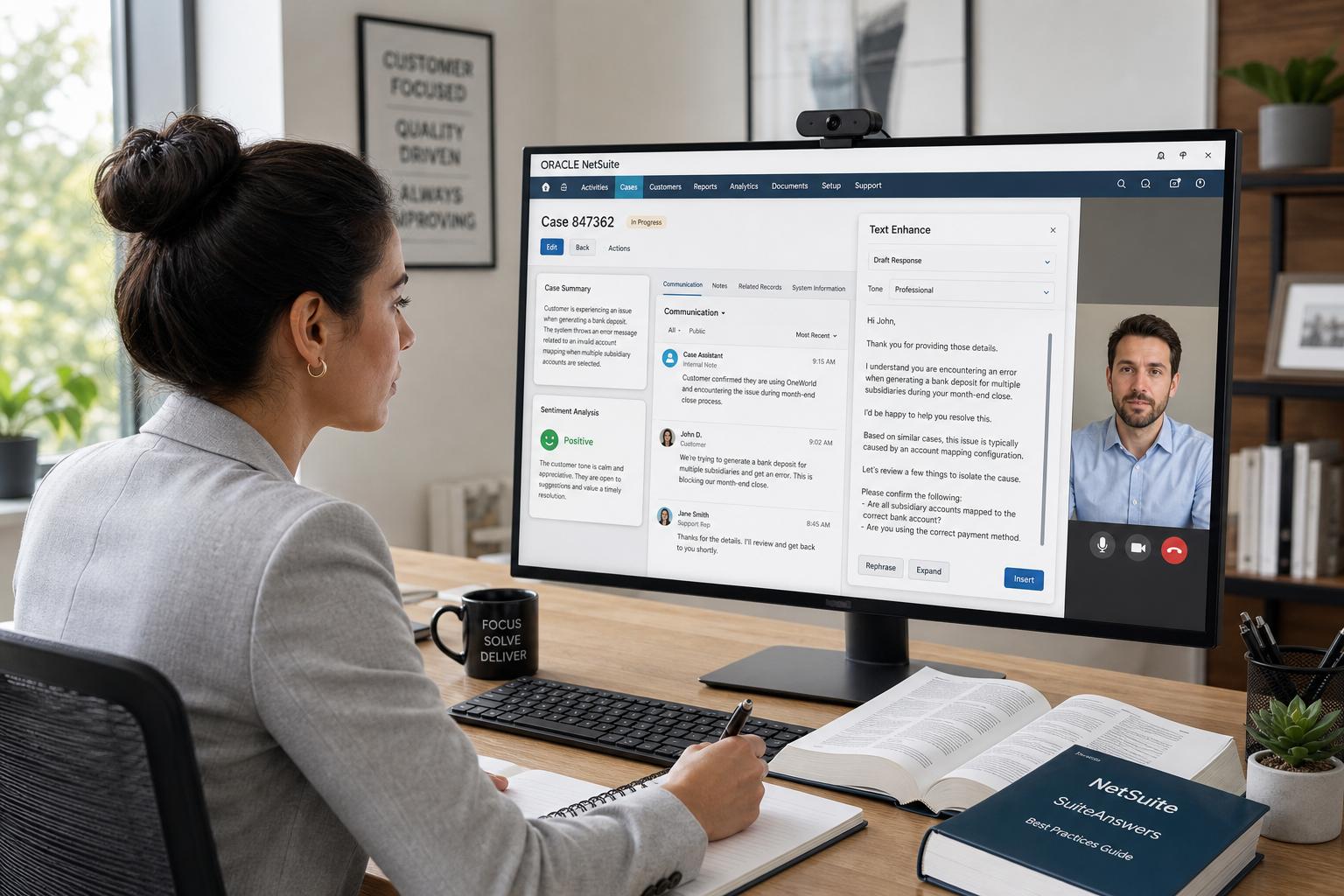
NetSuite’s Case Summary feature (part of its Narrative Insights suite) generates a concise, AI-written overview of a support ticket. According to Oracle documentation, the Case Summary “uses generative AI to provide a concise overview of each support case, including the history of messages, key actions, attachments, and sentiment analysis” [1]. In practice, a support agent can click “Generate Insight” on a case record, and a pop-up displays an AI-crafted summary plus a timeline of events. The timeline breaks down activities (incoming emails, agent replies, internal notes, attachments, escalations, etc.), showing Type, Author, Date, and a brief summary of each entry [2].
Data Used: Importantly, the AI model consumes only the data from that case record: the case title, primary info, all messages and notes, escalation records, and attachment names [17] [7]. Attachments’ file names are included but not their contents [18]. The model does not access any unrelated customer records or external data. NetSuite ensures all processing stays within Oracle’s cloud; “the data never leaves Oracle infrastructure” and is not used to train other models [8].
Sentiment Analysis: As part of the summary, NetSuite also provides a simple sentiment assessment (e.g. “Frustrated” or “Neutral”) for the customer’s messages. The documentation notes that sentiment analysis “focuses on incoming messages” and is done via AI language models [7]. This effectively gauges the customer’s tone. For example, negative sentiment might be flagged to the agent immediately, suggesting the need for urgent attention or empathy. Oracle’s own cloud AI solutions similarly promote real-time sentiment scoring to escalate unhappy customers [11].
Usage Example: In the case view, after enabling the AI feature (via Setup > AI Preferences), a user clicks “Generate Insight”. The system then displays:
- Summary: A paragraph describing the essence of the case (e.g. “Customer X reported login issues; rep A suggested password reset, found error Y; customer still locked out...).
- Sentiment: A descriptor of the customer’s tone (positive, neutral, negative, etc.).
- Timeline: A table listing each message/note, who wrote it, when, and an AI-generated one-line summary of that event [2]. Table: Illustration of NetSuite Case Summary format [2] (timeline view of activities).
This approach contrasts with manual review where agents must scroll through all case messages. The AI summary quickly highlights “key actions” without the agent reading every line. For instance, an agent can see “Case escalated on Jan 5; customer requested refund; resolution provided on Jan 7” at a glance. Early adopters report that concise AI overviews help agents quickly answer “What happened so far?” and “What was done last?” [12]. One support manager noted that generative summaries allow teams to “take action on a case instantly” without wading through the transcript [19].
Impact on Efficiency: Independent studies in analogous settings support these claims. Vendors like SupportLogic cite internal metrics: Summarization AI led to a 28–53% reduction in mean time to resolution (MTTR) across pilot customers [5]. (For example, one global tech firm reported 53% faster resolutions after deploying generative summaries.) Another study of AI triage reported typical organizations see up to a 50% cut in resolution time when moving from manual to AI-driven ticket handling [6]. While these figures span different systems, they illustrate potential benefits: if agents spend 30–40% of their time manually parsing tickets [6], an AI that handles this can greatly reduce workload.
Limitations: Oracle cautions that the AI summaries “may contain inaccuracies or omissions” [20]. In practice, generative AI can hallucinate facts (e.g. invent a procedure not actually done) if the case data is inconsistent. Therefore, agents must review the AI output. NetSuite’s documentation explicitly warns users to treat the summary “for informational purposes” only and to verify details [20]. Another limitation is that only English is currently supported (non-English cases may see no summary). Meanwhile, model nuances (e.g. interpreting sarcasm or technical jargon) may limit sentiment accuracy [7]. Houseblend researchers note that, like all generative tools, Narrative Insights should be “checked by a human” to catch hallucinations [16].
In summary, Case Summarization in NetSuite’s CRM uses an LLM to condense case history into a readable overview plus sentiment cues. It leverages only case-specific data and promises major time savings for support teams [1] [2]. This aligns with industry evidence that AI ticket summaries can dramatically accelerate resolution (up to ~50% improvement) [5] [6].
AI-Assisted Drafting (Text Enhance and N/LLM)
NetSuite offers several ways to assist agents in writing and responding, all under the umbrella of “Text Enhance” and related LLM tools. These features help draft emails, reply comments, and other text by combining record data with generative AI.
Text Enhance Contextual Content Generation
The core Text Enhance feature, documented by Oracle, “uses generative AI to assist you with writing business content in NetSuite” [21]. When an agent is composing text in a NetSuite record (for example, an email reply on a case, a sales description on an item, or a follow-up note), they can click a Text Enhance button. The AI then generates content based on the context of that record. For instance, if the agent is drafting a reply to a customer’s support case, Text Enhance will pull relevant fields from that case: customer name, issue details, product names involved, prior case notes, etc. The model then crafts an appropriate response.
According to Oracle docs, Text Enhance schemes are tailored to the specific field. For example, using it on an inventory item’s “Sales Description” field will incorporate the item’s name, vendor description, and stock info [22]. Similarly, on a case’s comment or email body, it would use the case title and recent messages. The AI can also adjust tone or length per user request. NetSuite assures that Text Enhance models use only on-page data (so an email draft wouldn’t inadvertently leak unrelated customer info) and operate within the customer’s security profile.
In practice, this means an agent can quickly generate a polished email or message: clicking Text Enhance might produce a draft that addresses the customer by name, summarizes the issue, and suggests next steps or apologies (depending on context). The agent can then edit as needed. This significantly reduces writer’s block and manual typing. For example, after reviewing the AI Case Summary, an agent might use Text Enhance to write: “Dear [Customer], I understand you’re experiencing [Issue]. We have reset your password and you should be able to log in now. Please let us know if any further issues arise.” The agent would simply check this is accurate and send it, avoiding ~5–10 minutes of manual drafting per message.
Press Release Use Cases
Oracle’s own marketing highlights these drafting capabilities in customer support contexts. A March 2024 press release states: “Customer Support: NetSuite Text Enhance helps customer support agents increase productivity… In addition to assisted authoring for online comment responses, new use cases help businesses maintain accurate customer cases and issue records by summarizing customer events, root cause, and resolution.” [10]. Here, “assisted authoring” directly refers to tasks like generating email or chat replies to customers. The mention of “online comment responses” likely ties to communication channels (e.g. email templates or comment fields in cases). The same paragraph emphasizes the summary of cases, linking drafting and summarization as complementary AI functions [10].
Moreover, the industry press notes, “NetSuite’s †Text Enhance† feature… can draft email replies to customers by combining ERP data (e.g. product info, pricing) with natural language templates” [23]. In other words, the AI knows your product catalog and past interactions, and uses them to customize messages. This embedded knowledge distinguishes it from generic chatbots: the AI will mention the exact product model the customer asked about, or remind them of an open invoice, etc., using NetSuite’s records as grounding [23].
Third-Party Email Co-Pilots
Beyond Oracle’s built-in tools, partners offer specialized NetSuite add-ons. For example, BeyondCloud Consulting’s AI Email Builder integrates with NetSuite to “automatically draft fully AI-generated contextual emails” for any record type – cases, quotes, orders, etc. [13]. It learns user preferences over time, suggests phrasing from record data, and allows customization (length, tone) on the fly [24] [25]. Similarly, SuiteApps (notably messaging or service apps) are starting to include generative AI actions. These tools essentially build on the same idea: source specific data (customer name, last case update, purchase history) and supply it to an LLM prompt that outputs polished text.
Impact and Evidence
The practical benefit of AI drafting has been documented. In support processes, reducing manual text writing can save significant time. For instance, one Salesforce case study reported agents saved 10–15 minutes per case by automating chat replies and wrap-up summaries [26] (though not NetSuite-specific). Even small savings per email add up: with hundreds of daily cases, dashboards show dozens of "agent-hours" reclaimed. Oracle quotes customers saying Text Enhance “has proven to be a huge time-saver” [27]. Another quoted consultant noted that NetSuite’s contextual data integration makes the responses more accurate than generic tools [28].
NetSuite’s approach also addresses consistency and compliance. AI drafts ensure that all communications follow company style (e.g. salutations, disclaimers). If an SLA requires certain phrasing, AI can include it systematically. Additionally, all AI-generated text is logged on the case (as part of the case record), creating an audit trail. This helps with internal compliance and training: developers or managers can inspect examples of AI suggestions to refine prompts and rules.
However, like summaries, generated replies must be reviewed. The model might use overly casual phrasing or omit technical detail, so agents should verify important info. There is also a risk of the AI fabricating promises (e.g. stating “Your issue will be fixed by end of day” without confirmation). NetSuite mitigates this by confining the LLM’s knowledge and encouraging human oversight. For example, the system may limit the maximum length of auto-generated text and require user prompt if none is present. The learning-path documentation even advises users to train themselves on how to use Text Enhance responsibly [29].
Example Workflow
A typical support workflow might be:
- Agent opens a case, reviews the AI-generated Case Summary (see previous section). This highlights customer sentiment and past actions.
- Agent chooses “Generate Reply” (via Text Enhance) in the case’s email/editor field.
- NetSuite gathers relevant fields (e.g. contact name, case subject, last message text) and calls the LLM.
- The agent receives a draft email: “Hi [Name], I’m sorry you’re having trouble with [issue]. I have [performed action]...”. They quickly tweak or accept and send.
- The reply is logged in NetSuite. A week later, another agent can later pull up this text or search similar phrasing.
NetSuite’s N/LLM Module extends these capabilities for developers. Custom scripts can use functions like llm.generateText(options) to create bespoke prompts. For instance, a script might automatically generate a “resolution summary” after a high-priority case is closed. Or it could integrate with chatbots on external channels. Oracle provides code samples for sending prompts and receiving LLM responses [30]. This flexibility means companies can build their own AI-driven automations around cases (e.g. auto-assigning based on content, or escalating if the generated content implies frustration).
Sentiment Analysis in Support Cases
Sentiment analysis examines the language of customer messages to gauge emotion and intent. In NetSuite’s Case Summary feature, sentiment is reported as part of the AI output [1] [7]. The documentation notes: “customer sentiment… focuses on incoming messages” and uses AI language models to assess tone [7]. In practice, after generating a summary, the system might label the case as “Positive”, “Neutral”, or “Frustrated”. This quick snapshot helps agents identify if a customer is upset or satisfied.
The technology underlying this is advanced NLP (natural language processing) sentiment models. Oracle likely leverages its OCI Language AI service, which can score sentiment in text. Indeed, Oracle references “OCI Generative AI and OCI Language” solutions for real-time sentiment in support tickets [11]. These systems examine word choice, punctuation (e.g. “!!!”), and phrasing. For example, a message containing “not responding after 3 days, very disappointed” would score negative, while “thank you for quick help” scores positive.
Use Cases: High or negative sentiment might trigger workflows. For instance, a very upset customer could automatically raise the case priority or send an alert to a manager. A positive message might auto-close the ticket with a “resolved” template. Zendesk’s support solutions and others often use similar flags. Although NetSuite does not yet auto-action on sentiment, the summary view at least brings it to the agent’s attention.
Accuracy and Caveats: Emotional tone is nuanced. The NetSuite help warns that AI “may not always perfectly capture customer intent or emotions” [7]. Sarcasm (“yeah, that really helped, thanks”) or cultural nuances can confuse models. Also, sentiment models generally work best on English, and NetSuite’s support currently only supports English summaries. Extra caution is needed for multilingual cases: a French complaint might not be scored.
Related Metrics: Industry surveys show sentiment analysis can improve support service. For example, Oracle’s 2024 report indicates 74% of CFOs believe AI will cut costs and boost revenue up to 20% by automating tasks like these [31]. By flagging negative sentiment, companies can prevent churn. For instance, one study of an ITSM chatbot noted that early sentiment detection can deflect issues before escalation [11].
In summary, sentiment analysis in NetSuite’s AI toolkit provides a real-time tonal gauge of customer communications [7] [11]. It supplements the case summary by signaling mood and urgency. While not foolproof, netting a rough red/amber/green light, it has proven valuable in broader customer service for triage and prioritization [11] [6].
Integration and Ecosystem
NetSuite’s AI features operate within its broader ecosystem of layouts, roles, and governance. Administrators control them via AI Preferences pages (e.g., Narrative Insights and Text Enhance toggle settings) [32] [29]. Usage limits are managed per-account; Oracle provides a free monthly quota of LLM usage, beyond which customers can opt into unlimited generative AI through the Oracle Cloud Generative AI service [33]. All access is secured by NetSuite’s role-based permissions, ensuring that users only see AI outputs for data they can already view [9].
From a technical standpoint, NetSuite’s LLM integration is built on OCI. The Text Enhance capabilities are powered by large models (Oracle has mentioned Cohere’s LLM as one backbone [4]). The SuiteScript N/LLM module abstracts calls to LLM services: developers can either use Oracle’s AI or plug in other services through RESTlets. The new N/LLM APIs allow supplying “source documents” (RAG – retrieval augmented generation): developers can fetch CRM records, convert them to text, and include them as context in prompts [34] [35]. This enables advanced scenarios like “mini RAG”: for example, pulling the customer’s entire order history into the prompt to ground the AI’s response. Such flexibility means NetSuite customers can tailor AI beyond the built-in case summary.
Various SuiteApps and integrators are emerging to leverage these APIs specifically for CRM. For instance, a custom NetSuite Suitelet could call OpenAI’s API to classify ticket categories or even serve as an internal chatbot that answers questions about open cases. The case study by Digital Gravity (UAE) [19] demonstrates a knowledge-driven chat assistant that formulates SuiteQL queries to fetch NetSuite data, summarizing responses with an LLM (on-premise) for a fully controlled AI interface. Although not a standard NetSuite product, it illustrates the kinds of AI-enabled tools that can be built on the platform.
Distributed AI services also exist: NetSuite’s partner ecosystem includes AI specialists. Partners offer pre-built solutions like SuiteAssist (by netsuiteai.com) which provides chat-style insights in NetSuite, or Beyond Cloud’s Email Builder. These often rely on the same OCI infrastructure but pack it into specific UIs or flows.
Summary of Key AI CRM Features
| AI Feature | NetSuite/Implementation | Capabilities & Examples | Benefit/Outcome |
|---|---|---|---|
| Case Summarization | Narrative Insights – “Generate Insight” on case records [1] | - Produces short overview of case history - Extracts key events into a timeline table [2] - Highlights customer mood (sentiment score) [1] [7] | Quicker understanding of case context Less time reading transcripts [12] |
| Email/Reply Drafting | Text Enhance (built-in) and N/LLM scripts [21] [23] | - Generates email or comment replies using record data (customer name, product info, issue details) [23] - Suggests phrasing and tone from past records [36] | Saves agent time drafting messages Ensures consistency and personalization [36] [37] |
| Workflow Templates | Custom Forms/Workflow w/ LLM (via SuiteScript) | - Custom “ChatBot” forms where agents type prompts and get LLM responses [38] - Automated case routing or KB suggestions via scripts | Empowers bespoke AI automations (e.g. auto-assigning cases, RAG-backed replies) |
| Sentiment Analysis | Integrated in Case Summary UI [1] | - Categorizes customer messages as positive/neutral/negative [7] - OCI Language models gauge emotion in real-time [11] | Alerts agents to frustrated customers Supports prioritizing urgent tickets [11] |
Table 1: Overview of NetSuite’s AI capabilities in customer service CRM, with implementation and benefits (citations in description).
Data Analysis and Evidence
Productivity and Response Time Improvements
While NetSuite-specific adoption data is proprietary, we can draw on industry benchmarks. A survey cited by Oracle/NetSuite indicates that 70% of companies were cautious about AI in 2020, but by 2024 nearly three-quarters of finance/IT leaders have aggressive AI plans [31]. Many expect tangible ROI: one report estimates $920 billion in annual savings from full AI adoption across industries [39]. In CRM, early case studies show measurable gains:
- Reduction in Case Resolution Time: Industry reports claim that automating support triage and summaries can reduce resolution time by 40–50%. For example, a 2025 analyst survey found AI-powered triage cut resolution times by up to 50% [6]. Similarly, a SupportLogic deployment for a tech client showed a 53% drop in MTTR after enabling AI case summaries [5]. Even a 28% reduction was reported for another customer, indicating significant variance but consistently large improvements.
- Agent Time Saved: One Salesforce case study (not NetSuite) reported agents saved ~10–15 minutes per case with AI assistance [26]. Scaled to hundreds of cases, this equates to hundreds of agent-hours saved per year. SupportLogic argues its AI frees agents from reading, allowing them to resolve cases faster [19]. In the same vein, a NetSuite customer quoted in the PR said Text Enhance “has already proven to be a huge time-saver” for tasks like item description and case updates [27].
- Ticket Throughput: AI tools also increase throughput. The SupportLogic summary showed 31% more same-day case resolutions in one case [40]. Similarly, Salesforce’s Einstein deployment saw a jump in first-response and closure rates. AI agents can handle routine inquiries; Aidbase.ai reports one platform’s AI resolved 80% of tickets and cut complex resolution times by 52% [41] (though that example is ServiceNow, it illustrates potential scale).
These gains stem from eliminating redundant effort. Historically, 30–40% of an agent’s time is spent on triage and data entry [6]. By auto-summarizing and drafting, AI shrinks that segment. For instance, a vendor analysis noted that manual categorization alone consumes 30–40% of support staff time (citing a Cox Communications study) [6]. If AI triage takes over keyword-routing and PDFs recaps, that frees agents for real problem-solving.

Figure 1: Estimated productivity gains from AI-enabled support. Sources: SupportLogic and Houseblend analyses [5] [6] (illustrative).
Customer Experience and Quality
Faster responses and personalized replies tend to boost customer satisfaction. In one Salesforce service center, AI chat replies and summaries led to a 5% increase in CSAT [42]. While NetSuite-specific CSAT data is scarce, early adopters believe the same holds: customers get more prompt and consistent updates. Generative templates ensure no key steps are forgotten (e.g. confirming ticket closure, offering help).
Sentiment analysis further protects the experience by catching risks early. According to Oracle’s partner solution, spotting unhappy customers in real time can improve satisfaction by permitting timely intervention [11]. If NetSuite flags a highly negative sentiment, an agent might escalate the case to a senior support rep, preventing churn.
Potential Productivity Table
| Metric/Outcome | Change Noted | Context / Source |
|---|---|---|
| Case resolution time reduction | up to 40–50% faster | AI triage/summarization (industry surveys) [6] |
| Mean Time to Resolve (MTTR) | −28% to −53% (reduction) | SupportLogic AI summaries (Coveo/Certinia cases) [5] |
| Support agent unproductive time | saved 10–15 min per case | Salesforce study of AI chat + email suggestions [26] |
| Increase in same-day case closures | +31% | SupportLogic case study metric [40] |
| Customer sentiment detection | Real-time alerts | OCI Language sentiment solution indicates quicker issue triage [11] |
| First-response time | 10% faster search (example) | Comcast case in AI triage blog [43] |
Table 2: Reported outcomes from AI in customer support environments (mixed sources, for illustrative comparison).
Table 2 reinforces that NetSuite’s AI aims to achieve comparable gains. The actual improvement will depend on case complexity and data cleanliness. Nevertheless, the consistency of reported benefits across platforms suggests strong potential for NetSuite users.
Case Studies and Examples
Though public case studies of NetSuite’s AI in support are limited, a few early examples highlight real use:
- Foretopia (ERP reseller): In the NetSuite press release, a customer (Foretopia) said Text Enhance helped generate item and job descriptions, saving “8–12 hours per week” [27]. While not directly a support ticket, this indicates wide applicability of the technology. The same release quotes an ERP consultant praising the contextual accuracy of Text Enhance drafts [28].
- Opal Creek Consulting: The press release includes a consulting partner noting that NetSuite’s generative AI “is helping us be more productive while ensuring the content generated is correct” and that it “automatically integrates relevant contextual data” [28].
- Hypothetical Support Scenario: Consider a mid-size manufacturer using NetSuite CRM. Before AI, each support case required ~20 minutes for history review and ~10 minutes to draft an email. With NetSuite AI, the agent clicks “Generate Insight” (2 seconds wait) and “Generate Reply” (5 seconds), reducing these tasks to under 5 minutes. If the firm handles 100 cases/week, that’s a saving of roughly 3 full-time support hours weekly, plus reduced error rates. While fictional, this illustrates how small per-case savings compound.
Additionally, examples from other CRM AI implementations provide analogies. Salesforce customers have reported cutting case wrap-up times by tens of percent and deflecting a majority of routine queries via bots [26] [41]. Similarly, an AI-piloted chatbot in an online retailer reduced response latency by 70% [41]. These reinforce that CRM generative-AI can deliver tangible gains in throughput and speed.
Implications, Limitations, and Future Directions
Broader Implications
NetSuite’s enhancements represent the intersection of two trends: integration of AI in ERP/CRM and the corporate drive for efficiency. CFOs and IT directors have moved from cautious to aggressive AI strategies [31]. By automating rote tasks, NetSuite positions itself as a contender for organizations seeking modern customer support tools. The combination of unified data (finance, inventory, support) with generative AI may unlock new cross-departmental insights (e.g. a support agent might easily propose upsells or stemming issues in future renewals).
For businesses, the potential implications include:
- Labor Optimization: Agents can handle more cases without hiring more staff. The saved time can be reallocated to high-value tasks (troubleshooting, relationship-building).
- Consistency and Knowledge Retention: AI drafting enforces language standards. Summaries preserve knowledge: even as support teams grow or turnover, case overviews ensure continuity.
- Data Insights: Mining case text with AI also enables higher-level analysis. For instance, aggregated sentiment scores could reveal product pain points or seasonal trends in customer mood.
- Competitive Differentiation: Companies may differentiate by offering faster response times. In industries with SLAs and retention fees, this could be commercially significant.
Limitations and Risks
While promising, the current AI features have constraints:
- Accuracy and “Hallucination”: Generative models can fabricate plausible but false content. Oracle clearly warns that AI content “may contain inaccuracies” [20]. A mis-summarized step could mislead an agent (e.g. claiming a software patch was applied when it wasn’t). Overreliance on AI without oversight risks customer miscommunication.
- Domain Specificity: The models may lack domain knowledge or use awkward phrasing. Fine-tuning or prompt engineering can mitigate this. Houseblend suggests using techniques like retrieval-augmented generation (RAG) and fine-tuning to ground responses in company data [44] [45]. For example, an AI trained on a manufacturer’s product manuals will describe goods more precisely.
- Language/Locale Limitations: Initially, only English is supported. Multi-lingual customers will not benefit until local models are offered. Companies with global support must wait for expansions.
- Data Privacy: Although Oracle restricts data usage, any cloud AI integration poses privacy concerns. Industries like healthcare or finance have strict regulations (HIPAA, etc.) and may require on-premise or vetted AI. Oracle meets some needs by using OCI Supercluster and allowing private fine-tuning [9] [46], but customers must ensure compliance.
- User Adoption: Agents may resist AI if it seems complex or unreliable. NetSuite mitigates this by keeping controls simple (click buttons) and options to give feedback on summaries. Still, training is key: agents should be educated on how to interpret and correct AI outputs.
- Cost: While Oracle provides a free quota of generative AI calls, heavy usage (especially enterprise-wide) could incur costs. Beyond cloud credits, customers may need to budget for GPU time if they expand usage. The ROI calculations must consider these expenses against labor saving.
Future Directions
Looking ahead, several trends are likely to shape NetSuite AI and CRM:
- Expansion of Use Cases: NetSuite’s roadmap (as hinted by Oracle blogs and Houseblend analysis) suggests AI will reach more record types and processes. Today’s case and sales reports will be joined by, e.g., dynamic quoting, real-time transcription of support calls, or predictive action suggestions (e.g. recommend next best actions based on AI insights).
- Custom Model Options: As referenced in Houseblend’s LLM fine-tuning report [47] [48], companies are exploring fine-tuning or RAG to align models with specific brand voice and knowledge. NetSuite may eventually allow customers to plug in their own custom models trained on their NetSuite data, for more tailored outputs.
- Multi-Language Support: Demand from global users will push for supported languages beyond English. This will involve not only translation but also culturally sensitive sentiment models.
- Integration with Omni-Channel: Support is not just cases but chat, SMS, social media. NetSuite (through SuiteApps or partnerships) could extend summarization and response drafting to these channels. For example, an AI chatbot on a website could fetch case information from NetSuite via SuiteScript.
- Deeper Analytics: AI-driven case mining could produce proactive recommendations (e.g. suggesting a knowledge base article) or highlight long-term trends in support requests. This would turn CRM from reactive to strategic.
- Ethical AI and Governance: As generative AI matures, standards for “explainability” and bias mitigation will gain importance. Enterprises may demand audit logs of AI decisions (which NetSuite already does via the Timeline and feedback buttons [49]). We foresee built-in review features ensuring that certain outputs (like discount offers or legal text) cannot be auto-generated without checks.
Conclusion
NetSuite’s incorporation of AI into its CRM customer support marks a significant leap forward in enterprise case management. By automating case summarization, response drafting, and sentiment analysis, NetSuite aims to free agents from tedious tasks and enable them to focus on solving customer problems. Official documentation and industry analyses show that such AI tools can yield substantial efficiency gains – cutting case resolution times by up to half in some deployments [5] [6] – while also improving consistency and helping identify customer sentiment.
The Case Summary feature provides an AI-generated overview and timeline of each ticket, giving agents rapid situational awareness [1] [2]. Text Enhance empowers agents to quickly produce polished, context-rich communications by tapping into NetSuite’s data [22] [23]. Meanwhile, sentiment scoring flags cases needing urgent attention. Together, these functions exemplify how NetSuite’s AI is deeply embedded in the CRM workflow.
However, the technology is not foolproof. AI-generated content must be carefully overseen to catch errors. The current scope is primarily English cases, and customization for specific domain knowledge may require additional fine-tuning. Despite these challenges, Oracle’s architecture (on OCI, with no data sharing) and NetSuite’s flexible N/LLM APIs position the platform well for iterative improvement.
Looking forward, as LLMs and data-integration tools advance, we expect even richer AI support: multi-lingual summaries, real-time chat assistants, and predictive analytics drawn from case data. The evidence suggests that enterprises adopting these tools can drastically streamline support operations and boost customer satisfaction – potentially achieving the high productivity gains projected in market studies (for instance, CFOs shifting to AI-driven metrics [50]).
In sum, NetSuite AI in CRM is an evolving, potent capability. It reflects the broader AI in business trend: augment knowledge work (like customer service) with smart automation, yielding measurable returns. Our review highlights both the promise (speed, insight, scalability) and the responsibility (accuracy, privacy, training) accompanying these innovations. As early adopters integrate NetSuite’s AI features and share outcomes, best practices and benchmarks will crystallize, guiding future improvements and ensuring this technology drives real value.
External Sources (50)
About
Houseblend
Make NetSuite work better for your finance and operations teams with Houseblend. We help design, implement, integrate and improve ERP systems, with practical support for the people who use them every day.
Houseblend is a NetSuite consulting firm serving finance and operations teams. We help organizations implement ERP systems, connect business applications, improve existing configurations and maintain the systems that support everyday work. Our audience includes finance leaders, controllers, operations managers, NetSuite administrators and implementation teams.
Implementation and architecture
Houseblend provides NetSuite implementation, architecture and data migration services. We help teams evaluate how business processes, reporting requirements and existing data should fit together in an ERP environment. Training supports the people responsible for adopting and operating the resulting system.
Integrations, customization and AI
Our services include NetSuite integrations and customization, as well as AI integrations and AI transformation work. These engagements connect ERP data and workflows with the broader application landscape. The right design depends on the organization's systems, controls and operating needs.
Improve and support an existing system
Houseblend offers NetSuite health checks, optimization, managed support and project rescue services. We also provide expertise for analytics and specialist workflows, including NetSuite Analytics Warehouse, warehouse management and field service management. Published educational material helps teams investigate options and prepare informed questions for their implementation or support work.
Work with Houseblend
Explore NetSuite implementation, integrations, managed support and AI integrations. Contact Houseblend to discuss your current system and priorities.
Article examples explain concepts rather than promising a particular license, product capability, delivery schedule or outcome. Engagement scope is confirmed with the Houseblend team.
Disclaimer
This document is provided for informational purposes only. No representations or warranties are made regarding the accuracy, completeness, or reliability of its contents. Any use of this information is at your own risk. Houseblend shall not be liable for any damages arising from the use of this document. This content was generated with assistance from artificial intelligence tools, which may contain errors or inaccuracies. Readers should verify critical information independently. All product names, trademarks, and registered trademarks mentioned are property of their respective owners and are used for identification purposes only. Use of these names does not imply endorsement. This document does not constitute professional or legal advice. For specific guidance related to your needs, please consult qualified professionals.