Houseblend Article
NetSuite Chart of Accounts Design & Best Practices
Inside this article
- 01Executive Summary
- 02Introduction and Background
- 03NetSuite Chart of Accounts: Dimensions and Structure
- 04Account Numbering Conventions
- 05Account Type and Category Design
- 06Segmentation of the Chart: Dimensions versus Sub-Accounts
- 07Multi-Entity and Consolidation Considerations
- 08Implementation and Maintenance
- 09Reporting, Analytics, and Business Impact
- 10Case Studies and Real-World Applications
- 11Future Directions and Implications
- 12Conclusion
Executive Summary
Designing an effective NetSuite Chart of Accounts (COA) is fundamental to achieving clear financial reporting, operational efficiency, and scalable growth. NetSuite’s multi-dimensional general ledger model separates what (account, e.g. revenue, assets) from why/where (segments such as Department, Class, Location, and custom segments), enabling far fewer GL accounts than traditional systems. A well-structured COA in NetSuite therefore relies on effective segmentation, logical account numbering, and correct account-type assignment. This report provides an in-depth analysis of best practices around NetSuite COA design, drawing on Oracle documentation, expert blogs, and case studies.
Key findings include:
- Segmentation (Dimensions vs. Accounts): Leverage NetSuite’s independent dimensions for classifications (Department, Class, Location, Subsidiary) rather than embedding operational detail into account codes. This prevents “exponential account explosion” [1] [2] and keeps the COA concise. Use custom segments (SuiteSegments) for additional dimensions (projects, funds etc.), and consider enabling SuiteGL’s balancing segments to enforce segment-level balance where needed [3].
- Account Numbering: Enable account numbers and adopt a consistent numeric scheme (e.g. 1000–1999 Assets, 2000–2999 Liabilities, 3000–3999 Equity, 4000–4999 Income, 5000–5999 COGS, 6000–6999 Expenses, 7000–7999 Other Income/Expense, etc.) [1] [4]. Reserve gaps between number blocks for future growth. Well-chosen numbers accelerate data entry, grouping, and training [1] [4].
- Account Types: Assign each account to the correct NetSuite Account Type (e.g. Bank, Accounts Receivable, Expense, Income, etc.), which determines its category (Asset, Liability, Equity, Income, or Expense) and balance normality [5]. Correct type assignment ensures proper placement on financial statements. Importantly, an account’s type cannot be changed once transactions exist [5], so types must be chosen carefully. Use Non-Posting or Statistical types only for their intended purposes (e.g. tracking orders or allocation metrics) [6] [7].
- COA Hierarchy and Sub-Accounts: NetSuite supports parent-child account hierarchies. Use sub-accounts sparingly (typically 1–2 levels deep) for reporting detail (e.g. “6100 – Payroll” as parent, with “6101 – Salaries”, “6102 – Taxes” as children) [1]. Avoid deeply nested trees, which are hard to manage and can obscure totals [1].
- Multi-Entity (OneWorld) Considerations: In NetSuite OneWorld, all subsidiaries share the same COA [8]. This facilitates consolidated reporting (and is a core design), but requires mapping legacy accounts from each entity into a single unified structure. NetSuite allows linking an account to specific subsidiary(ies) if desired [9], and provides accounting contexts for local-GAAP statutory COAs if needed [10]. Bank and credit-card accounts are inherently tied to one subsidiary.
- Implementation and Migration: Designing the COA is a one-time (and largely irreversible) task, so it must be done upfront. Migrating a legacy chart “as-is” undermines NetSuite’s model [11]. Instead, use the implementation as an opportunity to simplify and normalize: consolidate duplicate accounts, remove unused ones, and lean on segmentation fields instead of dozens of near-duplicate accounts [1] [4]. Plan for sign-off and testing; once transactions are posted, account deletion is impossible (at best inactivate) [12]. Best practices include locking in the COA before loading opening balances [4].
Case studies illustrate the impact of COA design. In one fast-growing SaaS startup, a bloated legacy COA of 450 accounts (three times larger than needed) was overhauled by shifting departmental detail into the Department and Class segments [6]. The result was a 30% faster month-end close and much clearer financial statements [11] [6]. Another case involved a nonprofit that had used a custom “Grant” segment for reporting; by mirroring Grant into NetSuite’s native Class field (and leveraging balancing), the organization unlocked automated Budget vs. Actual reports without manual exports [13]. These and other examples underscore that a “clean and dimensional” COA reduces manual reconciliation, improves analytics, and future-proofs the finance function [11] [14].
In summary, a well-designed NetSuite COA — one that uses concise account codes, aligns each account to the proper type, and exploits independent segments for detail — becomes a scalable data asset.It enables faster, more reliable reporting and analytics [11] [14]. The following sections provide comprehensive guidance on each aspect of COA design, backed by NetSuite documentation and industry expert advice.
Introduction and Background
The Chart of Accounts (COA) is the foundation of financial accounting. In any ERP, the COA is essentially a “table of contents” for financial data [4]. It lists all asset, liability, equity, revenue (income), cost-of-goods, and expense accounts that categorize every transaction. In NetSuite, as with traditional double-entry accounting, every debit and credit ultimately posts to some COA account. A clean, well-structured COA yields accurate books and straightforward audits; a poorly structured one makes every downstream report error-prone and time-consuming. As one consultant notes, the COA is “permanent in practice”: errors in GL design can lead to permanent reconciliation issues [11] [1].
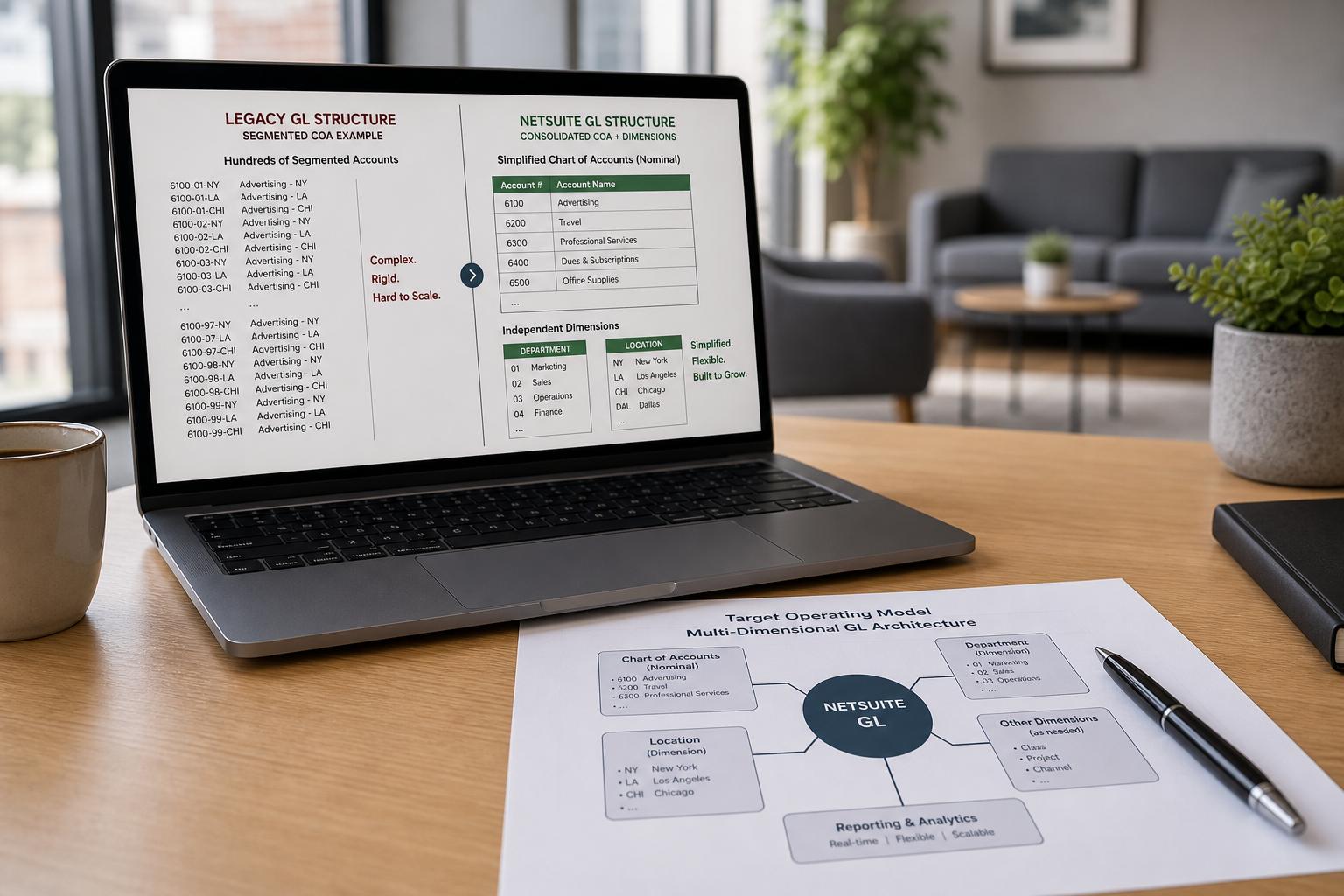
Historically, ERP systems designed charts in a flat (or segmented) format. Older systems often embedded multiple dimensions into an account code (e.g. account-department-location all in one long account number) [1]. This “segmented account” approach required proliferation of accounts for each combination of factors (for example, separate salary accounts for each department and location). NetSuite ushers in a more modern paradigm: it uses a multi-dimensional model where the COA handles the “what” (type of account) and separate fields (segments) handle the “why/where”. The account number itself only identifies the nominal account (e.g. “Salaries & Wages”); the department, class, and location fields on transactions capture departmental or geographic context [1].
Figure 1 below illustrates the key structural differences between traditional and NetSuite GL designs:
| Traditional GL (Segmented Codes) | NetSuite Multi-Dimensional GL (Separate Segments) |
|---|---|
Uses long segmented codes (e.g. 6100-02-10 for "6100 = Salaries, 02 = Engineering, 10 = New York") | Uses short nominal accounts plus independent segment fields |
| Requires millions of combination accounts if many dimensions | One account (e.g. Salaries) combined with Department, Class, Location on transactions |
| Inflexible: adding a new dimension (e.g. brand) forces new accounts for every combination | Flexible: add a new Class or Department value once and size accounts remain constant |
| Example: 4 accounts (depart. × location) needed: Marketing, Eng × NY, LA, etc. | Example: 1 salary account + 2 departments + 2 locations covers same analysis [1] |
Figure 1: Traditional segmented accounting vs. NetSuite’s multi-dimensional model. NetSuite’s independent segments avoid the “exponential explosion of accounts” seen in static segmented charts [1].
This shift dramatically impacts best practices. Rather than cramming as much detail into account codes as possible, NetSuite users must embrace transparent segments. Effective COA design in NetSuite means:
- Consolidation and Cleanness: Keep the COA concise; let segmentation fields capture breakdowns. For example, use one “Sales” account plus Department and Location dimensions instead of dozens of specialized sales accounts [1] [4].
- Defined Account Types: Assign each account an appropriate NetSuite Account Type from the outset (e.g. Revenues, COGS, Assets, etc.), which determines whether it appears on the balance sheet or P&L [5]. Once transactions post, the account type is fixed, so this must align with reporting and tax requirements.
- Structured Numbering: Although optional in NetSuite, a meaningful account numbering scheme greatly aids usability. Adopt a logical range (e.g. 1000s for assets, 2000s liabilities, etc.) and leave room for growth [1] [4].
- Parent-Child Hierarchy: Utilize sub-accounts only when helpful for grouping (e.g. a “Payroll Expenses” parent with child accounts for salaries, taxes, benefits) [1], but limit nesting to a few levels to maintain clarity.
These principles lead to a COA that is lean, logical, and aligned to both statutory needs and management reporting. Importantly, the COA should be built “for the future, not for the old system” [4]. Migrating a messy legacy chart without redesign would defeat NetSuite’s analytics model; instead, treat implementation as a GL “clean-up” opportunity [11] [4].
Multiple expert sources reinforce these ideas. Leading finance teams view the chart of accounts as a strategic data asset, not just a compliance formality [14]. When charts are designed only for static control, analytics suffer. One large firm observed that heavy spending on dashboards and data platforms is wasted if the underlying COA cannot support multidimensional queries [14]. Conversely, simplifying accounts and shifting detail into dimensions yields faster closing, reliable analysis, and a “scalable foundation” for growth [11] [14].
The remainder of this report explores each aspect of NetSuite COA design in detail: segment/dimension strategy, numbering guidelines, account type selection, multi-entity considerations, implementation tactics, and real-world outcomes. All recommendations are evidence-based, citing NetSuite documentation and industry expertise.
NetSuite Chart of Accounts: Dimensions and Structure
NetSuite’s GL architecture is multi-dimensional. The nominal chart of accounts provides the fundamental classification of each transaction (assets, revenue, expense, etc.), while separate segment fields (Department, Class, Location, Subsidiary) capture other key attributes. This section examines how to structure these dimensions for maximum flexibility and clarity.
Standard Segments: Account, Department, Class, Location
By default, a NetSuite corporate account has four main dimensions (sometimes called segments):
- Account (Natural Account): Each GL account record (Cash, AR, Sales, Rent, etc.) is the Account dimension. It determines a transaction’s financial category (balance sheet vs P&L) based on its type [5].
- Department: An organizational segment typically used to categorize transactions by function or cost center (e.g. Marketing, Engineering, HR). Departments do not need to balance; they serve for internal analysis [1] [14].
- Class: A flexible segment often repurposed for product lines, business units, or other cross-department categories. Classes, like Departments, are analysis fields and do not carry balancing constraints.
- Location: A segment for physical or logical locations (offices, warehouses, regions). Also an analysis dimension (no balance requirement).
These standard segments are fully integrated into NetSuite’s financial reports and saved searches. For example, a posted expense will have both an Account (Expense) and may have a Department, Class, and Location. Reports can then be sliced by any combination: one can get “Total salaries by Department” or “Rent by Location in Q1” without additional accounts [1]. This demonstrates the power of independent dimensions – analysis is driven by field values, not by proliferation of account codes.
Why use segments instead of splitting accounts? Conventional systems without flexible dimensions might require separate accounts for each combination (e.g. “Salaries – Marketing – Austin”). In NetSuite, if you need to report salaries by dept and location, create one “Salary” account and fill the Department and Location fields on transaction lines [1]. This avoids dozens of duplicate accounts. One blog sums it up: “A traditional system might need dozens of accounts, whereas NetSuite needs one account plus department and location dimensions” [1]. The key insight is that the dimensional data does not get aggregated in the GL in NetSuite; instead each transaction carries each dimension separately, enabling any cross-filtering.
Best Practice: Do not use the COA to track what segments can do. For instance, if you know you will use Departments, you should not create separate salary accounts for each department. As AccountingFresh advises: “If you know you’ll be using departments, don’t create separate expense accounts just to ‘track departments.’” [4]. Similarly, to get location-based reporting, use the Location field instead of making ten different rent accounts. Table 1 summarizes the roles of these dimensions:
| Dimension | Type | Require Balance? | Typical Use |
|---|---|---|---|
| Account | Structural (Nominal) | Yes | Core GL accounts (cash, AR, AP, Sales, etc.); defines BS vs. P&L via account type. |
| Subsidiary | Structural (Entity) | Yes | Legal entities or books (OneWorld); used for intercompany and consolidation. |
| Department | Analytical (Tag) | No | Functional cost centers (Marketing, Engineering, etc.); internal reporting. |
| Class | Analytical (Tag) | No | Business segments (product lines, divisions) or custom category. |
| Location | Analytical (Tag) | No | Geographic or facility classification (offices, regions, stores). |
| Custom Segment | Analytical (Custom) | No (balance by opt) | Additional dimensions (projects, grants, funds, customer segments, etc.). |
Table 1: NetSuite chart of accounts dimensions and their roles. (“Balance?” refers to whether NetSuite enforces Debit=Credit at that level. Accounts and subsidiaries must balance; Departments, Classes, Locations do not.)
This table is informed by official and expert sources. For example, NetSuite guides and consultants often classify departments, classes, and locations as “reporting dimensions” [1] [14]. RSM notes that embedding operational detail into account structure (e.g., putting department codes into account numbers) is a form of overengineering that makes closing harder [14]. Instead, use the “clean dimensions” and consistent tagging recommended by experts [14].
Custom Segments: NetSuite also allows unlimited custom segments (SuiteSegments). These behave just like department/class/location fields: each has a set of values and can be attached to transactions. They are extremely useful when you need classification beyond the four standard fields (for example, tracking projects, funding sources, grants, customer classifications, or any bespoke category). Custom segments can optionally impact the GL (i.e. appear on GL Impact and be used in GL reports) and even participate in balancing (see below) [3]. They are discussed further in the next subsection.
In summary, segments (subsidiary, department, class, location, and custom) are second-class dimensions that tag transactions without altering the GL equation. This allows far simpler COAs. As one improved general ledger guide explains: “NetSuite’s General Ledger uses a multi-dimensional accounting model where the chart of accounts handles what type of transaction it is (revenue, expense, asset, liability), while segments like Department, Location, and Class handle where and why.” [1]. The implication for COA design is to keep the chart focused on core financial categories and steer all other categorization into these dimensions.
Custom Segments and Balancing by Segment
While Department, Class, and Location cover many needs, some organizations require additional dimensions. NetSuite’s SuiteCloud platform provides Custom Segments for this purpose. When enabled (from Customization > Lists, Records & Fields > Segments), you can create named segments (for example “Fund”, “Project”, “Division”, “Grant”, etc.), define their active values, and assign them to transaction forms and GL impact legend [3]. Custom segments function like native segments but are fully flexible.
A critical feature is that custom segments can drive financial analysis and even statutory records. For example, one report notes that segment values appear on the GL Impact page and in the Financial Report Builder just like Departments or Classes. If you mark a custom segment as GL Impacting, then each transaction’s GL lines will carry that segment value, enabling slicing in GL reports and in the Financial Report Builder.
Another powerful capability is the “Balancing Segments” feature (introduced in SuiteGL). By default, NetSuite enforces that Debits = Credits at the subsidiary level only. However, you can designate up to two custom segments as balancing dimensions. When you mark a segment (e.g. a “Fund” segment) as balancing, NetSuite will automatically generate offsetting “intersegment” GL entries so that each segment value balances independently. For example, if $100 of expenses are booked to Fund A and $40 to Fund B (within the same subsidiary), NetSuite will automatically offset $60 to Fund A and $40 to Fund B using special intersegment accounts, ensuring each Fund’s debits equal credits. This allows subsidy-level GL integrity plus additional breakdown by chosen dimension. In short, balancing segments enforce the accounting equation inside those segment categories.
Case Study (NAFY Nonprofit): A real-world example underscores the importance of segment design. New Avenues for Youth (NAFY), a nonprofit, had created a custom segment “Grant” for tracking funding. But when they needed Budget vs. Actual reports by Grant, they discovered NetSuite’s native reports only recognize the native segments (Dept, Class, Location). They solved it by automating a mirror: using the native Class field in parallel with Grant. For every Grant value, a Class value was auto-created and synced. This way, Budget vs. Actual by Class (a built-in report) effectively became by Grant, with no change to user workflow [13]. This case illustrates that creative segment use (and understanding native vs. custom limitations) can unlock powerful reporting without multiplying accounts.
Balancing Custom Segments: Configuring a segment as balancing requires it to be GL-impacting. As Houseblend explains, marking a custom “Fund” segment as balancing tells NetSuite to run the Balance Segments process, which “automatically generate[s] offsetting entries for each segment’s totals”. Table 2 below summarizes different dimension types and NetSuite capabilities:
| Dimension | NetSuite Field | Category | Balance Enforced? | Typical Use / Notes |
|---|---|---|---|---|
| Company / Entity | Subsidiary | Structural (Entity) | Yes | Legal entity; must balance for consolidation. |
| Nominal Account | Account | Structural (Nominal) | Yes | GL accounts; dictates financial statement category. |
| Department | Department | Analytical (Cost Center) | No | Organisational unit (Dept, cost center). Can tag for reporting. |
| Business Unit | Class | Analytical (Tag) | No | Flexible classification (product line, division, etc.). |
| Location | Location | Analytical (Geography) | No | Physical or logical locations. |
| Custom Segment | Custom Segment Field | Analytical (Custom Tag) | No (Yes, if balancing) | Additional tags (projects, funds, grants, etc.). If set as balancing, debits=credits per segment. |
Table 2: NetSuite COA dimensions and balancing behavior. This generally follows recommended practice: Type 1 dimensions (accounts, subsidiaries) must balance, whereas Type 2 dimensions (departments, classes, etc.) do not—overloading Type 2 details into accounts causes exponentiation and complexity [2]. When extra balancing is needed, custom segments + balancing segments are the tool of choice.
Overall, leveraging segments is central to NetSuite COA best practices. NetSuite consultants emphasize resisting the urge to create new accounts for any new reporting slice; instead, create or use segments. As one guide states: “Instead of creating multiple accounts for each revenue source, consider using one revenue account with different classes or departments for categorization” [6]. This is reiterated by multiple sources: clean accounts plus robust segmentation yields “reliable, actionable reporting” and a faster close [11] [14].
Parent-Child Accounts (Sub-Accounts)
While segments handle most dimensionality, parent-child hierarchies within the COA provide organizational roll-ups. NetSuite allows each account to be designated as a sub-account of another (provided they share the same account type) [10].
Best Practice: Use sub-accounts judiciously for logical roll-ups, but avoid deep or unwieldy hierarchies. For instance, you might have a parent expense account “6100 – Payroll Expenses” and children “6101 – Salaries”, “6102 – Payroll Taxes”, “6103 – Benefits” [1]. On financial reports, sub-account balances automatically roll up into the parent category, allowing summary-level and detailed views. However, complexity rises dramatically with each added level. The BrokenRubik guide advises no more than 2–3 levels deep: "Sub-accounts roll up to the parent on financial reports. Use them for reporting detail within a category, but don't go deeper than 2–3 levels — deeply nested accounts become hard to manage and report on" [1].
Common practice is to limit sub-accounts to when categories are large enough to warrant summarization. For example, multiple bank accounts might be sub-accounts under a “1000 – Cash” parent, or multiple prepaid asset types under one parent. But do not create children for every minor subdivision; that’s what segments should do.
In summary, sub-accounts add a light hierarchy primarily for reporting convenience (subtotaling); they do not change NetSuite’s multi-dimensional logic. Ensure that any sub-account shares the parent’s account type [10], and recall that inactivating or deleting a parent account can affect its children. NetSuite’s help notes that summary accounts (parents) become inactive by default and must be toggled inactive in stages to cascade to children [12]. Thus, plan any hierarchy carefully.
Account Numbering Conventions
By default, NetSuite treats account names as the primary identifiers. However, account numbers can be enabled and provide significant practical benefits: they accelerate data entry, ensure consistent grouping, and make reports easier to scan [1] [4]. Account numbers in NetSuite can be alphanumeric up to 60 characters [1], but simplicity is key. A common best practice is to use a few digits to indicate the account category, leaving the rest for specific details.
Standard Number Ranges: A widely adopted scheme is to reserve thousands ranges by category, for example:
- 1000–1999 – Assets: e.g. 1010 = Cash, 1150 = Equipment, etc.
- 2000–2999 – Liabilities: e.g. 2000 = Accounts Payable, 2100 = Accrued Expenses.
- 3000–3999 – Equity: e.g. 3000 = Retained Earnings, 3200 = Opening Balance Equity.
- 4000–4999 – Revenue (Income): e.g. 4100 = Sales, 4200 = Service Income.
- 5000–5999 – Cost of Goods Sold: e.g. 5100 = COGS - Materials, 5200 = COGS - Labor.
- 6000–6999 – Operating Expenses: e.g. 6100 = Payroll Expense, 6200 = Rent/Utilities.
- 7000–7999 – Other Income/Expenses: e.g. 7100 = Interest Income, 7300 = Misc. Expense.
- 8000–8999 – Taxes and Extraordinary Items.
These illustrative ranges are drawn from NetSuite documentation and expert blogs [1] [4]. Using such blocks means that seeing an account number immediately tells you its financial category. For example, “1050” signals an Asset account, while “7100” is under Other Income/Expense [4]. A suggested detailed mapping is shown below.
| Account Number Range | Account Category |
|---|---|
| 1000 – 1999 | Assets (balance sheet) |
| 2000 – 2999 | Liabilities (balance sheet) |
| 3000 – 3999 | Equity (balance sheet) |
| 4000 – 4999 | Income / Revenue (P&L) |
| 5000 – 5999 | Cost of Goods Sold (P&L) |
| 6000 – 6999 | Operating Expenses (P&L) |
| 7000 – 7999 | Other Income/Expenses (P&L) |
| 8000 – 8999 | Taxes / Non-Operating (P&L) |
Table 3: Example Account Numbering Scheme (ranges by general category) [1] [4]. The exact boundaries can vary by organization, but the principle is to leave space (gaps) between major groups (e.g., after 4999, skip to 6000 for expenses).
Best Practices with Numbering: Experts advise keeping numbers orderly:
- Leave gaps: Do not number everything consecutively. If current assets run 1000–1050, start the next account at 1100 or 1200, not 1051 [1]. This reserves room for related accounts in that category.
- Use decimals or dashes only if needed: Many companies prefer simple integers. If hierarchical coding is desired, limited dashes can indicate sub-accounts, but don’t overuse it (NetSuite allows up to 60 chars alphanumeric).
- Enable numbering early: Turn on “Use Account Numbers” in Setup > Accounting Preferences before entering accounts [15]. NetSuite will then allow you to enter numbers for new accounts. (Enabling later will auto-assign defaults to existing accounts, which you can change.)
- Keep it legible: Avoid overly long or cryptic codes. Aim for 3–4 digits for main accounts, using text for clarity (e.g. “[4000] – Product Sales” rather than “Product Sales”). This matches how traditional accountants read charts.
It is not required to use numbering, nor is there a universal scheme enforced by NetSuite, but the community consensus is that consistent numbering accelerates adoption. As one blog puts it, seeing “6200” should immediately tell the user it’s an operating expense, whereas “1100” is an asset [4].
Enabling account numbers also benefits importing and integration. Data exports (CSV) often use number fields for mapping, and many legacy systems expect chart codes. NetSuite’s Chart of Account Numbering help even provides an interface for bulk updating account numbers [15].
In summary, while optional, numbering is considered a best practice in NetSuite implementations for clarity and performance [1] [4]. The numeric ranges chosen should align with the business’s financial structure but remain consistent and leave headroom. A recommended simple starter scheme is provided in Table 3, which aligns with Oracle’s standard categorization [1] [4].
Account Type and Category Design
Every account in NetSuite must belong to one of the system’s predefined Account Types. These types are grouped into the fundamental accounting categories that make up the general ledger equation (Assets + Expenses = Equity + Liabilities + Income) [5]. The account type determines on which financial statement an account will appear (Balance Sheet or Income Statement) and its normal balance.
NetSuite’s official documentation lists all available account types and their categories. Key types include (with example understanding):
- Asset (Debit balance): e.g. Bank, Accounts Receivable, Fixed Asset, Other Current Asset (like Prepaids), Inventory Asset, etc. These feed into the Asset side of the balance sheet [5].
- Liability (Credit balance): e.g. Accounts Payable, Credit Card, Other Current Liability, Long Term Liability, Deferred Revenue, etc. (Liabilities side of balance sheet) [5].
- Equity (Negative/Credit balance): e.g. Equity (a generic equity account), Retained Earnings, Additional Paid-In Capital, etc. (Equity on the balance sheet) [5].
- Income (Revenue, Credit balance): e.g. Income, Other Income. (Appears on the income statement) [5].
- Cost Of Goods Sold (Expense type, Debit): Cost of Goods Sold (COGS) for manufacturing or product costs [5].
- Expense (Debit balance): e.g. Expense, Other Expense. Operating expenses on the income statement [5].
- Other Income/Expense: Other Expense and Other Income types for non-operating gains/losses (still debit for other expense, credit for income) [5].
- Non-Posting and Statistical: Not listed in the GL impact table, but available to mark specialized accounts (more on this below).
Figure 2 (below) highlights examples of common NetSuite account types and their placements:
| Example Account Type | Category | Normal Balance | Statement |
|---|---|---|---|
| Accounts Receivable | Asset | Debit (positive) | Balance Sheet |
| Bank | Asset | Debit | Balance Sheet |
| Fixed Asset | Asset | Debit | Balance Sheet |
| Accounts Payable | Liability | Credit (negative) | Balance Sheet |
| Other Current Liability | Liability | Credit | Balance Sheet |
| Equity | Equity | Credit | Balance Sheet |
| Income | Income | Credit | Income Statement |
| Cost of Goods Sold | Expense | Debit | Income Statement |
| Expense (e.g. Rent) | Expense | Debit | Income Statement |
| Other Expense | Expense | Debit | Income Statement |
| Other Income | Income | Credit | Income Statement |
Figure 2: Examples of NetSuite Account Types and their financial statement roles [5]. By convention: Asset, Expense, Cost of Goods Sold types are “debit-normal” (positive balance); Liability, Income, Other Income, and Equity types are “credit-normal” (negative balance).
Why Account Types Matter: The account type drives classification. On financial reports, NetSuite groups accounts by these types: for instance, all Asset-type accounts roll into the balance sheet’s Assets section. Therefore, picking the correct type is crucial. As documentation warns, “You can’t change the account type for an account that has associated posting transactions” [5]. For example, if a Cash account was mistakenly set up as Income type and transactions posted, it cannot later be converted to Asset. Hence, accountants must carefully plan the account types before going live.
Moreover, beyond standard types, NetSuite provides Non-Posting and Statistical accounts. Non-posting accounts (such as sales order or purchase order registers) appear on lists but have no direct GL effect; they are managed in special registers [7]. Statistical accounts are used for budget or work-in-progress tracking (e.g., number of units, square footage) and do not affect financial balances. A NetSuite COA should reserve Non-Posting types only for their designated purpose (e.g. to allow drill-down of orders) and should not attempt to treat them as real GL accounts.
Account type selection should also align with reporting and compliance requirements. For instance, some international or industry standards necessitate specific accounts (like a “Cost Center Trading” account or statutory equity accounts). NetSuite’s OneWorld even supports Accounting Contexts, where a company can maintain alternate COAs for local GAAP versus consolidated reporting [10]. In practice, an administrator might set up one chart for US GAAP and another for IFRS (in a secondary book) using contexts, ensuring account types comply with each jurisdiction.
Recommendation: Familiarize yourself with NetSuite’s account type definitions (see Table 2 above and Oracle’s documentation) [5]. During design, each account should be assigned the type that matches its real-world function (e.g. AR accounts as Accounts Receivable type, rent as Expense, interest income as Other Income, etc.). Use category prefixes or numbering to reinforce type. In doubt, consult with accounting leadership to align types with statutory chart accounts. Remember, changing a type later is nearly impossible once data exists [5], so upfront diligence is essential.
Segmentation of the Chart: Dimensions versus Sub-Accounts
We have already covered the main dimensions (segments) and the role of sub-accounts. In NetSuite, remember that segments handle detail, accounts handle categories. Overreliance on either causes problems:
- Overcomplicating Accounts: Creating synthetic detail in accounts (e.g. “6100 – Salaries – East” and “6101 – Salaries – West” instead of a single “6100 – Salaries” account combined with Location=East/West) is discouraged [1] [4]. This leads to a bloated COA and redundant coding work.
- Underutilizing Segments: Conversely, failing to leverage segmentation forces day-to-day users to select accounts they shouldn’t. For instance, if a company uses separate expense accounts for each department, end-users must know those account numbers instead of simply selecting “Office Equipment” expense with Department=“Marketing.” This can cause miscoding errors and slow entry.
As continuousscale’s guide succinctly puts it: the right COA “isn’t about more accounts — it’s about smarter segmentation that grows with your business” [6].
NetSuite’s flexibility extends beyond the traditional chart. For example, Netsuite offers the concept of “Account Input Masks” (in Accounting Preferences) where you can impose a digit pattern (like “4-###”) but this is purely cosmetic. The real discipline comes from policy and training. Always ask when adding an account: Can this dimension be captured by Department/Class/Location or a custom segment? If yes, do that first.
Multi-Entity and Consolidation Considerations
Many NetSuite customers operate multiple legal entities (subsidiaries) or books, making OneWorld functionality relevant. A critical global best practice is:
-
Single Unified COA Across Subsidiaries: In NetSuite OneWorld, all subsidiaries share the same chart of accounts [8]. This simplifies group consolidation and reporting because every entity’s transactions use the same account identifiers. Having a unified COA means the multi-entity structure is just another balancing segment (like Subsidiary) in the dimensional model. Some legacy systems may have had separate COAs per entity; migrating to OneWorld often requires mapping those into one COA. As one consultant notes: “In NetSuite, your accounts will be the same across all entities… This will make financial reporting and consolidating numbers easier going forward but may complicate the initial mapping process” [8].
-
Account Availability by Subsidiary: Although the COA is global, OneWorld allows linking certain accounts to specific subsidiaries. On the account record, the Subsidiaries field can list which subsidiaries may use that account [9]. Selecting the root with “Include Children” shares it with all; otherwise an account can be exclusive to one or more specific entities. This is commonly used for intercompany or local statutory accounts. For instance, a shared “Intercompany Payable” account might be made available to the parent and relevant sub, while a local tax liability account is limited to its country’s subsidiary. (Note: Bank and Credit Card accounts in NetSuite inherently belong to one subsidiary and cannot be shared [9].)
-
Accounting Contexts: OneWorld’s advanced feature “Accounting Contexts” supports completely separate COAs for different standards or books [10]. A common scenario is a multi-country organization that must report one way for local GAAP and another for consolidated IFRS. Contexts let you define a statutory chart for each context. This is a more specialized need, but is considered during COA design when legal requirements diverge significantly across operations.
-
Currency and Conversion: Each netSuite account can have exchange rate preferences for consolidation (current, average, historical) to support consolidated financials across currencies [9]. This is important when charting accounts like Equity or fixed assets on the consolidated statements.
Multi-entity design generally follows these rules: use one chart, categorize accounts for consolidated statements, and attach accounts to subsidiaries as needed. As one implementation case demonstrated, some companies go live with one entity first, then use a predefined template to onboard additional subsidiaries rapidly [16], ensuring consistency. This approach (often called “template COA”) leverages the universal COA to drive fast, uniform roll-outs. The downside is the initial mapping effort; the upside is real-time group reporting from day one.
Implementation and Maintenance
Building the NetSuite COA is a deliberate process. It should be treated as a critical configuration project, not a quick “copy-paste” of the old Chart. According to consultants, attempting to migrate a legacy COA “as-is” into NetSuite often hamstrings the system and results in years of inefficiency [11]. Instead, use go-live preparation as an opportunity to streamline:
- Gap Analysis: Review the old COA and consider what belongs there under NetSuite. Remove redundant accounts. Identify legacy accounts that were artifacts of flat systems (e.g. “Sales – Product A” vs “Sales – Product B”) and plan to handle those via segments instead.
- Needs Assessment: Talk with business managers about reporting needs. Let their needs for dimension (by product, by region, by cost center) drive the creation of classes or custom segments, rather than spawning accounts. Involve both accounting and operational stakeholders; focus on “How will management want to view this?” as AccountingFresh advises [4].
- Template and CSV Import: NetSuite provides a CSV Import Assistant (Setup > Import/Export) for uploading account records en masse. Large companies often compose the COA in a spreadsheet and import it. Whether entering manually or via CSV, consider starting with the parent accounts (by type) then adding sub-accounts.
- Seguing vs. Converting: If migrating, treat constructing the new COA and uploading opening balances as two distinct steps. First, lock in and test the COA; then import beginning balances under that COA structure. This often involves mapping old account codes to new ones. The Suiterep blog suggests staging: map the old trial balance to the new chart so that financial continuity is maintained.
- Set Numbering Preferences Early: In Preferences (Setup > Accounting > Accounting Preferences, General), enable “Use Account Numbers” before or during COA creation [15]. This way, NetSuite will allow you to manually enter the desired numbers.
- Lock and Review: Once PILOTED, require management sign-off on the COA. After transactions go live, accounts with activity generally cannot be deleted [12]. (At best you can make them inactive, but their history stays in reports.) NetSuite help specifically warns that certain system accounts and any account with transactions cannot be removed [12]. For instance, the built-in Sales Order account in NetSuite can never be deleted. Thus, initial correctness is crucial.
Chart Maintenance: Even after go-live, periodically review the COA. Remove or inactivate accounts no longer used: NetSuite lets you delete accounts with zero activity (others must be inactive to hide them) [12]. For new lines of business or evolving needs, one should revisit segments and numbers. Always treat changes to COA as design changes – they can impact historical comparability and automated integrations.
Governance: As RSM recommends, establish governance over the COA. [14] Define who can create accounts or segments, and set a process for chart changes. Because the COA is a cross-functional asset, consider a finance-led steering committee to approve changes or ensure consistency. Without governance, gradual creep can still bloat the chart. Regularly check that “account volumes haven’t expanded out of control” as growth occurs [14].
Reporting, Analytics, and Business Impact
Designing an optimal COA is not just a technical exercise; its goal is to empower insight. A well-crafted COA directly improves reporting speed and accuracy. Many sources quantify this:
- Faster Close: A modular COA can accelerate period-close. One estimate from a NetSuite project showed a 30% reduction in close time after streamlining the chart and using segments properly [11]. Similarly, the continuousscale case study reported going from slow reconciliations to real-time dashboards, shifting the team’s focus from manual data-gathering to analysis [6].
- Trustworthy Data: Complex or inconsistent accounts require extensive reconciliation and fixes. RSM warns that over time, inconsistent coding practices lead to “account sprawl” and require finance teams to spend “more time correcting and interpreting data before reporting” [14]. By contrast, a smaller, well-organized COA reduces errors and rework, improving data quality.
- Advanced Analysis: Modern CFOs demand multidimensional reporting (e.g. profitability by product, region, customer, project). A static COA cannot answer such queries without extensive manual reclassification. RSM emphasizes treating the COA as a data asset: when properly modeled, it “builds trust, clarity and speed” into analytics [14]. In NetSuite, analysts can now slice GL balances by any combination of Dept, Class, Location, or custom segments in real time. For example, one report noted how sub-dividing salaries by department and location becomes trivial in NetSuite but would require dozens of accounts in a legacy system [1].
- Scenario Reporting: With NetSuite’s Financial Report Builder and Saved Searches honoring all segments (including custom GL-impacting ones), organizations can quickly assemble bespoke P&L and balance sheet reports. This native flexibility has huge ROI compared to manual Excel consolidation. Users can, for example, run a budget vs. actual by fund or project with a few clicks if the COA and segments are set up correctly.
- Audit and Compliance: A neatly numbered COA that aligns with official schema simplifies audits. For U.S. GAAP or IFRS compliance, auditors appreciate seeing clear account structures (e.g. all tax accounts in the 8000 range, or all AR in 1000s) [1] [5]. Clear parent-child roll-ups also help present financial statements with subtotals that match statutory formats.
In short, a well-designed COA is the linchpin of a high-performing finance organization. As RSM puts it, companies that modernize their COA gain “faster, more reliable insights, enabling better decision making” [14]. They move from firefighting data issues to proactive management reporting.
Case Studies and Real-World Applications
Case 1: SaaS Company Overhauls COA (Continuousscale, 2025). A high-growth SaaS firm migrating from QuickBooks to NetSuite found its legacy COA excessively granular. The CFO’s original COA had 450 accounts, “three times more than needed” [6]. Critically, the company had been inserting department info into account names. For example, instead of “6100 – Payroll”, the old chart had “6100 – Marketing Payroll”, “6101 – Engineering Payroll”, and so on. This created dozens of virtually identical accounts. The NetSuite consultants restructured the chart: one salary account plus the Department field for Marketing vs Engineering, etc. They also introduced a proper NetSuite Department for cost centers (instead of misusing accounts for that) [6].
Results: Post-implementation, the company reported a 30% faster month-end close [6] [11] and significantly easier reporting. Productivity improved as accountants no longer had to decide among dozens of nearly identical accounts. The new COA, combined with added Departments and Classes, enabled clean board-level dashboards and timely IPO-readiness metrics. The key lesson: “the right NetSuite COA structure isn’t about more accounts—it’s about smarter segmentation” [6].
Case 2: Nonprofit Budget vs. Actual (Opal Creek, 2025). The New Avenues for Youth case highlights how creative segmentation solves reporting gaps. As noted, their “Grant” was a custom funding segment (Type 2), so native Budget vs. Actual couldn’t use it. Opal Creek designed a workaround: they mapped Grants into Classes using an automated sync. Each Grant value had a corresponding Class value, preserving all Grants in a native segment [13]. Crucially, daily workflows did not change: users still tagged transactions with “Grant”, and the sync behind the scenes filled the Class field. This allowed running Budget vs. Actual by Department and Class, fulfilling board requirements. The automated solution (via a script) maintained their outcome integrity.
Results: The nonprofit gained on-demand budget reports by Grant without the risk of manual exports. This empowered quick decisions during a constrained budget cycle. It also demonstrated how NetSuite’s Charts and segments can be engineered for an organization’s unique needs. The customer was able to exploit the new GL architecture without re-entering complex data.
Case 3: Global Subsidiary Rollout (NetSuite OneWorld). A digital health provider (Physitrack) scaled from 1 to 10 subsidiaries during the pandemic [16]. Consultants used NetSuite OneWorld and a “phased go-live” approach: first implement the COA in one pilot subsidiary, then roll out additional subsidiaries with a reusable template [16]. Because the COA was identical for each new subsidiary (by design), financials could be consolidated immediately. The template included segment structures as well (locations and departments common across the group). The result was real-time group reporting across all subsidiaries and faster onboarding of new entities [16].
Insight: In multi-entity scenarios, a standardized COA is critical. By sharing one chart and duplicating it via a template, cohort companies avoid reconciliation headaches. The accounting team can add a new acquisition quickly by attaching it to the existing GL segments. NetSuite’s configuration (account-level subsidiary restrictions and consolidations) ensures that intercompany transactions are handled properly.
Additional examples from practitioners echo these narratives: fast-growing companies consolidate departments into segments for scalability [11] [6]; nonprofits link custom segments cleverly for reporting consistency [13]; and enterprises view the COA redesign as a part of finance transformation [14].
Future Directions and Implications
Looking ahead, charts of accounts remain a critical strategic asset even as finance evolves. Several trends are worth noting:
- Greater emphasis on analytics: As data-driven management becomes imperative, companies will further treat the COA structure as a data model. RSM’s guidance stresses that treating the COA as a “data asset” with stable definitions is key to scaling analytics [14]. Expect more organizations to revisit and modernize their charts not merely for compliance, but to support predictive planning and AI-driven insights.
- Enhanced automation: Tools like NetSuite’s Automated Cash Application and ML-powered coding may ease some transaction categorization, but they rely on a sound COA taxonomy. Automation (e.g., AI-based coding suggestions) will work better if accounts, segments, and types follow strict rules [14].
- Dynamic Chart Management: Advanced companies may adopt continuous optimization of the COA. Regular reviews to merge under-used accounts, add segments, and retire obsolete lines can become more common. Cloud ERPs like NetSuite make this more feasible (no more downtime to change structure), but human governance remains crucial.
- Global and Regulatory Changes: If accounting standards evolve (e.g. new revenue recognition rules, lease accounting, ESG reporting), the COA may need adjustments. NetSuite’s flexibility allows adding accounts or contexts (as with OneWorld’s accounting contexts [10]) to meet new requirements without backlog.
- User Training and Change Management: As segmentation and dimensions become richer (with possible dozens of custom segments), organizations must invest in training. A potential pitfall is user confusion if too many segments exist. Future emphasis on segment design will likely explore balancing richness of capture with usability.
- NetSuite Features: Oracle’s SuiteCloud roadmap may introduce more dimension-friendly features (as they did with SuiteGL and Custom Segments). For example, further integrated budgeting by segment or multi-book improvements could alter how COAs are used. Companies should monitor such features (e.g. future balancing enhancements, new built-in segments) to continually refine COA best practices.
Overall, the trajectory is clear: COA best practice in a modern ERP is ever deeper alignment with business questions. Instead of adding accounts retroactively to answer one-off queries, finance teams will continue moving toward front-loading question-based design. By codifying what needs to be measured (e.g. “we want profitability by product and region”), and building accounts and segments around those needs, organizations create a sustainable reporting environment [14].
Conclusion
A NetSuite implementation offers powerful native capabilities – but to harness them fully, the Chart of Accounts must be planned meticulously. This report has detailed the best practices for NetSuite COA design in three key dimensions: Segments (dimensions), Numbering, and Account Type. Across the literature and case studies examined, a consistent philosophy emerges: simplicity and relevance. NetSuite’s multi-dimensional GL encourages a lean chart (only essential accounts) augmented by robust tags (Department, Class, Location, and custom segments) for granularity. Logical numbering and accurate account types support user efficiency and correct financial classification.
The payoff for doing this work up front is substantial. Finance teams spend less time on reconciliation and more on analysis. Management gets real-time insights with fewer manual steps. Month-ends become measurably shorter. And the organization is poised to scale: adding a new product line or subsidiary no longer forces chart chaos, but simply adds a new segment value or a small set of accounts.
In an illustrative summary: NetSuite’s co-founder emphasizes that Cloud ERP allows us to eliminate outdated practices. Instead of copying every nuance of an old legacy chart, companies should rebuild their COA “for the future” [4]. The evidence supports this: companies that embraced dimensional design saw 30% faster closes and shifted from data crunching to strategic analysis [11] [6].
In closing, Chart of Accounts design is a cornerstone of financial architecture. It must be approached not as a clerical task, but as the creation of a financial data model. By applying the best practices outlined here – thorough planning, consistent numbering, correct types, and rich but controlled segmentation – NetSuite users can establish a COA that endures. Such a COA will keep financial reporting “clean, readable, and flexible,” enabling the company to adapt quickly to new business questions [1] [14].
Sources: This report synthesizes guidance from Oracle/NetSuite documentation [15] [5], independent NuSuite expert blogs [1] [6], accounting firm analyses [14], and real-world case studies [6] [13] cited throughout.
External Sources (16)
About
Houseblend
Make NetSuite work better for your finance and operations teams with Houseblend. We help design, implement, integrate and improve ERP systems, with practical support for the people who use them every day.
Houseblend is a NetSuite consulting firm serving finance and operations teams. We help organizations implement ERP systems, connect business applications, improve existing configurations and maintain the systems that support everyday work. Our audience includes finance leaders, controllers, operations managers, NetSuite administrators and implementation teams.
Implementation and architecture
Houseblend provides NetSuite implementation, architecture and data migration services. We help teams evaluate how business processes, reporting requirements and existing data should fit together in an ERP environment. Training supports the people responsible for adopting and operating the resulting system.
Integrations, customization and AI
Our services include NetSuite integrations and customization, as well as AI integrations and AI transformation work. These engagements connect ERP data and workflows with the broader application landscape. The right design depends on the organization's systems, controls and operating needs.
Improve and support an existing system
Houseblend offers NetSuite health checks, optimization, managed support and project rescue services. We also provide expertise for analytics and specialist workflows, including NetSuite Analytics Warehouse, warehouse management and field service management. Published educational material helps teams investigate options and prepare informed questions for their implementation or support work.
Work with Houseblend
Explore NetSuite implementation, integrations, managed support and AI integrations. Contact Houseblend to discuss your current system and priorities.
Article examples explain concepts rather than promising a particular license, product capability, delivery schedule or outcome. Engagement scope is confirmed with the Houseblend team.
Disclaimer
This document is provided for informational purposes only. No representations or warranties are made regarding the accuracy, completeness, or reliability of its contents. Any use of this information is at your own risk. Houseblend shall not be liable for any damages arising from the use of this document. This content was generated with assistance from artificial intelligence tools, which may contain errors or inaccuracies. Readers should verify critical information independently. All product names, trademarks, and registered trademarks mentioned are property of their respective owners and are used for identification purposes only. Use of these names does not imply endorsement. This document does not constitute professional or legal advice. For specific guidance related to your needs, please consult qualified professionals.