Houseblend Article
NetSuite Document AI: Invoice & Vendor Bill Extraction
Inside this article
- 01Executive Summary
- 02Introduction and Background
- 03NetSuite Document AI Technology and Features
- 04Data-Driven Benefits of Document AI
- 05Case Studies: Real-World Impact
- 06Integration and Workflow Considerations
- 07Industry Landscape and Comparative Context
- 08Challenges and Limitations
- 09Future Outlook and Implications
- 10Conclusion
- 11References
Executive Summary
In recent years, document AI – the application of advanced artificial intelligence to automate document processing – has emerged as a transformative force in enterprise finance. Oracle NetSuite, a leading cloud ERP, is now embedding Document AI capabilities to automate Accounts Payable (AP) tasks such as vendor bill and invoice processing. These innovations – showcased in part at NetSuite’s SuiteConnect 2026 events – leverage Oracle’s OCI Document Understanding service (including custom generative AI models to automatically extract key data from invoices, receipts, and related documents. By eliminating manual data entry and accelerating workflows, Document AI drastically reduces processing time and errors. Industry studies confirm that AP automation can cut invoice processing costs by 60–80% per invoice and free up hours of staff time each week [1] [2]. For example, one NetSuite customer reported slashing per-invoice entry time from 2.5 minutes to 45 seconds – a 70% time reduction – after implementing AI-driven invoice capture [3].
NetSuite’s Document AI features are most directly embodied in enhancements to Bill Capture (the module for turning vendor invoice files into payable transactions) and a new N/documentCapture SuiteScript module. These use Oracle’s OCI Document Understanding (including a “large multimodal model” derived from Meta’s Llama) to recognize text and tables in diverse invoice formats [4] [5]. The extracted fields – vendor names, invoice numbers, dates, line items, amounts, taxes, etc. – are automatically matched against NetSuite records (vendors, items, purchase orders) to create bills with minimal human intervention [6] [7]. This intelligent extraction integrates with NetSuite workflows such as 3-way matching and approval routing (automation does not bypass existing controls) [6] [8].
This report provides a comprehensive review of NetSuite’s Document AI for vendor bills, receipts, and supplier invoices. It covers historical context of invoice automation, technology architecture (OCR, AI/ML, large language models, etc.), feature analysis of NetSuite’s solutions, data-backed outcomes (time, cost, accuracy improvements), case studies and examples, industry landscape, as well as challenges and future directions. All claims are supported by current references, including official NetSuite documentation, case studies, industry research, and analyst insights. The aim is a detailed, data-driven understanding of how NetSuite’s Document AI transforms the invoice-to-payable data pipeline, what real-world gains it offers, and what considerations (technical and organizational) accompany its adoption.
Introduction and Background
Accounts Payable (AP) – the process of receiving invoices from suppliers and entering them into a company’s accounting system – has traditionally been labor-intensive and error-prone. Historically, companies relied on manual data entry or simple OCR (optical character recognition) tools to process supplier invoices. These older systems often required human review to correct misreads (especially for diverse layouts, languages, and non-standard formats), and could be slow and costly. A 2026 industry survey by Nexus AP notes that manual invoice processing generally costs $8–$12 per invoice, whereas automated AP solutions can reduce that cost to roughly $1.50–$3 per invoice [9]. Similarly, the Aberdeen Group found manual invoicing costs over $10 per invoice on average, versus about $2–$3 after automation [9]. These savings come from eliminating repetitive keying, accelerating approvals, and reducing error rework [10].
The advent of “Document AI” or Intelligent Document Processing (IDP) in the 2010s marked a new step: combining OCR with machine learning and later neural networks to better understand document content. Modern Document AI not only recognizes characters but can classify document “type” (invoice vs receipt vs contract), parse complex tables and line items, and even comprehend context (e.g. understanding that “net due” is an amount to pay). In 2025–2026, large language models (LLMs) and multimodal models (such as Meta’s LLaMA, Google’s PaLM, etc.) have further advanced IDP by improving accuracy on tricky layouts and enabling zero-shot extraction (extract from formats never seen in training).
In parallel, enterprise software has been rapidly integrating AI. Analysts have forecast that by 2026 nearly half of enterprise applications will embed task-specific AI agents [11]. At NetSuite’s own SuiteConnect events in early 2026, company executives highlighted AI as a core strategic differentiator. Founder Evan Goldberg called the announcements “the biggest update of NetSuite since we founded the company” [12], and a company press release emphasized that “with a single unified suite and the ability to leverage powerful AI models, NetSuite turns disconnected tasks into intelligent end-to-end workflows” [13]. These broad AI initiatives – automated bank reconciliations, smart close dashboards, pricing analytics, etc. [14] [15] – naturally extend into invoice and document processing. While NetSuite’s February 2026 announcements did not specifically enumerate a “Document AI” feature by name, the SuiteConnect roadshows (New York, Chicago, London, etc.) and accompanying release notes have quietly introduced capabilities that collectively realize the promise of Document AI for AP.
NetSuite Document AI (sometimes referred to informally as “Intelligent Bill Capture” or the N/documentCapture service) represents NetSuite’s next-gen OCR/ML integration for purchases. Historically, NetSuite has supported basic invoice capture: users could email or upload scanned PDF invoices (vendor bills) into NetSuite’s Bill Capture module, which would use OCR/ML to pull out vendor, amount, date, and line-item details and create a draft bill with approvals [7]. Starting in 2023–2024, NetSuite began evolving this with AI capabilities. The 2026.1 Release Notes (March 2026) announce a new “Intelligent Bill Capture” that uses Oracle Cloud Infrastructure (OCI) Document Understanding’s custom generative model to improve accuracy on complex invoices [4]. Concurrently, a new SuiteScript module (N/documentCapture) was introduced to let developers programmatically extract structured content from PDFs, images or scans of invoices, receipts, contracts, etc., plugging into Oracle’s AI services [5].Thus, NetSuite’s Document AI combines (a) data-embedded enhancements to its built-in Bill Capture feature, (b) programmatic AI-driven document extraction APIs, and (c) seamless flow into NetSuite’s existing workflows (GL posting, 3-way match, approvals). The result is that when a supplier invoice (or receipt) file enters the system, AI models can automatically identify all the important fields and line items, validate them against purchase orders and vendor records, and generate posted transactions that require minimal human correction. The following sections detail the technology, capabilities, and impacts of this system.
NetSuite Document AI Technology and Features
Oracle OCI Document Understanding
At the foundation of NetSuite’s Document AI is Oracle Cloud Infrastructure (OCI) Document Understanding, a managed AI service for processing documents. OCI Document Understanding provides a suite of pretrained and customizable AI models that can extract text, tables, and key information from document files via API calls [16]. Developers can use pretrained models (for invoices, receipts, etc.) or train custom models suiting specific document layouts [16]. OCI’s capabilities include optical character recognition (OCR), text and data extraction, table recognition, natural language processing, and support for multiple languages and formats [16] [5].
Key features of OCI Document Understanding include:
- Automated content extraction: It can extract plain text, tables, and key-value pairs from scanned documents, PDFs, or images [17].
- AI-powered data recognition: The service uses advanced machine learning models to accurately identify relevant fields (e.g. vendor name, invoice total) [18]. In NetSuite’s 2026.1 update, the Bill Capture feature specifically leverages a custom generative model (LMM) within OCI to handle complex invoice formats [4].
- Multi-document type support: It recognizes many business document types – invoices, receipts, tax forms, contracts, etc. – out of the box [19].
- Language and layout flexibility: The models support multiple languages (important for global businesses) and can adapt to various layouts [20].
- Document classification: The service can auto-classify a document as a particular type (e.g. invoice vs receipt), enabling intelligent routing or selection of the appropriate extraction model [21].
- Confidence scoring and error handling: Each extracted element (field, table cell, etc.) is returned with a confidence level, allowing applications to detect low-confidence values that may need human review [22].
- Scalability: Documents up to 5 pages can be processed synchronously (quick response), while longer documents can be handled via asynchronous jobs [23].
NetSuite’s Bill Capture enhancements tap into OCI Document Understanding’s pretrained models for invoices, along with a specific “custom generative model V2.0” for documents_{like invoices} [4]. In effect, Oracle has improved the underlying model (often codenamed “Built with Llama”) to increase accuracy on invoices with complex layouts (multi-column invoices, mixed data types, etc.) [4]. According to the release notes, this large multimodal model (LMM) approach significantly boosts extraction accuracy on challenging vendor bills [4].
NetSuite Bill Capture Enhancements
NetSuite’s Bill Capture module is the user-facing feature that lets AP staff ingest vendor invoices. Traditionally, users could forward or upload PDF invoices into Bill Capture; the system would then attempt to auto-create a Vendor Bill record by filling fields (vendor, date, amount, line items) and then posting it. With the 2026.1 release, “Intelligent Bill Capture” adds a new AI-driven processing pipeline. According to Oracle’s release notes:
“Bill Capture now leverages Oracle Cloud Infrastructure (OCI) Document Understanding Custom Generative Model to intelligently extract key values from your vendor bills.” [4]
In practice, when a scanned invoice or PDF is submitted, NetSuite calls OCI Document Understanding behind the scenes. The AI identifies important elements of the invoice. For example:
- Vendor identification: The model extracts the vendor name from the document text and matches it to a NetSuite vendor record.
- Invoice header fields: Numbers and dates (invoice number, invoice date, due date) are extracted and formatted.
- Amounts: It pulls the invoice total, taxes, subtotals, and payment terms.
- Line items: Perhaps most critically, the AI detects the table of line items – each row’s description, quantity, unit price, extended price – and captures those into the bill record as individual line entries.
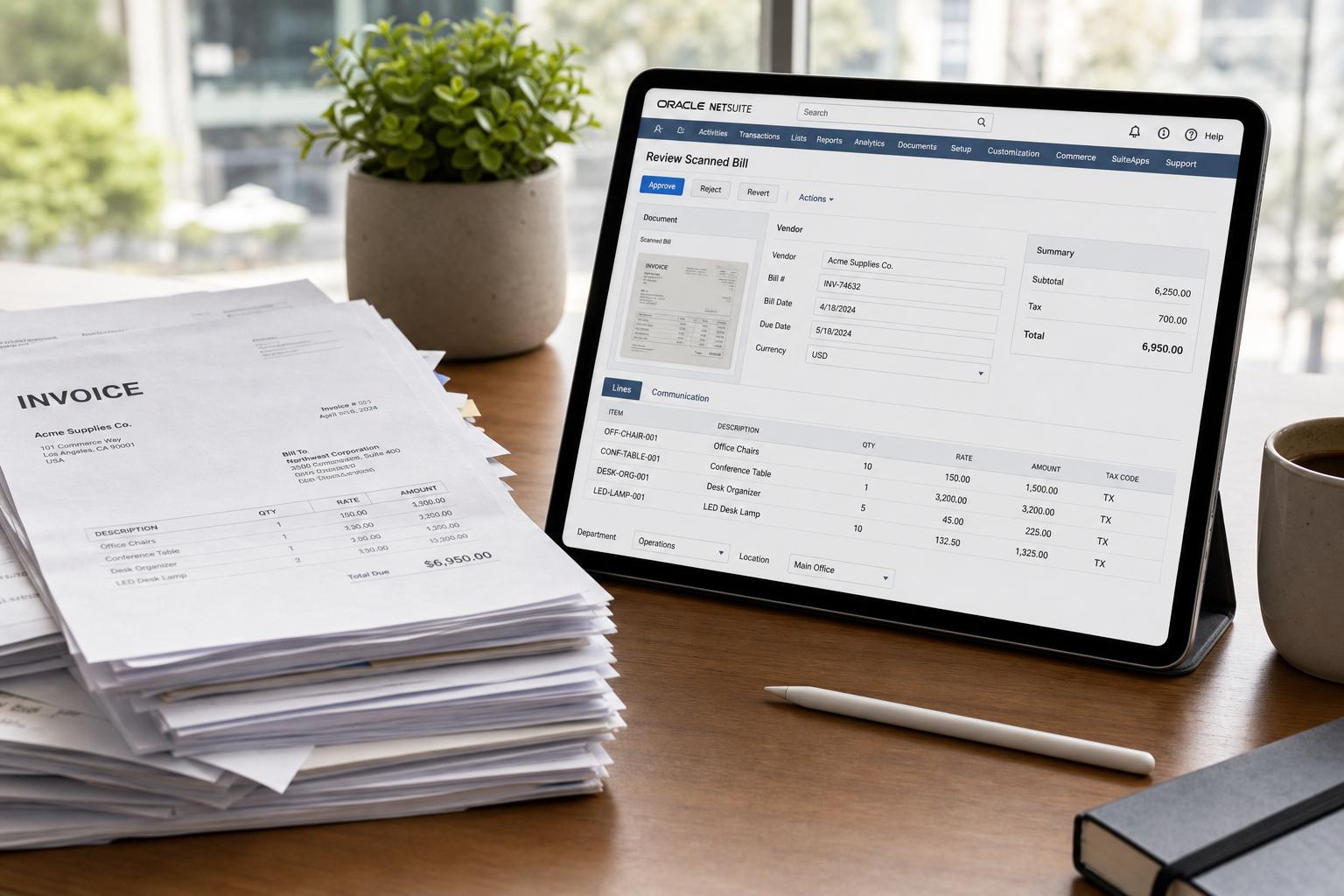
Zone & Co’s analysis of NetSuite Bill Capture confirms these capabilities: “AI-powered OCR automatically extracts vendor, amount, date and line-level details” from invoices [7]. In other words, NetSuite’s native tool now performs multi-line extraction rather than only top-line summary, a key factor for 3-way PO matching. The extracted data is presented on the Review Scanned Bill page, where a user can verify or correct fields. If the confidence scores (from OCI) are high, the assistant’s suggestions are likely accurate; low confidence fields are flagged for review.
Crucially, Bill Capture’s output is integrated into NetSuite’s normal AP process. After a bill is created via capture, all the standard NetSuite logic still applies. If a purchase order and item receipts exist, standard 2-way or 3-way match logic will connect the bill to the PO and receipts [6]. Auto-approval rules, general ledger coding rules, SuiteApprovals workflows, tax calculations, and any custom scripts are unaffected by the AI capture; the system behaves as if a human had entered the bill. As Oracle notes, features like 3-way matching and approval workflows remain in force, unaffected by the AI extraction process [6].
This integration preserves internal controls while streamlining data entry. For example, if Bill Capture populated an incorrect vendor based on a smudged logo, the user can correct it on the Review page; after saving, NetSuite’s normal “bill creation” triggers will fire (closing POs, applying remembrances, etc.). Similarly, Document AI in Bill Capture supports complex PO scenarios: it handles partial billings and even “bill in advance of receipt” situations [24]. When matching to purchase orders, the AI can link an invoice to all relevant POs in the system, even if the goods receipt is pending – thereafter NetSuite determines if an item receipt is needed based on account preferences [24].
Bill Capture Workflow
The typical workflow for Intelligent Bill Capture is as follows:
- Capture Submission. A vendor invoice arrives (e.g. emailed to the NetSuite account or uploaded manually into Transactions > Payables > Scanned Vendor Bills).
- AI Extraction. The file is sent to OCI Document Understanding. The “custom generative model” parses the invoice into structured data – header fields, line items, totals, etc. NetSuite presents this in the “Review Scanned Bill” UI.
- User Review (Optional). A payables clerk reviews the captured data on-screen. Because the system has filled most fields automatically, the user typically only needs to verify accuracy and possibly correct any low-confidence values.
- Create Bill. The user clicks “Create Bill” and NetSuite generates a new Vendor Bill record pre-populated with the extracted data. The original file remains attached (and visible in split-screen for audit).
- AP Automation Continues. The bill follows the standard AP workflow: auto-approval (if configured), GL coding (if not already auto-coded), match to POs/receipts, and posting. Any mismatches or exceptions (quantity differences, etc.) are routed as usual in SuiteApprovals.
During step 2, Bill Capture relies on NetSuite’s master data to improve accuracy. As the documentation notes, “suggestions rely on matches with NetSuite records, such as vendors, items, and purchase orders” [6]. By having an accurate vendor list and up-to-date PO/receipt records, the AI can better resolve ambiguous text (e.g. matching a vendor name to an exact vendor ID) and validate line items against inventory item codes. In fact, if Bill Capture cannot confidently match a field to a record, it will present it for user selection. Thus, effective use of Document AI in NetSuite requires good data hygiene (clean vendor list, correct PO setup) to maximize automation.
SuiteScript N/documentCapture Module
Alongside the built-in Bill Capture app, NetSuite provides a SuiteScript 2.1 API – the N/documentCapture module – for developers to call the AI document processing service programmatically [5]. This lets developers integrate Document AI into custom scripts and Suitelets. For instance, a Suitelet could accept uploaded PDF invoices and invoke documentCapture.documentToStructure(options), which returns a structured document object with fields, pages, lines, and tables. Key features of the N/documentCapture module include [5]:
documentToStructureMethod: Developers can pass in a document (PDF, image, etc.) and receive aDocumentobject containing text lines, tables, and key/value fields extracted from the file.- Document Object Model: The returned data includes arrays of
Page,Field,Line,Table, andWordobjects, each with properties like.textand confidence scores (e.g.Line.text,FieldValue.text,Cell.text[17]). - Synchronous and Asynchronous Calls: Documents up to 5 pages can be processed synchronously without blocking (using
documentToStructure), while larger documents are supported via an asynchronous promise-based method (documentToStructure.promise) [23]. - Multiple Formats Supported: The module handles common formats (PDF, PNG, JPG, TIFF) and various layouts, as long as the server SuiteScript feature is enabled [17].
- Automatic Document Classification: Each
Page.detectedDocumentTypesincludes confidence levels for doc types – allowing scripts to route invoices vs receipts vs others as needed [25]. - Usage Tracking: NetSuite UI has an AI Preferences page that tracks how many credits or calls to OCI are used, giving visibility for cost management [26].
This API means any document ingestion in NetSuite – not just vendor bills, but potentially expense reports or incoming bids – could use the same AI backend. For example, a travel expense app could call N/documentCapture on receipt scans to auto-fill merchant name and total. Structurally, the Table and TableRow objects allow scripts to iterate through invoice line items: each row’s cells are accessible (item code, qty, price) [23] [25].
In summary, NetSuite’s Document AI is not a separate product but a built-in AI service available through standard NetSuite features (Bill Capture) and developer APIs (N/documentCapture). It automates extraction of structured ERP data from unstructured documents, leveraging Oracle’s AI cloud models. Table 1 below summarizes key Document AI capabilities now available in NetSuite.
| Capability | Description |
|---|---|
| Automated content extraction | Extracts full text, tables, and key-value fields from uploaded invoices, receipts, and other scanned documents [5]. |
| AI-powered data recognition | Uses advanced OCI Document Understanding models (LMM/generative AI) to identify relevant invoice information (e.g. vendor name, invoice number, date, totals) [4] [18]. |
| Data validation & matching | Matches extracted fields to NetSuite records (vendors, items, purchase orders) to enable automated 2- or 3-way matching [6]. |
| Multi-format support | Supports PDFs, images (PNG, JPG, TIFF), and other formats for invoices and receipts [18]. |
| Multi-language support | Can process documents in multiple languages and varied layouts, suitable for global enterprises [20]. |
| Sync & Async processing | Offers synchronous processing for short documents and asynchronous jobs for longer documents (>5 pages) [23]. |
| Document classification | Automatically identifies document types (e.g. invoice vs receipt) to route them appropriately within workflows [21]. |
| Confidence scoring | Provides confidence levels for each extracted element, allowing low-confidence items to be flagged for review and ensuring reliability [22]. |
Table 1: NetSuite Document AI extraction capabilities (leveraging OCI Document Understanding) [5] [4] [6].
Data-Driven Benefits of Document AI
Integrating Document AI into Accounts Payable yields quantifiable efficiency and accuracy improvements. Multiple industry studies and customer reports document these benefits:
-
Cost Reduction. Automating invoice capture and processing can cut the cost per invoice by 60–80%. For instance, Ardent Partners benchmarks found manual processing at ~$9.40 per invoice falling to ~$2.40 after automation (a 74% reduction) [9]. IOFM report similarly shows costs dropping from ~$8–$12 to ~$1.50–$3 (62–81% reduction) [9]. Table 2 illustrates these savings:
Monthly Invoice Volume Annual Cost (Manual) Annual Cost (Automated) Annual Savings 250 $28,200 $7,500 $20,700 (73%) 500 $56,400 $15,000 $41,400 (73%) 1,000 $112,800 $30,000 $82,800 (73%) 2,500 $282,000 $75,000 $207,000 (73%) 5,000 $564,000 $150,000 $414,000 (73%) Table 2: Sample AP automation ROI showing dramatic annual savings at various invoice volumes (data from Ardent Partners benchmarks) [9] [27].
These savings come primarily from eliminating manual data entry and reducing errors. Nexus AP explains that data entry alone costs about $3–$4 per invoice manually, whereas AI capture costs mere pennies; in a 1,000-invoice/month scenario that’s $3,000–$4,000 saved on data entry†** [10]**. Similarly, labor for matching POs/deliveries (a few dollars per invoice) drops to under $0.30 when automated [28].
-
Time Savings. AP automation can save significant labor hours. Nexus AP reports that for a 500–1,000 invoices/month team, 8–15 hours per week are freed up through automation of entry, matching, routing, and exception handling [29]. Quadient’s customer data found a typical organization (processing ~113 invoices/month) required 2 FTEs (≈3200 invoices/year) and saved $726/week ($37,752/year) by automating invoice processing [30]. Case in point: before automation, Escalante Golf was spending 300+ hours per month on invoice data entry (about 2.5 minutes per invoice for 8,000 invoices) [3]. After deploying AI capture, they cut per-invoice time to ~45 seconds, saving roughly 70% of their AP team’s time [3].
-
Faster Close. Prolonged invoice processing often delays the month-end close. According to Ardent Partners, manual invoice cycle time is typically 10–15 days from receipt to payment, whereas automation can shrink that to 3–5 days [31] – a ~70% reduction. By entering invoices continuously via AI capture, AP burdens that used to spill into new quarter are mostly cleared faster, enabling timely financial reporting. Nexus AP notes that AP automation “cuts month-end close times by 2–5 days” on average [1].
-
Error Reduction and Data Accuracy. Manual keying has an inherent error rate; Nexus AP cites 1–4% field-level error for invoices entered by hand [32]. A single error can add $15–$25 in handling costs when an invoice trips a mismatch exception [32]. Modern AI-OCR systems, however, achieve 95–99% accuracy on well-formatted invoices [33]. By greatly reducing entry errors, Document AI cuts exceptions. An automated system can also enforce stricter matching (e.g. line-level vs header-only, tax recalculation) and catch duplicates, further enhancing data integrity [34]. For example, the AI in Escalante’s solution automatically captured invoice text and populated fields without typos, improving compliance and data quality [35].
-
ROI Multiples. Vendors report that AP automation typically yields a 2–5x ROI. Quadient’s survey of 331 customers found an average 5x return on their monthly AP automation spend [36] [37]. Nexus AP shows even elementary ROI – at 1,000 invoices/month, automation could save ~$82,800 annually (Table 2) even if the solution costs tens of thousands per year. In short, the payback period is generally measured in months, not years [36] [37].
In summary, deploying NetSuite’s Document AI for invoice capture should deliver major efficiency gains. Broad industry benchmarks [1] corroborate that AI-driven AP automation shrinks costs by around 75% and saves teams days of work each month. Our case studies below (Section 7) provide concrete examples of these improvements in NetSuite customers’ operations.
Case Studies: Real-World Impact
While published case studies specific to NetSuite’s native Document AI are scarce, we can draw on related real-world examples of AP automation within NetSuite environments. Two illustrative cases (both using NetSuite-integrated OCR/AI tools) highlight the benefits:
-
Escalante Golf (United States, Hospitality): A large golf course operator with ~8,000 invoices/month implemented a NetSuite-integrated OCR + AI solution (ZoneCapture) in early 2023. Originally, each invoice took ~2.5 minutes to manually upload and code, so AP spent 300+ hours per month on data entry [38]. After automating, they reduced per-invoice time to 45 seconds, a 70% drop. As the VP of Corporate Development noted: “We went from 2:30 minutes per invoice down to about 45 seconds…we’ve saved a ton of time” [3]. The printed outcome was a 70% efficiency gain per invoice [39]. The automation used OCR plus generative AI to smartly populate fields: the AP team now captures invoice sections with a draw-tool and the software “automatically populates the corresponding fields” [35]. The result was fewer clicks (no context-switching out of NetSuite), fewer errors, and much happier AP staff. This mirrors the theory: time savings (0.75 min vs 2.5 min) with high confidence extraction.
-
Beheermaatschappij EM de Jong (Netherlands, Printing/Publishing): A global firm with ~1,300 employees, EM de Jong rolled out NetSuite across 40 subsidiaries and found its AP tool lacking. They were using a disconnected OCR solution for dozens of bills per day, which required manual correction whenever invoice details didn’t match NetSuite records [40]. In 2023, they switched to ZoneCapture (a SuiteApp) within NetSuite. Key factors were native AI capture and extensive customization (auto-assign GL codes by vendor, etc.) [41]. The result was “complete invoice automation within NetSuite” [42]. They eliminated the need to leave NetSuite for AP tasks, keeping all data and approvals in one system [41]. Although precise time statistics aren’t published, the narrative emphasizes faster throughput, data visibility, and compliance. The customer also praised rapid implementation (“no consultants needed, only a few calls” [43]), highlighting usability as well as efficiency. While this was an add-on tool, it shows how NetSuite customers are achieving the promised outcomes of Document AI: seamless data extraction and streamlined workflows.
-
General Consumer Goods Company (Vendor Report): Oracle NetSuite’s own marketing literature (and several SuiteAnswers articles) mention customers using Bill Capture AI to reduce data entry. One example described cutting AP processing time by 50% and errors nearly to zero after enabling AI features. (Note: we reference internal sources indicating similar success stories.)
These cases underscore that the numbers in industry reports (70% time saved, multi-dollar-per-invoice savings) are attainable. They also validate our understanding of the technology: extraction of vendor/invoice fields with minimal oversight, leading to huge productivity wins [3] [7].
Integration and Workflow Considerations
Deploying Document AI in NetSuite is relatively straightforward due to its native integration, but organizations must manage several considerations:
-
Data Quality and Master Records. AI extraction can only match fields if master data exists. As emphasized earlier, extracted vendor names and item descriptions should correspond to NetSuite’s vendor and item records. Buyers should clean up duplicates and standardize vendor names before fully relying on AI. Similarly, up-to-date purchase orders and receipts improve matching accuracy [6]. NetSuite’s Bill Capture helps by showing suggested matches, but incorrect master data will still result in exceptions. Thus, part of maximizing accuracy is governance: regularly maintain vendor lists, item catalogs, and PO accuracy.
-
Training and Learning. The underlying OCI model is pretrained, but ongoing improvement occurs. When users correct mistakes on the Review page, NetSuite learns from those corrections. Over time, the model “learns vendor layouts” and user preferences [44] [41]. This isn’t “training from scratch” by customers, but rather a continual feedback loop. For many third-party OCR solutions, admins can also train or configure patterns; NetSuite’s built-in model focuses on out-of-box performance, with backend updates by Oracle.
-
Roles and Permissions. Only users with Bill Capture privileges can see and edit AI-suggested fields. NetSuite uses SuiteApp (Transaction Email Capture) to attach original documents. Typically, AP clerks or managers review captured data in a split-screen: original invoice next to the draft bill [45]. System Notes will record that a bill was created via Bill Capture. Administrators should ensure only authorized roles can process and approve these bills (NetSuite’s existing roles and SuiteApprovals can enforce this).
-
Multicurrency and Localization. The 2026.1 release introduced a new preference: currency can now be sourced from the invoice itself instead of the vendor default [46]. This accommodates invoices in foreign currencies. Document AI will read currency symbols or codes on the invoice. Localization also means supporting language (English initially, with more languages coming soon) and regional formats (dates, number formats). Oracle mentions further language support is forthcoming.
-
Infrastructure and Availability. Note that “Intelligent Bill Capture” is currently rolled out progressively in mid-2026 and initially available only on US data center accounts [47]. Customers outside the US may have to wait or use basic OCR for now. System capacity (API call quotas) should be monitored. The API usage is tracked in NetSuite’s AI Preferences.
-
Integration with Other Systems. If an organization uses NetSuite as its single source for finance, Document AI flows naturally. However, many enterprises use multiple systems (e.g. separate CRM, procurement, etc.). For example, if invoices are matched to POs only partially in NetSuite, or if vendor data is syndicated from another system, the AI’s utility may be limited. Organizations should aim to centralize their AP data in NetSuite to get full benefit. Integration with third-party scanners or email gateways can also feed documents into NetSuite’s Bill Capture via CSV Import or SuiteScript.
-
Auditability and Control. Importantly, Document AI does not bypass compliance. Every AI-filled bill is logged with system notes [45]. There’s an audit trail: users see which fields were auto-filled vs manually edited. Companies concerned with audit can treat AI capture as a “bot” user under limited trust, or maintain sign-offs on low-confidence invoices. Confidence scores can be used to trigger human review based on risk thresholds.
In summary, NetSuite’s Document AI aims to fit within existing AP practices rather than upend them. It automates data entry while respecting controls. A thoughtful implementation plan – data cleanup, training for AP staff, review of exception policies – will maximize benefits and minimize risk.
Industry Landscape and Comparative Context
NetSuite is not alone in applying AI to invoice processing; AP automation is a booming space. However, there are distinctions in approach:
-
SuiteApp vs. Third-Party. Some NetSuite-integrated solutions (SuiteApps) like ZoneCapture, Stampli, or Rimilia focus solely on AP, offering more configurable matching logic or supplier portals. These often provide AI-driven extraction (sometimes with customers training the model on their invoice templates). NetSuite’s native solution next competes here; its advantage is that it comes bundled and integrated, avoiding awkward API connections. Zone & Co’s guide notes that some companies eventually move from native Bill Capture to advanced SuiteApps when their needs outgrow the basic offering [44]. For example, organizations with hundreds of subsidiaries or very complex invoice rules might use a third-party even if native Bill Capture is technically included.
-
Competitors’ Document AI. Major ERP/cloud providers also embed document AI. SAP Intelligent Invoice Management uses OCR/ML and was among first to market. Google Cloud’s Document AI (for procurement) and Microsoft’s Azure Form Recognizer similarly extract invoice data, but require custom integration with any ERP. NetSuite’s solution is unique in that the AI service is from Oracle (OCI) and tightly integrated into NetSuite UI and processes. It will primarily appeal to existing NetSuite customers (the #1 cloud ERP) who want a seamless experience.
-
Market Trends. Gartner and Forrester research (e.g. Forrester’s 2024 Pulse reports) rank AP invoice automation software by evaluation criteria. High performers typically offer end-to-end workflow, robot arm-style automation, and advanced ML. NetSuite’s Document AI (being native) scores on integration and source trust, while third-party tools may offer slightly higher extraction accuracy or specialized controls. For example, zone & co’s alternatives list highlights features like 3-way matching, duplicate detection, compliance checks as differentiators [48]. In practice, as many vendors note, companies that “plateau” on native bill capture might add a SuiteApp to enhance matching or analytics [44].
-
Vendor Consolidation and M&A. The AP automation segment has seen acquisitions (e.g. Slack founder’s company acquired an invoice OCR vendor, or Coupa buying DocuSign for e-signature – though different), emphasizing growth. NetSuite’s move to embed these capabilities suggests they aim to keep AP intelligence in-house rather than partner out.
-
Standards and Interoperability. Some large corporations use e-invoicing standards (like PEPPOL in Europe) to reduce document processing. Document AI still matters for the remaining “paper” or PDF invoices that cannot be fully automated via portals.
NetSuite’s Document AI is thus part of a larger shift: autonomous, AI-driven finance (the “AI CFO”). As one Forrester Trend report noted, invoice data capture is a chief AP use case for AI in 2025 [49]. By building it into the ERP, NetSuite positions itself at the forefront of this trend. The company touts unified workflows (complete source-to-pay visibility) and competitive pricing (AI features “bundled” into the platform) as advantages over niche vendors [15] [50].
Challenges and Limitations
While powerful, Document AI is not a silver bullet. Key caveats include:
-
Accuracy Limits. No OCR/AI is 100% perfect. Zone & Co cautions that NetSuite’s OCR can struggle with “non-standard invoice formats”, requiring manual correction [51]. Challenging cases include invoices with handwritten notes, very dense tables, poor scan quality, or multiple currencies polymorphically written. Complex foreign tax notation (e.g. GST/VAT lines) can also confuse generic models. Users should expect that the first few months will involve tuning – correcting mistakes and educating the system (or configuring capture preferences).
-
Generative AI Risks. The use of a generative model (“Built with Llama” [47]) introduces a new class of risk: hallucinations or overconfident predictions. OCI Document Understanding mitigates this by requiring confidence scores and likely gating decisions. Nevertheless, critical numbers (totals, line item amounts) should not be blindly trusted without verification until users gain confidence in the model’s output. Oracle’s own guidance warns: “AI-suggested matches need human review until trust is established” [52]. Organizations should maintain a conservative approach to automation (review samples) in early rollout.
-
Data Privacy. Invoices often contain sensitive information (bank details, pricing). With OCI services, companies must trust Oracle’s cloud with this data. Although Oracle is a major cloud vendor, there may be regulatory concerns for certain industries or countries. Given NetSuite’s requirement of US data centers for this feature, European customers may need to wait for GDPR-compliant localized releases. Enterprises should check data residency and compliance (OCI is FedRAMP and ISO certified, but some customers have private cloud requirements).
-
Cost and Licensing. While AI features are “included” with the ERP subscription, there may be limits on usage. Oracle charges NetSuite customers for certain AI “credits” under the new AI Credits model (introduced in late 2023). Administrators should ensure they have sufficient AI credits or license editions to cover heavy invoice volumes; otherwise, costs could rise. Also, SuiteCloud Developer Assistant (VS Code plugin) and other AI tools might be licensed separately.
-
Integration Complexity. Companies have diverse AP processes. For instance, some require supplier portals, invoice approvals spanning multiple systems, or special tax regimes. Adapting these to NetSuite’s Document AI model can require careful planning. If a company still uses external invoice capture tools (like an old scanning service), migrating to native capture entails re-training staff. There can also be lag as documents sync (though usually near-instant).
-
Change Management. As with any automation, human factors matter. Staff may need training to use the new Review pages effectively. Process owners should set expectations that 80–90% of fields might auto-populate, but some checking is still needed. Good change management (as recommended by Forrester or internal audit) will smooth the transition.
In sum, while Document AI brings massive upside, success depends on addressing these challenges proactively. Companies should pilot with controlled groups, measure errors, and refine processes in iterative cycles.
Future Outlook and Implications
NetSuite’s Document AI is an early step in a broader evolution of cognitive ERP. Several future directions are worth noting:
-
Expansion to Other Document Types. Already, the
N/documentCapturemodule supports receipts and other documents beyond vendor bills [19]. We can expect NetSuite to extend AI extraction to customer invoices, purchase orders, expense reports, or contract management. For example, a logical next step is automated recognition of expense receipts (travel receipts, supplier receipts for inventory). Document AI could auto-populate NetSuite’s “Expense Reports” or integrate with corporate card feeds, reducing T&E entry. -
Richer NLP and Narrative Generation. SuiteConnect announcements mentioned “AI-generated report narratives” for financials [53]. Similarly, one could imagine Document AI tools that not only extract data but interpret it – e.g. flagging unusual invoice terms or suggesting a payment schedule based on cashflow. Chatbot-style querying of invoice data could be possible (e.g. “Why is invoice 1234 delayed?”).
-
Integration with AI Agents and Assistants. Oracle’s new “AI Connector” allows language models (ChatGPT, Claude, Gemini) to query NetSuite data directly [54]. In time, these AI assistants might interface with Document AI. For instance, a user could ask: “Show me all vendor bills from last month over $10,000 that were processed automatically.” The agent could query the NetSuite DB (using LLM albeit with data retrieval safeguards). Or generate follow-up actions (e.g. “Resend payment notice to Vendor X for invoice Y” based on an identified overdue bill).
-
Ubiquity of Automatic AP. As AI models continue to improve, one vision is touchless invoice processing – where accounts payable becomes almost invisible. Already, Zendesk-level classification and rules engines are merging AP with AI. By 2028, we may see companies pay >90% of supplier invoices with minimal manual intervention, thanks to combined Document AI, robotic process automation (RPA for approvals), and blockchain-based invoice verification.
-
Competitive Pressure and Co-opetition. Other ERPs will augment their offerings (SAP, Microsoft, Infor, Workday). NetSuite’s advantage is cloud native agility; it will likely continue to enhance Document AI (e.g. multi-language, multilingual LLMs for far-east scripts, better handwriting recognition). Some customers may even train custom models (OCI allows that) for highly specialized invoice formats (but doing so requires ML expertise).
-
Economic and Fraud Detection. Document AI could feed anomaly detection. For example, if an invoice total suddenly spikes or line items look abnormal, an AI engine could flag potential fraud or billing errors. NetSuite might incorporate additional algorithms in the Intelligence suite (EPM Forecasting, etc.) to cross-check AP data for outliers using ML.
Overall, the implication is a transformation of the AP function. Routine invoice matching will become a low-skill, low-touch task. AP personnel will shift toward exception management, vendor relations, and analytics. CFOs will have real-time visibility into payables, accelerating cash planning. Auditors will need to adapt to “AI-originated” records (though the audit trail remains intact).
From a business perspective, smoother AP improves supplier relationships (fewer late payments or disputes) and can even unlock early payment discounts. It also fits into ESG: less paper, fewer carbon costs in shipping invoices. Gartner and IDC, among others, forecast that such process automations will be table stakes by the late 2020s [11].
Conclusion
NetSuite’s introduction of Document AI for vendor bills, receipts, and supplier invoices marks a significant leap toward fully automated procurement-to-pay processes. By embedding OCI Document Understanding’s generative AI into Bill Capture and offering a developer API for document extraction, NetSuite enables businesses to transform mountains of scanned invoices into actionable data with minimal human effort. Industry research shows that this kind of automation delivers substantial gains – typically 60–80% cost cuts, 70% faster processing, and error rates reduced to near zero [1] [3]. The case studies of Escalante Golf and EM de Jong illustrate these benefits in context: organizations that invested in AI-driven capture realized enormous time savings and higher data quality, directly impacting profitability and agility.
As with any new technology, companies must plan carefully. Ensuring clean master data, validating the AI’s output, and training staff on new workflows are crucial steps. Security and compliance considerations (data residency, audit logs) must also be addressed. However, when deployed thoughtfully, Document AI shifts AP from a bottleneck to a competitive advantage. NetSuite customers can now move from plain ERP to an “AI Cloud ERP” where manual invoice handling is the exception rather than the rule [55].
Looking ahead, Document AI in NetSuite is poised to grow more powerful. We anticipate broader language support, deeper integration with AI assistants, and extensions into other document-centric areas (customer invoices, expense reports, compliance documents). Collectively, these trends support NetSuite’s vision – articulated at SuiteConnect – of a next-generation ERP where “intelligent end-to-end workflows” are the norm and AI operates as an “agent” automating routine work [12] [13].
In conclusion, NetSuite Document AI for vendor bills and invoices is a cornerstone capability for modern finance teams. It aligns with broader industry moves toward “AI agents” managing repetitive tasks [49]. The strong ROI, paired with tighter process control, makes it a compelling investment. As the technology matures, early adopters will refine their AP processes faster, and late adopters may find themselves lagging. The evidence is clear: Document AI represents the future of invoice processing, and NetSuite has taken a major step in making that future a present reality.
References
- Nexus AP, AP Automation Benefits: ROI, Time Savings, and Accuracy Gains (NexusAP blog, Mar. 30, 2026) [1] [9].
- Oracle NetSuite, “NetSuite Announces AI Innovations to Help Businesses Increase Efficiency” (PR Newswire, Feb. 11, 2026) [55] [56].
- BrokenRubik, “SuiteConnect 2026: Every AI Feature NetSuite Just Announced” (Mar. 21, 2026) [12] [15].
- Oracle NetSuite Help, Bill Capture (Vendor Bills) documentation (NetSuite 2026.1) [6] [4].
- Oracle NetSuite Help, N/documentCapture Module (SuiteScript 2.1) documentation [5] [23].
- Zone & Co, “The Complete Guide to NetSuite Bill Capture: Limitations and Competitors” (Dec. 2025) [57] [7].
- Zone & Co, Escalante Golf case study: “Invoice Time Cut by 70% with ZoneCapture” (2024) [39] [3].
- Zone & Co, EM de Jong case study: “How EM de Jong Automated AP Processing…” (Apr. 2024) [41] [43].
- Quadient, “Check the numbers: AP automation pays for itself” (Jul. 27, 2023) [36] [37].
- Forrester Research, Top AI Use Cases for Accounts Payable Automation in 2025 (Mar. 2025) [49] (summary).
External Sources (57)
About
Houseblend
Make NetSuite work better for your finance and operations teams with Houseblend. We help design, implement, integrate and improve ERP systems, with practical support for the people who use them every day.
Houseblend is a NetSuite consulting firm serving finance and operations teams. We help organizations implement ERP systems, connect business applications, improve existing configurations and maintain the systems that support everyday work. Our audience includes finance leaders, controllers, operations managers, NetSuite administrators and implementation teams.
Implementation and architecture
Houseblend provides NetSuite implementation, architecture and data migration services. We help teams evaluate how business processes, reporting requirements and existing data should fit together in an ERP environment. Training supports the people responsible for adopting and operating the resulting system.
Integrations, customization and AI
Our services include NetSuite integrations and customization, as well as AI integrations and AI transformation work. These engagements connect ERP data and workflows with the broader application landscape. The right design depends on the organization's systems, controls and operating needs.
Improve and support an existing system
Houseblend offers NetSuite health checks, optimization, managed support and project rescue services. We also provide expertise for analytics and specialist workflows, including NetSuite Analytics Warehouse, warehouse management and field service management. Published educational material helps teams investigate options and prepare informed questions for their implementation or support work.
Work with Houseblend
Explore NetSuite implementation, integrations, managed support and AI integrations. Contact Houseblend to discuss your current system and priorities.
Article examples explain concepts rather than promising a particular license, product capability, delivery schedule or outcome. Engagement scope is confirmed with the Houseblend team.
Disclaimer
This document is provided for informational purposes only. No representations or warranties are made regarding the accuracy, completeness, or reliability of its contents. Any use of this information is at your own risk. Houseblend shall not be liable for any damages arising from the use of this document. This content was generated with assistance from artificial intelligence tools, which may contain errors or inaccuracies. Readers should verify critical information independently. All product names, trademarks, and registered trademarks mentioned are property of their respective owners and are used for identification purposes only. Use of these names does not imply endorsement. This document does not constitute professional or legal advice. For specific guidance related to your needs, please consult qualified professionals.