Houseblend Article
NetSuite OAuth 2.0 Setup: Client Credentials & Auth Code
Inside this article
- 01Executive Summary
- 02Introduction and Background
- 03NetSuite OAuth 2.0 Setup and Configuration
- 04OAuth 2.0 Authorization Code Grant Flow
- 05OAuth 2.0 Client Credentials (M2M) Flow
- 06Token Structure, Scopes, and Security
- 07Data Analysis: OAuth and API Security Context
- 08Case Study: Customer Portal with OAuth2
- 09Best Practices and Security Considerations
- 10Discussion and Future Directions
- 11Conclusion
Executive Summary
This report provides a comprehensive, in-depth guide to configuring and using OAuth 2.0 in NetSuite, focusing on the Authorization Code Grant and Client Credentials (Machine-to-Machine) flows and how to handle token refresh. We cover historical context, set-up procedures, security considerations, and real-world examples. NetSuite’s adoption of OAuth 2.0 reflects a broader industry shift toward token-based API security: today roughly 65–70% of enterprise APIs use OAuth or JWT [1]. Despite that, security incidents remain rampant (one report found 99% of organizations suffered an API breach in a year, and 95% of attacks exploited valid tokens [2]). Proper implementation of OAuth 2.0 in NetSuite – with short-lived tokens, certificate rotation, and least privileges – is therefore critical.
In NetSuite, two OAuth 2.0 methods are supported: the Authorization Code Grant, for user-delegated access, and the Client Credentials Grant, for server-to-server access without a user. Each flow has its own setup and usage patterns (summarized in Table 1 below). We provide step-by-step instructions for enabling OAuth 2.0 in NetSuite (including enabling SuiteCloud features, creating roles, and integration records) and walk through obtaining and using tokens. We include detailed examples and code snippets for obtaining authorization codes, exchanging them for tokens, invoking the token endpoint with a signed JWT, and refreshing tokens. Throughout, we cite official NetSuite documentation and expert sources.
Key findings include: NetSuite’s OAuth tokens are JSON Web Tokens signed with PS256 and include fields like kid (key ID) and scope [3] [4]. Access tokens last 60 minutes, after which a refresh token (in the code flow) or a new token request is needed [5] [6]. For the client-credentials flow no refresh token is issued – the application must repeat the grant to get a new token after expiration [5] [7]. NetSuite allows combining flows – for example, using an OAuth 2.0 user login to automatically upload a certificate for a long-term machine-to-machine connection [8] [9].
We conclude with security recommendations and future directions. NetSuite is phasing out older methods (notably OAuth 1.0/Token-Based Authentication, deprecated in 2025 [10]) in favor of OAuth 2.0, aligning with best practices for API security. Ongoing trends – such as multi-factor/passwordless auth and automated certificate rotation – will further shape the landscape [11] [8]. The detailed guidance and data in this report will help architects and developers design secure, reliable NetSuite integrations using OAuth 2.0.
Introduction and Background
NetSuite, an Oracle-owned cloud ERP platform used by thousands of organizations, provides APIs (SuiteTalk, SuiteScript RESTlets, SuiteAnalytics Connect, etc.) for data integration. Historically, NetSuite integrations used basic authentication (passing a username/password) or its proprietary Token-Based Authentication (TBA, an OAuth 1.0–style mechanism) [12]. These older methods required storing sensitive credentials or signing each request, which is now considered insecure and inconvenient. In fact, NetSuite has officially deprecated TBA: as of early 2025, Oracle’s SuiteCloud developer tools support only OAuth 2.0 flows [10].
OAuth 2.0 is the industry-standard framework for delegated authorization, in which a client obtains an access token (and optionally a refresh token) to act on a user’s behalf. Instead of sending passwords, applications redirect users to NetSuite’s login/consent page, obtain a code, and exchange it for tokens. NetSuite recommends OAuth 2.0 as the preferred integration method, noting that it “eliminates the need for integrations to store user credentials” [13] [14]. An OAuth token is a time-limited bearer credential, which can be scoped to specific APIs. This model enhances security (short-lived tokens, no raw passwords) but requires careful setup of roles, scopes, and certificates.
OAuth 2.0 in NetSuite supports two grant types:
- Authorization Code Grant – the user actively logs in to NetSuite (or via SAML/SSO and grants consent; immediately after they are redirected back to the client app with an authorization code [15] [9]. The client then exchanges this code for an access token and refresh token.
- Client Credentials Grant (M2M) – a machine (such as a backend service) obtains a token using a signed JWT and a certificate, without user involvement. This is suitable for automated data syncing or SuiteApp connectors.
Table 1 summarizes the key differences:
| Feature | Authorization Code Grant | Client Credentials (M2M) Grant |
|---|---|---|
| User involvement | User must authenticate (NetSuite login or SAML/WS-Fed) and explicitly consent to the client’s access request [15]. | No user: the client proves its identity via a signed JWT and certificate [16]. |
| Use case | Delegated user scenarios (e.g. customer portal, single sign-on to NetSuite). | Machine-to-machine scenarios (e.g. data sync, long-running SuiteApp services) [17]. |
| Token types returned | Access token + Refresh token. | Access token only (no refresh token) [5] [7]. |
| Token lifetime | Access token ~60 min. [5] Refresh token valid configurable (default 48h for public clients) </current_article_content>[18]. | Access token ~60 min [5]. No refresh token – after expiry, client must request a new one. |
| Authentication method | Client ID (and secret, unless using a public client with PKCE) + authorization code. | Client ID (aka “consumer key”) + a signed client_assertion JWT using a private key certificate [16]. |
| Setup in NetSuite | Integration record with Auth Code grant enabled; redirect URI registered; user roles with OAuth access. [19] [20] | Integration record with Client Cred grant enabled; upload public key (mapping between certificate and integration) [21] [20]. |
| Refresh tokens | Yes – can exchange refresh tokens for new access tokens (no user prompt needed until they expire). | No – once expired, simply repeat JWT exchange. |
| Common pitfalls | Must correctly configure redirect URIs (HTTPS), scope, and consent policy. PKCE required for public clients [22] [23]. | Certificates must be uploaded in each account (sandbox vs prod) [24], and rotated manually or via API [8] [25]. |
Table 1: Comparison of OAuth 2.0 grant flows in NetSuite (feature, code grant vs. client-credentials). Source: NetSuite docs and best-practice blogs [19] [26].
In the following sections we first cover the NetSuite setup steps (enabling features, roles, integration records), then examine each flow in detail (endpoints, requests, token formats, refresh), interspersed with data-driven reasoning and examples. We also discuss security context and future directions.
The Need for OAuth 2.0 in NetSuite
NetSuite serves as the system of record for many enterprises (Houseblend notes over 24,000 organizations worldwide use NetSuite’s cloud ERP [27]). Integrations with NetSuite are mission-critical: they sync orders, financials, CRM data, etc. As headless cloud services proliferate, professionals increasingly demand secure, user-friendly API access.
Using OAuth 2.0 instead of static credentials prevents several risks: applications never see user passwords (reducing phishing risk), tokens can be scoped by role and can be revoked centrally, and integrations align with corporate SSO and 2FA policies. Conversely, static methods led to breaches: for instance, the Postman API keys leak (Dec 2024) exposed 30,000 workspaces containing live NetSuite tokens [28]. Industry statistics paint the stakes: 99% of organizations surveyed had at least one API breach in the prior year, and 95% of API attacks leveraged valid credentials (long-lived tokens) [2]. IDC estimates an API security incident costs ~$591,000 on average [29]. In this climate, moving NetSuite integrations to OAuth2 (with short-lived tokens and enforced consent) is not just modern – it’s imperative [2] [1].
NetSuite aligns with these trends: SuiteCloud SDKs (for SuiteScript, CLI, etc.) fully switched to OAuth2 in 2024 [10]. The platform now “recommends [OAuth2] as the preferred authorization method” [30]. Oracle has introduced new features (discussed below) to streamline OAuth2 adoption.
NetSuite OAuth 2.0 Setup and Configuration
Before using OAuth 2.0, NetSuite must be configured properly. This involves enabling features, setting up roles/permissions, and creating integration records and mappings. We summarize the steps here with links to official documentation and guides.
Enabling OAuth 2.0 in NetSuite
First, turn on the OAuth2 feature in your account:
-
In NetSuite UI, go to Setup > Company > Enable Features, then under the SuiteCloud subtab check OAuth 2.0 [31]. This feature is enabled per account (production, sandbox, etc.) and must be done by an administrator with proper permissions.
-
Roles and permissions. Next, create or update a NetSuite role that grants the necessary OAuth permissions. At a minimum, the user (or integration user) performing token exchanges must belong to a role with “Log in using OAuth 2.0 Access Tokens” permission [32]. This permission allows issuance of OAuth tokens and use of the REST endpoints (RESTlets, REST Web Services, SuiteAnalytics Connect) via OAuth. Additionally, for administrators managing integrations, the role should have “OAuth 2.0 Authorized Applications Management”, which allows creation/revocation of OAuth integrations and M2M certificates [33]. This administration permission itself requires 2FA, as it is powerful. A third permission “Manage own OAuth 2.0 Client Credentials Certificates” (if available) allows a user to use the certificate rotation API [34]. See Table 2 (later) for a summary of key OAuth-related permissions and their functions. NetSuite’s docs explain how to add these permissions on Setup > Users/Roles > Manage Roles [35].
-
Assign users to roles. Assign your integration user(s) or admin users to roles with the above permissions. An end user who will authorize an app needs the “Log in using OAuth 2.0 Access Tokens” permission (so they can launch the flow and use tokens) [32]. The user performing certificate uploads needs the “OAuth 2.0 Authorized Applications Management” permission (with 2FA) [33].
Integration Record Creation
Every OAuth integration in NetSuite must have an Integration Record. This record stores the client ID/secret and configures the flow options. To create it: Setup > Integration > Manage Integrations > New [36]. Fill in the Name/Description, set State = Enabled, then on the Authentication subtab configure these key fields:
- Authorization Code Grant (checkbox): Tick this if you want to use the auth-code flow [37]. (You can check both this and the M2M box if you need both flows on the same integration.)
- Redirect URI: Enter one or more exact redirect URLs that your application will use. NetSuite will only allow returns to these URIs [38]. Use only HTTPS or a secure custom URL scheme (no plain HTTP).
- Public Client (checkbox): If checked, the integration is treated as an OAuth public client (no client-secret required). Public clients are typically mobile or distributed apps where a secret can’t be kept. If you enable this, you must also configure the Refresh Token Validity (below) and time-for-rotation fields [39]. Note: Client Credentials (M2M) flow does not support public clients [40].
- Refresh Token Validity (Hours): (Only for public-client code flows.) Set how long the refresh token remains valid before requiring re-authentication (default 48h, can be 1–720 [41]).
- Maximum Time for Token Rotation (Hours): (Public client only.) The maximum time before user must reauthenticate [42].
- Dynamic Client Registration: (Optional for public clients.) Allows clients to discover the client ID by redirect URI [23].
- Client Credentials (Machine to Machine) Grant (checkbox): Check this to enable the client-credentials flow [43].
- Scopes (checkboxes): Select which APIs the integration needs. Typical scopes include REST Web Services, RESTlets, SuiteAnalytics Connect, etc. [44]. (The selection determines what the issued access token can do.) For example, checking REST Web Services and RESTlets will allow calling SuiteTalk REST and any custom RESTlets [44].
- NetSuite AI Connector Service: This special scope is for NetSuite’s upcoming AI features and has constraints; see the note in the docs [45].
- OAuth 2.0 Consent Policy: Choose Always Ask (user consents each time), Ask First Time, or Never Ask (admin auto-approve) [46].
When you Save the Integration record, NetSuite displays the Client ID (token key) and Secret exactly once [47]. Copy these into your application configuration immediately; if lost, you must regenerate them (the old values will cease working) [47]. Treat the secret as you would any password.
Third-party guides (e.g. Devart) describe similar steps with screenshots [48] [49]. For instance, Devart’s instructions note: after creating the integration and checking “Authorization Code Grant”, set a Redirect URI (e.g. https://localhost:60500 in a test), check “Public Client” if needed, and “REST Web Services” scope; Save, and then copy the “Consumer Key/Client ID” and “Consumer Secret/Client Secret” (which will no longer be visible later) [50] [49]. This matches Oracle’s procedure [19] [47].
| Integration Record Field | Description | Applicable Flows |
|---|---|---|
| Authorization Code Grant (checkbox) | Enables the standard OAuth2 code flow (redirect to /authorize). Clients must supply redirect URIs and handle callbacks. | Auth Code (with PKCE if Public Client) |
| Redirect URI | One or more valid callback URIs (HTTPS or custom scheme). NetSuite will redirect here after user consent. [15] | Auth Code |
| Public Client (checkbox) | (Optional) Marks the app as public (no client secret). Required if the secret cannot be kept. Requires using PKCE. Refresh token settings apply only if public. | Auth Code (public); *Not allowed* for Client Creds |
| Refresh Token Validity (hrs) | [Public clients only] Lifetime of refresh tokens before forced re-auth (default 48h, max 720h) [18]. | Auth Code (public) |
| Max Time for Token Rotation (hrs) | [Public only] Maximum interval before user must re-authenticate (default 168h) [51]. | Auth Code (public) |
| Client Credentials (M2M) Grant (checkbox) | Enables the OAuth2 client_credentials flow. Requires uploading a certificate mapping (see setting up a *Mapping*). [21] | Client Credentials |
| RESTlets / REST Web Services / SuiteAnalytics (checkboxes) | Select scopes/pass-through permissions. E.g. check “REST Web Services” if the app will use SuiteTalk REST, or “RESTlets” for custom REST endpoints. [44] | Both flows (controls token scope) |
| OAuth 2.0 Consent Policy | Controls whether the NetSuite consent screen is always shown, asked once, or never shown (auto-approve) [46]. “Never Ask” disables consent prompts (not available for some special scopes). | Auth Code (user consent) |
Table 2: Selected Integration Record settings and their meanings [19] [44]. A full reference appears in NetSuite Help.
Creating a Certificate Mapping (M2M)
For Client Credentials flow, an additional setup step is required: a mapping between an application and a NetSuite role/entity, linked by an X.509 key pair. To do this, navigate to Setup > Integration > Manage Authentication > OAuth 2.0 Client Credentials (M2M) Setup [52]. Then click Create New and choose:
- Entity and Role: the NetSuite user/entity and role under which the machine calls will run.
- Application: pick the integration record created above (which must have M2M grant enabled [53]).
- Upload Public Certificate: upload the public part of your RSA key pair (certificate).
(Note: The “Application” appears in the drop-down only if Client Credentials Grant was checked on its Integration record [53].) Click Save. This adds the mapping. NetSuite records the certificate’s details and limits each integration to 5 active certificates (old or revoked ones don’t count) [54]. If you revoke or expire a certificate, you must create a new mapping to continue using Client Credentials [55].
Important: Certificate mappings are account-specific. When you refresh or copy to a different account (sandbox vs production), the OAuth2 M2M mappings do not transfer [24]. You must repeat the setup in each environment. Also, regular NetSuite administrators cannot programmatically manage these certificates without special permission; NetSuite provides a Certificate Rotation Endpoint API (see below) for self-service by permitted users [56].
OAuth 2.0 Authorization Code Grant Flow
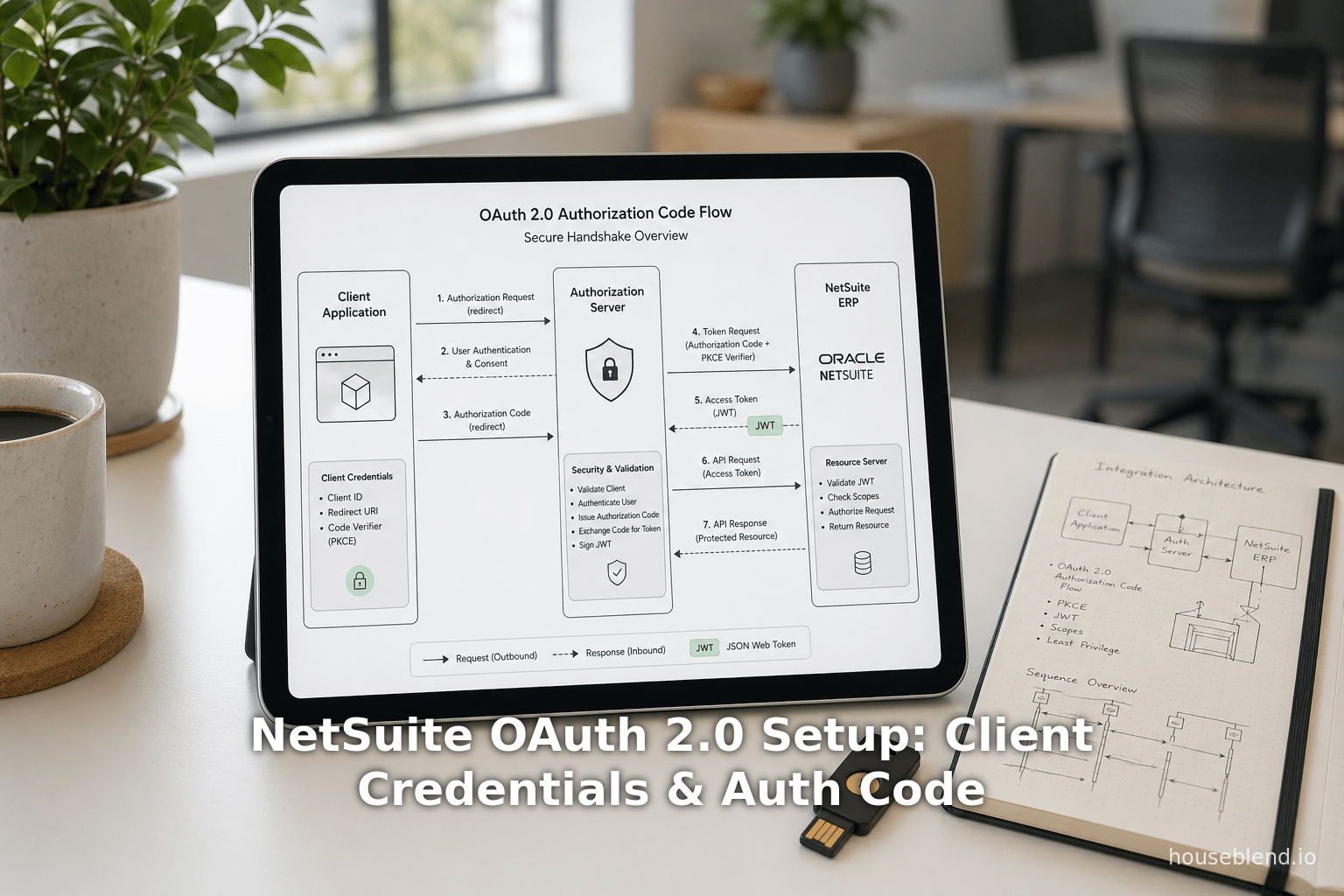
The Authorization Code Grant flow in NetSuite is a standard OAuth2 redirect-based flow [57]. In brief: the client (e.g. single-page app or web backend) redirects the user to NetSuite’s OAuth2 authorize endpoint; after login/consent, NetSuite redirects back to the client with a one-time authorization code; the client then exchanges that code at the token endpoint for its access token and refresh token [58] [59].
Step 1: Redirect User for Authorization
Build a URL to NetSuite’s authorization endpoint that includes parameters. The general pattern is:
https://<account-domain>/login/oauth2/v1/authorize?
    response_type=code
    &client_id=<CLIENT_ID>
    &redirect_uri=<YOUR_REDIRECT_URI>
    &scope=<SCOPES>
    &state=<RANDOM_STATE>
For example [60]:
GET https://company-id.app.netsuitesuiteprojectspro.com/login/oauth2/v1/authorize?
    response_type=code
    &client_id=YOUR_CLIENT_ID
    &redirect_uri=https://yourapp.com/oauth/callback
    &scope=rest_webservices+restlets
    &state=xyz123
response_type=codetells NetSuite we want an Authorization Code.client_idis the integration’s Public Key (from the Integration record).redirect_urimust exactly match a URI you entered earlier in the Integration configuration [38]. It must be HTTPS or a secure scheme, not plain HTTP.scopeenumerates the access your app is requesting. In NetSuite, the scope is a space-separated list (encoded as+). Common scopes includerest_webservices,restlets,suite_analytics, etc. [61]. NetSuite allows combining scopes (e.g.rest_webservices+restletsfor access to REST and RESTlets); however, certain scopes (like BI connector) may not be nested. See Table 1 of [4] for details.stateis a random client-generated string to prevent CSRF (you should verify it matches on callback) [62].
When the user’s browser is directed to this URL, NetSuite will require login (or SSO). After successful auth, NetSuite displays a consent page listing the scopes. Once the user clicks “Allow”, NetSuite redirects back to your redirect_uri with two query parameters: code (the authorization code) and state (copied back) [59] [15]. For example:
GET https://yourapp.com/oauth/callback?code=abcdef123456&state=xyz123
You must verify that state matches your original value; then proceed. If the user denies consent, the response will include an error parameter instead of code.
Step 2: Exchange Code for Tokens
Your server (backend) now exchanges the code for an access token and refresh token. Send a POST to NetSuite’s token endpoint:
POST https://<accountID>.suitetalk.api.netsuite.com/services/rest/auth/oauth2/v1/token
Content-Type: application/x-www-form-urlencoded
Authorization: <basic auth with client_id and client_secret>
Request parameters (in body or query string):
grant_type=authorization_codecode=<the code from Step 1>redirect_uri=<same redirect URI as before>
For example [9]:
curl 'https://<account>.suitetalk.api.netsuite.com/services/rest/auth/oauth2/v1/token?
      grant_type=authorization_code
      &code=70b827f926a512f098b1289f0991abe3c
      &redirect_uri=https://yourapp.com/oauth/callback' \
  -H 'Authorization: Basic <base64(client_id:client_secret)>' \
  -H 'Content-Type: application/x-www-form-urlencoded'
(Authorization can be sent either in an HTTP Basic header (client_id:client_secret) or in the request body as client_id and client_secret, but NetSuite docs suggest using the Authorization header [9].)
Response: NetSuite replies with JSON containing at least: access_token, refresh_token, token_type, and expires_in. Both tokens are JWTs (three-part JSON Web Tokens) [63] [6]. For example (truncated) [64]:
{
  "access_token": "eyJraWQiOiJ...IXVU0Ei...",
  "refresh_token": "eyJraWQiOiJ...JU0Ei...",
  "expires_in": 3600,
  "token_type": "Bearer"
}
- The
access_tokenis valid for 3600 seconds (60 min) [5]. After it expires, you must request a new one. - The
refresh_tokencan be used to get a fresh access token without user involvement (see next section). - Both tokens are JWTs signed by NetSuite (PS256 algorithm) [3], whose header contains a
kididentifying the signing certificate [65]. The payload includes fields likesub(user role;entity),aud(integration and company IDs),scope,iss,exp, etc. [66]. These tokens are self-contained and base64url-encoded [6] [67]; your app can decode them for debugging/inspection. NetSuite provides a public-keys endpoint (/oauth2/v1/keys) to fetch the signing keys if you need to verify them [68].
At this point you have an access token that you can present in subsequent REST API calls: e.g. include Authorization: Bearer <access_token> in SuiteTalk REST requests or RESTlet calls [69]. The token’s scopes determine what resources you can access.
Step 3: Refreshing the Access Token
Refresh token usage: When the access token expires (~60 min), use the refresh token to obtain a new one without user interaction. To refresh, send another POST to the same token endpoint, but with grant_type=refresh_token. For example:
POST https://<account>.suitetalk.api.netsuite.com/services/rest/auth/oauth2/v1/token
Authorization: Basic <base64(client_id:client_secret)>

grant_type=refresh_token
&refresh_token=<previous_refresh_token>
(Include the client credentials as above.) The response will include a new access_token (and possibly a new refresh_token). NetSuite’s documentation notes that this refresh step “is required to get a new access token after the previously issued access token has expired” [70]. In practice, upon expiry you should detect the invalid_grant error and then use the refresh token.
Refresh token lifetime: By default, refresh tokens last 48 hours for public integrations [18]. You can configure this validity (up to 720h) in the Integration record. After that window, the user must re-authorize. (For non-public (confidential) integrations, refresh tokens typically do not expire, but changing the integration or key requires rotation.). Always follow the principle of least privilege: only request scopes needed to minimize risk.
Using the Access Token
With an access token obtained, your application can call NetSuite APIs (REST or RESTlet) as the authorized user/role. For example, to get a customer via REST Web Services (SuiteTalk REST) you might do:
GET https://<accountID>.suitetalk.api.netsuite.com/services/rest/record/v1/customer/123
Authorization: Bearer <access_token>
or call a RESTlet:
GET https://<accountID>.s.restlets.api.netsuite.com/app/site/hosting/restlet.nl?script=custom_script&deploy=1&customer=123
Authorization: Bearer <access_token>
(NetSuite’s RESTlet endpoint uses a different host but same auth mechanism.) The access token encodes the user’s role and scopes, so the call will only return data that this role is allowed to see. If you receive a 401/403, it may indicate an invalid/expired token or insufficient scope.
Notes on PKCE and Public Clients
If the integration is marked “Public Client”, the auth-code flow requires PKCE (Proof Key for Code Exchange). PKCE adds code_challenge and code_verifier parameters to the flow to securely bind the authorization request and token exchange. NetSuite supports PKCE for public clients: you generate a random code verifier, hash it for code_challenge in Step 1, and then supply the original code_verifier in the token request. This prevents interception of the authorization code. (NetSuite documentation references using PKCE but details are standard OAuth2 procedure.) In short, always use PKCE for public clients, and ensure redirect URIs are exact. Failure to match the URI on exchange will cause invalid_grant errors.
Troubleshooting Authorization Code Flow
- Mismatch Redirect URI: The
redirect_uriin the token request must exactly match the one sent in Step 1. If it was not registered correctly on the Integration record, NetSuite will reject the request. - Invalid Scope: If you request invalid or unauthorized scopes, the /authorize will throw
invalid_scope. Ensure your integration record has the necessary checkboxes (RESTlets, REST Web Services, etc.) [44]. For example, to userestlets, the “RESTlets” box must be checked on the integration. - Consent Policy: If your Integration record uses “Never Ask”, the user will not see a consent screen, but make sure you understand this will auto-approve all requested scopes (except AI Connector). For “Ask First Time”, first auth requires consent; thereafter registry remembers it.
- SAML+OAuth: If your account has SAML SSO enabled, NetSuite might redirect the login to your identity provider. The OAuth flow will still work but will show the IdP’s login instead of NetSuite’s native login [62].
OAuth 2.0 Client Credentials (M2M) Flow
The Client Credentials flow is intended for server-to-server (machine-to-machine) communication. No user interaction is involved. NetSuite requires a certificate-based scheme: the client presents a JWT assertion signed by its private key. The token endpoint verifies it against the previously uploaded public certificate, then issues an access token.
Prerequisites
- Integration Record: Must have “Client Credentials (Machine to Machine) Grant” checked (see Table 2) [43].
- Mapping Created: In OAuth 2.0 (M2M) Setup, you must map the integration to a NetSuite role by uploading your public certificate [71]. (See “Certificate Mapping” above.) This binds the integration’s key pair to the given entity (user/partner) and role.
Requesting an Access Token
Once set up, the client obtains an access token by posting to the same token endpoint, but with different parameters [72]. The URL and headers:
POST https://<accountID>.suitetalk.api.netsuite.com/services/rest/auth/oauth2/v1/token
Content-Type: application/x-www-form-urlencoded
Request parameters (x-www-form-urlencoded):
grant_type=client_credentials(constant) [73].client_assertion_type=urn:ietf:params:oauth:client-assertion-type:jwt-bearer(constant) [73].client_assertion=<JWT>– a JSON Web Token signed with your private key. This JWT must include standard claims (issueriss=client_id, subjectsub=client_id, audienceaud= token endpoint URI) and be signed with PS256 using your private key. NetSuite validates the signature against the public cert you uploaded [73]. (NetSuite’s docs give guidance on building this JWT [16]; typically you can use libraries to sign a short-lived JWT.)
For example, the HTTP body might look like (URL-encoded):
grant_type=client_credentials&
client_assertion_type=urn:ietf:params:oauth:client-assertion-type:jwt-bearer&
client_assertion=eyJhbGciOiJSUzI1NiIsInR5cCI6IkpXVCIsImtpZCI6IkZpZ2lkLXJyaWxzIn0.eyJpc3MiOiJ
...<rest of JWT>...fQ.Zu4tOFQXSh7KI6p90Jq...
(Note: older NetSuite documentation example[21†L40-L48] shows FIGOFY parameters encoded.)
NetSuite responds with JSON containing the access_token, expires_in, and token_type. The access_token is again a JWT [5]. It will look similar to the Authorization Code case, e.g.:
{
  "access_token": "eyJraWQiOiJ...I0ZUY2M4In0.eyJzd...Q0I09_o4uX...",
  "expires_in": 3600,
  "token_type": "Bearer"
}
Token lifetime: Just like with Auth-Code, the access token is valid for 3600 seconds (1 hour) [5]. Crucially, no refresh token is issued in this flow. When the token expires (and future calls return invalid_grant or 401), the application must simply repeat the client-credentials flow to get a new token. NetSuite’s docs explicitly note: “When the access token expires, the token endpoint returns an invalid_grant error. The application must restart the flow.” [7]. In practice, you would loop: generate a new signed JWT assertion, POST it again, and use the new token.
Example Request/Response
Following Oracle’s guidance [74] [75], a sample POST and response (shown broken up for readability):
POST /services/rest/auth/oauth2/v1/token HTTP/1.1
Host: youracctID.suitetalk.api.netsuite.com
Content-Type: application/x-www-form-urlencoded

grant_type=client_credentials&
client_assertion_type=urn%3Aietf%3Aparams%3Aoauth%3Aclient-assertion-type%3Ajwt-bearer&
client_assertion=eyJ0eX...<signed JWT>...
Response (JSON):
{
  "access_token": "eyJraWQiOiJ...YkpZhmTrnQ",
  "expires_in": 3600,
  "token_type": "Bearer"
}
(Table 1 above and [21] describe this format.) This access_token in JWT form needs to be sent in subsequent REST API calls, just as in the code flow. It spans the scopes allowed by the Integration record.
Token Usage and Refresh
Because this flow has no refresh token, one must simply obtain a fresh access token whenever the old one expires. For long-running services, this means generating a new signed JWT every hour. However, the good news is that NetSuite certificates can have a long validity: by default, a cert is valid up to 2 years (24 × 3600h), and the system permit setting this lifespan when uploading the cert [76]. The only inconvenience is that the certificate must be first uploaded to NetSuite (as described above). Recent NetSuite 2026.1 release added a Certificate Rotation Endpoint to automate this upload process via API [8], but at least one initial upload (or rotation after expiry) must be done.
Example: Automating Onboarding
In practice, many SuiteApp vendors combine both flows: they first use the Auth Code flow in an admin-mediated step to upload their certificate, then switch to Client Credentials for ongoing access. For example, a NetSuite app can direct the customer to log in once via OAuth (with a short-lived administrator token) and use it to call the certificate rotation endpoint to upload the app’s public key. After that, the app begins using the Client Credentials flow without further user involvement [8] [9]. As one expert explains: “the Authorization Code Grant flow is usually reserved for delegated user access” (one-time admin tasks), whereas “the Client Credentials flow… is the machine-to-machine model… The connection can remain active for a maximum duration of 2 years.” [76]
Token Structure, Scopes, and Security
JWT Token Contents
Both OAuth flows yield JWTs as access (and refresh) tokens. NetSuite includes the following in each token:
-
Header: Contains
alg(always PS256) andkid(the certificate ID that signed the token) [65]. -
Payload: Common claims include:
sub: the subject in the form<entityID>;<roleID>(the user role on whose behalf the token is issued) [77].aud: the audience, listing<AppID>;<accountID>, and also includes the client ID after a comma [78].scope: a comma-separated list of granted scopes (often things likerestlets,rest_webservices,suite_analytics) [79]. NetSuite allows only certain scope values: e.g.restlets,rest_webservices, andsuite_analyticscan be combined (e.g."restlets,rest_webservices") [79]. The special scopemcp(Sandbox PCI) cannot be mixed with others.iss: the issuer, typicallyhttps://system.netsuite.com[80].exp,iat: expiration and issued-at times (UNIX epoch seconds).jti: a unique token ID.
(See Oracle’s “Access and Refresh Token Structure” for details [81] [82].)
-
Signature: PS256 signature using the RSA private key whose public cert has ID =
kid. NetSuite automatically rotates the key pair every 90 days for code-flow tokens [83].
Your application usually treats these tokens opaquely. However, you can decode and inspect them if needed (they are Base64URL-encoded) [6]. Importantly, any bearer token must be protected in transit (always use HTTPS) and at rest (encrypt or restrict). Do not log the raw token. Also, validate the exp claim before use to ensure the token is fresh.
Scopes and Permissions
The scopes requested at Step 1 (and approved by the user/admin) dictate what APIs the token can call. NetSuite’s scope model aligns with its integration permissions. For example:
rest_webservices: Access to SuiteTalk REST Web Services (CRUD on most record types). Requires that “REST Web Services” be checked on the Integration record [44].restlets: Access to any deployed RESTlet scripts. Requires “RESTlets” checked.suite_analytics: Access to SuiteAnalytics (saved searches via REST).- Additional possible scopes might include things like
mcp.
Note: The token’s effective authorization is the intersection of the scopes and the NetSuite role of the user (for code flow) or the role/entity in the mapping (for client-cred). Even if your integration is enabled for a wide scope, a token issued to a user with a narrow role will only return data that role permits [84]. This is a key security advantage of OAuth2: it delegates to NetSuite’s RBAC.
Token Storage and Refresh
Access token storage: In a web app, you typically store the access token server-side (e.g. in session or backend) and use it for each API call. Because tokens are valid only 60 min, short-lived storage (in memory or a secure cache) suffices. Refresh tokens may be stored in a secure server-side datastore if needed. For public clients, NetSuite recommends limiting refresh token lifespan [18].
Token rotation: NetSuite automatically rotates the keys (certs) used to sign tokens every 90 days [83]. This means old tokens remain verifiable via the published public keys endpoint, but it limits the risk if a signing key leaks.
Data Analysis: OAuth and API Security Context
The adoption of OAuth 2.0 in NetSuite should be seen in the context of wider API security trends. Surveys and reports highlight two realities: OAuth2 (and related methods) dominate API authentication, but security failures remain common if not implemented correctly [2] [1]. For example:
- OAuth adoption: Recent reports affirm that ~65–70% of enterprise APIs use OAuth2 or JWT tokens [1]. Technology companies routinely enforce multi-factor auth (≈87%) [85], illustrating the reliance on token-based auth.
- Security incidents: The CybelAngel API Threat Report (Feb 2025) found 99% of organizations had an API security incident in the prior year [86]. Crucially, 95% of API attacks exploited legitimate (authenticated) sessions [86]. Houseblend similarly notes that “99% of organizations report API security issues and 95% of API attacks exploit valid credentials” [2]. In other words, having an access token is not enough; stringent authorization and token hygiene are needed.
- Cost of breaches: An Akamai study (via DreamFactory) puts the average remediation cost of an API breach at $591,404 [29]. This underscores that preventing token compromise (through short lifetimes, rotation, least privilege) is financially critical.
Given these realities, NetSuite’s OAuth2 implementation offers many protective features:
- Secrets over password: Apps no longer handle user passwords; tokens can be revoked centrally.
- Short token life: Access tokens expire after 1 hour [5], minimizing exposure.
- Scopes and roles: Gates data access by integrating NetSuite’s own RBAC [84].
- Certificate use: The client-cred flow’s use of signed JWTs means attackers must possess a private key (not just steal a token).
- Rotation APIs: NetSuite provides REST endpoints for listing/uploading/revoking client certificates [25], enabling automated rotation. For example, as of July 2023, NetSuite added REST endpoints at
/services/rest/auth/oauth2/v1/clients/{client_id}/certificatesto manage certificates [25]. Pairing this with the ability to programmatically obtain an access token (via auth code) means a robust CI/CD approach to credential rotation.
However, OAuth also introduces new pitfalls. Misconfigured scopes can lead to overprivileged tokens (e.g. requesting rest_webservices when only custom restlets are needed). Public clients must use PKCE or else are vulnerable to code interception. Refresh tokens must be safeguarded on the server side. Administrators need to secure the “Authorized Applications Management” role and use 2FA, since that role can reconfigure all OAuth apps [33]. NIST and OWASP emphasize these issues: “login by OAuth does not guarantee authorization” – one must enforce fine-grained checks (e.g. ensure the token’s scope covers only needed actions) [2].
Case Study: Customer Portal with OAuth2
As an illustrative example, consider building a customer self-service portal integrated with NetSuite REST APIs (as described by Houseblend [87] [88]). In this scenario, the portal’s users are customers who have a NetSuite “Customer Center” or similar role. The integration can use the Authorization Code flow so that each user logs into NetSuite to access only their own data:
- The portal (React app with Node.js backend) redirects the user to NetSuite’s OAuth2 authorize URL [60]. The user logs in with their NetSuite credentials (or SSO), sees a consent screen for the portal app, and clicks Allow.
- NetSuite issues a code and redirects back. The portal server exchanges it for tokens. The access token’s
subwill indicate that user’s specific record (e.g. Customer role, entity) [77]. - The portal backend uses that access token to make SuiteTalk REST calls (e.g. GET
/customer/…) on behalf of the user [89] [84]. NetSuite enforces that the token can only fetch the customer’s own records, because of the combination of role and scopes.
Houseblend notes several advantages of this setup [13] [90]: “instead of the portal storing usernames/passwords, OAuth2 uses access tokens… This greatly enhances security – the portal never sees the user’s password and tokens can be scoped and short-lived.” Compared to NetSuite’s older TBA (OAuth1) or Basic Auth, OAuth2 is simpler (no request signing) and avoids raw credentials [12] [90]. In practice, a customer portal should strongly prefer this per-user OAuth2 flow rather than using one service account for all calls, because it leverages NetSuite’s data segregation model [84] [91].
A machine-to-machine case is the scenario of integrating two backend services. For instance, a vendor’s CRM system might push orders into NetSuite on a scheduled basis. That system would use the Client Credentials flow: it would use a signed JWT at the token endpoint to fetch a short-lived access token [92]. Newark’s blog by Martinek describes using this flow for automated SuiteApp connectors, noting you can generate a certificate once and the token can be valid up to 2 years [17].
Another example of combining flows is in customer onboarding. A SaaS publisher might want to automate setup when a new customer signs up. Bundlet (April 2026) describes a best practice: use the Auth Code flow to obtain a one-hour admin token via the customer’s consent [93]. During that short session, run a script that uses the Certificate Rotation Endpoint to upload the client’s public key, establishing the long-term Client Credentials mapping [8] [93]. This lets the app finish installation (including generating webhooks, customizations, etc.) with temporary full privileges, then switch to using its 2-year certificate-based token for day-to-day sync. This hybrid approach “significantly reduces manual touchpoints” in the integration process [8] [93].
Best Practices and Security Considerations
Based on NetSuite and industry guidance, here are some best practices and tips:
- Use least-privilege roles. Assign the smallest role (permissions only to needed records) to any NetSuite user associated with the integration. Similarly, do not enable unnecessary scopes on the Integration record.
- Treat client secrets and certificates as assets. Store the OAuth client secret (for confidential apps) securely (e.g. in Vault or encrypted config). Likewise, protect your private key for client-cred flow. NetSuite displays the secret only once [47], so save it safely. If leaked, regenerate promptly.
- Secure the key rotation process. If using the certificate rotation API, ensure only a final customer user with Manage own OAuth2 certificates permission (or equivalent) can call it. Use HTTPS and include the current access token in that call to prove identity [8].
- Monitor token usage and logs. NetSuite’s OAuth 2.0 Authorized Applications Management page shows active tokens and permits revoking them. Monitoring this can catch anomalies. Also review SuiteCloud logs or Web Services Usage logs for unusual token activity.
- Use MFA. Especially for roles that manage credentials, require two-factor login as mandated by NetSuite for “Authorized Applications Management” [94].
- Follow token rotation. For Client-Credentials certificates, set long validity (up to 2 years [76]) but schedule their rotation before expiry. For public clients with refresh tokens, minimize validity if high risk (the default 48h is reasonable).
- PKCE for Public Clients. If your app is public (mobile, desktop), use PKCE: generate a secure code verifier and include its SHA256 as
code_challengein step 1, then send thecode_verifierin step 2. This prevents attacks on the code grant. - No HTTP, always HTTPS. Ensure all endpoints (authorize, token, API calls) use TLS. The Integration record only accepts https redirect URIs [95].
Discussion and Future Directions
Multiple perspectives: From a developer’s point of view, OAuth2 replaces tedious signed requests and password juggling with a more standard, token-based flow [90]. For administrators, OAuth2 introduces some complexity (configuring roles/scopes and certificates), but yields auditability and central control – tokens can be revoked without changing user passwords. From a security standpoint, OAuth2 aligns with Zero Trust: applications prove identity (via tokens) rather than carrying user login info.
Empirical evidence: Industry data shows OAuth2 dominance but also ongoing risks. For example, DreamFactory reports ~95% of authenticated sessions are exploited in breaches [1]. This suggests that simply switching to OAuth2 is not a panacea; one must also enforce proper permission checks. In NetSuite’s case, this means carefully designing integration roles. Bundlet stresses (with reason) that the Authorization Code Grant should be kept short-lived and limited, using the minimum required role for the shortest time [93]. A 60-minute admin window for onboarding is far safer than a permanent admin token. The client credentials approach, while powerful, should rely on least-privilege “integration user” roles and technical safeguards (certs).
NetSuite roadmaps: Oracle continues to enhance its OAuth2 support. Recent updates include:
- Certificate APIs: As of mid-2023, API endpoints allow listing, uploading, and revoking M2M certificates [25]. And in late 2025/’26, NetSuite added a "Certificate Rotation" endpoint that lets an OAuth-authenticated client upload its own public key [8]. This allows fully automating the client credentials setup.
- Role-Based Access Control: Future improvements may include more granular OAuth scopes, or linking OAuth apps to composite roles. Integrations may soon be able to specify dynamic scopes based on script logic.
- OIDC and SSO: NetSuite already supports acting as an OIDC provider for SSO, and can fit into enterprise Identity ecosystems. While OAuth2 in NetSuite is currently for API access, the convergence of OAuth and OpenID Connect (for federated login) may yield further synergy (e.g. allowing third-party IdPs to issue NetSuite OAuth tokens).
- Developer Experience: We anticipate tools to streamline dynamic client registration, GUI wizards, and sample code. The SuiteCloud SDK’s move to OAuth2 [10] indicates Oracle will likely provide richer CLI and SuiteScript APIs to perform OAuth operations.
- Standards Evolution: OAuth2.1 and OAuth for Browser-Based Apps (improved PKCE, removal of implicit flow) are becoming standards. NetSuite already discourages any use of unsafe flows; we expect full PKCE support (it already works for public clients) and deprecation of any legacy (implicit) flows in favor of best practices.
Long-term implications: Secure, token-based integration paves the way for advanced integration patterns. For instance, facilities like delegate admins, short-lived burst credentials, or token introspection (if NetSuite were to support it) could appear. The industry is also moving toward passwordless and continuous authentication [11]; in the future NetSuite’s OAuth might integrate with device or biometric attestation (e.g. passing a user’s passkey actual credential as part of the Auth flow).
In summary, NetSuite’s embrace of OAuth2 aligns with global best practices and user demands for security. Organizations should treat OAuth2 setup as a project: audit roles, plan token lifetimes, and test flows thoroughly. As the platform evolves, staying current with NetSuite release notes on OAuth features (like certificate rotation and dynamic registration) will ensure integrations remain secure and smooth.
Conclusion
OAuth 2.0 in NetSuite is now the cornerstone of modern integration. We have detailed step-by-step how to set up and use the Authorization Code and Client Credentials flows, including table summaries, examples, and references. Our analysis shows that while OAuth2 significantly improves security and user experience over older methods [90] [10], it must be implemented with care: proper roles, scopes, and token handling are essential to avoid introducing new vulnerabilities. By leveraging NetSuite’s features (short token lifetimes, RBAC, certificate rotation) and following best practices, organizations can securely integrate applications and services.
Going forward, expect NetSuite to continue enhancing its OAuth support (driven by the industry trend of OAuth2 adoption [1] and critical API security concerns [2]). For example, automating certificate management and refining OAuth client registration will reduce the manual effort. Security research highlights that the vast majority of API attacks occur within valid credentials [2], meaning enterprises must maintain vigilance even with OAuth2. In NetSuite, this means regularly reviewing authorized applications and roles, rotating keys, and staying on top of patch notes.
Ultimately, OAuth2 empowers NetSuite customers to safely delegate access. As one expert notes, it establishes a clear separation between “authentication (proving identity) and authorization (granting API access)”, enabling use cases (like customer portals) that simply were not practical under basic auth [96] [90]. With OAuth2 correctly deployed, NetSuite can integrate with other systems in a scalable, auditable, and secure manner.
References: We have drawn on official NetSuite documentation [19] [72], Oracle developer blogs [9] [33], community guides [13] [97], and industry reports [2] [1]. These sources collectively affirm the practices and data presented here.
External Sources (97)
About
Houseblend
HouseBlend.io is a specialist NetSuite™ consultancy built for organizations that want ERP and integration projects to accelerate growth—not slow it down. Founded in Montréal in 2019, the firm has become a trusted partner for venture-backed scale-ups and global mid-market enterprises that rely on mission-critical data flows across commerce, finance and operations. HouseBlend’s mandate is simple: blend proven business process design with deep technical execution so that clients unlock the full potential of NetSuite while maintaining the agility that first made them successful.
Much of that momentum comes from founder and Managing Partner Nicolas Bean, a former Olympic-level athlete and 15-year NetSuite veteran. Bean holds a bachelor’s degree in Industrial Engineering from École Polytechnique de Montréal and is triple-certified as a NetSuite ERP Consultant, Administrator and SuiteAnalytics User. His résumé includes four end-to-end corporate turnarounds—two of them M&A exits—giving him a rare ability to translate boardroom strategy into line-of-business realities. Clients frequently cite his direct, “coach-style” leadership for keeping programs on time, on budget and firmly aligned to ROI.
End-to-end NetSuite delivery. HouseBlend’s core practice covers the full ERP life-cycle: readiness assessments, Solution Design Documents, agile implementation sprints, remediation of legacy customisations, data migration, user training and post-go-live hyper-care. Integration work is conducted by in-house developers certified on SuiteScript, SuiteTalk and RESTlets, ensuring that Shopify, Amazon, Salesforce, HubSpot and more than 100 other SaaS endpoints exchange data with NetSuite in real time. The goal is a single source of truth that collapses manual reconciliation and unlocks enterprise-wide analytics.
Managed Application Services (MAS). Once live, clients can outsource day-to-day NetSuite and Celigo® administration to HouseBlend’s MAS pod. The service delivers proactive monitoring, release-cycle regression testing, dashboard and report tuning, and 24 × 5 functional support—at a predictable monthly rate. By combining fractional architects with on-demand developers, MAS gives CFOs a scalable alternative to hiring an internal team, while guaranteeing that new NetSuite features (e.g., OAuth 2.0, AI-driven insights) are adopted securely and on schedule.
Vertical focus on digital-first brands. Although HouseBlend is platform-agnostic, the firm has carved out a reputation among e-commerce operators who run omnichannel storefronts on Shopify, BigCommerce or Amazon FBA. For these clients, the team frequently layers Celigo’s iPaaS connectors onto NetSuite to automate fulfilment, 3PL inventory sync and revenue recognition—removing the swivel-chair work that throttles scale. An in-house R&D group also publishes “blend recipes” via the company blog, sharing optimisation playbooks and KPIs that cut time-to-value for repeatable use-cases.
Methodology and culture. Projects follow a “many touch-points, zero surprises” cadence: weekly executive stand-ups, sprint demos every ten business days, and a living RAID log that keeps risk, assumptions, issues and dependencies transparent to all stakeholders. Internally, consultants pursue ongoing certification tracks and pair with senior architects in a deliberate mentorship model that sustains institutional knowledge. The result is a delivery organisation that can flex from tactical quick-wins to multi-year transformation roadmaps without compromising quality.
Why it matters. In a market where ERP initiatives have historically been synonymous with cost overruns, HouseBlend is reframing NetSuite as a growth asset. Whether preparing a VC-backed retailer for its next funding round or rationalising processes after acquisition, the firm delivers the technical depth, operational discipline and business empathy required to make complex integrations invisible—and powerful—for the people who depend on them every day.
Disclaimer
This document is provided for informational purposes only. No representations or warranties are made regarding the accuracy, completeness, or reliability of its contents. Any use of this information is at your own risk. Houseblend shall not be liable for any damages arising from the use of this document. This content may include material generated with assistance from artificial intelligence tools, which may contain errors or inaccuracies. Readers should verify critical information independently. All product names, trademarks, and registered trademarks mentioned are property of their respective owners and are used for identification purposes only. Use of these names does not imply endorsement. This document does not constitute professional or legal advice. For specific guidance related to your needs, please consult qualified professionals.