Houseblend Article
NetSuite 2026.2 RCCP Setup Guide: Rough-Cut Capacity Planning
How to set up NetSuite Rough-Cut Capacity Planning in 2026: the new native 2026.2 RCCP feature versus the legacy Advanced Manufacturing RCP module, work center capacity fields, and MRP integration steps.

Inside this article
- 01Executive Summary
- 02Introduction and Background
- 03What Is Rough-Cut Capacity Planning? Definition and Planning Hierarchy
- 04Where RCCP Sits Relative to MPS, MRP, and BOM
- 05How Other ERP Platforms Handle Rough-Cut and Aggregate Capacity Planning
- 06NetSuite's Two Capacity Planning Systems: Native RCCP and Advanced Manufacturing RCP
- 07Native Rough-Cut Capacity Planning in NetSuite 2026.2: Account-Verification Required
- 08Prerequisite: Supply Planning and MRP Must Already Be Configured
- 09Reported Native RCCP Controls: Verify Before Configuration
- 10Setting Up Rough Cut Capacity Planning in Advanced Manufacturing (Legacy Module)
- 11Step 1: Install the Advanced Manufacturing SuiteApp and Create Standard Work Centers
- 12Step 2: Create Advanced Manufacturing Work Centers with an Exact 1-to-1 Name Mapping
- 13Step 3: Complete the RCP Parameters Subtab
- 14Step 4: Build an RCP Plan
- 15Step 5: Generate and Interpret Capacity Planning Reports
- 16Work Center Capacity Setup and Common Configuration Pitfalls
- 17Data Analysis and Evidence
- 18Manufacturing Capacity Utilization: The Macro Backdrop
- 19Manufacturer Sentiment: The NAM Q1 2026 Outlook Survey
- 20The Cloud ERP Market NetSuite Competes In
- 21Oracle's Cloud Applications Financials
- 22Case Studies and Real-World Examples
- 23Second Skin: Rough-Cut Capacity Planning for Custom Medical Garment Manufacturing
- 24Bonemasters: Doubling Production Capacity While Maintaining Batch-Level Traceability
- 25Radio Flyer: Real-Time MRP After Migrating from JD Edwards
- 26Dansons: Standardizing Work Order and Production Costing Across Multiple Plants
- 27Fulton Industries: Replacing Manual Lead-Time and Scheduling Estimates
- 28JonnyPops and Lightspeed: MRP and Demand-Driven Planning as the Foundation Beneath RCCP
- 29Implications and Future Directions
- 30Frequently Asked Questions (FAQs)
- 31Conclusion
NetSuite 2026.2 RCCP Setup Guide: Rough-Cut Capacity Planning
Executive Summary
Rough-Cut Capacity Planning (RCCP) is the manufacturing-planning step that checks whether a factory has enough labor and machine hours to execute a production schedule before that schedule is committed. Oracle NetSuite shipped a native RCCP feature in its 2026.2 release, which Terillium, a NetSuite implementation partner, describes as allowing "planners to compare required labor and machine capacity against available work center capacity" [1]. The rollout is happening in phases between August and October 2026, and Oracle's own Help Center confirms the enhancements are "not available until your account is upgraded to NetSuite 2026.2" [2].
This report distinguishes two separate capacity-planning systems that coexist inside NetSuite, a distinction most vendor and partner summaries blur together. The first is the new, native RCCP feature: it requires no separate SuiteApp, works by adding total machine and labor capacity fields to standard Work Center records and an Include in RCCP checkbox (unchecked by default) to Supply Plan Definition records, which triggers RCCP processing automatically after Material Requirements Planning (MRP) completes successfully [3]. The second is the older Advanced Manufacturing SuiteApp's Rough Cut Capacity Planning (RCP), a paid, separately installed add-on built on a required 1-to-1 name mapping between standard Work Centers and Advanced Manufacturing Work Centers [4].
Both systems address a real, documented gap: NetSuite practitioners on Reddit report that core NetSuite "does not respect capacity constraints. It will generate the work orders irrespective of work center considerations" [5], which is precisely the blind spot RCCP is designed to close. Setup for the native feature is comparatively light: populate Work Center capacity fields, check the Include in RCCP box, run MRP, then filter the resulting RCCP report by subsidiary, location, work center, date range, assembly item, or supply plan definition, viewed in daily, weekly, or monthly buckets [6]. Advanced Manufacturing setup is considerably heavier, requiring a separately installed SuiteApp [7], a documented RCP Parameters subtab with Machine Count, Head Count, and Hours Per Day fields, and at minimum View permission to employee records, gated behind SuitePeople HR provisioning [8].
The context for this launch is a manufacturing sector operating well under theoretical maximum output: the Federal Reserve's July 2026 G.17 release put total US industrial capacity utilization at 76.1% and manufacturing-specific utilization at 75.7% for June 2026 [9], and the National Association of Manufacturers' Q1 2026 outlook survey of 240 manufacturers found trade uncertainty was the single most cited business challenge, named by 70.6% of respondents [10]. Against that backdrop, Oracle reports NetSuite now serves more than 44,000 customers across 220 countries, up from more than 43,000 ten months earlier [11] [12], and the global cloud ERP market is projected by MarketsandMarkets to grow from $87.73 billion in 2024 to $172.74 billion by 2029 [13]. Oracle's aggregate Cloud Applications segment, which includes NetSuite, posted $15.9 billion in revenue for fiscal year 2026, up 11% [14]. Real-world adopters, including Second Skin, Bonemasters, and Radio Flyer, illustrate the payoff of disciplined capacity and MRP setup, with Radio Flyer alone reporting roughly a 70% cut in EDI processing time after its NetSuite migration [15]. The remainder of this report documents Advanced Manufacturing RCP setup and identifies the native 2026.2 details that require account-specific Oracle verification.
Introduction and Background
Manufacturers rarely fail because they lack demand; they fail because they commit to schedules their shop floor cannot physically execute. Rough-Cut Capacity Planning (RCCP) is the planning discipline built to catch that mismatch early, before a Master Production Schedule (MPS) is locked in, by comparing aggregate labor and machine capacity requirements against what a work center can actually deliver. It sits above the more granular Capacity Requirements Planning (CRP) step and works alongside Material Requirements Planning (MRP), the process that converts a production plan into specific component and material orders.
Until NetSuite's 2026.2 release, this comparison inside NetSuite required either manual spreadsheet work or purchasing the Advanced Manufacturing SuiteApp, a separately licensed and installed add-on. Oracle's 2026.2 release notes address this gap directly under the "Manufacturing" feature area, alongside other manufacturing changes such as zero-quantity component handling and Advanced Bill of Materials (ABOM) storage updates [6].
This report is a setup and reference guide for both of NetSuite's rough-cut capacity planning systems, written for supply chain managers, NetSuite administrators, and manufacturing operations leads evaluating whether, and how, to turn RCCP on. It first defines RCCP in the vocabulary of the broader manufacturing-planning hierarchy (MPS, MRP, CRP), and shows briefly how SAP, Microsoft Dynamics 365, and Oracle Fusion Cloud handle the same problem, so NetSuite's approach can be judged in context. It documents the established Advanced Manufacturing RCP configuration step by step from Oracle help documentation. For native RCCP reported for 2026.2, it identifies the public-documentation gap and directs administrators to verify the feature's account-specific controls and behavior before production use. A dedicated section addresses Work Center capacity setup specifically, since a misconfigured Work Center record is the single most common cause of an unreliable RCCP report, a partner blog bluntly summarized as: "if they are empty or wrong, the report is confidently wrong" [16]. Quantitative context, seven named case studies of NetSuite manufacturing customers, and forward-looking implications close out the report, with the goal of giving a reader who has never opened NetSuite's manufacturing module a source-verified explanation of the planning concepts and the documented Advanced Manufacturing RCP configuration, while identifying native 2026.2 RCCP details that require account-specific Oracle verification.
What Is Rough-Cut Capacity Planning? Definition and Planning Hierarchy
The APICS/ASCM Definition and the Four-Level Capacity Hierarchy
The standard reference definition of RCCP comes from the dictionary maintained by the Association for Supply Chain Management (ASCM, formerly APICS), which defines it as "the process of converting the master production schedule into requirements for key resources" [17]. The same dictionary places capacity management on a four-level hierarchy: "resource planning, rough-cut capacity planning, capacity requirements planning, and input/output control" [17]. RCCP sits second from the top: broader and faster than detailed CRP, but more specific than long-range resource planning.
Critically, passing an RCCP check is not a guarantee. The ASCM dictionary explicitly notes that "rough-cut capacity planning may indicate that sufficient capacity exists to execute the MPS" even when a later, more granular pass finds otherwise [17]. That is because RCCP works at an aggregate level, typically bill-of-resources or key-work-center hours, while Capacity Requirements Planning (CRP) works from the shop floor up: "open shop orders and planned orders in the MRP system are input to CRP" [17], meaning CRP consumes MRP's detailed output while RCCP consumes only the MPS. In practice this means RCCP is a fast, directional check run before a schedule is committed, and CRP is the detailed, resource-by-resource validation run after work orders exist.
Where RCCP Sits Relative to MPS, MRP, and BOM
The UK's Chartered Institute of Procurement & Supply (CIPS) frames the Master Production Schedule as the anchor of the entire chain: it "drives the entire MRP system" [18], and defines MRP itself as "a planning and decision-making tool" that reconciles inventory, production capacity, and forecasted needs [18]. A Columbia University production-management course describes MRP's three defining inputs as the master production schedule, the Bill of Materials (BOM) or product structure, and inventory status records, an architecture especially suited to manufacturing where component demand is derived, not independently forecast [19]. CIPS separately distinguishes aggregate, organization-wide capacity planning from a narrower "review of a 2 to 18 month demand forecast" typical of shorter-term capacity requirement planning [20].
Put in sequence: an MPS states what will be built and when; MRP explodes that MPS through the BOM into material and component orders; RCCP checks the MPS against aggregate labor and machine capacity before those orders are released; CRP checks the resulting, detailed work orders against specific work-center hours. NetSuite's native 2026.2 RCCP feature deliberately wires itself into this sequence at the MRP boundary: NetSuite "starts RCCP processing after Material Requirements Planning completes successfully" [6], rather than being a fully independent, pre-MPS check. This same aggregate-versus-detailed logic recurs across the industry: ASCM's dictionary treats capacity requirements planning as the downstream, order-by-order pass that follows an aggregate RCCP or Bill-of-Resources check, not a substitute for it [17].
How Other ERP Platforms Handle Rough-Cut and Aggregate Capacity Planning
NetSuite is not alone in treating capacity as a distinct planning layer. SAP documentation describes its rough-cut planning profile as "designed to give you an aggregate view on your resources" [21], configured directly "from the standard SOP or flexible planning menu" (Sales and Operations Planning), tying capacity checks to the same level where the master schedule itself is built [22].
Microsoft Dynamics 365 Supply Chain Management takes a binary approach at the scheduling layer instead of a dedicated RCCP module: "infinite capacity" scheduling "introduces scheduling that is based on route information" without checking resource limits at all [23], while its "finite capacity" mode pushes delivery dates out when a resource is overbooked, since "the delivery date is pushed out, and the job is scheduled when there's enough capacity" [24]. Microsoft's documentation notes finite capacity has to be turned on at three separate levels, globally, per master plan, and per resource, before it takes effect [24], a layered enablement pattern conceptually similar to NetSuite's own "opt-in at the Work Center, opt-in at the Supply Plan Definition" model.
Oracle Fusion Cloud SCM (Oracle's separate, larger supply-chain-management cloud, distinct from NetSuite) uses a "Bill of Resources" and Bottleneck/Critical Component attribute system for aggregate planning, flagging constrained resources and critical assemblies so planners can concentrate a rough-cut check on the items and work centers most likely to gate the schedule [25]. Table 1 below places these approaches, plus NetSuite's two systems, side by side.
| ERP Platform | Capacity Planning Construct | Mechanism |
|---|---|---|
| NetSuite (native, 2026.2) | Rough-Cut Capacity Planning (RCCP) | Work Center capacity fields plus an "Include in RCCP" flag on Supply Plan Definitions, triggered automatically after MRP [3] |
| NetSuite (Advanced Manufacturing SuiteApp) | Rough Cut Capacity Planning (RCP) | Separate RCP plan run against a Plan Type (Work Orders, Sales Orders, or Demand Plan), using RCP Parameters set on mapped Advanced Manufacturing Work Centers |
| SAP S/4HANA | Rough-Cut Planning Profile | Aggregate resource view configured from the Sales and Operations Planning (SOP) menu [21] |
| Microsoft Dynamics 365 SCM | Infinite vs. Finite Capacity Scheduling | Binary scheduling mode toggled globally, per plan, and per resource; finite mode pushes dates out when capacity is exhausted [24] |
| Oracle Fusion Cloud SCM | Bill of Resources | Aggregate resource/item statement with explicit Bottleneck and Critical Component attribute flags [26] |
Table 1 shows that ERP platforms use different mechanisms and setup burdens for aggregate capacity planning. NetSuite's documented Advanced Manufacturing RCP is a separately installed SuiteApp; the public material reviewed here does not establish native 2026.2 RCCP licensing, setup burden, or permissioning.
NetSuite's Two Capacity Planning Systems: Native RCCP and Advanced Manufacturing RCP
Any NetSuite administrator researching "RCCP setup" first needs to determine which of two distinct systems applies to their account, because the setup steps, prerequisites, and cost do not overlap.
Native RCCP, introduced in the 2026.2 release, requires no separate SuiteApp installation. It is documented under the general "Manufacturing" feature area of the 2026.2 release notes rather than under Advanced Manufacturing, and its mechanics were confirmed against Oracle's Help Center chapter for the 2026.2 release notes, which states the notes "summarize the changes to NetSuite between NetSuite 2026.2 and the previous release" [2]. As of this report's publication in August 2026, Oracle had not yet published a standalone, dedicated RCCP help topic separate from the release notes themselves, a gap consistent with a feature still rolling out; one partner blog explicitly caveats its own 2026.2 analysis as based on "release notes for 2026.2, which every page marks as subject to change" ahead of general availability [16].
Advanced Manufacturing RCP predates 2026.2 by years and is a fundamentally different product: it is an installable SuiteApp, and Oracle's own documentation is unambiguous that "to set up Advanced Manufacturing, you must install the Advanced Manufacturing SuiteApp" [7], extending "your NetSuite manufacturing routing into the Advanced Manufacturing Work Bench" [27]. A NetSuite partner guide frames Advanced Manufacturing as the top tier of three progressively deeper manufacturing capability levels available in NetSuite, noting the platform "offers three manufacturing tiers, allowing you to start with what you need and scale" [4], with Advanced Manufacturing sitting above base Work Orders and Assemblies and above WIP and Routings.
The distinction matters operationally, not just administratively. Advanced Manufacturing access is gated behind employee-record permissions: Oracle documentation states plainly, "to access Advanced Manufacturing, you must have at least View permission to an employee record" [28], and that permission model, called Advanced Employee Permissions, is "available only for accounts with SuitePeople HR provisioned" [8], meaning an unrelated HR module can become a hard prerequisite for capacity planning. By contrast, a summary of the native RCCP feature notes that Oracle's own release-notes source material "does not specify particular permissions required to use the new RCCP feature" [3], a gap this report flags rather than guesses at. Organizations already running Advanced Manufacturing for its finite scheduling and shop-floor execution capabilities, of the kind reflected in the "three manufacturing tiers" framing above [4], are unlikely to abandon it for the lighter native feature; organizations that never adopted Advanced Manufacturing, and simply want a directional check that MRP-driven planned work orders do not overload a work center, are the more likely audience for native RCCP.
Native Rough-Cut Capacity Planning in NetSuite 2026.2: Account-Verification Required
Release-status note: Oracle's public 2026.2 release-notes landing page confirms that enhancements are unavailable until an account is upgraded [2]. Public Oracle material reviewed for this article does not provide a standalone RCCP help topic or substantiate the specific field labels, report filters, processing behavior, permissions, licensing, or configuration sequence. Do not use the following background as production setup instructions; confirm every operational detail in the upgraded account and account-specific Oracle documentation before configuring or relying on the feature.
Prerequisite: Supply Planning and MRP Must Already Be Configured
Native RCCP is not a standalone module; it is a downstream check on an MRP run, so Supply Planning has to be functioning first. Oracle documentation describes NetSuite's supply planning as using "sales order details to generate dependent demand for work order components" and requires activating a chain of dependent features, most centrally the Material Requirements Planning feature, which Oracle's setup documentation describes as needed "to activate the supply planning feature" itself [29], alongside Locations, Multi-Location Inventory, Assembly Items, Advanced Bills of Materials, Work Orders, and Advanced Inventory Management. A Supply Plan Definition record, which Oracle describes as providing "a permanent holding place for your planning criteria and planning results" [30], must exist and be run before RCCP has anything to evaluate. Oracle's own performance testing found large planning horizons can strain MRP: "internal testing has shown that MRP may fail when using a planning horizon of 730 days and 100,000 item-locations but completes successfully when reduced to 400 days" [31], a practical ceiling worth respecting before layering RCCP on top of an already-large MRP run.
Reported Native RCCP Controls: Verify Before Configuration
Native RCCP's first configuration point sits on the standard Work Center record itself, not on a separate Advanced Manufacturing object. The 2026.2 release notes state that "Work Center records now include total machine and labor capacity resource fields" [6], used directly to calculate available capacity for the RCCP report. A partner blog's caution on this step is worth repeating in spirit: an empty or incorrect capacity field produces a report that looks authoritative but is not, because "if they are empty or wrong, the report is confidently wrong" [16]. This is the same underlying Work Center object used by standard NetSuite routing and by Advanced Manufacturing, if installed, so populating it correctly benefits every downstream planning process, not RCCP alone.
Reported Supply Plan Option: Verify Before Configuration
The second configuration point is the Include in RCCP checkbox added to Supply Plan Definition records. The box "is clear by default" [6], meaning RCCP is opt-in and existing Supply Plan Definitions are unaffected until an administrator deliberately enables it. Once checked and saved, "NetSuite starts RCCP processing after Material Requirements Planning completes successfully" [3], and this connection is exclusive: a planned work order "is only included in RCCP calculations if it was created from a Supply Plan Definition with the Include in RCCP box checked" [6]. Practically, this means an organization running multiple Supply Plan Definitions, for example one per subsidiary or product line, can enable RCCP selectively rather than account-wide, which is a meaningfully lighter rollout path than installing a SuiteApp for the entire company at once.
Reported Processing and Reporting: Verify Before Configuration
Once the checkbox is set, the RCCP run happens automatically as part of the normal MRP process; there is no separate "run RCCP" button to remember. The resulting report can be filtered "by subsidiary, location, work center, date range, assembly item, supply plan definition" and other planning criteria [6], and viewed in "daily, weekly, or monthly time buckets" [6]. The report itself displays "total and required machine and labor capacity, as well as machine and labor utilization" figures [6], and planners can "refine results by resource type and utilization range to identify overloaded or underutilized work centers" [6]. For root-cause investigation, report rows can be expanded to "review related transaction details, including operation, transaction number" and start and end dates [6], which lets a planner trace an overloaded work center back to the specific planned work order driving the overload.
For native RCCP, first confirm that the account has been upgraded to 2026.2 and then validate the available setup controls, permissions, report behavior, and commercial entitlement in the account-specific Oracle release notes and the live account. Oracle publicly documents the Supply Planning prerequisites, including Material Requirements Planning, but the detailed native-RCCP setup assertions in this guide are provisional until Oracle publishes or makes available feature-specific account documentation. Advanced Manufacturing remains separately documented as an installable SuiteApp.
Setting Up Rough Cut Capacity Planning in Advanced Manufacturing (Legacy Module)
Organizations that adopted Advanced Manufacturing before 2026.2, or that need its finite scheduling and shop-floor execution features regardless of native RCCP, configure capacity planning through a materially different, older workflow.
Step 1: Install the Advanced Manufacturing SuiteApp and Create Standard Work Centers
Advanced Manufacturing must be installed as a SuiteApp before any of its capacity-planning objects exist [7], consistent with its position as the top tier of the three-tier manufacturing capability ladder a NetSuite partner guide describes [4]. Standard, non-Advanced-Manufacturing Work Centers in NetSuite are built by creating a static employee group and flagging it for manufacturing use: administrators "create work centers by creating a static group, and then identifying it as a manufacturing work center," which enables the group to be used with routing records, after which NetSuite uses the associated work calendar to schedule operation tasks [32]. This standard Work Center must exist first: Oracle's documentation states, "before you create an advanced manufacturing work center, you must create a manufacturing work center," and each Advanced Manufacturing location record must likewise have "a matching NetSuite location record with the same name" [33] [34].
Step 2: Create Advanced Manufacturing Work Centers with an Exact 1-to-1 Name Mapping
Advanced Manufacturing Work Centers are created via Advanced Manufacturing > Administration/Setup > Location Setup, editing the location, and selecting the Work Centers subtab. The mapping requirement is exact and unforgiving, down to matching field text, and a separate Oracle article reiterates, "there must be a 1-to-1 mapping between work centers" [28]. A NetSuite partner implementation guide corroborates the operational consequence of a naming mismatch: "your Advanced Manufacturing Work Centers and standard NetSuite Work Centers must have identical names and matching statuses" [4], meaning a work center accidentally left inactive in one system while active in the other will silently break capacity calculations.
Step 3: Complete the RCP Parameters Subtab
Each Advanced Manufacturing Work Center carries an RCP Parameters subtab whose fields feed the legacy capacity calculation directly. Oracle's documentation on this subtab specifies that Machine Count and Head Count must match the standard Work Center's machine and labor resource values, that Hours Per Day is the total man hours available per working day, calculated as "hours per day x head count" [35], and that Hours Per Day, Labor Hours Per Man Day, and Week Days together are approximates or averages drawn from the more detailed shop calendar settings. Oracle is explicit that these fields exist only for one purpose: "the fields are only used in capacity planning" [35], meaning they do not drive shop-floor scheduling or shop calendar behavior directly; they are a deliberately simplified snapshot for aggregate reporting.
Step 4: Build an RCP Plan
RCP plans are created at Advanced Manufacturing > Capacity Planning > Capacity Planning, and Oracle documentation defines the process as "a long term process that helps planners verify that the required capacity is available to meet production priorities" that "evaluates production demand against resource availability to report work center percentage use over a planning period" [36].
A plan's demand basis is chosen from a Plan Type list, and can draw on "open work orders in planned or released status" [36], open sales orders, or an active demand plan. Two rules govern the plan's calendar: the horizon start date must be a Monday, and planners can set a "time fence," which Oracle defines as "a boundary between planning horizon periods that helps minimize shop floor and supplier schedule disruptions" [36].
Step 5: Generate and Interpret Capacity Planning Reports
Once an RCP plan runs, results surface at Advanced Manufacturing > Capacity Planning > Capacity Planning Reports. The Units Planned metric represents the number of items to be produced in the plan, and Oracle flags a specific quirk in the Planned Machine Hours figure, noting "this number is positive even when available hours is zero" [37], a nuance planners need to know before assuming a nonzero figure implies available capacity. The Work Center Planned Production Summary report shows how often planned and actual orders have run on a work center over a period, while the Work Center Utilization by Period report lets planners review available work center hours against recorded use.
Advanced Manufacturing's setup path involves five distinct configuration layers: SuiteApp installation, standard Work Center creation, Advanced Manufacturing Work Center creation with strict name matching, RCP Parameters field entry, and RCP plan/report configuration. Access requires at least View permission to an employee record. Oracle identifies SuitePeople HR as a prerequisite for the separate Advanced Employee Permissions feature, not for Advanced Manufacturing itself.
Work Center Capacity Setup and Common Configuration Pitfalls
Table 2 below consolidates the two setup paths into a single comparison, since the answer to "how do I set up capacity planning in NetSuite" genuinely depends on which system an account is running or evaluating.
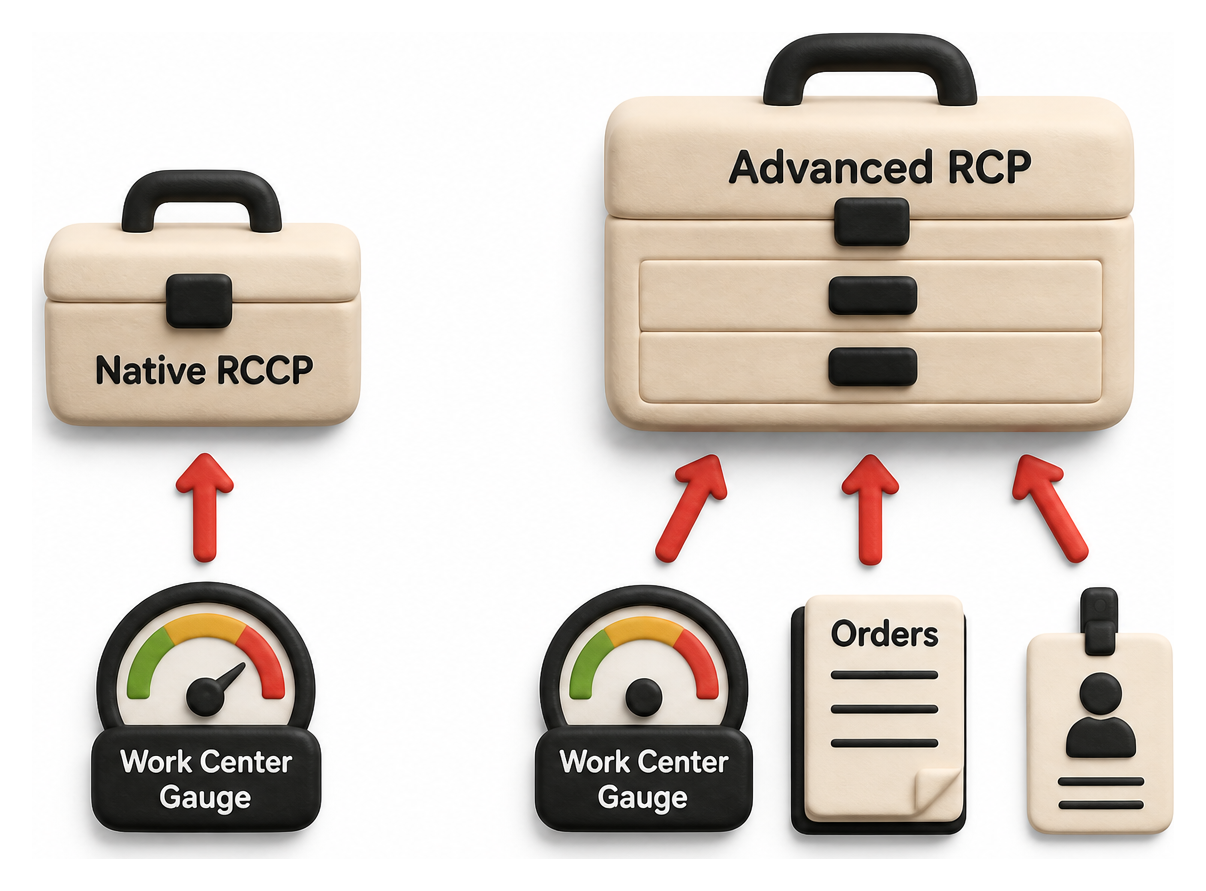
| Attribute | Native RCCP (2026.2) | Advanced Manufacturing RCP |
|---|---|---|
| Installation | Confirm availability after the account is upgraded to 2026.2 | Requires installing the Advanced Manufacturing SuiteApp |
| Primary trigger | Verify in account-specific Oracle documentation | Manual RCP plan run, based on Work Orders, Sales Orders, or a Demand Plan |
| Capacity data source | Verify in account-specific Oracle documentation | RCP Parameters subtab (Machine Count, Head Count, Hours Per Day) on the mapped Advanced Manufacturing Work Center |
| Report views | Verify in account-specific Oracle documentation | Work Center Planned Production Summary and Work Center Utilization by Period reports |
| Permission gate | Verify in account-specific Oracle documentation | At least View permission to an employee record; Advanced Employee Permissions is a separate feature available only with SuitePeople HR |
Table 2 distinguishes the documented Advanced Manufacturing RCP workflow from the native 2026.2 details that require account-specific Oracle verification. Advanced Manufacturing RCP has a documented configuration path and related scheduling and shop-floor capabilities; a work order supports full scheduling when it is in Released status.
Several practical pitfalls recur across both systems, drawn from official documentation and NetSuite practitioner discussion:
- Empty or mismatched capacity fields silently corrupt the report. Whether it is the native Work Center's total machine/labor capacity fields or the legacy RCP Parameters subtab, an unpopulated or wrong number produces an output that looks like a real utilization percentage but is not [16], a lesson echoed by manufacturers who struggled with disconnected, unreconciled legacy data before consolidating onto a single platform (Source: abvt.com.au).
- Concurrent batching only works with forward scheduling. Oracle's Advanced Manufacturing documentation states "backward scheduling doesn't work for concurrent batching. Only forward scheduling supports concurrent batching" [28].
- "Workdays" versus "calendar days" is a licensing trap, not just a settings toggle. A NetSuite practitioner on Reddit reports that running manufacturing on business workdays instead of a 7-day calendar "is incredibly frustrating that you are required to buy the project management module to run manufacturing on work days" [38]; without it, "with calendar days the MRP will tell us that we need to create a work order on a Saturday" [38].
- A committed work order becomes rigid. A separate practitioner describes standard WIP and Routing behavior once a transaction posts: "it is very rigid once you've applied a transaction to a work order" [39], meaning capacity checks are far more useful before a work order progresses than after.
- A dedicated shop-floor role often needs an additional license. Oracle documentation notes the "Specialized User: Manufacturing Operator role is not available by default in NetSuite Manufacturing" [40], requiring a separate Specialized Manufacturing Cloud Service User license on top of an active Advanced Manufacturing account.
For organizations that need finite, resource-constrained scheduling beyond what either native RCCP or Advanced Manufacturing RCP provides, the SuiteApp Marketplace lists third-party scheduling tools such as Delfoi Planner, built specifically as a NetSuite-integrated finite scheduler, as an option worth evaluating alongside NetSuite's own capacity tools [41].
Data Analysis and Evidence
Manufacturing Capacity Utilization: The Macro Backdrop
RCCP exists to prevent overcommitting capacity, and the macroeconomic backdrop shows why that discipline matters even when overall plants are running under, not over, their theoretical maximum. The Federal Reserve's G.17 Industrial Production and Capacity Utilization release for June 2026, published July 17, 2026, reports total industry capacity utilization "unchanged at 76.1 percent" [9] and manufacturing-specific utilization "edged down 0.1 percentage point to 75.7 percent in June" [9]. Utilization sitting roughly 20 to 25 points below full theoretical capacity does not mean capacity planning is unnecessary; it means the constraint is rarely factory-wide and almost always localized to specific bottleneck work centers, exactly the kind of localized overload that an aggregate, factory-wide utilization statistic cannot reveal but a Work Center level RCCP report can.
Manufacturer Sentiment: The NAM Q1 2026 Outlook Survey
The National Association of Manufacturers' Q1 2026 Manufacturers' Outlook Survey, fielded "Feb. 10 to 26, 2026," drew "240" responses [10], published March 12, 2026. Trade uncertainty topped the list of business challenges, with "70.6% of manufacturers" citing it as their top concern, running close behind rising health care and insurance costs [10]. Volatile input costs and uncertain trade policy both make production schedules harder to commit to with confidence, which is precisely the environment in which a fast, directional RCCP check, rather than a slow, fully detailed CRP pass, has the most value: it lets planners re-validate capacity quickly as demand assumptions shift, the same underlying rationale CIPS gives for keeping short-horizon capacity requirement reviews to a 2 to 18 month window rather than a single static annual plan [20].
The Cloud ERP Market NetSuite Competes In
MarketsandMarkets projects the global cloud ERP market to grow "from USD 87.73 billion in 2024 to USD 172.74 billion by 2029," implying roughly a 14.5% compound annual growth rate over the period [13], with a 2025 market size estimate of "USD 102.30 Billion" [13]. North America alone "accounted for a 39.1% revenue share in 2024" [13]. NetSuite operates inside that growing market at meaningful scale: Oracle's own July 2026 announcement states NetSuite is "relied on by more than 44,000 customers in 220 countries and dependent territories" [11], up from "more than 43,000 customers" in Oracle's October 2025 partner-program announcement [12], roughly a thousand-customer net gain over ten months.
Oracle's Cloud Applications Financials
Oracle no longer breaks out NetSuite revenue as a standalone line item in its headline earnings; NetSuite now reports inside Oracle's aggregate "Cloud Applications (SaaS)" segment. For the quarter ended May 31, 2026, Oracle reported "Q4 Cloud Apps (SaaS) Revenue $4.1 billion, up 10% USD" [14], and for the full fiscal year, "FY 2026 Cloud Apps (SaaS) Revenue $15.9 billion, up 11% USD" [14]. Oracle's contracted backlog is far larger still: "Remaining Performance Obligations, or RPO, ended the quarter at $638 billion" [14], a figure dominated by Oracle Cloud Infrastructure commitments rather than NetSuite specifically, but indicative of the parent company's overall financial scale behind continued NetSuite investment. On pricing, NetSuite has never published fixed list prices; an archived snapshot of NetSuite's own pricing page confirms the model is subscription based: "users subscribe to NetSuite for an annual license fee" [42], built from a base platform fee plus optional modules and user counts rather than a public per-seat rate card, a pattern that extends to Advanced Manufacturing licensing as well.
Case Studies and Real-World Examples
Second Skin: Rough-Cut Capacity Planning for Custom Medical Garment Manufacturing
Second Skin, a Perth headquartered manufacturer, is described by implementation partner OneKloudX as "a manufacturer specialising in custom-made Burnt Trauma and Neuro garments" (Source: onekloudx.com.au), a roughly 50-employee medical device business making custom compression garments and splints. The company deployed "NetSuite Manufacturing SuiteSuccess Standard including Advanced Manufacturing" to replace an in-house, CRM-derived production system (Source: onekloudx.com.au). The case study describes a direct, named use of rough-cut capacity planning: "with rough-cut capacity planning and visual scheduling tools, Second Skin optimised resource allocation effectively" (Source: onekloudx.com.au). This deployment predates NetSuite's native 2026.2 RCCP feature and used the Advanced Manufacturing RCP system described earlier in this report, but it is the clearest documented instance of RCCP terminology applied to a real NetSuite customer's operations available at the time of writing. A second implementation partner, Anchor Group, independently corroborates the outcome, stating "Second Skin, a medical device manufacturer, achieved full traceability from raw materials to finished products through proper configuration of lot tracking and BOM revision control" (Source: anchorgroup.tech).
Bonemasters: Doubling Production Capacity While Maintaining Batch-Level Traceability
Bonemasters, a Dutch manufacturer of fonds, jus, and glace products, worked with implementation partner FoodQloud and reported that "production capacity has doubled from three to six production lines" following its NetSuite rollout [43], a directly capacity-relevant outcome. Bonemasters Quality Manager Sara Poklar credited the platform with audit responsiveness: "for us, quality and compliance are key. Thanks to NetSuite, we can instantly show auditors all checks and certificates associated with a batch" [43], and Plant Manager Joyce Verhoeven added that the company gained "complete control over finances and operations, from weekly profit and loss reports to purchasing insights and batch traceability" [43]. The go-live itself was fast: "in a short time of just 5 months, Bonemasters went live with NetSuite" [43].
Radio Flyer: Real-Time MRP After Migrating from JD Edwards
Radio Flyer, the Chicago based toy and electric bike manufacturer, migrated from JD Edwards to NetSuite with implementation partner Terillium. The quantified results were substantial: a roughly 70% reduction in EDI (Electronic Data Interchange) processing time and a cut in accounts payable staffing "from 1.5 FTE to 0.5 FTE" [15], a direct consequence of gaining real-time MRP visibility into procurement and production planning that the company's prior JD Edwards environment could not deliver.
Dansons: Standardizing Work Order and Production Costing Across Multiple Plants
Dansons Pellet Company, maker of Louisiana Grills and Pit Boss Grills, implemented NetSuite Manufacturing with Terillium, and "implemented work order processing and management, and production costing" as core elements of the rollout [44], standardizing processes across multiple manufacturing plants, underscoring that work order and production-costing configuration, the transactional layer RCCP ultimately checks against, is itself a substantial project even without a dedicated capacity-planning workstream layered on top.
Fulton Industries: Replacing Manual Lead-Time and Scheduling Estimates
Fulton Industries Australia, an electrical equipment manufacturer, implemented NetSuite with partner AVT after struggling for years to plan around production lead times on its legacy systems, describing the prior state bluntly: "it is time consuming to evaluate the impact of lead time on production scheduling" (Source: abvt.com.au). Before the implementation, the company had "no workshop scheduling or time tracking ability, so are unable to measure efficiency and jobs in real time" (Source: abvt.com.au). Fulton Industries Director Mark Donnelly said NetSuite eliminated the need to reconcile data across disconnected legacy systems: "we no longer have to reconcile information from different systems, we have up to date data on our NetSuite dashboards" (Source: abvt.com.au), the kind of unified transactional data that any capacity-planning report, RCCP included, ultimately depends on.
JonnyPops and Lightspeed: MRP and Demand-Driven Planning as the Foundation Beneath RCCP
JonnyPops, a frozen treat manufacturer, provides an example of MRP's role upstream of capacity planning. NetSuite's own case study, preserved via web archive, describes how "when facing supply chain snags, the team quickly reformulates products using NetSuite Material Requirements Planning (MRP)" [45]. Co-founder and CFO Connor Wray explained the mechanism: "we're able to rerun supply plans and generate a whole updated list of recommendations to allow us to respond to supply disruptions quickly and effectively" [45], and the company reports it "has quadrupled in size since implementing NetSuite" [45].
A related, older NetSuite deployment illustrates the same principle from the inventory side. Lightspeed Technologies, a classroom audio-system manufacturer, paired NetSuite with demand-driven MRP (DDMRP) and reported that "inventory levels have been dramatically reduced during the same period that customer satisfaction rates have actually risen to an incredible 83 percent" [46]. Lightspeed's EVP of Operations and CFO Carl Cox credited the platform's flexibility for enabling the shift from reactive to proactive planning, since the company "is now able to identify inventory issues before they become problems instead of having to determine the cause after shipments are unexpectedly delayed" [46]. Both JonnyPops and Lightspeed show that MRP and demand-driven planning discipline, run well before RCCP even enters the picture, is what makes a capacity check meaningful in the first place: a company that "quadruples in size" or overhauls its inventory model is precisely the kind of organization for which an aggregate, fast-running RCCP check becomes more valuable than a purely manual capacity review, since headcount and work center throughput rarely scale in lockstep with revenue.
Table 3 below summarizes all seven cases.
| Company | Industry | NetSuite Capability Used | Documented Outcome |
|---|---|---|---|
| Second Skin | Medical device / custom garments | Advanced Manufacturing rough-cut capacity planning, visual scheduling | Full traceability from raw materials to finished product |
| Bonemasters | Food manufacturing | Production planning, batch traceability | Production lines doubled from 3 to 6; 5-month go-live |
| Radio Flyer | Consumer products (toys, electric bikes) | Real-time MRP | Roughly 70% EDI processing time reduction; AP staffing cut from 1.5 to 0.5 FTE |
| Dansons | Outdoor grills / consumer hardgoods | Work order processing, production costing | Standardized processes across multiple manufacturing plants |
| Fulton Industries | Electrical equipment | Unified transactional data, workshop scheduling | Eliminated manual reconciliation across legacy systems |
| JonnyPops | Frozen food manufacturing | Material Requirements Planning | Company size quadrupled since NetSuite implementation |
| Lightspeed Technologies | Classroom audio equipment | Demand-driven MRP (DDMRP) | Customer satisfaction rose to 83 percent alongside reduced inventory |
Table 3 underscores a recurring theme: none of the publicly available, named case studies describe the brand-new native 2026.2 RCCP feature specifically, since it had only begun rolling out in the months immediately before this report was published. Every documented, quantified capacity-related outcome available as of August 2026 instead traces back to Advanced Manufacturing, MRP, or general production-planning deployments, a gap this report notes honestly rather than papering over.
Implications and Future Directions
Native RCCP's rollout schedule matters for anyone planning around it: Terillium states the broader 2026.2 release "will be rolling out in phases between August and October 2026" [1], meaning an account's exact upgrade date determines when RCCP becomes available, and Oracle's own Help Center confirms enhancements are simply "not available until your account is upgraded to NetSuite 2026.2." A partner blog's caveat that release-preview documentation "every page marks as subject to change" is a genuine caution: administrators evaluating RCCP before general availability should expect field names, report filters, or permission requirements to shift slightly by the time their own account is upgraded, and should re-verify against their live account rather than assuming preview documentation is final.
The likely medium-term trajectory is convergence rather than replacement. Native RCCP addresses the most commonly cited gap in core NetSuite, the fact that unenhanced MRP "does not respect capacity constraints" [5], for organizations that need only a directional, aggregate check. It does not replace Advanced Manufacturing's finite scheduling, shop-floor execution, or detailed work-center routing, and does not appear likely to for organizations with genuinely complex, multi-constraint scheduling needs; those organizations are more likely candidates for either the Advanced Manufacturing SuiteApp or a specialized third-party scheduling tool from the SuiteApp Marketplace, in the vein of the ERP-agnostic finite-scheduling logic Microsoft Dynamics 365 exposes through its own capacity settings [23]. For organizations evaluating native RCCP, the public documentation reviewed here is insufficient to establish its licensing, prerequisites, or configuration burden; those details require account-specific Oracle confirmation. This progressive-enablement philosophy mirrors the layered, deliberately narrow-scope capacity reviews CIPS describes for short-horizon capacity requirement planning, rather than a single sweeping annual resource plan [20].
The broader industrial backdrop, capacity utilization sitting at 75.7% for manufacturing as of June 2026 [9], against a NAM survey showing 70.6% of manufacturers naming trade uncertainty their top challenge, suggests demand for fast, cheap, frequently re-run capacity checks will keep growing, since manufacturers facing volatile input costs and trade policy cannot afford the multi-week cycle of a fully detailed CRP pass every time assumptions shift. A lightweight, MRP-integrated RCCP report that a planner can rerun on demand fits that need directly, and case studies such as Bonemasters, which doubled production lines from three to six [43], suggest fast-growing manufacturers are exactly the segment most likely to feel MRP's blind spot around work center constraints most acutely. The continued growth of the broader cloud ERP category, on track for the mid-teens compound growth MarketsandMarkets projects through 2029 [13], gives Oracle ample commercial incentive to keep investing in both systems rather than sunsetting either outright. Whether Oracle eventually folds native RCCP's data model into Advanced Manufacturing's more granular scheduling engine, or keeps the two permanently separate as different price points on the same manufacturing spectrum, is not yet documented publicly and should be treated as an open question rather than assumed.
Frequently Asked Questions (FAQs)
What is Rough-Cut Capacity Planning (RCCP)? RCCP is the manufacturing-planning process, standardized by ASCM/APICS, of converting the master production schedule into requirements for key resources and comparing that requirement against available capacity before a schedule is committed [17]. It is an aggregate, directional check, not a guarantee, since detailed Capacity Requirements Planning (CRP) can still surface issues afterward.
How does NetSuite RCCP differ from MRP? MRP determines what materials and components need to be ordered or built, using sales order details to generate dependent demand for work order components. RCCP runs after MRP and checks whether the resulting production plan is achievable given available Work Center labor and machine capacity; in NetSuite's native 2026.2 feature, RCCP processing is triggered directly after MRP completes successfully [6], a sequencing choice consistent with the classic MPS-then-MRP-then-RCCP-then-CRP hierarchy Columbia's production-management materials describe for MRP generally [19].
How do I set up capacity planning in NetSuite? The path depends on which system is available in the account. For native RCCP, populate the Work Center's total machine and labor capacity fields [6], check "Include in RCCP" on the relevant Supply Plan Definition, and run MRP. For Advanced Manufacturing RCP, install the SuiteApp, create name-matched Advanced Manufacturing Work Centers, complete the RCP Parameters subtab, and build an RCP plan.
Does native RCCP require the Advanced Manufacturing SuiteApp? No. Oracle's 2026.2 release notes place RCCP under the general "Manufacturing" feature area [6], distinct from Advanced Manufacturing, which explicitly requires its own SuiteApp installation, as detailed earlier in this report.
What permissions does RCCP require? For native RCCP, no distinctly named permission requirement is documented as of August 2026 [3]. For Advanced Manufacturing, Oracle requires at least View permission to an employee record [28]. Oracle limits the separate Advanced Employee Permissions feature to accounts with SuitePeople HR provisioned; it does not document SuitePeople HR as an Advanced Manufacturing prerequisite [8].
What is a NetSuite work center, and how is capacity set up on it? A standard NetSuite work center is created by turning a static group into a manufacturing work center. For Advanced Manufacturing RCP, use the documented RCP Parameters on the mapped Advanced Manufacturing Work Center. Verify any native RCCP capacity fields and calculations in account-specific Oracle documentation.
Can NetSuite MRP overload a work center without warning? Yes, in the absence of either capacity-planning system. A NetSuite practitioner reports that core NetSuite MRP "does not respect capacity constraints. It will generate the work orders irrespective of work center considerations" [5], which is the specific gap both native RCCP and Advanced Manufacturing RCP are designed to close, and the same rigidity a separate practitioner describes once a work order transaction posts [39].
Conclusion
NetSuite's RCCP landscape as of August 2026 includes the established Advanced Manufacturing RCP module and native RCCP information reported for the 2026.2 release. Public Oracle material reviewed for this article does not substantiate native RCCP's detailed configuration, implementation sequence, permission model, or commercial entitlement, so those points must be verified in the upgraded account. Advanced Manufacturing is the separately installed product with documented work-center mapping, employee-record access, and capacity-planning configuration. Both systems sit inside a NetSuite installed base Oracle now counts at more than 44,000 customers worldwide [11], a base large enough that even a narrow, opt-in feature like native RCCP will reach a meaningful number of manufacturers quickly once fully rolled out.
Advanced Manufacturing does not eliminate the need for careful setup discipline. Its documented work-center mapping and RCP Parameters must be maintained accurately. Organizations evaluating native RCCP should verify its record fields, report behavior, and configuration requirements in their upgraded account before establishing operating procedures. That discipline matters most for the manufacturers least able to absorb a bad schedule, the same trade-exposed, cost-pressured segment NAM's Q1 2026 survey found naming external uncertainty as its top concern [10].
NetSuite administrators evaluating native RCCP should verify availability and every setup detail in their own upgraded account and account-specific Oracle documentation before relying on it in production.
External Sources (46)
About
Houseblend
Make NetSuite work better for your finance and operations teams with Houseblend. We help design, implement, integrate and improve ERP systems, with practical support for the people who use them every day.
Houseblend is a NetSuite consulting firm serving finance and operations teams. We help organizations implement ERP systems, connect business applications, improve existing configurations and maintain the systems that support everyday work. Our audience includes finance leaders, controllers, operations managers, NetSuite administrators and implementation teams.
Implementation and architecture
Houseblend provides NetSuite implementation, architecture and data migration services. We help teams evaluate how business processes, reporting requirements and existing data should fit together in an ERP environment. Training supports the people responsible for adopting and operating the resulting system.
Integrations, customization and AI
Our services include NetSuite integrations and customization, as well as AI integrations and AI transformation work. These engagements connect ERP data and workflows with the broader application landscape. The right design depends on the organization's systems, controls and operating needs.
Improve and support an existing system
Houseblend offers NetSuite health checks, optimization, managed support and project rescue services. We also provide expertise for analytics and specialist workflows, including NetSuite Analytics Warehouse, warehouse management and field service management. Published educational material helps teams investigate options and prepare informed questions for their implementation or support work.
Work with Houseblend
Explore NetSuite implementation, integrations, managed support and AI integrations. Contact Houseblend to discuss your current system and priorities.
Article examples explain concepts rather than promising a particular license, product capability, delivery schedule or outcome. Engagement scope is confirmed with the Houseblend team.
Disclaimer
This document is provided for informational purposes only. No representations or warranties are made regarding the accuracy, completeness, or reliability of its contents. Any use of this information is at your own risk. Houseblend shall not be liable for any damages arising from the use of this document. This content was generated with assistance from artificial intelligence tools, which may contain errors or inaccuracies. Readers should verify critical information independently. All product names, trademarks, and registered trademarks mentioned are property of their respective owners and are used for identification purposes only. Use of these names does not imply endorsement. This document does not constitute professional or legal advice. For specific guidance related to your needs, please consult qualified professionals.