Houseblend Article
NetSuite REST vs SOAP SuiteTalk API Comparison Guide
Inside this article
Executive Summary
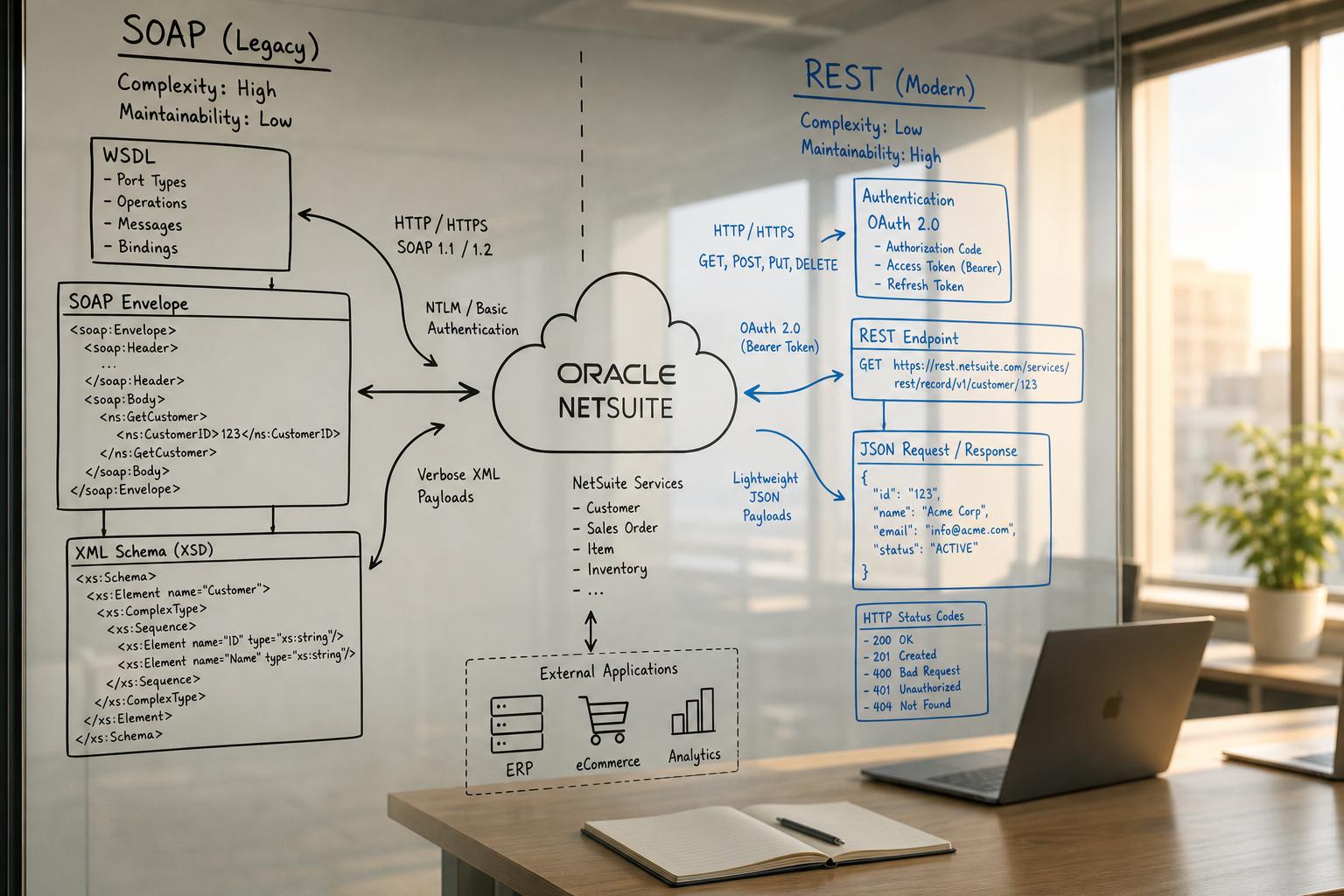
NetSuite supports two primary external integration APIs under its SuiteTalk framework: the legacy SuiteTalk SOAP Web Services and the newer SuiteTalk REST Web Services. This report provides an in-depth comparison of these two interfaces, focusing on their base URL structures, authentication methods, and steps to get started. NetSuite’s SOAP-based SuiteTalk has been the traditional integration workhorse, using XML/SOAP protocols and supporting batch {addList/updateList} operations [1]. In contrast, the REST API (introduced in 2019) uses JSON and OAuth 2.0 flows, is optimized for modern development, and is the strategic focus moving forward [2] [3].
We examine how each API uses account-specific domains (e.g. 123456.suitetalk.api.netsuite.com) [4] [5], how developers must enable features and assign permissions, and how authentication is performed. For SOAP, authentication historically included basic login credentials and Token-Based Authentication (TBA) with OAuth 1.0∙HMAC; as of version 2020.2, SOAP requires TBA and no longer allows legacy username/password “Passport” logins [6]. For REST, NetSuite requires OAuth 2.0 (Bearer tokens) [3] [7], though legacy TBA endpoints exist for token issuance [8] [7].
Practical examples, including a published case study of migrating a retail integration from SOAP to REST, illustrate the operational impact: REST-based flows saw 40% faster response times and simplified JSON payloads [9]. Tables compare SOAP and REST side-by-side on endpoints, data formats, auth, and other dimensions. Finally, we discuss current industry trends (e.g. NetSuite’s announced deprecation of SOAP by 2028 [2] [9]) and recommend how organizations should adapt. All claims and data are supported by NetSuite documentation, developer guides, and published analyses.
Introduction and Background
Oracle NetSuite’s SuiteTalk APIs allow external applications to interact with NetSuite records and business logic. SuiteTalk originally provided a SOAP/XML interface for integrations, which has been used widely by ISVs and enterprises for over a decade [1]. In 2019, NetSuite introduced a REST-based SuiteTalk Web Services API as a modern complement, giving developers a JSON/RESTful interface [1] [2]. While both SOAP and REST interfaces are part of SuiteTalk, they differ significantly in design and use. SOAP is based on a single, static WSDL/XML schema describing all NetSuite operations [2], whereas REST is dynamic and metadata-driven (via Swagger/OpenAPI) [10].
Historical Context: SuiteTalk SOAP began around 2008 and evolved over time; its last planned version is 2025.2, with full removal scheduled by 2028 [2]. NetSuite has explicitly urged new projects to use REST with OAuth 2.0. By contrast, SuiteTalk REST debuted as a beta in mid-2019 (Release 2019.1) [11] and reached general availability soon after. REST Web Services have since been rapidly expanded to cover most record types and preferable use cases [1] [2].
Current Landscape: Today, developed NetSuite integrations may choose between: SuiteTalk SOAP (legacy), SuiteTalk REST (latest recommended), plus other channels like RESTlets and SuiteScript APIs. This report focuses narrowly on comparing SuiteTalk SOAP vs SuiteTalk REST with respect to their endpoints, authentication, and initial setup. We draw on official NetSuite documentation [4] [6], developer guides and blogs [1], and industry analyses [9]. The analysis includes multiple angles: technical (protocols, payloads), operational (performance, limits), and strategic (future support, migration path [2] [9]).
SuiteTalk SOAP vs REST: Key Differences
The table below summarizes major attributes of the two APIs:
| Feature | SuiteTalk SOAP (Web Services) | SuiteTalk REST (Web Services) |
|---|---|---|
| Protocol | SOAP 1.1/1.2 over HTTPS (XML payload) | REST/JSON over HTTPS |
| Data Format | XML with SOAP envelope (uses WSDL) [1] | JSON (no WSDL; uses dynamic JSON/Swagger metadata)[10] |
| Base Endpoint | Account-specific SOAP domain (🛈 https://{accountID}.suitetalk.api.netsuite.com/services/NetSuitePort_{version}) [5] [7] | Account-specific REST domain (🛈 https://{accountID}.suitetalk.api.netsuite.com/services/rest/...) [5] [1] |
| Versioning | Versioned by release in WSDL and endpoint suffix (e.g. _2025_2_0) [2] | Major version often v1; stable endpoint paths (e.g. /v1/record/...) [1] |
| Authentication Methods | – Token-Based (OAuth 1.0HMAC) TBA (supported, required from 2020.2) [6] – User Credentials (Passport: username/password/role/account) legacy (removed in 2020.2+) [6] – SuiteSignOn (SSO callbacks) allowed [6] – OAuth 2.0: not supported [3] | – OAuth 2.0 (Bearer tokens) – supported and recommended [3] – Token-Based (OAuth 1.0) via TBA endpoint exists for issuing tokens (for Admins) [8] [7] – NLAuth (User cred) not used for REST (except token endpoints) [8] |
| Operations Style | RPC-like operations (e.g. get, add, search, update) via WSDL; supports batch list ops (addList, updateList, deleteList, etc.) [1] | CRUD operations via standard HTTP verbs (GET/POST/PATCH/DELETE) on resource URLs [1] – Also supports SuiteQL queries by POSTing to /query/v1/suiteql [1] |
| Bulk Data Handling | Supports built-in list operations (addList, updateList, getList, etc.) for multi-record calls [1] | Primarily single-record per request. Bulk imports via SuiteTalk CSV import or separate bulk architecture (no native “multi-record REST call” like addList) |
| Record Coverage | Extensive: nearly all standard and custom records, including complex transactions and line items (all SOAP ops defined in one WSDL) [2] | Covers most common standard (and custom) records, though some niche records may still require SOAP. REST is rapidly expanding. Many complex transaction record types are now available [2]. |
| Data Schema | Fixed WSDL/XSD schema file (downloadable ZIP) [2] (static until next version) | Dynamic metadata (Swagger/OpenAPI v3) describing custom fields and record structures at runtime [10] |
| Example Base URL | https://123456.suitetalk.api.netsuite.com/services/NetSuitePort_2025_2 [5] [2] | https://123456.suitetalk.api.netsuite.com/services/rest/record/v1/customer/123 [5] [1] |
| Query Language | SuiteTalk Search (SOAP payload), Saved Searches; limited record joins | SuiteQL (SQL-like REST query) via /query/v1/suiteql endpoint [1] |
| Example Tool Support | WSDL import generates stubs for Java/.NET/PHP, existing SuiteTalk Toolkits. | Familiar REST tools (curl, Postman) with Bearer tokens; Swagger metadata enables client generation [10]. |
| Use Cases | Best for existing SOAP integrations, multi-record transactions, highly complex data structures [1]; needed for niche operations not (yet) in REST. | Recommended for new integrations, mobile and web apps, simpler record CRUD, and modern OAuth-based security [1]. |
| Future Outlook | Deprecated: final version (2025.2) is last; removed by 2028 [2]. All new development should target REST. | Future: Actively maintained. Works with OAuth 2.0, JSON, and aligns with NetSuite roadmap [2] [9]. Performance improvements (faster JSON, streaming) and additional endpoints expected. |
The above comparison highlights that REST is the modern default, whereas SOAP is effectively in maintenance mode [2]. For example, Oracle documentation explicitly states that “SuiteTalk REST web services is the technology intended to replace SOAP” and that all new integrations should use REST with OAuth 2.0 [2]. The SOAP API’s last supported endpoint is 2025.2, after which no further updates will be made [2].
From a data format standpoint, REST’s JSON payloads and standard HTTP patterns are typically easier for developers to consume than SOAP/XML. For instance, a GET request for a record in REST might simply be curl -X GET 'https://1234567.suitetalk.api.netsuite.com/services/rest/record/v1/customer/123' -H 'Authorization: Bearer {token}' [1], whereas the SOAP equivalent requires constructing a full SOAP envelope with namespaces and possibly a get operation in XML [1]. That said, SuiteTalk SOAP does permit batch operations in one call (e.g. addList) which can save round-trips for large imports [1] – a feature without direct REST counterpart.
The official NetSuite documentation provides guidance on when to use each interface. A published comparison table notes that SOAP is suited for “complex transactions with many sublists” or legacy integrations, while REST is ideal for “simple CRUD operations” and modern applications needing JSON [1]. This is corroborated by practitioner blogs: for example, Joaquin Vigna of BrokenRubik (a NetSuite integration expert) advises starting with the REST API for most cases, reserving SOAP for legacy or highly specialized tasks [1].
Base URLs and Endpoint Structure
Account-Specific Domains
NetSuite endpoints are account-specific, meaning every call is directed to a hostname unique to your NetSuite account ID. The domain format is <accountID>.<service>.netsuite.com. For SuiteTalk SOAP and REST, the service is suitetalk.api [5]. For example, if your account ID is 123456 (and using a sandbox, it might be 123456-sb2), the domain would be:
- SOAP (SuiteTalk Web Services):
https://123456.suitetalk.api.netsuite.com/services/NetSuitePort_{version}, where{version}might be2025_2_0(for SOAP 2025.2) [5] [2]. - REST (SuiteTalk REST Web Services):
https://123456.suitetalk.api.netsuite.com/services/rest/record/v1/{recordType}for record endpoints, and similarly for query (/query/v1/suiteql) or other REST resources [1] [5].
Official Oracle documentation emphasizes that these account-specific domains should be used directly for both SOAP and REST; hard-coding a global domain (e.g., webservices.netsuite.com) is deprecated [4] [5]. In fact, since 2019.1 NetSuite requires SOAP calls to use the account-specific domain (including the account ID) [4]. For example:
“As of 2019.1, SOAP web services versions… are only available on account-specific domains. The URL for your account-specific SOAP web services domain includes your account ID. For example, if your account ID was 123456, then your account-specific SOAP web services domain would be 123456.suitetalk.api.netsuite.com.” [4]
The official REST URL Schema documentation similarly states:
“To access REST web services, you must use account-specific domains… For example, if your account ID is 123456, your account-specific domain for REST web services is 123456.suitetalk.api.netsuite.com.” [5].
In practice, this means that the base host depends on your account’s data center and environment. NetSuite provides dynamic discovery services (explained below) if your integration must handle multiple accounts or changes in hosting. But for most use, developers read the account’s domain from Setup > Company > Company Information > Company URLs, which will list the “Account ID-based” SuiteTalk URL [4].
Example Endpoints
In REST, the record service endpoint for a record type (e.g. “customer”) follows the pattern:
https://{accountID}.suitetalk.api.netsuite.com/services/rest/record/v1/{recordType}
For instance, to GET customer ID 123:
GET https://123456.suitetalk.api.netsuite.com/services/rest/record/v1/customer/123
Authorization: Bearer <access_token>
This pattern (as seen in developer blogs) includes the account ID in the host and /services/rest/record/v1/ before the record name [1]. The v1 indicates the REST API version (currently v1 for SuiteTalk REST).
For SuiteTalk SOAP, the main entrypoint is defined by the WSDL. The WSDL itself is retrieved from a URL like:
https://webservices.netsuite.com/wsdl/v2025_2_0/netsuite.wsdl
(for example, SOAP version 2025.2) [2]. (Note that this uses the global webservices.netsuite.com to fetch the WSDL XML. However, actual SOAP calls should use the account-specific domain returned by getDataCenterUrls.) The WSDL defines a soap:address location, which in older endpoints was often https://webservices.netsuite.com/services/NetSuitePort_{version} [2]. Today, you should instead invoke SOAP methods on your account-specific host, e.g. https://123456.suitetalk.api.netsuite.com/services/NetSuitePort_2025_2_0 [2] [5]. The final SOAP endpoint path may include the version suffix (e.g. _2025_2_0) if using a specific WSDL version.
To summarize the base URL formats:
- SOAP SuiteTalk Base URL (per Web Services WSDL):
https://<accountID>.suitetalk.api.netsuite.com/services/NetSuitePort_<version>(e.g.NetSuitePort_2023_2_0) [2] [5]. - REST SuiteTalk (record):
https://<accountID>.suitetalk.api.netsuite.com/services/rest/record/v1/<recordType>[1] [5]. - REST SuiteTalk (query):
https://<accountID>.suitetalk.api.netsuite.com/services/rest/query/v1/suiteqlfor SuiteQL queries [1]. - RESTlet (custom):
Similar pattern but usingrestlets.api.netsuite.comdomain (account-specific): e.g.https://{accountID}.restlets.api.netsuite.com/app/site/hosting/restlet.nl?script=...(though that is a different integration approach).
One must also consider sandbox and release preview accounts: these have a suffix. For example, a sandbox account might have ID 123456-sb2, making the domain 123456-sb2.suitetalk.api.netsuite.com. Oracle’s docs confirm sandboxes use unique domains just like production [4].
Dynamic Domain Discovery
If an application will serve multiple customers (multi-tenancy) or if data center migration is possible, NetSuite provides a dynamic discovery API to retrieve the correct domains on the fly [4] [12]. The SOAP getDataCenterUrls call (no auth needed) can return the account-specific SOAP and REST domains [4]. Similarly, NetSuite provides a REST “DataCenterURLs” service at rest.netsuite.com for OAuth2 flows [12]. These allow integration code to query for restDomain or webservicesDomain given an account ID, avoiding hard-coded domains. In most cases, however, a single-account integration will set the domain explicitly. As NetSuite states, once you use account-specific domains, “dynamic domain discovery is not needed” [5].
The URL paths beyond the domain vary by service:
- SOAP (SuiteTalk): All operations share the same
/services/NetSuitePortendpoint (with version suffix). SOAP actions are indicated by XML inside the SOAP envelope, not by URL. - REST (SuiteTalk): The URL path specifies the service area (
/services/rest/) followed by a category (record,query, etc.), followed by the record name and ID for record-level operations [1], or the HTTP method (POST/GET/PATCH) signals the action. Additional endpoints (e.g./metadata-catalog,/query/v1/suiteql) are documented in NetSuite help.
Authentication and Security
Authentication is a critical differentiator between SuiteTalk SOAP and REST.
SuiteTalk SOAP Authentication
SuiteTalk SOAP historically supported two main methods of authentication: Token-Based Authentication (TBA) and User Credentials (Passport) [6]. Development and best practices have evolved:
-
User Credentials (Passport): In early SOAP versions, you could log in with a user’s email (or username), password, and role and account ID (the login operation or request-level credentials). However, this had limitations (e.g. needing login calls). As of SOAP version 2020.2, NetSuite has removed support for user/pass authentication. The critical note in Oracle docs is: “As of the 2020.2 SOAP web services endpoint, authentication through request-level credentials is not supported. The Passport complex type is not supported… you must ensure integrations use TBA.” [6]. In other words, SOAP integrations on 2020.2+ have to use tokens. Legacy support for user credentials may still work on older endpoints (2019.2 and before), but it is no longer recommended or future-proof.
-
Token-Based Authentication (TBA): This is OAuth 1.0a with HMAC-SHA256 signing. It requires an Integration Record in NetSuite (created via Setup > Integration > Manage Integrations) that has “Token-Based Authentication” enabled. The integration record yields a consumer key/secret, and an individual user can then generate an Access Token (token ID/secret) for that integration/role combination [6]. The SOAP request header then includes a
<tokenPassport>element carrying the account, consumerKey, token, nonce, timestamp, and HMAC signature [1]. The Oracle docs detail: “You generate a consumer key and secret when you create an integration record… configure the record to permit TBA (by checking the Token-based Authentication box) [6].” TBA has been required for SOAP since 2020.2; older versions could use user/pass, but now all SOAP (v2020.2+) must use TBAℹ. -
SuiteSignOn (Single Sign-On): SOAP also supports callback-style SAML/OAuth for user logins (SuiteSignOn) [6], but that is more relevant for UI auth flows than typical APIs.
Example (SOAP): A valid Soap request header using TBA might include:
<soap:Header>
  <platformMsgs:tokenPassport>
    <platformCore:account>123456</platformCore:account>
    <platformCore:consumerKey>YOUR_CONSUMER_KEY</platformCore:consumerKey>
    <platformCore:token>USER_TOKEN_ID</platformCore:token>
    <platformCore:nonce>randomString</platformCore:nonce>
    <platformCore:timestamp>1660000000</platformCore:timestamp>
    <platformCore:signature algorithm="HMAC-SHA256">CALCULATED_SIGNATURE</platformCore:signature>
  </platformMsgs:tokenPassport>
</soap:Header>
as illustrated by developer examples [1].
SOAP requests must not mix auth methods: only TBA (OAuth1) or Passport login in a given call [6]. And since Passport is obsolete, use TBA. The integration record’s Application ID is optional, but if using user credentials in older endpoints, it must be checked on the integration record [6].
SuiteTalk REST Authentication
SuiteTalk REST was designed to use OAuth 2.0 (Bearer token form) as its primary authentication. Key points:
-
OAuth 2.0 (Authorization Code or Client Credentials Flow): NetSuite provides OAuth2 support specifically for REST (and also for RESTlets). SOAP does not support OAuth2 [3]. To use OAuth2, one must create an Integration Record and configure it for OAuth 2.0. The typical flow is the Authorization Code grant: the app directs the user to NetSuite’s authorization endpoint, the user approves, and NetSuite returns an auth code which the app exchanges for an access token. The token issuance (and later refresh) happens via POST requests to endpoints like:
https://<accountID>.suitetalk.api.netsuite.com/services/rest/auth/oauth2/v1/tokenas per official docs [7]. Once an access token is obtained, it is sent in each REST request as:
Authorization: Bearer <access_token>For example, creating a record:
POST https://123456.suitetalk.api.netsuite.com/services/rest/record/v1/customer
Authorization: Bearer eyJ...def...
Content-Type: application/json
{ "companyName": "Acme", "email": "[email protected]", ... }
The Oracle help alludes to this standard OAuth2 bearer usage [3].
-
Token-Based (OAuth 1.0 / TBA) for RESTlets: In addition to OAuth2, NetSuite supports a special token endpoint flow even for REST, mainly intended for developers/admins to create access tokens for scripts. The “Issue Token” REST service lets a user programmatically create a TBA token for themselves, using either NLAuth or an OAuth header [8]. However, this is not the same as SOAP TBA; it is a one-shot REST call for token management (see [32]). Once such a token is created, one could include it in a REST call similarly to SOAP (with HMAC). Houseblend’s guide notes that TBA (OAuth 1.0) is still used for RESTlets and that clients “POST /rest/accessToken” in a 3-legged flow. In practice, most native REST Web Services integrations use OAuth2, and TBA is mainly for backward compatibility or specific 3-legged RESTlet auth.
-
No NLAuth Directly: REST web services do not allow the legacy NLAuth (email/password) login like SOAP did. All REST requests (outside of obtaining a token) require either a valid Bearer token (OAuth2) or a properly signed OAuth1 header (if using a token created via TBA endpoints) [3] [8].
Postman Tutorial: Oracle’s docs include a step-by-step Postman example for OAuth2 with REST [13], underscoring that OAuth2 is the intended route.
Authentication Comparison Table
| Auth Method | SOAP Web Services | REST Web Services |
|---|---|---|
| OAuth 2.0 (Bearer) | Not supported (SOAP only uses TBA) | Supported (default method) [3] |
| OAuth 1.0a (TBA, HMAC) | Supported (since v2015.2+) [6]; required from 2020.2 onward [6] | Supported via Rest token endpoints (issue/revoke token) [8] (rarely used for REST Web); primary use is OAuth2. |
| User Credentials (NLAuth) | Supported in SOAP only (deprecated after 2020.2) [6] | Not supported for REST API (except as used by IssueToken endpoint) |
| SuiteSignOn SAML (SSO) | Supported (SuiteSignOn callbacks) [6] | Not applicable (REST usually client-server) |
| Integration Record | Required for TBA (Consumer Key/Secret) [6] | Required for OAuth2 (Client ID/Secret) and recommended for TBA (if used) |
| Required Headers | <tokenPassport> block with HMAC signature [1] | Authorization: Bearer <token> (OAuth2) [3]; or Authorization: OAuth realm="{acctID}", oauth_consumer_key="...", oauth_token="...", ... for OAuth1 (TBA) if applicable. |
In summary, SuiteTalk REST mandates modern OAuth 2.0 token flows [3] [7], whereas SuiteTalk SOAP relies on an older three-legged TBA scheme [6]. This is a key practical difference: implementing REST calls typically means handling OAuth2, refreshing tokens, etc., while SOAP calls involve constructing and signing an OAuth1 token header. Many developers find OAuth2 more straightforward, though some find the simplicity of a few token fields (consumer and token and HMAC) in SOAP easier than full OAuth2 flows. Either way, in both cases an Integration Record with appropriate settings must be created in NetSuite.
Prerequisites and Getting Started
Before making API calls, both SOAP and REST require NetSuite account configuration. Important setup includes enabling features, setting up roles, and creating integration records.
Enabling Features
-
SuiteTalk (Web Services) Feature: By default, SOAP web services are always available; however, you may need to enable certain features for specific record types. In old versions, there was a “Web Services” feature on the SuiteCloud subtab; today, NetSuite assumes SOAP SuiteTalk is on for all accounts. For REST, the REST Web Services feature must be enabled: go to Setup > Company > Enable Features, under SuiteCloud (Web Services) subtab, check REST Web Services [14]. You must also accept the SuiteCloud Terms of Service to use REST.
-
Permissions: The user account (role) you use for API calls must have necessary permissions. For SOAP, the user must at least have Web Services access and proper record-level permissions (e.g.
Lists > Customers: Viewto read customers). For REST, the role must have REST Web Services and “Log in using Access Tokens” permissions [14]. Oracle’s docs specify default roles (like Administrator) have these, but it is best to assign a custom role for integrations with minimal privileges (e.g. just needed record types, plus REST Web Services and token access) [14]. Important: Even SOAP-TBA and REST OAuth use access tokens, so the role must have Log in Using Access Tokens permission [14].
Integration Record / Application Setup
-
Create Integration Record: In Setup > Integration > Manage Integrations > New, create a new integration record. Give it a name (e.g. “MyAPIApp”), check Token-Based Authentication box if you plan to use TBA (SOAP or REST TBA), and/or OAuth2 if available. Save it. The record will generate a Consumer Key and Consumer Secret (for OAuth1/TBA) and an Application ID (used for tagging requests, optional). For OAuth2, you’ll generate a Client Credentials (ID & Secret) and configure redirect URLs for authorization flows.
-
SuiteSignOn (if applicable): If you plan to use OAuth2 Authorization Code Flow, ensure you add at least one Redirect URI on the integration record.
-
Create Access Tokens (for TBA, SOAP): For SOAP, each user/role that will use the integration must generate an access token via Setup > Users/Roles > Access Tokens > New. You select the integration, user, role, and give the token a name; NetSuite then provides Token ID and Token Secret. These go into your SOAP
<tokenPassport>along with the consumer key/secret. For REST, you may similarly generate tokens if using an OAuth1 flow, but often OAuth2 negates manual token creation. -
Sandbox Considerations: If testing in a sandbox, create separate integration records there. (Tokens/keys do not copy from production). Also, note sandbox domains include
-sb1,-sb2, etc.
Sample “Hello World” Calls
Once setup is complete, you can test basic calls.
-
SuiteTalk SOAP: Download or inspect the WSDL (e.g.
https://webservices.netsuite.com/wsdl/v2025_2_0/netsuite.wsdl). Use a SOAP client (Java wsimport, PHP Toolkit) to generate stubs. Construct a simplegetrequest for a known record. For example, C# or Java: instantiate NetSuitePort, set thetokenPassportheader (as above), and callget(...). -
SuiteTalk REST: You might first fetch metadata:
GET /metadata-catalogor the swagger at/services/rest/metadata-catalog/v1/swaggers. Or test a CRUD:GET https://123456.suitetalk.api.netsuite.com/services/rest/record/v1/metadata-catalog Authorization: Bearer <yourOAuth2AccessToken>to list all record types (provided by REST Record service). Then try retrieving a known record:
GET /services/rest/record/v1/customer/123as shown earlier [1]. The response is JSON with the customer fields. To create:
POST .../record/v1/customer
Content-Type: application/json
Authorization: Bearer <token>
{ "companyName": "Contoso", "email": "[email protected]" }
The REST API Guide covers these operations in detail.
Rate Limits and Concurrency
Although not a “getting started” step, new developers should be aware NetSuite enforces usage limits (Source: unified.to). Each account has a concurrency cap (parallel calls) shared by SOAP, REST, RESTlet, and other SuiteTalk APIs. For example, a Premium account starts at ~15 concurrent requests (plus 10 per SuiteCloud license). Exceeding the limit results in HTTP 429 or SOAP errors, so plan for retry/backoff. Daily quotas (e.g. 60-second and 24-hour caps) also exist. Designing efficient use (batching, limited polling) is crucial for production.
Comparison Table: Getting Started Steps
| Step/Feature | SuiteTalk SOAP | SuiteTalk REST |
|---|---|---|
| Enable NetSuite Features | Ensure SuiteTalk (Web Services) is enabled (default). | Enable REST Web Services suitecloud feature [14]. |
| Integration Record | Create integration record with TBA enabled [6]. | Create integration record with OAuth2 (set redirect URIs, etc.) or TBA as needed. |
| Credentials Required | Consumer Key/Secret (from integration record) + Token ID/Secret (from Access Tokens) [6]. | Client ID/Secret (OAuth2) from integration record, or Consumer Key/Secret + Token for any TBA usage. |
| User Role Permissions | Role needs appropriate record permissions; until 2020.1 needed “Log in via Web Services” (implicit normally). | Role must have REST Web Services and Log in using Access Tokens [14]. |
| Auth Flow | No login flow: Include TBA passport in each request. | OAuth2: do standard auth code or client credentials flow to get access_token [7]. |
| Sample Call (Authentication) | <ns:tokenPassport><ns:account>123456</ns:account>...<ns:token>...</ns:token>... [1] | Authorization: Bearer eyJraWQiOiIyMDIwXzEiLCJhbGciOi... [3] |
| Tester Tools | SOAP tools (e.g. SOAP UI, WSDL import). | REST tools (curl, Postman; Swagger support) [10]. |
| Discoverable Schema | Static WSDL/ XSD. Download or view via URL [2]. | Dynamic metadata via /metadata-catalog, OpenAPI spec [10]. |
Case Study: SOAP → REST Migration
A real-world example underscores the practical implications. NeosAlpha, a NetSuite consultancy, describes a case where a retail furniture company migrated from SuiteTalk SOAP to REST for its integrations [9]. Prior to migration, the company’s e-commerce, shipping, and CRM systems were integrated via SOAP Web Services. The goals of migration included aligning with NetSuite’s roadmap (to phase-out SOAP), reducing integration complexity, and improving performance [9].
Challenges with SOAP: The legacy SOAP integration posed issues: heavy XML payloads slowed data exchange, and maintaining numerous list operation calls was cumbersome [9]. Security was also a concern: SOAP used token-based auth (OAuth1) which “lacked the flexibility” of OAuth2 [9]. With SOAP nearing end-of-life, continuing on that path risked future downtime and lost vendor support [9].
Results of REST Adoption: According to the post-mortem “Results” section, moving to REST yielded measurable gains [9]:
- 40% faster API response times, attributing to REST’s “lighter payloads and improved performance” [9].
- Enhanced security via OAuth 2.0 and encrypted JSON [9].
- Real-time synchronization became feasible through event-driven REST callbacks [9].
- Reduced maintenance: a unified JSON data model and fewer endpoints simplified ongoing development [9].
- The transition was done with zero downtime, showing that a well-planned migration can be executed without business interruption [9].
This case clearly illustrates why Netsuite is moving away from SOAP: REST endpoints provided faster performance and easier development (JSON vs XML), and the company gained better security and maintainability [9]. (Similar successes have been noted by other integration teams transitioning Stack or from user community discussions.)
Implications, Limitations, and Future Directions
Implications for Integrators
Given Oracle’s strategic shift, all new integrations should favor SuiteTalk REST. Organizations still running SOAP-based connectors must plan migration, as existing SOAP integrations will stop working by 2028 [2] [9]. The transition may involve rewriting code to use REST endpoints and OAuth2. Tools and libraries for REST/JSON are abundant and likely to be better-supported long-term.
However, some SOAP capabilities are not one-to-one in REST. For example, key SOAP operations like addList have no direct REST equivalent; an integrator needing to insert hundreds of records may have to loop over REST calls or use bulk CSV import. Likewise, certain very complex transaction types may have been exposed only via SOAP in older versions (e.g. some assembly build operations), though NetSuite has been closing those gaps [1]. For integrations deeply reliant on such SOAP-only features, third-party middleware or waiting for the REST API to catch up might be necessary.
Given concurrency limits (Source: unified.to), architects should also note that API rate governance is uniform across SOAP and REST: the 15–55 concurrent request ceiling applies to all SuiteTalk calls combined (Source: unified.to). REST’s faster responses (JSON) may allow higher throughput, but heavy loops of calls can still hit throttle limits, so design with batching and caching in mind.
Future Directions
-
Phasing Out SOAP: As noted, NetSuite plans no new SOAP endpoints beyond 2025.2 and will discontinue SOAP entirely by 2028 [2]. Thus, in the medium-term (2-5 years), SOAP will be obsolete. This will simplify NetSuite’s API governance but require migration cost for SOAP users.
-
Expanding REST: NetSuite is expanding the REST API catalog. New record types and operations are continually added. For instance, REST now supports SuiteQL (SQL query language) to bypass SOAP search complexities [1]. Eventually, all capabilities (like custom records, workflow triggers, subledger operations) should be available via REST or other modern endpoints. Third-party insights predict that future integrations will rely entirely on REST and related services (like new GraphQL or API features yet unannounced), making REST expertise essential.
-
Better Tools: The REST API’s use of standard OAuth 2.0 and OpenAPI may enable auto-generation of client SDKs and better tooling (e.g., NetSuite announcing Postman collections and improved developer consoles). Meanwhile, SOAP’s complexity has kept many integrations in custom code or legacy toolkits; in future, robust REST frameworks will simplify development.
-
SuiteTalk and SuiteQL: NetSuite is also developing SuiteQL further. Complex queries that previously required SOAP search calls or saved searches can now be executed via the RESTful SuiteQL endpoint, potentially reducing the need for data transformations in client code.
-
Developer Ecosystem: Anecdotal evidence suggests a growing community support for REST: blogs, Q&As, and libraries (like nodesuite, netsuite connectors in Zapier, etc.) emphasize REST-based flows. As REST becomes the norm, training and documentation will also focus on it.
Limitations of This Comparison
-
Evolving Features: Netsuite frequently updates both APIs. At the time of writing (mid-2026), our data includes documentation up through 2025.2. Some niche features might differ by version. Readers should check the latest NetSuite Development docs for changes.
-
Vendor Bias: Much of the cited material (Oracle docs, HouseBlend, etc.) is either official or consulting-driven. We have aimed to include multiple viewpoints, but independent academic studies on NetSuite APIs are scarce.
-
Performance Benchmarks: While the NeosAlpha case provides one example of performance gain, empirical benchmarks across different use-cases (record size, network conditions) are not widely published. Integration architects should conduct their own tests tailored to their data.
Conclusion
NetSuite’s SOAP and REST SuiteTalk APIs offer different trade-offs. SuiteTalk REST Web Services (JSON + OAuth2) represents the future direction: it is officially recommended for new projects [2], yields simpler JSON payloads, and, as real-world cases show, can improve performance and maintainability [9]. SuiteTalk SOAP (XML + JWT/HMAC) remains necessary for legacy integrations and certain advanced functions, but it is legacy technology that will soon be deprecated [2].
Understanding the differences in base URL structure (account-specific domains), authentication flows (OAuth1 vs OAuth2), and initial setup procedures is essential for developers and architects planning NetSuite integrations. This report has provided a comprehensive analysis, backed by NetSuite’s own documentation and expert sources. As NetSuite’s platform continues to evolve, we expect the REST API to gain functionality and usage, and organizations should prioritize migrating to REST to align with NetSuite’s roadmap [2]. Future work may include monitoring REST API expansions, assessing tools for automatic migration, and watching for new integration paradigms (e.g. GraphQL). For now, both the technical and operational verdict is clear: REST is the new standard for SuiteTalk integrations, with SOAP remaining only for backward compatibility [2] [9].
External Sources (14)
About
Houseblend
Make NetSuite work better for your finance and operations teams with Houseblend. We help design, implement, integrate and improve ERP systems, with practical support for the people who use them every day.
Houseblend is a NetSuite consulting firm serving finance and operations teams. We help organizations implement ERP systems, connect business applications, improve existing configurations and maintain the systems that support everyday work. Our audience includes finance leaders, controllers, operations managers, NetSuite administrators and implementation teams.
Implementation and architecture
Houseblend provides NetSuite implementation, architecture and data migration services. We help teams evaluate how business processes, reporting requirements and existing data should fit together in an ERP environment. Training supports the people responsible for adopting and operating the resulting system.
Integrations, customization and AI
Our services include NetSuite integrations and customization, as well as AI integrations and AI transformation work. These engagements connect ERP data and workflows with the broader application landscape. The right design depends on the organization's systems, controls and operating needs.
Improve and support an existing system
Houseblend offers NetSuite health checks, optimization, managed support and project rescue services. We also provide expertise for analytics and specialist workflows, including NetSuite Analytics Warehouse, warehouse management and field service management. Published educational material helps teams investigate options and prepare informed questions for their implementation or support work.
Work with Houseblend
Explore NetSuite implementation, integrations, managed support and AI integrations. Contact Houseblend to discuss your current system and priorities.
Article examples explain concepts rather than promising a particular license, product capability, delivery schedule or outcome. Engagement scope is confirmed with the Houseblend team.
Disclaimer
This document is provided for informational purposes only. No representations or warranties are made regarding the accuracy, completeness, or reliability of its contents. Any use of this information is at your own risk. Houseblend shall not be liable for any damages arising from the use of this document. This content was generated with assistance from artificial intelligence tools, which may contain errors or inaccuracies. Readers should verify critical information independently. All product names, trademarks, and registered trademarks mentioned are property of their respective owners and are used for identification purposes only. Use of these names does not imply endorsement. This document does not constitute professional or legal advice. For specific guidance related to your needs, please consult qualified professionals.