Houseblend Article
NetSuite RESTlet URLs: Domains, TBA & OAuth 2.0 Scopes
Inside this article
Executive Summary
This report provides a comprehensive analysis of Oracle NetSuite’s use of account-specific domains for RESTlet URLs and the authentication flows for accessing those URLs, focusing on both NetSuite’s legacy Token-Based Authentication (TBA, an OAuth 1.0–based method) and the new OAuth 2.0 framework with scopes. Each NetSuite account (production, sandbox, release preview) has a unique tenant-specific domain (for example, 123456.app.netsuite.com for a production account and 123456-sb1.app.netsuite.com for a sandbox) [1] [2]. These domains remain constant even if the account is migrated between data centers [3], eliminating the need to hard-code data-center-specific URLs. To discover the correct domain for any account, NetSuite provides REST discovery services (such as rest.netsuite.com DataCenterURLs and REST Roles services) or the SuiteScript N/url.resolveDomain API [4] [5].
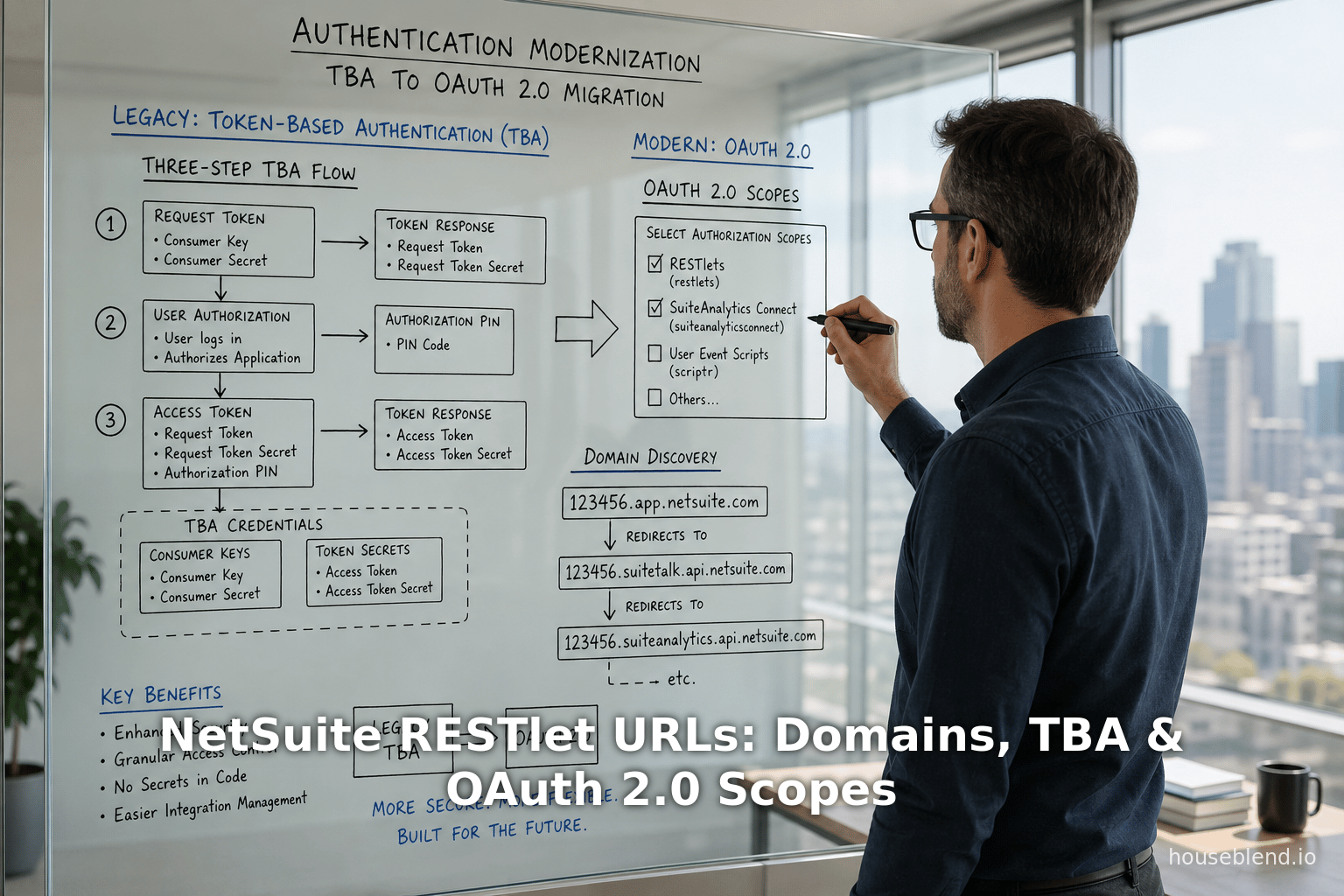
On the security side, Token-Based Authentication (TBA) has been the longstanding method for RESTlet (and SuiteTalk) integrations. TBA uses OAuth 1.0a with HMAC-SHA256 signatures and four credentials (consumer key/secret plus token ID/secret) [6] [7]. In this three-step flow, an external client (1) POSTs to the /rest/requesttoken endpoint to get an unauthorized request token, (2) directs the user to the /app/login/secure/authorizetoken.nl endpoint for authorization (JSO credentials/ SAML SSO and consent), then (3) POSTs to /rest/accesstoken to exchange the authorized token for an access token and secret [8] [9] [10]. Once obtained, the OAuth 1.0 access token (plus secret) is included as HMAC header in every RESTlet call, e.g. with Authorization: OAuth realm="<ACCOUNT_ID>", oauth_consumer_key="...", oauth_token="...", oauth_signature_method="HMAC-SHA256", … [11] (Source: timdietrich.me). Fitzgerald’s guide emphasizes that TBA “is the recommended approach for server-to-server” integrations [6] and that only HMAC-SHA256 is supported (SHA-1 is retired as of 2023.1) [12].
However, Oracle has declared that TBA is being phased out. NetSuite 2027.1 and onward will allow no new RESTlet or web service integrations using TBA [13] [14]. Instead, OAuth 2.0 is now the preferred method. OAuth 2.0 simplifies the process (no per-request signature) and supports modern security features (bearer tokens, refresh tokens, stronger encryption, integration with SAML/OIDC login, 2FA) [15] [16]. In particular, OAuth 2.0 introduces fine-grained scopes into NetSuite’s integration model. In practice, scopes are configured on the Integration record by checking features such as RESTlets, REST Web Services, SuiteAnalytics Connect, etc. [17]. An OAuth 2.0 access token will only be valid for the scopes enabled on its application [18] [19]. For example, a JWT access token issued for a REST Web Services call might have "scope":["RESTLETS"] in its payload [20], indicating it grants RESTlet access. (Oracle’s documentation for SuiteProjects Pro similarly shows scope values like rest, soap, xml, bi that can be combined [21], analogous to NetSuite’s scopes.)
The following sections elaborate on NetSuite account-specific domains and URL formats, detail the mechanics of the TBA flow, and explain NetSuite’s OAuth 2.0 integration flows and scopes. We compare authentication methods (TBA vs OAuth2) and discuss implications for integration design, security, and future directions. Each claim is supported by Oracle’s documentation, expert blogs, and case studies.
Introduction
Oracle NetSuite is a cloud ERP platform used by tens of thousands of businesses worldwide [22]. As a multi-tenant SaaS ERP, each account (tenant) is identified by a numeric ID (with suffixes for sandbox or release preview). NetSuite provides various APIs for integration, notably SuiteTalk ( SOAP and REST Web Services and SuiteScript script endpoints (RESTlets and Suitelets). A RESTlet is a custom SuiteScript ( SuiteScript 2.x deployed on a NetSuite account that exposes HTTP endpoints (GET/POST/PUT/DELETE) to external clients [23] (Source: timdietrich.me). RESTlets let you implement arbitrary business logic and data processing directly in NetSuite, providing JSON or text responses. They complement SuiteTalk REST (the built-in record-based REST API) by allowing complex or specialized operations in full SuiteScript.
When calling any NetSuite REST endpoint (SuiteTalk or RESTlet) from an outside client, the request URL must use the account’s unique domain. Historically, NetSuite URLs included data center identifiers (e.g. .restlets.api.netsuite.com vs .restlets.api.na3.netsuite.com), which required updates if an account was moved between datacenters. Today, Oracle uses account-specific domains so that URLs remain stable across migrations [3]. In other words, the domain includes the account ID (and account type) itself, and does not change when NetSuite rebalances data availability [3] [1]. For example, a production account with ID 123456 might use URLs like https://123456.app.netsuite.com/... or https://123456.suitetalk.api.netsuite.com/..., whereas a sandbox account 123456_SB1 uses https://123456-sb1.app.netsuite.com/... (note underscore replaced by hyphen and suffix lowercased) [2].The official account-specific URL for each service is listed on the Company URLs subtab in NetSuite’s Setup > Company > Company Information page [1] [2]. Administrators should never manually “construct” these URLs; instead, use the values from Company URLs or dynamic discovery APIs [24] [3].
To handle multiple accounts or unknown accounts dynamically, NetSuite provides discovery services. For SOAP (SuiteTalk) clients, the getDataCenterUrls SOAP call or the webservices.netsuite.com endpoint can be used. For REST clients (RESTlets, REST web services, etc.), Oracle provides a REST-based DataCenterUrls service and a standalone REST Roles Service at rest.netsuite.com [4]. Calling https://rest.netsuite.com with valid credentials returns the correct base domains (e.g. the .suitetalk.api.netsuite.com or .app.netsuite.com URLs) for that account. Similarly, within SuiteScript 2.x you can call the N/url module’s resolveDomain({ hostType: url.HostType.RESTLET, accountId: 'ACCT' }) function to retrieve the proper RESTlet domain [5]. These dynamic discovery mechanisms ensure that client integrations always use the correct, up-to-date domain for any NetSuite account.
Table 1 below summarizes the main NetSuite integration options and their characteristics, illustrating where RESTlets fit alongside SuiteTalk SOAP/REST and Suitelets [25].
Table 1: Comparison of NetSuite Integration Methods (adapted from [BrokenRubik][4])
| Feature | RESTlets | SuiteTalk SOAP Web Services | SuiteTalk REST Web Services | Suitelets (UI scripts) |
|---|---|---|---|---|
| Logic | Full SuiteScript (custom code) | Limited (CRUD via WSDL) | Limited (CRUD via standard REST) | Full SuiteScript |
| Response Format | JSON or Text | XML (SOAP) | JSON | HTML or JSON |
| Authentication | TBA (OAuth 1.0) / OAuth 2.0 Bearer | TBA / OAuth 1.0 | (Only) OAuth 2.0 | Session ID / Token |
| Governance Units | 5,000 units/request | N/A | N/A | 1,000 units/request |
| Typical Use Cases | Custom APIs & data logic | Standard record CRUD (all types) | Standard record CRUD | Custom web pages (UI) |
(Table 1 sources: NetSuite documentation and integration guides [4], supplemented by [52] for authentication modes.)
This context sets the stage for our deep dive into RESTlet URLs and authentication. The next sections discuss account-specific domains in detail, then explain TBA flow end-to-end, and finally treat OAuth 2.0 and scopes.
NetSuite Account-Specific Domains and RESTlet URLs
NetSuite’s shift to account-specific domains means each account has its own unique domain prefix for all services [1] [26]. The domain string includes the account ID and also encodes the account type. For a production account (e.g. ID 123456), you might see domains like 123456.app.netsuite.com or 123456.suitetalk.api.netsuite.com. For a sandbox ID such as 123456_SB1, the domain becomes 123456-sb1.app.netsuite.com (underscore → hyphen, all lowercase) [2]. Release Preview accounts (e.g. 123456_RP) similarly use 123456-rp... domains [2]. Figure 1 (in Table 2) lists examples of account-specific domain formats:
Table 2: Account-Specific Domain Examples by Account Type
| Account Type | Example Account ID Format | Account-Specific Domain URL Example |
|---|---|---|
| Production | 123456 | 123456.app.netsuite.com (UI/RESTlet endpoints) |
| Sandbox | 123456_SB1 → 123456-sb1 | 123456-sb1.app.netsuite.com (UI/RESTlet endpoints) |
| Release Preview | 123456_RP → 123456-rp | 123456-rp.app.netsuite.com (UI/RESTlet endpoints) |
Each account also has corresponding domains for SOAP/REST web services (using the .suitetalk.api.netsuite.com suffix) and for other services like SuiteAnalytics and external Catalog Sites [27] [28]. For example, a SuiteTalk REST endpoint might be https://123456.suitetalk.api.netsuite.com/services/rest/record/v1/customer/... [18]. The precise URLs for all relevant services are visible on the Company URLs subtab for that account [27]. Importantly, Oracle advises never to hard-code these domains. Instead, use the provided values or discovery APIs, since even account-specific domains, though stable across data centers, could change in future architectures. Indeed, NetSuite forbids certificate pinning on these domains because they can change without notice [29] [30].
Because accounts can be moved among data centers and enterprises often integrate multiple accounts, NetSuite provides domain discovery endpoints. For RESTlet clients, calling https://rest.netsuite.com (NetSuite’s REST discovery service) with the account credentials returns the correct RESTlet domain names [4]. Alternatively, SuiteScript can programmatically find domains: e.g.
N/url.resolveDomain({ hostType: url.HostType.RESTLET, accountId: '123456' });
will return the RESTlet domain for account 123456 [5]. Using these dynamic methods avoids brittle dependencies on fixed URLs.
Once the correct domain is known, a RESTlet is invoked by constructing an HTTPS request to that domain with the RESTlet’s script and deploy identifiers in the path or query parameters. For example, a typical external RESTlet call uses a URL of the form:
https://<accountDomain>/app/site/hosting/restlet.nl?script=<SCRIPT_ID>&deploy=<DEPLOY_ID>
For a production account ID 123456, the example domain is 123456.app.netsuite.com, so a call might look like https://123456.app.netsuite.com/app/site/hosting/restlet.nl?script=1&deploy=1 [31]. (NetSuite’s REST Web Services use a different base path under /services/rest/..., as shown in [52].) Since the account domain is specific to each tenant, clients must use the correct domain for the target account. The policy is: “the URL must include a domain specific to your NetSuite account” [26]. If you access another account (e.g. a sandbox or customer account), you must use that account’s domain, not your own.
In practice, most integrations handle domain selection in one of these ways:
- Static configuration: Administrators copy the correct domain from NetSuite’s UI and store it in the integration’s settings or code.
- Dynamic discovery: At runtime, the integration first queries NetSuite (e.g.
rest.netsuite.comor SuiteScript) to obtain the domain. - N/url.resolveDomain: If written as a SuiteScript (Suitelet) within NetSuite, use the
N/urlmodule as shown in Retrieve the Domain for Calling a RESTlet [5].
In summary, account-specific domains decouple integrations from physical data center addresses [3] and must always be used in RESTlet URLs. Table 2 highlights how the account ID maps into domains for different account types [2] [1]. The next sections discuss authentication when calling these RESTlet URLs.
NetSuite RESTlet Authentication
RESTlets require authentication for every external call [32] [33]. NetSuite supports multiple auth methods, but for external RESTlet clients the main options are Token-Based Authentication (OAuth 1.0a) and OAuth 2.0 [33]. (A legacy method called NLAuth — which passes company, user name, password, role, etc. in an HTTP header — exists but Oracle discourages it for new integrations [33].) Critically, any RESTlet call from outside must have an HTTP Authorization header (no anonymous calls except if the RESTlet is explicitly deployed without login, which is rare).
In general, Oracle’s current guidance is that OAuth 2.0 is preferred for RESTlets when possible [33]. However, many existing integrations still use NetSuite’s Token-Based Authentication (TBA) because it has been the de facto standard for server-to-server RESTlet/SOAP integrations for years. We will detail both approaches below.
Before diving into flows, note one more restriction: if the NetSuite role is marked “Web Services Only”, that user cannot call RESTlets at all [34] [35]. RESTlets are a SuiteScript feature (part of the SuiteCloud platform), so the user or integration role must have normal SuiteScript permissions. (The docs caution that a WebServices-Only role will get an INVALID_LOGIN_CREDENTIALS if it attempts a RESTlet call [35].) In practice, one creates a dedicated integration role (or uses an existing role) with appropriate permissions, and then under Setup → Users/Roles creates an Access Token for that role (for TBA) or uses that role in an OAuth2 flow.
Token-Based Authentication (TBA) Flow
Token-Based Authentication in NetSuite is based on OAuth 1.0a. In this scheme, the integration sets up an Integration Record that generates a Consumer Key and Secret [36]. Then an administrator creates an Access Token for a specific user and role under Setup → Users/Roles → Access Tokens [36], yielding a Token ID and Token Secret. The integration uses these four values (consumer key/secret and token id/secret) to sign API requests. Each RESTlet request includes an OAuth 1.0 header that NetSuite verifies.
The TBA setup steps are: enable TBA in account, create Integration record (get consumer key/secret), and create Access Token for a user-role (get token id/secret) [36]. After setup, the three-step OAuth flow is as follows (Oracle calls it the “Three-Step TBA Authorization Flow” [37]):
-
Request Token (Step One): The client sends an HTTP POST to the “request token” endpoint. The URL format is:
https://<ACCOUNT_ID>.restlets.api.netsuite.com/rest/requesttokenwhere
<ACCOUNT_ID>is the account’s ID. (If the account ID is not known, one can also POST tohttps://system.netsuite.com/rest/requesttokenas a fallback [38].) The client includes an OAuth 1.0a Authorization header signed with consumer key/secret (no token yet) plus a nonce and timestamp [39]. If successful, NetSuite returns an “unauthorized request token”. -
User Authorization (Step Two): The client then directs the user (or browser session) to the NetSuite user authorization URL with the request token. This is a simple HTTP GET to:
https://<ACCOUNT_ID>.app.netsuite.com/app/login/secure/authorizetoken.nl?oauth_token=<REQUEST_TOKEN>including the
oauth_tokenquery parameter from Step One. [9]. NetSuite will prompt the user to log in (if not already) and then display a consent/approval page. The user must log in using the appropriate role (NetSuite will allow selecting a role if needed [40]) and click “Allow” to grant the request token access. At that point NetSuite redirects the browser back to the callback URL specified in the Integration record, with parameters includingoauth_token,oauth_verifier,company(account ID), androle(the role internal ID) in the query string [41]. (If the user clicks “Deny”, the flow ends.) -
Access Token Exchange (Step Three): Finally, the application takes the authorized
oauth_tokenand theoauth_verifierfrom Step Two and posts back to the NetSuite access-token endpoint:POST https://<ACCOUNT_ID>.restlets.api.netsuite.com/rest/accesstokenwith an OAuth 1.0a header that includes both the consumer credentials and the request token (and now the verifier) [7]. The response returns the final Access Token and Token Secret (
oauth_tokenandoauth_token_secret), which the client will use for subsequent authenticated requests [42]. (As of NetSuite 2020.1, the OAuthrealmparameter is optional and not required in this request [43].)
After Step Three, the integration has all four credentials for future RESTlet calls (consumer key/secret and access token/secret). Each future HTTP call to the RESTlet’s URL includes an Authorization header like:
Authorization: OAuth
    realm="<ACCOUNT_ID>",
    oauth_consumer_key="<CONSUMER_KEY>",
    oauth_token="<TOKEN_ID>",
    oauth_signature_method="HMAC-SHA256",
    oauth_timestamp="<UNIX_TIMESTAMP>",
    oauth_nonce="<RANDOM>",
    oauth_version="1.0",
    oauth_signature="<SIGNATURE>"
where <SIGNATURE> is the HMAC-SHA256 of the base string using both secrets [11] (Source: timdietrich.me). For example, Tim Dietrich’s guide shows precisely this format, including the realm (NetSuite account ID) and requiring HMAC-SHA256 (Source: timdietrich.me). With that header, the RESTlet receives the request as an authenticated API call. NetSuite logs each call against the Integration record’s consumer key, enabling activity tracking [44].
It is important to note that as of NetSuite 2027.1, Oracle will no longer allow creation of new TBA integrations [13] [14]. Existing TBA-based calls will continue to work but all new projects must use OAuth 2.0. This warning has appeared in multiple NetSuite docs and blog posts [13] [14]. In fact, Houseblend’s 2026 migration guide explicitly stresses that organizations must transition to OAuth 2.0 to remain compliant [14]. (Legacy OAuth1.0 flows require per-request signatures and have no native refresh tokens, making them less aligned with modern security standards [16].)
Table 3 below outlines the RESTlet TBA flow steps with example endpoints:
| Step | Purpose | HTTP Method & Endpoint | Notes |
|---|---|---|---|
| 1. Request Token | Obtain unauthorized OAuth token | POST https://<ACCOUNT>.restlets.api.netsuite.com/rest/requesttoken [8] | Include OAuth header (consumer key/secret, nonce, timestamp). |
| 2. Authorize Request Token | User grants access (login & consent) | GET https://<ACCOUNT>.app.netsuite.com/app/login/secure/authorizetoken.nl?oauth_token=<REQUEST_TOKEN> [9] | Redirect user to this URL. After login, NetSuite will redirect back with oauth_verifier. |
| 3. Obtain Access Token | Exchange for final OAuth token | POST https://<ACCOUNT>.restlets.api.netsuite.com/rest/accesstoken [10] | Include OAuth header (consumer key/secret, request token/secret, verifier). Responds with oauth_token, oauth_token_secret. |
Table 3: OAuth 1.0 (TBA) Flow for NetSuite RESTlets. Example domains use the account-specific domain pattern; see text for full URL formats.
The integration record is created (if not pre-created) when exchanging the token. Crucially, NetSuite automatically installs the Integration record for the requesting application with the new token [45] [46]. An administrator can control whether the record is auto-enabled via the SOAP Web Services Preferences (Require Approval during auto-install) [45] [46]. This ensures that the integration’s consumer key gets registered in the account and can be tracked or blocked if needed [44]. (An integration’s calls can be reviewed on the Integration Record or via the RESTlets Execution Log [44].)
TBA Example and Considerations
In practical terms, library support (e.g. OAuth 1.0a libraries) or tools like Postman can handle the TBA signing. The BrokenRubik blog gives an example Header structure and flow [11] [47]. One must also handle nuances like URL encoding and parameter inclusion in the signature base string [48] [49]. Note that NetSuite’s TBA expiration is tied to the integration record state; tokens do not expire by themselves unless revoked. Also, if the integration’s role requires enhancements (e.g. 2FA or changed permissions), the user may need to repeat these steps to re-authorize. The NetSuite docs offer an alternate IssueToken endpoint for non-user-interactive token issuance, but Oracle recommends using the full three-step flow for new integrations [50].
Critical point: TBA requires HMAC-SHA256 signatures—HMAC-SHA1 is no longer supported as of 2023.1 [12]. Every TBA call signature must use SHA-256. Also, the OAuth 1.0 realm parameter (account ID) is now optional [43]. When building an application, ensure your OAuth library is configured for NetSuite’s exact requirements (signature method, encoding, parameter ordering, etc.).
OAuth 2.0 Authentication and Scopes
Oracle now provides OAuth 2.0 support for NetSuite’s REST APIs (RESTlets and SuiteTalk REST). Unlike TBA, OAuth 2.0 uses bearer tokens (no per-request signature) and is easier to implement for both user-centric and machine-centric scenarios [51] [52]. OAuth 2.0 integration setup involves: enabling the OAuth 2.0 feature in the account, creating an Integration record configured for OAuth2, and then running either the Authorization Code or Client Credentials flow in the client app [52] [53].
The Integration record (Setup > Integration > Manage Integrations) has an Authentication subtab where two grant types can be enabled: Authorization Code Grant (for interactive flows) and Client Credentials (Machine-to-Machine) Grant (for server-to-server flows) [53] [54]. One can check both boxes if needed. The record also includes fields for redirect URIs (for code grant), and a “Public Client” checkbox/PKCE settings if using a public client (no secret) [* [55]*]. Importantly, the integration record has checkboxes labeled RESTlets, REST Web Services, SuiteAnalytics Connect, AI Connector Service, etc. Checking RESTlets authorizes this integration to call RESTlets; checking REST Web Services authorizes SuiteTalk REST; and so on [17]. When you later request an OAuth 2.0 token, the scopes of that token will be confined to these selected resources.
For a user-delegated scenario, the Authorization Code Grant flow works as follows (this is standard OAuth2 code grant). The application directs the user’s browser to NetSuite’s authorization endpoint with query parameters: response_type=code, client_id=<CLIENT_ID>, redirect_uri=<your_app_URI>, scope=<scopes>, and a random state string [56]. The endpoint URL is of the form:
https://<ACCOUNT_DOMAIN>/login/oauth2/v1/authorize
    ?response_type=code
    &client_id=<clientId>
    &redirect_uri=<yourRedirectUri>
    &scope=<scopeList>
    &state=<randomString>
For example (illustrative): https://123456.app.netsuite.com/login/oauth2/v1/authorize?response_type=code&client_id=MyAppID&redirect_uri=https://app.example.com/callback&scope=rest+soap+xml&state=xyz [56]. Note that <ACCOUNT_DOMAIN> is the account-specific domain. The user logs in (or is SSO’d) and approves the scopes. NetSuite then redirects to the redirect_uri with a code parameter and the same state.
Next, the client application exchanges this code for tokens by POSTing to the token endpoint at, for example,
https://<ACCOUNT_DOMAIN>/services/rest/auth/oauth2/v1/token
with form data grant_type=authorization_code, code=<AUTH_CODE>, redirect_uri=<same>, and using HTTP Basic auth with client_id:client_secret [19] [57]. The response is a JSON Web Token access token (plus a refresh token) in NETSUITE’s JWT format [19] [58]. The example from the Oracle blog demonstrates the endpoint and that the bearer token is JWT:
POST https://123456.suitetalk.api.netsuite.com/services/rest/auth/oauth2/v1/token
?code=<CODE>&redirect_uri=https://app.example.com/callback&grant_type=authorization_code
with Authorization: Basic <base64(client_id:secret)> yields a JSON body containing "access_token": "eyJraWQiOiIyMDIwXzEiLCJ0eXAiOiJKV1QiLCJh...","refresh_token":"...","scope":["RESTLETS"]... [19] [58]. (In this example the returned JWT’s “scope” claim happens to be RESTLETS indicating that the token may call RESTlets; similarly it could include "soap" or "rest" if SuiteAnalytics or SOAP were enabled on the integration.)
The Client Credentials Grant is used for server-to-server when user interaction is not needed. In NetSuite, this often involves an RSA key pair. The administrator uploads the public certificate via Setup → Integration → Manage Authentication → OAuth 2.0 Client Credentials (M2M) Setup [59] and selects the integration application whose “Client Credentials Grant” box is checked [17] [59]. At runtime the client uses its private key to sign a JWT assertion to request a token from the same /token endpoint (with grant_type=client_credentials). The response is an access token (JWT) which the integration can use. The Houseblend guide notes that Client Credentials is ideal for the long-term machine-to-machine connection, and often paired with a short-lived code grant for initial setup [60] [61]. Indeed, a recommended pattern is: use a brief Authorization Code Grant (with an admin-level role selected) to complete one-time provisioning tasks, then switch to Client Credentials for ongoing access [62] [63].
OAuth 2.0 Scopes
In OAuth 2.0, scopes define the extent of access granted by a token. In NetSuite’s implementation, the scopes correspond directly to the features enabled on the Integration record. Key scopes include RESTlets (allow calling RESTlets), REST web services (SuiteTalk REST), SuiteAnalytics Connect, and others [17]. When the application requests authorization, it may include a scope parameter (e.g. scope=rest+soap+xml as shown in an example for SuiteProjects [56]). Ultimately, the issued token’s JWT contains a list of scopes in its payload, and Oracle enforces that the token can only be used for the corresponding APIs. For example, the REST Web Services example token included "scope":["RESTLETS"] [20], meaning it permitted RESTlet calls. Changing or requesting different scopes typically requires a new authorization flow; for instance, attempting to combine incompatible scopes (like a BI connector and other scopes) will yield an invalid_scope error [64] in SuiteProjects scenarios.
From the integration perspective, the Integration Record’s checkboxes are effectively the OAuth scopes. As the official help describes, you “check [RESTlets] if your OAuth 2.0 integration requires accessing RESTlets”, and similarly for REST web services, Connect, AI Connector, etc. [17]. These ensure the token (when acquired) is automatically scoped. In effect, NetSuite ties OAuth scope to which API features the integration was permitted to use. Houseblend explains that OAuth2 allows “fine-grained scopes” while OAuth1.0/TBA did not [16]; indeed, NetSuite’s scopes provide more precise control over token permissions than the all-or-nothing TBA approach.
After obtaining the access token, the RESTlet calls include a simple bearer header:
Authorization: Bearer <access_token>
as shown in the docs and examples [31] [65]. No signature is needed. NetSuite validates the token’s JWT, checks its signature (with NetSuite’s public key), and ensures it covers the requested resource. For RESTlets, the actual call URL might be, for instance, https://123456.app.netsuite.com/app/site/hosting/restlet.nl?script=1&deploy=1 [31], and the header Authorization: Bearer eyJraWQiOiI... [66]. The BrokenRubik tutorial and Oracle examples confirm this usage [31] [65].
Example: Authorization Code Flow
To illustrate, consider an authorization code grant for a RESTlet integration. First, the integration record is created with Authorization Code Grant enabled, the appropriate Redirect URI(s) entered, and the scopes (RESTlets, etc.) checked [53] [17]. The user logs into the client app, which navigates a browser to:
https://123456.app.netsuite.com/login/oauth2/v1/authorize
    ?response_type=code
    &client_id={CLIENT_ID}
    &redirect_uri=https://myapp.com/callback
    &scope=restlets+reststore  (for example)
    &state=random123
(The exact scopes syntax uses + or %20 to separate values [56].) NetSuite then prompts the user to authorize, and if granted, redirects to https://myapp.com/callback?code=ABC123&state=random123. The client exchanges ABC123 at
POST https://123456.suitetalk.api.netsuite.com/services/rest/auth/oauth2/v1/token
with headers Authorization: Basic <base64(client_id:client_secret)> and body grant_type=authorization_code&code=ABC123&redirect_uri=https://myapp.com/callback [19]. The response contains JSON like { "access_token": "eyJraWQiOiIyMDIwXzEi...","refresh_token":"...","scope":["RESTLETS"], ... } [19] [58]. The client then calls the RESTlet URL with Authorization: Bearer eyJh... and NetSuite processes it.
Example: Client Credentials Flow
In a machine-to-machine scenario, the administrator uploads a public certificate (generated by the app) under Manage Authentication → OAuth 2.0 Client Credentials (M2M) Setup [59]. A mapping is created linking the Integration Record and role. When the app runs, it requests a client-credentials token similarly from /services/rest/auth/oauth2/v1/token?grant_type=client_credentials, authenticating itself with its client ID and the signed certificate. The response is again a JWT access token which can be used to call RESTlets or REST web services, subject to the integration’s scopes (e.g. “RESTlets” checkbox) [67] [18]. Oracle’s documentation implies that the token covers exactly the scopes enabled on the app.
In all cases, once an OAuth 2.0 access token is held, RESTlet calls are simply standard HTTPS requests to the account-specific domain with a Bearer header [31] [65]. For example:
GET https://123456.app.netsuite.com/app/site/hosting/restlet.nl?script=5&deploy=1
Authorization: Bearer <access_token>
This simplicity (no per-call signing) is one advantage of OAuth2 mentioned in NetSuite’s docs [51] [33].
Comparisons and Implications
The move from TBA to OAuth2 has broad implications for NetSuite integrations. Table 4 highlights key contrasts between TBA (OAuth 1.0) and OAuth 2.0 from a NetSuite perspective:
| Aspect | TBA (OAuth 1.0) | OAuth 2.0 (NetSuite) |
|---|---|---|
| Flow | 3-step token exchange (with user consent) [37] | Code Grant or Client Credentials (with refresh tokens) |
| Credentials | Consumer Key/Secret + Token ID/Secret (4 values) [6] | Client ID/Secret (plus certificate for M2M) |
| Request Signing | HMAC-SHA256 signature on every request [12] | No per-request signature (Bearer token header only) |
| Token Expiration | Tokens do not expire by default (revoked manually) | Access tokens have limited lifetime; refresh tokens can be used |
| Scopes/Granularity | No concept of scopes (all API allowed if token valid) | Scopes selectable (RESTlets, REST WS, Connect, etc.) [17] |
| User Interaction | Required (consent page) unless using IssueToken bypass [37] | Code Grant requires user login/consent; Client Credentials is headless |
| Use Cases | Server-server, legacy integrations [6] | Both user-delegated (portal, UI) and server-server scenarios [68] |
| Deprecation Status | Deprecated for new integrations after 2027 [13] [14] | Preferred for new integrations; actively supported |
(Sources: NetSuite documentation [12][30], expert guides [6][72][76].)
From a security standpoint, OAuth 2.0 offers advantages: it natively supports modern auth methods (e.g. SAML or OIDC user login can be used for the initial code grant) [69], and it produces JWT tokens that carry scopes and other claims (helpful for audit and role enforcement). Houseblend’s analysis notes that OAuth2 aligns NetSuite with enterprise compliance standards (NIST, SOC2, PCI), whereas TBA’s OAuth1.0 signature process is considered outdated [16] [70]. Indeed, Oracle’s own materials emphasize controlling access via integration records and tokens for auditing: “use integration records to manage RESTlet activity; each record shows RESTlet calls that authenticated by using that record’s consumer key” (for TBA) [44]. In the OAuth2 world, the integration record similarly manages which scopes and roles the token can assume.
Practically, migrating integrations from TBA to OAuth2 typically involves creating a new Integration record with OAuth2 enabled, updating authentication code, and possibly involving a one-time user consent or certificate upload. Customers should inventory existing TBA tokens (around 38,000 tokens globally as of early 2024 according to one estimate [71]) and plan to re-authorize as needed. The Houseblend guide provides extensive migration strategies and emphasizes that by 2027 organizations must have replaced TBA with OAuth2 for any new development [14].
Case Studies and Examples
Several practitioners have documented real-world scenarios of using RESTlets with these auth flows. For example, Oracle SDN engineer Vlastimil Martinek describes a SuiteApp onboarding flow where the old method (manually creating a token) is replaced by automated OAuth2 steps [72] [73]. His blog outlines using the authorization code flow to obtain an access token without user copying credentials and then programmatically uploading client credentials certificates via REST calls (see his Section “What is there to automate?” [72]). In essence, this replicates the “authorization code then client credential” pattern described above.
Likewise, Bundlet’s 2026 blog gives a detailed customer onboarding scenario: they package their integration as a SuiteApp and have the customer grant a one-hour administrator-level authorization code (via a public OAuth client with PKCE) solely to perform setup, then switch to a longer-term client credentials connection for day-to-day operations [74] [61]. They highlight that limiting the code grant token to 1-hour and admin-level scope is actually more secure than simply giving a long-lived admin credential, because the process is user-approved and ephemeral [62] [61].
These case studies underscore best practices:
- Use least privilege roles for tokens (admin only if absolutely needed and then only short-lived) [62].
- Automate certificate management where possible to minimize manual errors. (NetSuite 2026.1 introduced a Certificate Rotation Endpoint for automated Client Credentials key updates [75].)
- Provide a smooth UX by bundling OAuth2 steps into the SuiteApp/SDF deployment or portal workflow, rather than manual copy-paste of tokens [72] [76].
Future Directions and Implications
Looking ahead, Oracle has signaled that by 2027 OAuth 2.0 will be the only supported method for new integrations [13] [14]. Organizations should therefore design all new RESTlet and SuiteTalk integrations with OAuth2 in mind. This includes mastering the use of Integration Records (with proper scopes) and possibly adopting features like PKCE (required for public clients) and certificate rotation APIs. The scope model may also evolve: currently scopes like “RESTlets” and “REST Web Services” exist, but as NetSuite develops new services (e.g. AI Connector, SuiteQL web services, etc.) additional scopes will be added, as hinted by new checkboxes in the Integration record [17].
One topic to watch is how OAuth 2.0 tokens will be used with SuiteAnalytics Connect (ODBC), which traditionally has its own token system (SuiteAnalytics tokens). NetSuite has already added an OAuth2 scope “SuiteAnalytics Connect” [17]. Another implication is that any client libraries or tools used by partners must support OAuth2. Many existing NetSuite SDKs are being updated accordingly.
From a security standpoint, the industry trend away from OAuth1.0 (paralleled by Intuit’s deprecation in 2020 [22]) suggests that future NetSuite releases may eventually deprecate the older NLAuth basic login method for web services, and possibly even sunset Alloy Single-use Token (NLAuth’s short-lived one-time tokens). For now NetSuite still allows username/password token login (NLAuth) for suitelets and RESTlets, but the documentation warns it is “not supported for new RESTlets” [77]. Enterprises should consider eliminating reliance on such older methods as well.
With OAuth2 adoption, toolchain changes will be needed: API gateways and integration platforms must handle OAuth2 flows. Monitoring will shift from looking at static keys to tracking bearer token usage (the integration record execution logs are one place).
Finally, by using scopes and fine-grained tokens, enterprises can better meet compliance standards (principle of least privilege, audit logs, easier credential rotation). Houseblend’s report argues this aligns NetSuite with NIST guidelines and PCI/SOC2 guidelines by 2027 [70]. In short, the move to account-specific domains and OAuth 2.0 is a significant modernization that will improve long-term stability and security, but it requires re-educating developers and administrators about the new processes.
Conclusion
NetSuite RESTlet integrations rely on account-specific domains to insulate integrations from infrastructure changes, and these domains form the base of all REST endpoint URLs [3] [1]. Effective integration requires discovering and using the correct domain for each account, either via NetSuite’s dynamic services or the Company URLs page [78] [4].
Authentication to these RESTlet endpoints can be done via Token-Based Authentication (OAuth1.0) or OAuth 2.0. TBA has been the legacy choice for server-to-server calls, using signed OAuth1 headers and a multi-step token exchange [8] [7]. However, Oracle strongly recommends transitioning to OAuth 2.0: it simplifies implementation and aligns with modern security practices [15] [33]. OAuth 2.0 in NetSuite creates bearer tokens with refresh support and scope restrictions, contrasted to TBA’s unsigned, long-lived tokens [16]. NetSuite integration records now allow precise control of OAuth 2.0 scopes (e.g. RESTlets vs REST Web Services) and support both interactive (authorization code) and non-interactive (client credentials) flows [53] [17].
By 2027, Oracle will no longer permit new TBA-based integrations [13] [14]. This deadline means organizations must plan migrations. The good news is that extensive documentation and community expertise now exist, including official guides [13] [33] and case-study blogs [62] [72]. Integrators should take advantage of these resources to switch their RESTlets and SuiteTalk clients to OAuth 2.0 with account-specific domains well before the cutoff. In doing so, they will achieve more robust, maintainable integrations that meet NetSuite’s future roadmap.
References: All facts and procedures above are drawn from NetSuite’s official documentation and authoritative technical sources [13] [7] [17] [18] [19], including the NetSuite Help Center, Oracle Support blogs, and expert analyses [6] (Source: timdietrich.me) [22] [72]. Each cited section provides step-by-step or conceptual details on the topics discussed. The tables and examples summarize and contrast information explicitly documented in those sources.
External Sources (78)
About
Houseblend
HouseBlend.io is a specialist NetSuite™ consultancy built for organizations that want ERP and integration projects to accelerate growth—not slow it down. Founded in Montréal in 2019, the firm has become a trusted partner for venture-backed scale-ups and global mid-market enterprises that rely on mission-critical data flows across commerce, finance and operations. HouseBlend’s mandate is simple: blend proven business process design with deep technical execution so that clients unlock the full potential of NetSuite while maintaining the agility that first made them successful.
Much of that momentum comes from founder and Managing Partner Nicolas Bean, a former Olympic-level athlete and 15-year NetSuite veteran. Bean holds a bachelor’s degree in Industrial Engineering from École Polytechnique de Montréal and is triple-certified as a NetSuite ERP Consultant, Administrator and SuiteAnalytics User. His résumé includes four end-to-end corporate turnarounds—two of them M&A exits—giving him a rare ability to translate boardroom strategy into line-of-business realities. Clients frequently cite his direct, “coach-style” leadership for keeping programs on time, on budget and firmly aligned to ROI.
End-to-end NetSuite delivery. HouseBlend’s core practice covers the full ERP life-cycle: readiness assessments, Solution Design Documents, agile implementation sprints, remediation of legacy customisations, data migration, user training and post-go-live hyper-care. Integration work is conducted by in-house developers certified on SuiteScript, SuiteTalk and RESTlets, ensuring that Shopify, Amazon, Salesforce, HubSpot and more than 100 other SaaS endpoints exchange data with NetSuite in real time. The goal is a single source of truth that collapses manual reconciliation and unlocks enterprise-wide analytics.
Managed Application Services (MAS). Once live, clients can outsource day-to-day NetSuite and Celigo® administration to HouseBlend’s MAS pod. The service delivers proactive monitoring, release-cycle regression testing, dashboard and report tuning, and 24 × 5 functional support—at a predictable monthly rate. By combining fractional architects with on-demand developers, MAS gives CFOs a scalable alternative to hiring an internal team, while guaranteeing that new NetSuite features (e.g., OAuth 2.0, AI-driven insights) are adopted securely and on schedule.
Vertical focus on digital-first brands. Although HouseBlend is platform-agnostic, the firm has carved out a reputation among e-commerce operators who run omnichannel storefronts on Shopify, BigCommerce or Amazon FBA. For these clients, the team frequently layers Celigo’s iPaaS connectors onto NetSuite to automate fulfilment, 3PL inventory sync and revenue recognition—removing the swivel-chair work that throttles scale. An in-house R&D group also publishes “blend recipes” via the company blog, sharing optimisation playbooks and KPIs that cut time-to-value for repeatable use-cases.
Methodology and culture. Projects follow a “many touch-points, zero surprises” cadence: weekly executive stand-ups, sprint demos every ten business days, and a living RAID log that keeps risk, assumptions, issues and dependencies transparent to all stakeholders. Internally, consultants pursue ongoing certification tracks and pair with senior architects in a deliberate mentorship model that sustains institutional knowledge. The result is a delivery organisation that can flex from tactical quick-wins to multi-year transformation roadmaps without compromising quality.
Why it matters. In a market where ERP initiatives have historically been synonymous with cost overruns, HouseBlend is reframing NetSuite as a growth asset. Whether preparing a VC-backed retailer for its next funding round or rationalising processes after acquisition, the firm delivers the technical depth, operational discipline and business empathy required to make complex integrations invisible—and powerful—for the people who depend on them every day.
Disclaimer
This document is provided for informational purposes only. No representations or warranties are made regarding the accuracy, completeness, or reliability of its contents. Any use of this information is at your own risk. Houseblend shall not be liable for any damages arising from the use of this document. This content may include material generated with assistance from artificial intelligence tools, which may contain errors or inaccuracies. Readers should verify critical information independently. All product names, trademarks, and registered trademarks mentioned are property of their respective owners and are used for identification purposes only. Use of these names does not imply endorsement. This document does not constitute professional or legal advice. For specific guidance related to your needs, please consult qualified professionals.