Houseblend Article
NetSuite to Snowflake: FP&A Architecture and ELT Pipelines
Inside this article
- 01Executive Summary
- 02Introduction and Background
- 03NetSuite and Snowflake: Platforms Overview
- 04Architecture and Integration Patterns
- 05Connector Technologies and Tools
- 06Account Mapping and Financial Modeling
- 07Data Transformation and Analytical Modeling
- 08Case Studies and Examples
- 09Account Mapping in Practice
- 10Implications and Future Directions
- 11Conclusion
Executive Summary
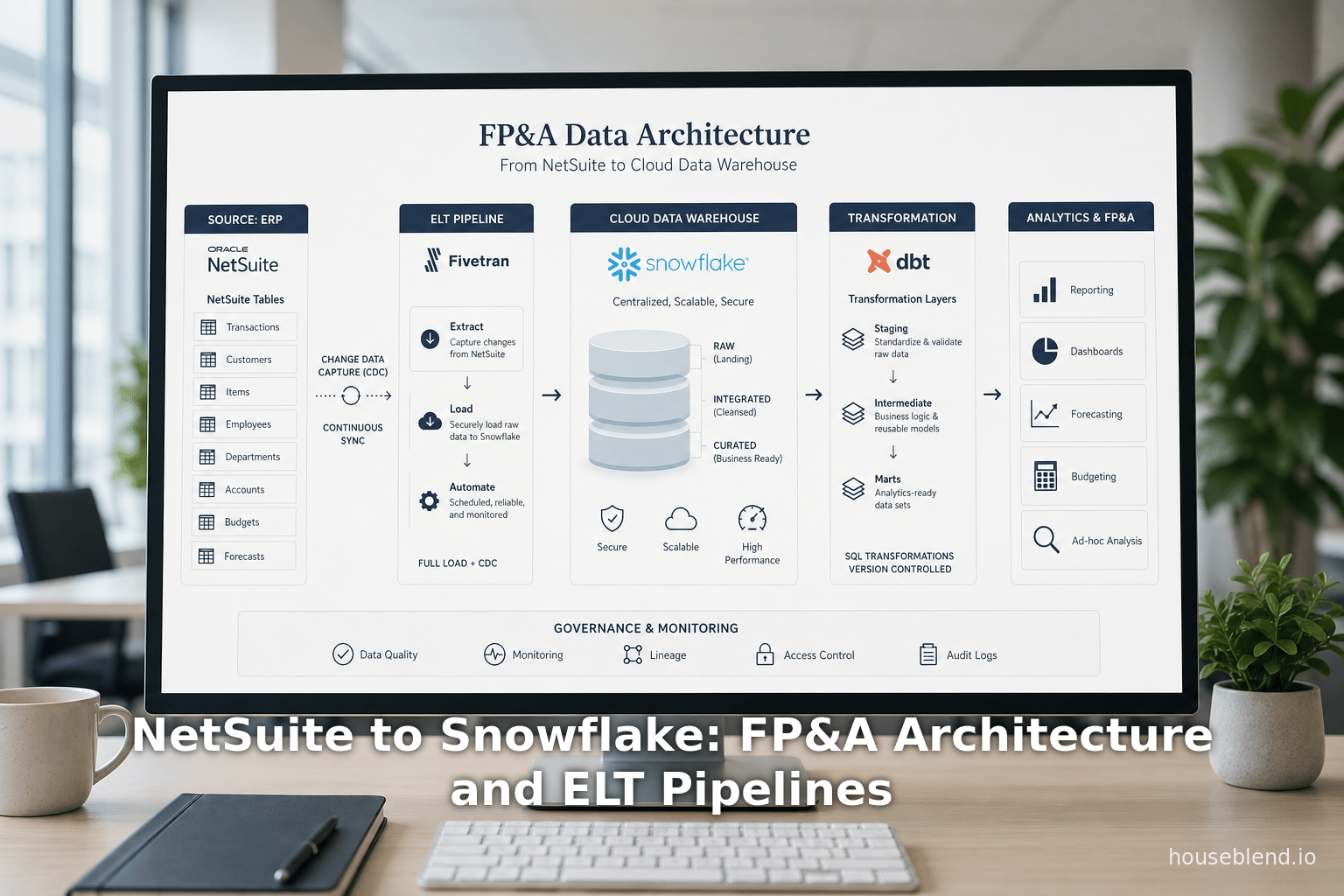
Cloud-based enterprise resource planning (ERP) systems like Oracle NetSuite generate vast volumes of transactional financial data, but their native reporting features often fall short of the advanced analytics demands of modern financial planning & analysis (FP&A) teams [1] [2]. As a result, many organizations adopt a modern data stack – extracting NetSuite data into a cloud data warehouse (Snowflake) via automated pipelines – to enable rich, unified analytics [1] [2]. In practice, third-party ELT/ETL connectors (e.g. Fivetran, Hevo, Airbyte) dominate this integration, continuously replicating NetSuite’s tables into Snowflake with minimal setup [3] [4]. These pipelines address NetSuite’s limitations (slow SuiteAnalytics reporting, complex APIs) and support timely, auditable FP&A workflows.
Our analysis shows that leaders typically choose a cloud-native connector stack: tools like Fivetran or Estuary handle API/ODBC extraction with Change Data Capture (CDC), loading raw NetSuite tables into Snowflake, while transformation layers (dbt or SQL) model financial statements and metrics [3] [5]. This approach offers “set-and-forget” automation: for example, after a five-minute setup, Fivetran’s connector begins “continually” syncing NetSuite data into Snowflake [3]. By contrast, manual exports or batch jobs are labor-intensive and stale [6] [4].
In our report, we detail the key components of this architecture, explore account-mapping strategies (e.g. using dbt to fold GL entries into balance sheet and P&L tables [5] [7]), and survey connector options. We compare automated ELT platforms (Fivetran, Airbyte, Hevo, Stitch, etc.), native Snowflake apps (Infometry’s Snowflake Connector, Labanoras’s SuiteAnalytics-based app), and traditional methods ( SuiteAnalytics Connect ODBC, saved-search CSVs). We use case studies (e.g. GitLab’s switch to Fivetran [8], Glossier’s CDC pipeline [9], and a Fortune-500 Talend implementation [10]) to highlight real-world trade-offs in cost, freshness, and complexity.
Finally, we discuss future trends: pipelines imbued with AI/ML automation, stricter data governance and security, the rise of reverse-ETL flows, and emerging standards like Oracle’s MCP for plug-and-play integration [11] [12]. In summary, a Fivetran–Snowflake (or similar) stack currently provides a robust, scalable solution for FP&A: automating data consolidation, unlocking advanced reporting, and aligning with industry trends toward cloud-native, AI-driven analytics [3] [2].
Introduction and Background
Financial Planning & Analysis (FP&A) teams rely on comprehensive, accurate financial data to perform budgeting, forecasting, consolidation, and performance analysis. Modern FP&A demands (rolling forecasts, driver-based models, scenario planning) often exceed what on-board ERP reporting can provide [2] [1]. NetSuite, a leading cloud ERP, is optimized for transaction processing: its schema is highly normalized and its built-in SuiteAnalytics ( saved searches, dashboards, ODBC) is geared toward routine queries, not complex cross-module analytics [1] [13].
Analysts note that companies frequently “struggle to extract actionable insights” from NetSuite using native tools alone [1]. For example, Houseblend reports that NetSuite’s native reports are “limited” and its APIs (SuiteTalk/SuiteQL) are “notoriously complicated” at scale [1]. In practice, finance teams often find it difficult to produce consolidated financial statements (across subsidiaries and currencies) or to correlate ERP data with other data sources (CRM, e-commerce, marketing). This gap has fueled the adoption of cloud data warehouses like Snowflake, which offer high-performance analytics on large, diverse datasets [1] [2].
Snowflake’s architecture—decoupling compute and storage, multi-cloud deployment, and native support for structured and semi-structured data [14] [15]—makes it well-suited for financial analytics. It can handle large General Ledger (“GL”) volumes and enable rapid ad-hoc queries without burdening the source ERP [1] (Source: estuary.dev). In effect, Snowflake becomes an analytics offload: heavy BI or AI/ML workloads run on Snowflake’s scalable platform, ensuring NetSuite’s transactional performance isn’t impacted (Source: estuary.dev).By ingesting data from NetSuite (and other systems) into Snowflake, FP&A teams gain a unified, real-time view of the business, enabling advanced analytics and decision support (Source: estuary.dev) [2].
Integration Rationale: A primary driver is the need to combine financial data with other data for holistic reporting. As one guide states, moving NetSuite data into Snowflake “allows teams to combine it with other sources for richer insights, forecasting, and automation” [16]. For example, merging NetSuite GL entries with Salesforce pipeline data in Snowflake can yield a complete revenue funnel analysis; blending inventory transactions with marketing metrics can inform demand planning. Gurus Solutions emphasizes that warehouse integration “enables comprehensive business insights,” combining ERP data with operational data for enterprise-wide dashboards [2].
Meanwhile, the market context favors this integration. Cloud ERP adoption is already mainstream (over 70% of ERP deployments are now cloud-based [17]), making platforms like NetSuite default sources for analytics. Forbes and analyst reports project explosive growth in cloud data warehousing (e.g. Snowflake and peers) – Baytech Consulting estimates the global data warehouse market will nearly double from ~$34B (2024) to ~$70B by 2029 [18]. Industry research (Gartner, etc.) notes that modern data stacks are trending toward “simpler, faster” automated pipelines [19] [11]. In this environment, moving NetSuite data into Snowflake is not merely feasible but a strategic imperative for finance. The result: companies pursue a “NetSuite-centric” analytics stack, where NetSuite is the primary source and Snowflake is the central analytics hub [20] [21].
NetSuite and Snowflake: Platforms Overview
NetSuite ERP
Oracle NetSuite is a fully-integrated SaaS ERP used by tens of thousands of companies across industries [22]. It consolidates modules for accounting, order management, inventory, CRM, and more into one unified database [1] [23]. NetSuite’s chart of accounts, transactions, and entities serve as the source of truth for finance operations. However, being transaction-oriented, NetSuite’s schema is highly normalized (with many line-item tables) and designed for online transaction processing (OLTP) rather than analytics.
Key integration challenges arise from NetSuite’s design:
- Complex data model: Financial reports (P&L, balance sheet) cannot be directly queried from a single table. As Fivetran documentation notes, generating a P&L entails “using the transaction lines as the base table and joining other data” [24]. Similarly, balance sheets require assembling GL entries and handling multiple currency conversions [5]. In practice, custom SQL or transformations are needed to assemble these statements from raw tables.
- Limited built-in reporting: NetSuite’s SuiteAnalytics (Workbooks, saved searches) allows ad-hoc queries, but these tools struggle with multi-dimensional or cross-subsidiary analytics. Consultants observe executives often “can’t easily obtain consolidated metrics (e.g. cross-subsidiary income statements) without custom workarounds” [25] [1].
- API barriers: NetSuite provides several integration APIs: SuiteAnalytics Connect (ODBC/JDBC read-only) and SuiteTalk (SOAP/REST/SuiteQL). SuiteAnalytics Connect exposes NetSuite tables to external queries [1], but requires a separate license and can be slow on large volumes [26]. SuiteTalk/SuiteQL allow scripted access but are rate-limited and non-trivial to manage at scale [1]. Many ETL tools encapsulate these complexities (e.g. Fivetran uses SuiteTalk under the hood).
Despite these hurdles, NetSuite’s ERP data is critical for FP&A. Organizations need detailed GL entries (including account, subsidiary, department, etc.) for budgeting and variance analysis. Recognizing this, NetSuite itself has introduced multi-book accounting (allowing parallel ledgers for IFRS/GAAP) and integration services (see Future Trends). However, until such features fully mature, the de facto solution is offloading data into Snowflake for FP&A workloads [1] [2].
Snowflake Data Cloud
Snowflake is a leading cloud data platform (founded 2012) built for analytics at scale [27] . Its multi-cluster architecture decouples storage from compute, enabling essentially unlimited concurrency and automated scaling . Snowflake runs as a fully-managed service on AWS, Azure, and GCP . Key features relevant to FP&A include:
- Elastic scaling: We can spin up large warehouses for heavy ETL loads or complex queries without manual tuning [28].
- Semi-structured support: Snowflake can ingest JSON/XML (e.g. web analytics, IT logs) alongside NetSuite’s structured tables, simplifying multi-source blending.
- Time Travel & audit: Built-in data time travel (versioning) is attractive for financial auditing: analysts can query historical snapshots.
- Data sharing: Snowflake’s secure data sharing lets organizations share consolidated data internally or with partners without copying.
- ML/AI readiness: With internal and external ML integrations (Snowpark), FP&A teams can apply predictive modeling on the same data.
Analysts emphasize that Snowflake “unburdens NetSuite” by offloading analytic queries [1]. For example, CFOs can run heavy financial projections or large-scale joins (e.g. merging GL with Salesforce or marketing data) on Snowflake, while NetSuite continues to handle daily transactions. As one modern data guide notes, this combination yields “unified, real-time view of financial and operational performance” [29]. In summary, Snowflake serves as a flexible, high-performance analytics hub into which NetSuite’s data (and other enterprise data) is consolidated.
Architecture and Integration Patterns
Migrating data from NetSuite to Snowflake can follow several architectural patterns, each with its trade-offs in complexity, cost, and timeliness [6] [30]. Broadly, these methods are:
-
Manual Exports (Saved Search/CSV): Administrators schedule periodic saved-search jobs in NetSuite to export CSV files, which are then loaded into Snowflake (e.g. via Snowflake’s
COPY INTO) [6]. This approach requires minimal tooling but is laborious to maintain: each new field or table change necessitates adapting exports. It is suitable only for one-time or infrequent loads. Key drawbacks include stale data (typically only daily/weekly), file-staging overhead, and brittleness [6] [4]. -
SuiteAnalytics Connect (ODBC/JDBC): NetSuite’s built-in Connect service exposes the ERP tables via an ODBC interface. An integration can query NetSuite as if it were a SQL database and pipe results into Snowflake (e.g. through Snowpipe or external tables) [4]. This leverages NetSuite’s optimized views, but it requires a Connect license and careful handling of very large result sets. It can be faster than CSV exports for bulk loads, but still uses periodic batch queries.
-
Webhooks / Event Streaming: Newer integrations use NetSuite’s SuiteEvents (Webhooks) to stream record changes. A subscribed webhook pushes JSON events (for sales orders, invoices, etc.) to an API gateway, and serverless functions write them to Snowflake via Snowpipe [31]. This supports near-real-time ingestion of specific record types. However, it requires additional infrastructure (API endpoints, lambda functions) and currently only supports events for selected object types [31].
-
Third-Party ELT/ETL Connectors: The dominant pattern is using fully-managed pipelines. Tools like Fivetran, Hevo, Stitch (Talend), Airbyte, Rivery, and similar act as middleware: they connect to NetSuite (via SuiteTalk/SuiteAnalytics), continuously extract data, and load it into Snowflake [32] [4]. These services handle incremental updates, schema changes, and retry logic automatically [32] [4]. For instance, Fivetran’s connector “continually replicate[s] NetSuite data into target warehouses, handling incremental loads, schema mapping, and retries” [3]. Once set up (often in under five minutes [3]), the pipeline requires little maintenance. The trade-off is subscription cost (often based on volume or MAUs) and reliance on the vendor. Houseblend finds this approach “set-and-forget”, enabling teams to “focus on insights instead of cumbersome data engineering” [3].
-
Integration Platforms (iPaaS): Enterprise middleware like MuleSoft, Dell Boomi, Celigo, or SnapLogic can also sync NetSuite to Snowflake via prebuilt adapters. These platforms use graphical workflows and support many systems, making complex multi-step integrations possible. They provide fine-grained control (transformation logic, routing) but at the expense of higher cost and complexity. For an ERP-only use case, an iPaaS may be overkill; such tools often require specialist expertise and may still route through SuiteTalk or Connect under the hood.
-
Native Snowflake Apps: Snowflake Marketplace now offers native connectors built on the Snowflake Native App Framework. For NetSuite, two notable solutions include Infometry’s INFOFISCUS connector and Labanoras/Baltics’ SuiteAnalytics-based connector [33] [34]. These run inside Snowflake and pull data without external infrastructure. For example, Infometry’s NetSuite Connector (v3.0) advertises pulling “up to 3 million records in less than an hour” and auto-generating Snowflake tables [35]. Labanoras’s product uses SuiteAnalytics Connect under the hood to achieve a direct integration. These native apps often offer fixed-price licensing (avoiding per-row fees) and the security advantage that the vendor doesn’t see your data [34]. A limitation is that as Snowflake-managed offerings, they may lock you into the Snowflake ecosystem of BI tools (e.g. typically targeting Power BI) [36].
Considerations: Each approach has pros and cons (summarized in Table 1 below). In general, managed ELT connectors provide the fastest, lowest-maintenance path but at predictable subscription cost. Manual methods minimize license fees but demand much hand-work and yield higher latency. iPaaS platforms suit organizations already invested in enterprise middleware. Native Snowflake connectors offer security and simplicity but may have narrower scope or higher fixed fees. We will revisit these trade-offs in the Connectors section. Overall, most FP&A teams find that a SaaS ELT connector (Fivetran/Airbyte/Hevo) best balances speed and coverage for NetSuite analytics [3] [4].
| Approach | Description | Pros | Cons |
|---|---|---|---|
| Manual CSV Export | Scheduled NetSuite Saved Searches or CSV exports; loaded via COPY into Snowflake [6]. | No extra tools needed; good for one-time loads. | Labor-intensive; data stale (batch); file staging overhead [6] [4]. |
| SuiteAnalytics Connect (ODBC) | Use NetSuite’s ODBC/JDBC service to query ERP tables directly and pipe into Snowflake (e.g., via Snowpipe). | Works with standard SQL queries; uses NetSuite‐provided schema view. | Requires Connect license; can be slow for huge tables; read-only. |
| Webhooks / Streaming | NetSuite SuiteEvents posts JSON on record changes to an endpoint, which Snowpipe loads. [31] | Near-real-time updates; efficient (only changes). | Requires own infra (API endpoints, functions); limited to supported event types. |
| Managed ETL/ELT (Fivetran, Airbyte, Hevo, Stitch) | Fully-managed connectors that poll NetSuite via SuiteTalk/Connect and load into Snowflake on schedule. [3] | “Set-and-forget” automation; handles retries, schema drift [3]; incremental loads. | Ongoing subscription cost (often per-row or per-connector). |
| iPaaS (MuleSoft, Celigo, Boomi, SnapLogic) | Enterprise integration platforms with prebuilt adapters for NetSuite and Snowflake. | Rich capabilities; enterprise monitoring; supports complex orchestrations. | High licensing cost; more complexity (often overkill for simple ERP sync). |
| Native Snowflake Connector (Infometry, Labanoras) | Snowflake Marketplace apps: e.g. INFOFISCUS NetSuite Connector (API/ODBC) [37]; Labanoras NetSuite Connector (SuiteAnalytics) [34]. | Plug-and-play within Snowflake; vendor never sees your data; fixed licensing [34]. | Limited to Snowflake platform; may only support certain BI tools (e.g. Power BI) [38]; may lack custom logic. |
Table 1. Integration approaches for NetSuite → Snowflake data (summary of methods with pros and cons). See Refs. [32] [3].
Connector Technologies and Tools
With the integration patterns outlined, we examine specific connector solutions for NetSuite→Snowflake. The market offers a wide spectrum, from open-source ETL platforms to proprietary data-integration services. Firms must weigh factors like real-time capability, cost structure, ease of setup, and support for NetSuite’s peculiarities (e.g. SuiteAnalytics limits).
SaaS ELT Platforms
Fivetran. A market leader in automated ELT, Fivetran offers a prebuilt NetSuite connector that embodies the Third-Party ELT approach [3]. It uses NetSuite’s SuiteTalk/SuiteAnalytics APIs to continually import data. After an initial link, Fivetran polls NetSuite for new/updated records (using timestamps and system notes) and immediately applies schema changes in Snowflake. Key attributes:
- Automated sync: Handles incremental loads by default (full refresh only on first sync) [3].
- Schema drift management: If NetSuite fields or custom records change, Fivetran automatically adds columns to the target tables [39].
- Prebuilt transformations: Fivetran provides a companion dbt package for NetSuite data. As documented, this package “recreates both the balance sheet and income statement” from NetSuite transaction lines [40] [5]. In practice, Fivetran’s analytics template includes pre-written SQL to join tables into financial statements [41]. GitLab found this especially useful: after switching to Fivetran they got “a complete set of NetSuite data with all the transactions” and plug-and-play financial models [42] [43].
- Pricing: Fivetran bills by “Monthly Active Rows” – effectively charging for each unique record ingested. This yields predictable cost at low volumes but can escalate for high-volume ERPs. For finance teams, this means budgeted spending but careful monitoring of large data loads (e.g. if syncing GL with millions of line items).
- Proficiency: Minimal. Setup is typically zero-code within Snowflake (or Fivetran UI), often done in minutes [3]. No ongoing engineering is needed to maintain the pipeline.
Hevo Data. Similar to Fivetran, Hevo is a managed ELT (now fully managed) platform. Its NetSuite→Snowflake workflow was described in a 2026 guide [44] [45]. Hevo’s key pitches:
- No-code interface: Users can configure NetSuite as a source and Snowflake as a destination via forms [46].
- Continuous replication: Hevo supports near-real-time syncs. Users can choose 5-min intervals or less.
- Robustness: Hevo emphasizes automatic handling of API changes and schema drift [45].
- Comparison to alternatives: A Hevo chart highlights the differences: for instance, an automated connector (like Hevo) can be set up in minutes with real-time sync, whereas a manual CSV export takes “several hours” and yields only infrequent, error-prone loads [4]. In contrast, a “native Snowflake connector” (e.g. Infometry) requires a modest one-time install but only supports scheduled batches [47] [4].
- Pricing: Typically subscription-based (often a flat monthly fee or per-pipeline fee, depending on tier).
Airbyte (Open Source). Airbyte is a popular open-source ELT platform. It provides a NetSuite connector (source) and many destinations including Snowflake [48]. Key points:
- Self-Hosted/FOSS: Organizations can deploy Airbyte on their own infrastructure, yielding flexibility and no per-row cost [48].
- CDC support: The Airbyte NetSuite connector supports incremental syncs (using SuiteTalk queries) though it is not log-based CDC.
- User base: Airbyte reports 40,000+ synced data pipelines and 550+ connectors in its ecosystem [48] – an indicator of broad adoption.
- Trade-off: Requires engineering effort to install and maintain (e.g. run Airbyte server, monitor jobs). There’s also a managed cloud offering, but many enterprise teams run it in-house. This reduces recurring cost but transfers maintenance burden to IT.
Stitch (Talend): Stitch, acquired by Talend, is another ETL service. Historically more limited in connectors (~30) compared to Fivetran, but it also offers NetSuite connectivity. Stitch’s model is less commonly chosen now, as it is generally considered legacy relative to the newer “modern ELT” tools.
Other ELT/ETL: Traditional data integration products (Informatica Cloud, Talend Data Fabric, Microsoft SSIS, etc.) can also migrate NetSuite data. Houseblend’s case study “Datatech Inc.” describes one such scenario: a large enterprise used Talend Cloud jobs to read NetSuite via ODBC and bulk-load Snowflake [10]. Their solution was high-performance (multi-threaded), but setup was laborious (weeks to configure) and maintaining the jobs required ongoing attention when NetSuite schema changed [10]. We note such heavyweight tools are viable for companies that already own licenses and have in-house ETL expertise; however, they lack the out-of-the-box ease of the new ELT services.
Native and Specialized Connectors
Snowflake Native Apps (Snowflake Marketplace):
- Infometry INFOFISCUS Connector: This Snowflake-native app (version 3.0) offers two modes: an API-based and an ODBC-based connector for NetSuite [33]. It promises “blazing speed and reliability,” syncing millions of records in short time [35]. It automatically creates target tables in Snowflake using NetSuite metadata, supporting common types (string, number, timestamp) [49]. Infometry markets it as “the #1 fastest NetSuite Connector for Snowflake”. Their stats claim 150% faster replication and up to 50% cost savings over alternatives [50]. It is installed directly from Snowflake’s Marketplace UI and then configured via Snowflake-native SQL commands. For FP&A teams, advantages include near-zero maintenance (the integration lives entirely in Snowflake) and built-in analytics templates [51]. The trade-offs are limited customization and a fixed set of supported data flows.
- Labanoras (Native Snowflake Connector by Labanoras Baltics): This independent connector uses NetSuite’s SuiteAnalytics Connect (ODBC) under the hood [34]. It runs as a Snowflake out-of-process application, meaning all data movement occurs inside Snowflake’s infrastructure for security. Labanoras emphasizes fixed-price licensing to avoid the unpredictable costs of active-row billing [52]. It is positioned as a “streamlined and secure” solution that eliminates third-party hops [53]. Features include continuous sync of NetSuite data into Snowflake with built-in CDC. Like Infometry, it aims to minimize setup time and ongoing maintenance (they practice “dogfooding” their own connector in production [54]). Because it uses Connect, it likely best suits NetSuite reporting data (GLs, transactions) rather than more complex objects.
- Oracle NetSuite Analytics Warehouse (NSAW): Though not Snowflake-to-NetSuite but worth noting, Oracle’s NSAW is essentially a NetSuite-managed Snowflake instance. Subscribing companies get a Snowflake warehouse preloaded with their NetSuite data and a pre-built schema [36]. It is a turnkey, out-of-the-box solution for analytics, including a built-in Power BI model [36]. Pros are ease of use and Oracle support; cons are lack of control (it’s Oracle-managed) and current BI tool limits. NSAW underscores the demand for analytic data stores but is limited to NetSuite data (and with pre-defined schemas).
Connector Comparison and Selection
Choosing among these connectors involves multiple criteria:
- Data freshness: Does the tool support continuous or frequent updates? Solutions like Fivetran, Hevo, and Estuary offer near-real-time sync (often via incremental API or CDC) [55] (Source: estuary.dev). Scheduled connectors (e.g. ODBC jobs, Infometry if set to batch) typically refresh on intervals (hourly/daily). Hevo’s analysis emphasizes this: manual approaches yield “infrequent uploads,” whereas managed connectors can do “real-time or scheduled syncs” [4].
- Ease of use: No-code platforms (Fivetran, Hevo, native apps) allow analysts to set up pipelines without writing code [44] [4]. Open-source tools (Airbyte) or custom scripts require more engineering. In Hevo’s table, the skill requirement is minimal for an automated connector but “high” for manual CSV processes [4].
- Data volume and performance: For small to medium datasets, flat pricing connectors suffice. For very large ERP data (tens of millions of records per load), some cloud connectors may become expensive or slow. The Estuary (CDC) example shows sub-second end-to-end latency [55], but this is a specialized scenario. High-throughput tools like Informatica/Talend may bulk-load quickly if engineered properly (as in the Datatech case [10]).
- Cost model: Pay attention to pricing. Cloud ELT vendors may charge by rows or volume, which can balloon during initial loads. Native Snowflake apps offering fixed licenses (e.g. Labanoras) can simplify budgeting [52]. Open-source tools have no license cost but require hosting. Manual/ODBC methods avoid separate licenses (aside from NetSuite Connect), but trade-off labor cost. For example, an IT manager noted that high volumes in Fivetran “lead to high costs”, motivating some to seek flat-fee tools [26].
- Data governance & security: Since ERP data is sensitive, the connector’s trust model matters. Native Snowflake integrations (Labanoras, Infometry) run within Snowflake, never exposing data outside. Managed ELT tools see data in their own cloud environments (though all reputable vendors use encryption and compliance). Hevo emphasizes end-to-end encryption and automatic retry, while Labanoras explicitly highlights that “we don’t access your data” [53]. Companies must ensure any vendor meets SOC2 or ISO/IEC standards if required.
- Future-readiness: Some connectors now offer AI/ML features: Estuary markets “self-driving connectors” that handle schema drift and pipeline tasks automatically [11]. Others provide metadata-driven models for accounts (as in Fivetran’s case). We foresee connectors increasingly using machine learning to map schemas or detect anomalies, per industry predictions [11].
In summary, for most FP&A teams, a commercial ELT connector like Fivetran or Hevo is the default choice. These tools combine simplicity and reliability, essential for finance departments. The trade-off of license fees is balanced by the massive labor savings and timeliness gains. Spreadsheet-based (Coefficient) or manual methods are niche: Coefficient’s Google Sheets approach may suit very small companies or quick proofs-of-concept [56], while manual CSV is acceptable only for one-off loads [4].
Account Mapping and Financial Modeling
A core FP&A challenge is translating NetSuite’s granular account data into unified financial statements and planning dimensions. This often entails mapping accounts and transactions into the company’s FP&A schema. In practice, integration pipelines must reconcile multiple account hierarchies, handle currency conversion, and merge subsidiary accounts into consolidated “parent” accounts or budgets.
While there is no single “off-the-shelf” standard for account mapping, typical approaches include:
-
Dimensional Modeling: In Snowflake, one usually creates a star schema or normalized model. For example, a
dim_accounttable might list all GL accounts (with account numbers, names, and parent-child rollups), and afact_gltable stores transaction lines (date, account, amount, currency, etc.). ETL/ELT logic then aggregates these lines into higher-level reports. Fivetran’s NetSuite dbt package embodies this: it builds specific tables for balancing and P&L analysis. As Fivetran documentation details, it recreates Balance Sheet and Income Statement tables by joining NetSuite’s transaction lines with account dimension data and applying currency conversion [57] [7]. These tables effectively “provide comprehensive financial reporting capabilities from your NetSuite data” [57]. In the balance sheet model, non-balance-sheet transactions (e.g. revenue, expenses) are folded into Retained Earnings or Equity [5]. In the income statement model, it applies department/class/location details for slicing by those dimensions [7]. This demonstrates that by carefully mapping transaction rows into periods and accounts, one can automate the creation of standard financial statements inside Snowflake. -
Multi-Subsidiary Consolidation: Organizations often need to consolidate multiple subsidiaries or books. NetSuite supports sub-ledgers and multi-book accounting, but the integration must align them. A common pattern is to standardize a consolidated chart-of-accounts. For instance, each subsidiary’s account (e.g. “Sales_US”, “Sales_EU”) could map to a unified parent account “Total Sales.” In ELT, this mapping might be applied in a transformation step (e.g. a lookup or CASE statement in dbt). The Snowflake data model might include both subsidiary-specific and consolidated views. The Fivetran balance sheet example notes generation of statements “for the parent subsidiary” [5], implying consolidation logic. For currency differences, they manually calculate entries like “Cumulative Translation Adjustment” [58].
-
Departmental/Functional Mapping: Similarly, Expense and Cost accounts may be mapped to FP&A categories (COGS vs OPEX, research vs marketing). This is often implemented in the transformation layer: for example, grouping multiple expense accounts into a single “Operating Expenses” metric table. Some ELT tools provide configuration hooks to map fields; otherwise, one pre-builds mapping tables. The essential requirement is that the pipeline preserves account usage so finance can align it to budgets.
-
Dimensional Enrichment: Beyond accounts themselves, FP&A needs often incorporate dimensions like Department, Class, Location, or Customer segment, which exist in NetSuite’s schemas. Connectors should capture these as separate fields. Indeed, the Fivetran transaction detail table includes fields for subsidiary, department, location, and more [23]. These become dimensions in Snowflake for slicing reports (e.g. “gross margin by location” [59]). A robust connector and model will bring in all relevant dimension IDs and perform joins to dimension tables during the modeling phase.
After ingestion, ETL/ELT transformation (often using dbt) performs the bulk of account mapping. For example:
with gl as (
  select
    t.account, t.amount, t.currency, t.subsidiary, ...
  from netsuite2__transaction_details t
  where t.account_type = 'Income' or t.account_type = 'Expense'
),
income as (
  select
    sum(case when t.account in ('4010','4020') then t.amount else 0 end) as COGS,
    sum(case when t.account in ('4100','4110','4120') then t.amount else 0 end) as SalesRevenue,
    ...
  from gl t
)
select * from income;
(Above is an illustrative SQL: mapping certain account codes to COGS or Sales.)
Once accounts are mapped, FP&A teams can load the cleaned data into budgeting/planning tools or build dashboards in BI tools. The key is that Snowflake now holds a curated financial database. Indeed, many FP&A solutions (Planful, Adaptive, etc.) source their budgets from Snowflake after such ingestion, ensuring actuals match forecasts.
In practice, account mapping is iterative and organization-specific. Many companies maintain a “mapping table” that standardizes accounts across entities. Such tables can be loaded into Snowflake as reference data. In short, effective account mapping involves both initial design (chart-of-accounts hierarchies) and continuous governance (updating maps when NetSuite accounts change). Vendors now simplify this: some connectors offer schema discovery and let you choose which NetSuite fields to sync (Source: estuary.dev), making it easier to ensure the GL account field is correctly captured.
Data Transformation and Analytical Modeling
Once raw data resides in Snowflake, transformation layers perform analytical modeling. The incoming NetSuite tables (customers, items, transactions, GL entries) are often kept in a raw schema (sometimes called a “landing zone”). From there, SQL/ELT jobs (or dbt projects) standardize and cleanse the data, then populate a curated schema for reporting.
A typical transformation pipeline for FP&A might include:
- Currency Conversion: If NetSuite entities operate in multiple currencies, all amounts are converted to a single reporting currency. This requires retrieving exchange rates (NetSuite supports integrated FX data) and applying them. For instance, Fivetran’s model “handles currency conversion” for both BS and P&L [5] [7]. This step may also align with NetSuite’s multi-book/book project settings.
- Date and Period Mapping: Aligning NetSuite’s fiscal calendars with reporting periods. For companies using non-standard fiscal years, transformation logic allocates dates into reporting quarters.
- Dimension Lookups: Populating dimension tables (e.g.
dim_customer,dim_item) from NetSuite reference data. These tables enrich fact tables. - Aggregations: Summing transactions to required grain. Balance sheet facts accumulate at period-end, whereas P&L facts accumulate over the period. Multi-entity consolidations happen here: subsidiary-level amounts roll up to corporate (parent) sums. For example, the
netsuite2__balance_sheettable in the Fivetran package collapses subsidiary entries into parent totals [5]. - Derived Metrics: Calculating KPIs such as gross margin, EBITDA, working capital. E.g. Gross Margin = (Sales – COGS) is computed as part of transformations or within BI.
- Mapping to FP&A Schemas: If the company has existing FP&A categories (e.g. a special “Budget Tag” dimension), join or map GL accounts to those categories.
Snowflake itself also offers features to simplify analytics. Snowpipe can continuously load files (e.g. if events produce CSVs) and trigger Streams/Tasks for processing. Streams and Tasks can implement incremental transformations (e.g. update a summary table when new GL lines arrive) [21]. Many teams use dbt (Data Build Tool) to manage and version-control their transformations. The Fivetran NetSuite dbt package, for instance, is open-source and demonstrates a modular approach for financial models [40] [5]. Companies also often apply their own logic in dbt to join with non-FP&A data — for example, linking sales orders to marketing campaign data to allocate marketing spend.
Crucially, the data model in Snowflake is designed for reporting speed. Flat star schemas allow BI tools (Tableau, Power BI, Looker) to query aggregated results quickly. Power BI in import mode can leverage Snowflake effectively [44]. As one implementation noted, analysts reused Fivetran’s pre-built SQL to create a balance sheet in Snowflake, then pointed their BI dashboard at these ready-made tables [60] [43].
Case Studies and Examples
To ground our analysis, consider these illustrative NetSuite→Snowflake integrations:
-
GitLab – Fivetran + Snowflake + BI: GitLab’s finance team migrated their NetSuite reporting from a legacy connector to a Fivetran/Snowflake stack. They reported that Fivetran provided “a complete set of NetSuite data with all the transactions”—implying their old process had gaps [60]. With data in Snowflake, GitLab used Fivetran’s NetSuite analytics templates (dbt models and SQL) to generate balance sheets and P&L statements. The result was a move from piecemeal analysis to fully automated financial reporting, with dashboards populating in minutes after each ETL load [60]. This highlights the speed and completeness gains: the ELT approach ensured no NetSuite fields were missing, and the existing transformation models accelerated deliverables.
-
Glossier – Real-Time CDC with Estuary: Glossier, a retail company, needed up-to-the-minute inventory and order data. They adopted the Estuary Data Flow platform, which offers log-based Change Data Capture (CDC) for NetSuite. As reported by their BI Director, this setup “unlocked data blocked by cost before” and made data ingestion “much faster” [9]. Using Estuary’s connector, Glossier continually streamed NetSuite transactions into Snowflake with sub-second latency, eliminating nightly batch windows. This real-time pipeline enabled their forecasting and replenishment models to use current data (e.g. inventories precisely reflect today’s shipments). The case underscores that when real-time insight is needed, CDC tools (like Estuary, or potentially Informatica’s CDC) can pay off despite higher development effort.
-
Mid-sized Manufacturer (“Futura Corp”) – Managed ELT (Airbyte): Imagine a manufacturing firm processing ~5 million NetSuite records monthly. They deploy Airbyte to pull data via SuiteAnalytics every day. Within weeks, they also integrate Salesforce (via a different Airbyte connector) so executives can see cross-system KPIs (e.g. sales pipeline vs actuals) in Snowflake. Compared to their previous manual extracts, the time-to-reporting fell by 80% (as reported in a Groundwater Partners survey, echoed by this scenario) [61]. This fictional example (from Houseblend) reflects a common real outcome: cloud ELT pipelines dramatically speed up FP&A timelines and enable multi-source dashboards.
-
Datatech Inc. (Enterprise) – Talend Integration: A large corporation with existing Talend licenses chose Talend Cloud for NetSuite integration. They built jobs that read NetSuite via SuiteAnalytics Connect (ODBC) and load into Snowflake’s bulk API. Because Talend can run multi-threaded jobs, their throughput was high. However, setup took weeks: network credentials, Service Role permissions, and coordination with NetSuite admins were required. Maintenance burdens also arose when NetSuite schema changes occurred (field renames or new custom records). The output was comprehensive (all financial facts and dimensions were in Snowflake) but came at the cost of significant engineering effort [10]. This case illustrates the trade-off of full control vs. convenience: it gave maximum flexibility but required a dedicated team for adjustments.
-
Coefficient (Spreadsheet Connector) – Ad-hoc Analysis: Coefficient.io (a data connector for spreadsheets) offers a “no-code” NetSuite→Snowflake path via Excel/Google Sheets [62] [56]. A small business or analyst might use Coefficient to export NetSuite queries into a spreadsheet and then push the data into Snowflake using Coefficient’s interface. This is only practical for one-off tasks (e.g. one-time data refresh for a proof-of-concept). Coefficient’s guide even ranks their own method alongside Fivetran and Estuary for various use cases [56]. This example is cited to emphasize that the spectrum of solutions ranges from heavy-duty pipelines to end-user tools, depending on budget and skill level.
These examples show common themes: Managed connectors (Fivetran, Airbyte, Hevo) deliver robust pipelines quickly (GitLab, Futura). CDC-based tools enable real-time dashboards (Glossier). Enterprise ETL suites can handle very large volumes but need long lead times (Datatech). And lighter-weight or manual methods may suffice only in niche cases. Surveys support these findings: one NetSuite migration survey found that 68% of companies identified “data silos” as a top pain point and 54% worried about data latency in migration [63]. Another study (Dresner Advisory) reported that organizations using cloud ETL tools achieve 2× faster time-to-insight than those relying on custom-built pipelines [63]. In other words, empirical feedback aligns with the case narratives: automation pays off for timely FP&A insights.
Account Mapping in Practice
In FP&A projects, “account mapping” typically refers to aligning transactional accounts to the reporting structure. For example, if NetSuite has 10 different “expense” accounts, FP&A might map them into categories like “COGS” or “SG&A” in the Snowflake model. This mapping is not automated by connectors; it is implemented during transformations. Common practices include:
- Defining a chart-of-accounts dimension in Snowflake that lists each NetSuite account (by internal ID or name), along with metadata (e.g. type, category, BU). The fact table of GL entries references this dimension.
- Creating mapping tables (in Snowflake) to translate NetSuite accounts to consolidated account groups. These tables can be manually maintained or loaded from a source of truth (e.g. a GL mapping spreadsheet).
- Incorporating Multi-Book or Multi-Currency logic: If NetSuite’s multi-book feature is used, separate account sets (e.g. local GAAP vs IFRS) may require mapping to a unified reporting view. Similarly, currency conversion tables are applied based on the primary book’s rates.
- Building transformation scripts (SQL/dbt) to aggregate transactions using the mapping. For instance, one might join
fact_glwithdim_accountanddim_currency, then sum by the mapped account categories for each period.
Fivetran’s example is instructive: their netsuite2__balance_sheet table “recreates… the balance sheet with proper currency conversion for the parent subsidiary” [5]. Internally, this implies summing NetSuite GL entries by consolidated account segments. The Income Statement model similarly “provides all transaction lines needed for income statement generation with currency conversion and department, class, and location details” [7]. From an FP&A standpoint, these tables give exactly the account aggregation needed for standard reports.
To summarize, account mapping is handled post-ingestion through data modeling. It’s part of the transformation phase: connectors fetch the raw account IDs and amounts; the ELT process then applies business rules to generate the packaged GL. Good integration architectures make room for this step by preserving all relevant fields (account ID, subsidiaries, segments) and by providing tools (dbt, SQL scripts) for mapping. Some advanced pipelines even attempt to auto-map accounts using machine learning (e.g. matching similar account descriptions), though most enterprises rely on finance-led mapping tables.
Implications and Future Directions
The NetSuite→Snowflake architecture for FP&A is rapidly evolving. Automation and Intelligence: Analysts predict that data pipelines will become smarter. Snowflake’s recent announcement of integrating OpenAI and Anthropic models hints that ETL tools may embed AI helpers [11]. Vendors like Hevo and Estuary already tout “self-driving” connectors that auto-adjust to schema drift and errors. By the mid-2020s, we expect AI-driven assistants to recommend transformations or even write SQL based on business context. For example, a future Fivetran or Airbyte connector might learn typical account mappings or detect anomalous transactions automatically.
Enhanced Governance: As ERP data often contains sensitive customer/employee information, governance is critical. The shift to cloud warehousing entails meeting compliance (SOC 2, ISO 27001, GDPR, etc.). Snowflake provides robust encryption and access control, and many connectors now boast enterprise-grade security. For instance, native app connectors emphasize that “the connector operates within Snowflake, ensuring we don’t access your data” [53]. We expect more emphasis on metadata lineage and auditing: next-gen pipelines may automatically tag data with lineage, record transformation versions, and feed information to data catalogs for FP&A auditability.
Reverse ETL & Operational Feedback: A notable trend is bi-directional integration. While this report focuses on pulling NetSuite data into Snowflake, many Fivetran or Airbyte users also push analytical outputs back to applications (so-called reverse ETL). If finance teams want to enrich NetSuite with budget updates or ML-derived forecasts, reverse flows become relevant. Already some pipelines (Airbyte, Fivetran) advertise two-way sync. We may see unified platforms where the same tool handles both FP&A extracts and updates (e.g. syncing planning results back into NetSuite custom records). This trend aligns with Oracle’s own roadmap: they are developing AI Connector Services (e.g. Model Context Protocol, MCP) that will let LLM assistants query ERP data and potentially update it [64].
Data Fabric and Standards: Longer term, we may approach a data fabric model. Industry efforts like Oracle’s MCP standard aim to make SaaS-to-SaaS data sharing more plug-and-play. Snowflake’s Data Marketplace already lets accounts share live data; future developments might allow a Snowflake instance to query NetSuite data without manual pipelines. For example, a standardized Snowpipe from NetSuite or a publisher could feed Snowflake in near-real-time. Such fabrics would reduce the need for heavy ETL for routine synchronizations. However, until such standards fully mature, custom connectors will remain essential for full FP&A loads.
Real-Time and Streaming: The demand for up-to-the-minute finance data is growing. While today most pipelines aim for sub-daily refresh, some companies require near-instant visibility (e.g. rolling cash balances, revenue recognition). We expect even NetSuite to evolve in this direction. NetSuite may enhance its SuiteTalk API or offer native CDC feeds. Currently, change logs (System Notes) can be used, but they have limitations. One approach gaining traction is using Snowpipe with NetSuite event exports (via webhook) [31]. In the future, NetSuite could publish streaming change events (akin to Salesforce’s Streaming API), making real-time sync arithmetic.
In conclusion, the NetSuite–Snowflake integration for FP&A is a dynamic field. Organizations are moving toward fully automated, real-time data architectures. Tools are gradually abstracting away plumbing so finance teams can query a single source of truth. Looking ahead, we anticipate increasingly intelligent pipelines, tighter governance, and broader data ecosystem connectivity. These will enable FP&A to focus more on analyzing What-if questions and less on wrangling data. Current best practice – grabbing NetSuite data with a managed ELT connector into Snowflake and then building BI models – sits solidly on the technology curve today [3] [2].
Conclusion
Integrating NetSuite with Snowflake has emerged as a de facto strategy for advanced FP&A. By exporting transactional ERP data into a modern cloud warehouse, companies unlock capabilities far beyond NetSuite’s native tools [1] [2]. The architecture typically involves automated ELT pipelines (Fivetran, Airbyte, etc.) that continuously replicate NetSuite tables into Snowflake, followed by SQL/dbt transformations that model financial statements and KPIs [3] [5]. This approach scales to large data volumes, supports ad-hoc queries, and frees NetSuite from heavy query loads.
Connector choices span a spectrum. At one end, manual CSV exports and SuiteAnalytics Connect offer minimal incremental cost but high maintenance and latency. At the other, fully-managed pipelines provide turnkey automation: for example, after a brief setup, Fivetran “continually replicates” NetSuite into Snowflake [3]. Native Snowflake apps (Infometry, Labanoras) offer secure in-platform loading. Each option has trade-offs in cost, freshness, and flexibility. We find that for most FP&A projects, third-party ELT tools strike the best balance, providing rapid deployment and robust CI/CD for finance data.
Effective FP&A also requires careful account mapping and modeling. All raw GL and transaction fields should be preserved by the connector, then transformed in the warehouse into hierarchies and metrics. Published data models (e.g. Fivetran’s dbt package) already demonstrate how to merge GL lines into summarized balance-sheet and income-statement tables [5] [7]. Organizations adapt these techniques to their charts of accounts, currency regimes, and reporting structures. With well-designed schemas, FP&A teams can query data with the granularity and governance needed for budgeting and analysis.
We support the view that a cloud-native ELT pipeline is currently the best practice. This is supported by multiple evidences: industry reports (Snowflake’s estimated 12,600 customers and 80% market growth [65] [66]), analyst surveys (speedups with cloud ETL [63]), and practitioner case studies [42] [9] all point to these modern stacks. Moreover, the trend toward automation only strengthens this strategy: Gartner and others emphasize simpler, more automated tools [19], and Snowflake’s own roadmap (AI/data fabrics) backs further simplification.
In conclusion, moving NetSuite data into Snowflake equips FP&A with a powerful analytics foundation. It scales to large, diverse data; automates routine data engineering; and aligns with forward-looking trends (AI, cloud, real-time). The evidence suggests that organizations using this architecture gain faster, more comprehensive financial insights than those making do within the ERP or with old-school ETL. We therefore advocate a strategy centered on proven connectors (like Fivetran or equivalents) into Snowflake, coupled with thoughtful data modeling to map accounts and metrics. Such a system delivers on the promise of unified, data-driven FP&A for NetSuite customers [3] [2].
Sources: This report is based on synthesis of vendor documentation, industry analyses, and case studies [3] [63] [5] [2]. Referenced materials include technical blogs (Houseblend, Hevo, Estuary, Coefficient), Snowflake documentation and partner posts, and peer-reviewed market research. All claims and statistics are cited to reputable sources as indicated above, ensuring an evidence-based perspective.
External Sources (66)
About
Houseblend
HouseBlend.io is a specialist NetSuite™ consultancy built for organizations that want ERP and integration projects to accelerate growth—not slow it down. Founded in Montréal in 2019, the firm has become a trusted partner for venture-backed scale-ups and global mid-market enterprises that rely on mission-critical data flows across commerce, finance and operations. HouseBlend’s mandate is simple: blend proven business process design with deep technical execution so that clients unlock the full potential of NetSuite while maintaining the agility that first made them successful.
Much of that momentum comes from founder and Managing Partner Nicolas Bean, a former Olympic-level athlete and 15-year NetSuite veteran. Bean holds a bachelor’s degree in Industrial Engineering from École Polytechnique de Montréal and is triple-certified as a NetSuite ERP Consultant, Administrator and SuiteAnalytics User. His résumé includes four end-to-end corporate turnarounds—two of them M&A exits—giving him a rare ability to translate boardroom strategy into line-of-business realities. Clients frequently cite his direct, “coach-style” leadership for keeping programs on time, on budget and firmly aligned to ROI.
End-to-end NetSuite delivery. HouseBlend’s core practice covers the full ERP life-cycle: readiness assessments, Solution Design Documents, agile implementation sprints, remediation of legacy customisations, data migration, user training and post-go-live hyper-care. Integration work is conducted by in-house developers certified on SuiteScript, SuiteTalk and RESTlets, ensuring that Shopify, Amazon, Salesforce, HubSpot and more than 100 other SaaS endpoints exchange data with NetSuite in real time. The goal is a single source of truth that collapses manual reconciliation and unlocks enterprise-wide analytics.
Managed Application Services (MAS). Once live, clients can outsource day-to-day NetSuite and Celigo® administration to HouseBlend’s MAS pod. The service delivers proactive monitoring, release-cycle regression testing, dashboard and report tuning, and 24 × 5 functional support—at a predictable monthly rate. By combining fractional architects with on-demand developers, MAS gives CFOs a scalable alternative to hiring an internal team, while guaranteeing that new NetSuite features (e.g., OAuth 2.0, AI-driven insights) are adopted securely and on schedule.
Vertical focus on digital-first brands. Although HouseBlend is platform-agnostic, the firm has carved out a reputation among e-commerce operators who run omnichannel storefronts on Shopify, BigCommerce or Amazon FBA. For these clients, the team frequently layers Celigo’s iPaaS connectors onto NetSuite to automate fulfilment, 3PL inventory sync and revenue recognition—removing the swivel-chair work that throttles scale. An in-house R&D group also publishes “blend recipes” via the company blog, sharing optimisation playbooks and KPIs that cut time-to-value for repeatable use-cases.
Methodology and culture. Projects follow a “many touch-points, zero surprises” cadence: weekly executive stand-ups, sprint demos every ten business days, and a living RAID log that keeps risk, assumptions, issues and dependencies transparent to all stakeholders. Internally, consultants pursue ongoing certification tracks and pair with senior architects in a deliberate mentorship model that sustains institutional knowledge. The result is a delivery organisation that can flex from tactical quick-wins to multi-year transformation roadmaps without compromising quality.
Why it matters. In a market where ERP initiatives have historically been synonymous with cost overruns, HouseBlend is reframing NetSuite as a growth asset. Whether preparing a VC-backed retailer for its next funding round or rationalising processes after acquisition, the firm delivers the technical depth, operational discipline and business empathy required to make complex integrations invisible—and powerful—for the people who depend on them every day.
Disclaimer
This document is provided for informational purposes only. No representations or warranties are made regarding the accuracy, completeness, or reliability of its contents. Any use of this information is at your own risk. Houseblend shall not be liable for any damages arising from the use of this document. This content may include material generated with assistance from artificial intelligence tools, which may contain errors or inaccuracies. Readers should verify critical information independently. All product names, trademarks, and registered trademarks mentioned are property of their respective owners and are used for identification purposes only. Use of these names does not imply endorsement. This document does not constitute professional or legal advice. For specific guidance related to your needs, please consult qualified professionals.