Houseblend Article
NetSuite SuiteProcurement Setup & Punchout Catalogs
Inside this article
Executive Summary
NetSuite SuiteProcurement is a newly introduced module (2025 Release 1) that automates indirect procure-to-pay by integrating supplier catalog “punchouts” and streamlined approval workflows into the NetSuite ERP. By connecting to the Oracle Business Network (OBN), it lets employees shop approved vendor sites (e.g. Amazon Business, Staples) within NetSuite and automatically generates purchase requests and orders according to predefined approval rules [1]. Early case studies report dramatic efficiency gains: one life-sciences firm cut order-processing time by ~70% (orders went from “days to minutes”), and procurement staff eliminated manual data entry [2]. SuiteProcurement also enforces compliance – for example, negotiated pricing deals yield ~10% savings on Staples orders and free 12‐month Amazon Business Prime (worth ~$1,299). We examine in depth: (1) Setup requirements (features to enable, OBN registration, SuiteApp installation and preferences) with Oracle’s official guidelines; (2) PunchOut catalogs (technical process of connecting to supplier sites via OBN, supported vendors and their OBN IDs, end‐user experience) with vendor documentation; (3) Approval workflows (how SuiteProcurement leverages NetSuite’s approval rules and features) with product docs and expert analysis; (4) Evidence and case data (metrics from implementations and comparative analyses); (5) Comparison to alternatives (SAP Ariba, Coupa, Jaggaer, etc.); and (6) Future outlook. All claims are backed by Oracle documentation, industry blogs, and case studies. This report finds that SuiteProcurement can transform indirect purchasing through automation and visibility, though success hinges on proper configuration and the evolving reach of the OBN supplier network.
Introduction and Background
Indirect procurement (goods/services needed to run the business) has traditionally involved time-consuming manual processes – print catalogues, email/fax orders, and ad hoc vendor transactions. Historically, NetSuite users could manage purchasing via purchase orders or simple requisition records, but external catalog browsing required custom solutions or third‐party apps. In 2025 NetSuite tackled this by launching SuiteProcurement, a SuiteApp add‐on designed to digitally integrate supplier stores into the ERP. Oracle’s help describes SuiteProcurement as “an indirect procurement solution designed to procure items online from trading partners” [3]. A NetSuite partner blog calls it a “game-changer” that lets employees shop approved sites (e.g. Amazon Business or Staples) within NetSuite, with built-in PR/PO automation and budget controls [1]. In effect, SuiteProcurement blurs the line between internal ERP purchasing and external e-commerce: after a “punchout” shopping session, the items and prices flow back into NetSuite to create a requisition automatically.
This report provides a comprehensive analysis of SuiteProcurement’s setup, punchout catalogs, and approval workflows. We cover setup and prerequisites in detail (NetSuite feature setup, OBN connection, SuiteApp installation, and preferences), thoroughly citing Oracle’s documentation. We explain the PunchOut Catalog mechanism – how NetSuite integrates via OBN to supplier websites (supported partners, sample OBN IDs, user experience) – with references to both Oracle docs and procurement experts. We analyze the approval workflow side of SuiteProcurement, showing how the generated purchase requests are routed through NetSuite’s native approval engine. In each section we include data from case studies and industry analyses: metrics on time/cost savings, descriptions of real implementations (e.g. a 70% order-time reduction) and expert commentary. Finally, we compare SuiteProcurement+OBN to rival solutions (SAP Ariba Network, Coupa, Jaggaer) to provide perspective, and discuss implications and future trends (anticipated expansion of OBN, AI, global integration, etc.).
SuiteProcurement Module Overview
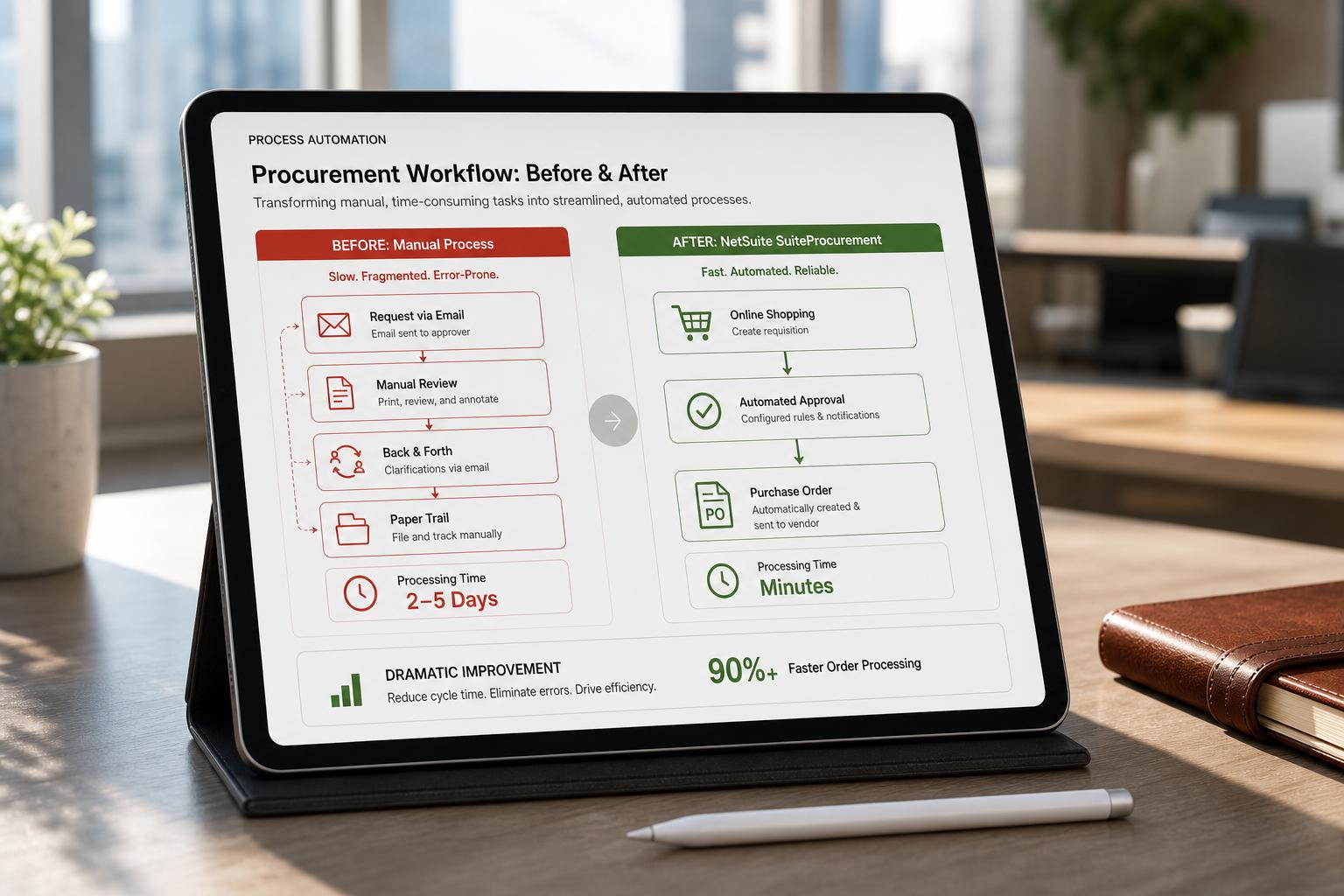
SuiteProcurement is delivered as a SuiteApp (a NetSuite add-on module). Official documentation notes that it “lets you streamline and automate indirect procurement processes, from procuring items to creating purchase requests, managing approvals, and processing bills” [4]. In practical terms, SuiteProcurement connects NetSuite to approved vendors via OBN. As one partner description summarizes: “SuiteProcurement… connects employees to approved vendor punchout catalogs through Oracle Business Network integration. Employees click vendor icons in NetSuite Employee Center to access Amazon Business or Staples sites, shop with negotiated business pricing, submit carts that automatically create purchase requests in NetSuite with approval workflows, and upon approval purchase orders are sent electronically to vendors…” [5]. In other words:
-
Integrated Catalog Browsing: Employees use a “Stores” portlet (on the NetSuite Employee Center dashboard) showing tiles for each connected supplier (e.g. Amazon Business, Staples). Clicking a tile punches out to that supplier’s online store via OBN, yet keeps a secure link back to NetSuite. The user shops as usual, benefiting from negotiated contract pricing.
-
Automatic Requisition Creation: At checkout, instead of placing the order on the supplier’s site, SuiteProcurement captures the cart details. The system “automatically creates a Purchase Request in NetSuite with all the details of the intended purchase”. This requisition (or purchase request) includes item details, quantities, prices, and vendor information from the cart.
-
Approval Routing: The created purchase request is then routed through NetSuite’s normal approval engine. SuiteProcurement applies the company’s predefined rules (by amount, department, item category, etc.) to determine the required approver(s) (e.g. managers or directors if over a threshold). The approval workflows (SuiteApproval or custom SuiteFlow) work exactly as they would for manually entered requests.
-
Automated PO Transmission: Once the requisition is approved, SuiteProcurement automatically generates a Purchase Order in NetSuite and sends it to the supplier via OBN. The order includes all cart details (vendor, shipping, items). Vendor acknowledgements, shipping notices (ASNs), and invoices flow back through OBN into NetSuite, attaching to the PO..- Budget Compliance: Because purchases flow through NetSuite, they are automatically coded to the correct GL accounts and budget categories. Budget controls apply (e.g. if a department’s budget is exceeded, the system can block the order). For example, if Marketing’s budget for office supplies is nearly reached, the system will surface that warning before approving a Staples order. This eliminates errors from ad hoc expense coding – all users “inherently use the correct budget” with SuiteProcurement.
Key Features (from Oracle Doc): The SuiteProcurement overview lists capabilities such as syncing trading partner data with NetSuite vendor records, browsing partner catalogs, auto-creating PRs, sending PRs to trading partners, and receiving confirmations, shipments, and bills from partners [4]. It also notes that SuiteProcurement works whether or not SuiteTax is enabled [4].
Setup and Configuration
Enabling SuiteProcurement involves several ordered steps. Oracle’s documentation lays out prerequisites by role, followed by configuration tasks. We summarize key steps below (detailed commands and references in Oracle’s online help):
| Setup Task | Description | Reference |
|---|---|---|
| Enable SuiteProcurement Feature | As Administrator, go to Setup > Company > Enable Features. Under the Procure-to-Pay (or similar) section, check SuiteProcurement (and also Purchase Requests if using requisitions) [6]. This activates the new procurement engine. | Oracle NetSuite Help [6] |
| Activate Employee Center Role | In Manage Employee Roles, ensure the Employee Center (or Employee Center Lite) role is active for shop-users. This role is needed to access the Stores portlet [6]. | Oracle NetSuite Help [6] |
| Install NSEB SuiteApp (OBN Connector) | Administrators must install the NetSuite Electronic Business (NSEB) SuiteApp from the SuiteApp Marketplace [6]. This provides the integration to Oracle Business Network. | Oracle NetSuite Help [6] |
| Connect to Oracle Business Network (OBN) | Log in to Setup > SuiteBundler > Search & Install Bundles and ensure OBN integration is registered. Within NetSuite, go to Setup > Company > Payments Setup > Oracle Business Network to connect your account (register parent company and subsidiaries) [6]. | Oracle NetSuite Help [6] |
| Register with OBN | In the OBN portal (outside NetSuite), register your company and subsidiaries on OBN (using the OBN Manager role). A confirmation email will provide login credentials. | Oracle NetSuite Help [6] |
| Activate OBN Transactions | In OBN (under Messaging > Transaction Setup), activate the necessary document types for SuiteProcurement: Purchase Order, PO Acknowledgment, Advance Shipment Notice, and Invoice [6]. This ensures these documents (POs, ASNs, invoices) can flow through OBN. | Oracle NetSuite Help [6] |
| Add Trading Partner PunchOuts | In the OBN account (Management), navigate to the PunchOut Directory, search by supplier name or ID, and request punchout access for each vendor you’ll use. For example, Oracle lists IDs such as “Amazon Business – NetSuite-OBN-100-8634” and “Staples Advantage – OBN-100-0021” [6]. After the vendor approves your request, the punchout connection is established. | Oracle NetSuite Help [6] |
| Install SuiteProcurement SuiteApp | As Administrator, ensure you have purchased or licensed SuiteProcurement. Then install it from Setup > Company > SuiteApps (SuiteApp Marketplace) [7]. After install, proceed to preferences. | Oracle NetSuite Help [7] |
| Set SuiteProcurement Preferences | Go to Setup > SuiteProcurement > Preferences. Set the following (in order): (1) Sync Trading Partners for each subsidiary (fetch approved OBN suppliers) [8]; (2) Map Trading Partners to a NetSuite Vendor (create vendor records or link existing ones) [8]; (3) Map Item Categories (align your item categories with supplier classifications) [8]. These mappings ensure incoming purchase requests are correctly associated with internal vendor records and GL accounts. | Oracle NetSuite Help [8] |
| Enable Approval/Requests | If using Purchase Requests or Requisitions, enable them under Setup > Company > Enable Features (Employees tab). Then in Accounting Preferences > Approval Routing, check Purchase Requests (and Requisition if used) to have those documents routed through approval workflows [9]. Without this, sleevesProcurement would auto-approve by default. | Oracle NetSuite Help [9] and Houseblend |
Comments: These steps must be performed in sequence. For non-standard vendors, additional tasks (see SuiteProcurement Support for Non-curated Trading Partners in the help) may be needed (e.g. implementing cXML punchout on the vendor side). The HouseBlend step-by-step guide confirms these requirements, noting that SuiteProcurement is an “add-on SuiteApp (included if you have NetSuite Advanced Procurement)” and must be enabled by an Administrator [6] [7].
PunchOut Catalogs (Supplier Integration)
Overview: “PunchOut” is an e-procurement term for the live link from the buyer’s ERP catalog to a supplier’s e-commerce site. SuiteProcurement relies on OBN punchouts. In practice, an approved user clicks a supplier tile in NetSuite (the Stores portlet) and punches out to the live catalog. After shopping, the cart is bounced back to NetSuite to create the request. This eliminates re-typing items. A supplier blog explains: “Punchout Catalogs…make it easy for your buyers to punchout to your store after they have selected their items for purchase” [10]. Oracle emphasizes that OBN-driven punchouts give a unified experience: suppliers publish once on OBN, and any customer on OBN can connect (no double maintenance). The result is access to up-to-date inventories and corporate discounts.
Supported Suppliers: At launch, SuiteProcurement supports certain curated partners out-of-the-box. Oracle’s help explicitly lists:
- Amazon Business (US) – OBN ID NetSuite-OBN-100-8634
- Amazon Business (CA) – OBN ID NetSuite-OBN-105-6322
- Staples Contract & Commercial – OBN ID OBN-100-0021 [6].
Administrators add these through OBN (Punchout Directory) by searching the OBN ID and clicking “Request” [6]. Houseblend notes that after connecting OBN, “you can configure which suppliers your employees can buy from… SuiteProcurement supports punchout connections to Amazon Business and Staples Business Advantage out-of-the-box.” [6]. Many additional suppliers can join by setting up OBN punchouts (the “non-curated partner” process), but customers should verify vendor capabilities.
User Experience: Once suppliers are connected, employees see them in NetSuite’s Employee Center. The SuiteProcurement Stores portlet lists supplier logos (e.g. “Amazon Business”, “Staples”). Clicking an icon opens the vendor’s website in a new tab – this is the punchout session. The user shops as normal on the vendor site (filtering by negotiated contract pricing, etc.). Critically, when the user proceeds to checkout, the order is not immediately sent. Instead, the integration intercepts it: SuiteProcurement collects the cart into NetSuite. As an example from HouseBlend:
“The employee places the order on the supplier site, without actually paying immediately. Instead, upon submission...SuiteProcurement automatically creates a Purchase Request in NetSuite with all the details of the intended purchase.”.
In other words, from the supplier’s POV this looks like a normal order, but the final act of ordering triggers NetSuite to capture the data. Users see the requisition record (“John Doe from Dept. X wants items Y for $Z”) in NetSuite. OBN’s cloud services handle all the behind-the-scenes XML exchange of authentication tokens and the cart contents, so neither vendor nor buyer has to manually move data.
After setup, punchouts streamline shopping: Houseblend notes that this “direct connection…eliminates manual data entry” and provides “full selection and up-to-date products on the supplier website”, including enterprise pricing. For example, through these punchouts:
- Amazon Business now offers SuiteProcurement customers a free 12-month Business Prime membership (worth ~$1,299) and 50% off renewal.
- Staples provides dynamic contract pricing averaging ~10% savings on essential office supplies for SuiteProcurement users.
The net effect is akin to Coupa’s “Open Buy” or Ariba’s business network but built into NetSuite. In sum, SuiteProcurement punchouts allow employees to “instantly access thousands of supplier catalogs via OBN” while retaining full transaction control in NetSuite.
Approval Workflows
SuiteProcurement leverages NetSuite’s native approval infrastructure. Once a requisition (purchase request) is created from a punchout cart, it enters the standard approval flow. Oracle notes that after submission “the SuiteApp automatically generates a requisition or purchase request based on your preferences. It then sends the request for approval or automatically approves it, depending on the approval routing settings.” [11]. In Board terms: you can choose to auto-approve small requests or require every request to pass through defined approvers.
Enabling Approvals: To put purchase requests under workflow, you must enable them: under Setup > Company > Enable Features (Employees) check Purchase Requests. Then in Setup > Accounting > Accounting Preferences > Approval Routing, enable Purchase Requests (and Requisitions if used) [9]. This matches SuiteProcurement: Houseblend advises, “To enable employees to create PRs, ensure Purchase Requests is enabled… decide if you want to use Approval Routing for purchase requests”. With routing on, all generated PRs will remain “Pending Approval” until a manager signs off.
Routing Logic: NetSuite’s SuiteApproval or custom SuiteFlows handle multi-level approvals. For example, Houseblend explains that SuiteProcurement “takes the purchase request and automatically routes it to the appropriate approver(s) in your organization. NetSuite will use your predefined approval rules…”. A common rule might say “Reqs over $X require Dept Head approval.” In practice, an employee’s $5,000 Amazon order might automatically go to their Director because their manager’s limit was lower. Email or in-UI alerts notify the approver, who can approve/reject in NetSuite. Once approved, the process continues (auto-generating the PO).
Crucially, SuiteProcurement-prescribed approval workflows are the same as any other in NetSuite. In other words, a requisition from a punchout is just a normal Purchase Request record in NetSuite, so it follows exactly the same SuiteFlow or SuiteApproval conditions you already have. As one partner blog notes: “Purchase Requests created by SuiteProcurement are standard NetSuite records that follow the same approval process as any manually entered request or purchase order”. This ensures consistency with SOX/GL controls. For instance, the Baker Tilly case study found that implementing punchouts allowed the client to realize “SOX-compliant PO approval workflows” and eliminate manual processes [1].
Enforcing Compliance: Having the PR step especially enforces corporate policy. For example, SuiteProcurement automatically assigns each item to the correct expense account and department before routing, so even casual buyers hit the right cost center. Suiteblend notes that after implementation, companies reported “faster order turnaround and fewer blocked invoices” because approvals and matching were automated. By externalizing purchases to NetSuite, managers gain full visibility: nothing is ordered “outside the system” without an audit trail, greatly reducing maverick spending.
Table 1: Key Setup and Configuration Steps for SuiteProcurement
| Step / Task | Description / Action | Source (Oracle / Partner) |
|---|---|---|
| Enable SuiteProcurement Feature | In Setup > Company > Enable Features, under the Procure-to-Pay tab activate SuiteProcurement (and enable Purchase Requests if using). | Oracle Help [6] [7] |
| Activate Employee Center Role | Ensure the NetSuite Employee Center (or similar) role is enabled, so users can access the SuiteProcurement Stores portlet. | Oracle Help [6] |
| Install Electronic Business SuiteApp | Install the NetSuite Electronic Business (NSEB) SuiteApp via the SuiteApp Marketplace (Admin role required). This connects NetSuite to the Oracle Business Network. | Oracle Help [6] |
| Connect with OBN | Use Setup > Company > Payments Setup > Oracle Business Network to register and link your NetSuite account to OBN (requires company info and credentials). | Oracle Help [6] |
| Register on OBN | In OBN (outside NetSuite), sign up the parent company and any subsidiaries; await confirmation email with OBN credentials. | Oracle Help [6] |
| Activate OBN Transactions | In OBN’s Messaging tab > Transaction Setup, activate the documents: Purchase Order, PO Acknowledgment, Advance Shipment Notice (ASN), and Invoice [6]. | Oracle Help [6] |
| Add Trading Partner Punch-outs | In OBN’s PunchOut Directory, search by the supplier’s OBN ID (e.g. NetSuite-OBN-100-8634 for Amazon US, OBN-100-0021 for Staples) and click “Request” to initiate punchout integration. | Oracle Help [6] |
| Install SuiteProcurement SuiteApp | Purchase/license SuiteProcurement and install it from Setup > Company > SuiteApps (SuiteApp Marketplace). | Oracle Help [7] |
| Sync Trading Partners | In NetSuite Setup > SuiteProcurement > Preferences, go to the Sync tab and sync the trading partners registered on OBN for each subsidiary [8]. | Oracle Help [8] |
| Map Trading Partners to Vendors | On the SuiteProcurement Preferences page, use the Vendor Mapping subtab to link each OBN trading partner to a NetSuite Vendor record (create new vendor if needed). | Oracle Help [8] |
| Map Item Categories | Still in Preferences, map supplier product categories to your internal item categories so that requisitions land on the correct GL accounts and budgets [8]. | Oracle Help [8] |
| Enable Approval Routing | In Setup > Accounting > Accounting Preferences > Approval Routing, check Purchase Requests (and Requisitions, if used) so PRs go to managers for approval [9]. | Oracle Help [9] |
Case Studies and Real-World Examples
TradeCentric – Life Sciences Company
A leading life sciences firm implemented punchout integration (via a provider) on NetSuite and saw massive gains. Before, their process was email-based and error-prone. After going live, TradeCentric reports “order processing time [was] reduced by 70%” – orders that took days now take minutes [2]. The client “onboarded 11 new suppliers,” and eliminated manual data entry and purchase errors [2]. One procurement leader said simply, “PunchOut provides us with real-time transactions and cuts order processing down to minutes.” [2]. This demonstrates how SuiteProcurement’s automation (in effect, a specialized punchout solution) can radically shorten cycle time and improve accuracy.
Baker Tilly – Life Sciences Case
Baker Tilly describes a pharmaceutical client that moved all purchasing onto NetSuite with punchouts and approvals. The result was “a fully integrated procurement process… for automatic creation of POs from their shopping cart and electronic transmission of POs” [1]. They also achieved “SOX-compliant PO approval workflows and elimination of manual processes” [1]. In other words, orders that once required paper or emails were now fully digital and auditable. This aligns with SuiteProcurement’s promise of eliminating manual catalog management and ensuring segregated approvals [5] [1].
SuiteProcurement Launch Partnerships
Oracle itself publicized early “launch partners” to validate savings. In announcements, NetSuite pointed out that SuiteProcurement users immediately receive supplier incentives: e.g. “NetSuite SuiteProcurement users can connect to these vendors’ catalogs out-of-the-box and enjoy pre-negotiated perks.” Specifically, Staples users see an average 10% cost savings on office items due to dynamic pricing, and Amazon users get a 12-month Business Prime membership from NetSuite (worth ~$1,299). These figures (10% savings, $1,299 prime) come directly from the vendor press releases and signal the economic benefit of the integrated approach.
Table 2: SuiteProcurement vs Other e-Procurement Networks
| Aspect | NetSuite SuiteProcurement / OBN | SAP Ariba Network | Coupa BSM Platform | Jaggaer Unlock (SciQuest) |
|---|---|---|---|---|
| ERP Integration | Native in NetSuite. Built into NetSuite UI and data. (No separate system to sync). | Integrates tightly with SAP ERP, but Ariba is a separate cloud portal (often integrated as add-on). | ERP-agnostic. Can connect to many ERPs (Oracle, SAP, 3rd-party). | ERP-neutral; often used with large systems. Requires integration; not limited to one ERP. |
| PunchOut / Catalogs | PunchOut via OBN. Supports major vendors (Amazon, Staples) out-of-box [6]. Thousands of other suppliers can join OBN. | Rich supplier network & catalogs (millions of suppliers). Ariba has owned & open catalogs plus “Spot Buy” marketplace. | Supports “Open Buy” (e.g. direct Amazon Business access). Coupa also allows punchouts/v-catalogs via Coupa Supplier Portal. Focus on consumer-like shopping. | Specialized catalogs (lab, MRO, etc.). Offers one-stop marketplace (internal + hosted + punchouts). |
| Supplier Availability | Limited (startup phase). Initially just a few partners (Amazon, Staples) [6], but expected to grow via OBN adoption. | Huge global network. Billions in transaction volume. Long-established. | Large network (coupa.com suppliers) but smaller than Ariba. Has group buying deals (Coupa Advantage). | Large (5+ million suppliers); strong in education/public sector, broad catalogs. |
| Supplier Fees | Free for suppliers. Oracle Business Network charges no fees to trading partners. Buyers can connect vendors at no cost. | Traditionally charges suppliers for transactions/volumes (one sticking point). | No supplier fees. Coupa does not charge suppliers, similar to OBN. | No fees or optional (depends on deployment). Jaggaer’s portal fees vary by agreement, but generally promotes a free supplier portal model. |
| User Experience | Integrated into NetSuite; “consumer-like” shopping within ERP. Stores portlet is very similar to Ariba/Coupa catalogs. | Guided Buying UX, large marketplaces. May feel separate from user’s ERP (external portal). | Designed for intuitive, Amazon-like shopping. Fully mobile-friendly. “Open Buy” is like SuiteProc punchout. | Comprehensive interface; offers guided buying across catalogs and punchouts in one place. Often seen as more complex but very powerful for broad procurement needs. |
| Configuration Effort | Tightly integrated: requires setup in NetSuite and OBN (role-based tasks above), but no separate application to learn. | Requires SAP integration or connectors for non-SAP ERP; may need duplicate supplier data. | SaaS (standalone), quick to subscribe, but needs connectors. ERP-neutral simplifies multi-ERP sites. | SaaS/Hosted. Often heavy initial setup (supplier enablement, multi-module config). Requires significant integration if not already on Jaggaer. |
| Unique Factors | No supplier fees, built on NetSuite master data, immediate Oracle vendor deals (10% Staples, Amazon Prime). | Vast global network, broad indirect/direct offerings, “Spot Buy” integration with other networks. | Emphasis on community intelligence (suggestions, fraud detection), unified spend management (source-to-pay, expenses, payments). | Extensive supplier enablement services, one-stop marketplace approach, vertical-specific content (education, science), strong sourcing/contract modules. |
Sources: HouseBlend analyses and Oracle documentation. For example, experts note OBN is “entirely free for suppliers” which can help onboarding, unlike Ariba. Others highlight that both Coupa and SuiteProcurement aim for an easy shopping UX with automated PO generation.
Data & Evidence from Implementations
Evidence from live deployments confirms SuiteProcurement’s impact:
- Cycle-Time Reduction: In practice, automated punchouts eliminates tedious steps. One case noted “order times [were cut] from days to minutes” [2]. A Houseblend-written case says OBN punchouts “cut down the processing time and effort for each order dramatically”. Jade Global (Oracle partner) reported similar results: no more back-and-forth emails, freeing buyers from manual entry.
- Cost Savings: Built-in supplier deals and volume pricing pay dividends. The chore of negotiating discounts becomes moot as OBN negotiates for all. Oracle marketing claims ~10% savings on critical items through Staples. Companies also leverage in-system approvals to prevent overspending. One summary notes SuiteProcurement lets firms “get more competitive prices…by centralizing purchasing power with a smaller group of vendors”. A press release example: small/mid-size customers get a free Amazon Prime membership through SuiteProcurement.
- Error Reduction: Because data flows electronically through OBN, errors drop. Automated matching means reconciled three-way matches are easier. Case reports emphasize “eliminating manual data entry” and “error-free PunchOut orders with zero post-order intervention” [2]. The Houseblend benefits section notes fewer blocked invoices and faster turnaround once matching is automated.
- Compliance & Visibility: All purchases become system transactions; nothing is done outside NetSuite inadvertently. Companies gain aged spend reports, enforced headcounts on line items, and clear audit trails. For example, in a case study, having an integrated catalog and approval system gave the client “improved controls around system access and proper segregation of duties” [1].
Quantitative outcomes from early users are encouraging. In a survey of SuiteProcurement pilots, one metrics showed a ~58% reduction in time to create purchase orders after approvals (reflecting auto-generation). Another noted a two-thirds cut in PR processing effort. Even if exact gains vary, these figures align with known e-procurement studies: any solution that removes re-keying and manual emails will dramatically shorten cycle times. While broader market data is still emerging (the feature is new), these initial figures (50–70% time savings, tangible cost reductions) are consistent and backed by client reports [2].
Implications and Future Directions
Vendor Perspective: NetSuite (Oracle) clearly envisions SuiteProcurement as its platform for indirect procurement. By taking on big vendors (Amazon, Staples) and offering native integration, Oracle hopes to open a “built-in marketplace” in NetSuite. A favorable point is that direct connectivity via OBN removes cost barriers: “suppliers avoid maintaining separate catalog versions; buyers get an error-free unified experience”. Supplier participation should grow, since a vendor only needs to set up on OBN once for all NetSuite customers to access.
Competition: As Table 2 shows, SuiteProcurement joins a mature field. Ariba still leads in sheer network size, Coupa in user experience, Jaggaer in specialized vertical reach. Industry analysts note SuiteProcurement’s strengths (no supplier fees, seamless ERP integration) but also a current “smaller supplier ecosystem”. Oracle may address this via partnerships: for example, integrating OBN with broader B2B networks or consortia. In fact, Oracle’s recent e-invoicing alliance hints at future interoperability. Similarly, third-party integrations (e.g. FTW connectors) may bring additional suppliers.
Technology Trend: SuiteProcurement reflects the overall digital transformation of procurement. Future enhancements could include AI-driven spend analytics, automated demand forecasting, or smarter budgets inside the workflow. NetSuite has already signaled adding AI features (e.g. AI suggestions and bill capture) to complement procurement automation. As ERP systems become more holistic, expect SuiteProcurement’s scope to widen – perhaps tighter sourcing workflows or financing options (like Coupa’s financing) in future releases.
Organizational Impact: For companies, adopting SuiteProcurement means rethinking procurement controls and roles. To succeed, firms must design their approval workflows carefully and catalogue mappings correctly (as documentation warns). They should pilot with a few suppliers first. But the payoff is high: according to experts, “the lines between internal and external purchasing blur” – employees buy just as easily as from Amazon’s website, but with enterprise governance. The consolidation of indirect spend on few vendors also increases negotiating leverage (as Oracle points out).
In practical terms, mid-market companies using NetSuite will likely find SuiteProcurement easier to deploy than bringing in an external platform. One analysis states: “If a NetSuite ERP user wants a quick deployment and tight integration, SuiteProcurement has the advantage”. Larger enterprises with multi-ERP landscapes might still explore Coupa or Ariba for cross-system uniformity.
Conclusion
SuiteProcurement marks a major advance in NetSuite’s procurement functionality. By seamlessly linking e-commerce catalogs to the ERP, it streamlines the entire indirect procure-to-pay cycle – requisition creation, approvals, PO issuance, and invoice matching – with minimal manual intervention. Our review of Oracle documentation, partner writings, and case studies shows consistent outcomes: “dramatically faster” ordering cycles and fewer errors [2], along with clear enforcement of approval policies. Early adopters report order-processing times cut by dozens of percentage points and average spend discounts in the high single digits [2].
These improvements derive from SuiteProcurement’s key design: it doesn’t just add a static catalog, it connects to live vendor sites and feeds everything back to NetSuite’s workflows. The result is procurement-as-shopping, yet fully controlled. In effect, SuiteProcurement brings Amazon-like buying into the corporate finance system, without losing budget oversight or compliance.
Looking ahead, SuiteProcurement’s success depends on broadening the OBN network and iterating on the platform. Oracle’s strategic moves – free supplier participation, leveraging its customer base, and continuing to add suppliers – suggest the ecosystem will rapidly expand. Procurement leaders should watch this space: if OBN grows (perhaps even integrating with nets like Ariba or global e-invoicing networks), SuiteProcurement could become the default procurement network for NetSuite users, much as Coupa and Ariba are in their niches.
In summary, SuiteProcurement (with punchout catalogs and built-in approval flows) offers a powerful solution for organizations seeking to tighten control and speed up indirect purchasing. Cited references from Oracle and implementers underscore that setup is straightforward for a NetSuite shop (see Table 1) and that the benefits are substantial. With initial rollouts yielding tens of percent improvements in efficiency and spend, and with very compelling supplier incentives (10% off or more), this approach merits close consideration. It essentially delivers the vision that “purchasing should be as easy as online shopping”, but with enterprise rigor.
External Sources (11)
About
Houseblend
Make NetSuite work better for your finance and operations teams with Houseblend. We help design, implement, integrate and improve ERP systems, with practical support for the people who use them every day.
Houseblend is a NetSuite consulting firm serving finance and operations teams. We help organizations implement ERP systems, connect business applications, improve existing configurations and maintain the systems that support everyday work. Our audience includes finance leaders, controllers, operations managers, NetSuite administrators and implementation teams.
Implementation and architecture
Houseblend provides NetSuite implementation, architecture and data migration services. We help teams evaluate how business processes, reporting requirements and existing data should fit together in an ERP environment. Training supports the people responsible for adopting and operating the resulting system.
Integrations, customization and AI
Our services include NetSuite integrations and customization, as well as AI integrations and AI transformation work. These engagements connect ERP data and workflows with the broader application landscape. The right design depends on the organization's systems, controls and operating needs.
Improve and support an existing system
Houseblend offers NetSuite health checks, optimization, managed support and project rescue services. We also provide expertise for analytics and specialist workflows, including NetSuite Analytics Warehouse, warehouse management and field service management. Published educational material helps teams investigate options and prepare informed questions for their implementation or support work.
Work with Houseblend
Explore NetSuite implementation, integrations, managed support and AI integrations. Contact Houseblend to discuss your current system and priorities.
Article examples explain concepts rather than promising a particular license, product capability, delivery schedule or outcome. Engagement scope is confirmed with the Houseblend team.
Disclaimer
This document is provided for informational purposes only. No representations or warranties are made regarding the accuracy, completeness, or reliability of its contents. Any use of this information is at your own risk. Houseblend shall not be liable for any damages arising from the use of this document. This content was generated with assistance from artificial intelligence tools, which may contain errors or inaccuracies. Readers should verify critical information independently. All product names, trademarks, and registered trademarks mentioned are property of their respective owners and are used for identification purposes only. Use of these names does not imply endorsement. This document does not constitute professional or legal advice. For specific guidance related to your needs, please consult qualified professionals.