Houseblend Article
Propel PLM vs Arena PLM: NetSuite Integration Comparison
Inside this article
Executive Summary
In modern manufacturing, Product Lifecycle Management (PLM) and Enterprise Resource Planning (ERP) systems play complementary roles: PLM drives what to build (designs, bills of material, engineering change orders, quality processes), while ERP manages how to build it (production planning, procurement, inventory, finance). For hardware and medical device companies—where complex products and stringent compliance dominate—integrating PLM and ERP is no longer optional but imperative. Disconnected systems lead to duplicate data entry, errors, and delays, whereas seamless integration yields faster time-to-market, higher data accuracy, and cost savings [1] [2].
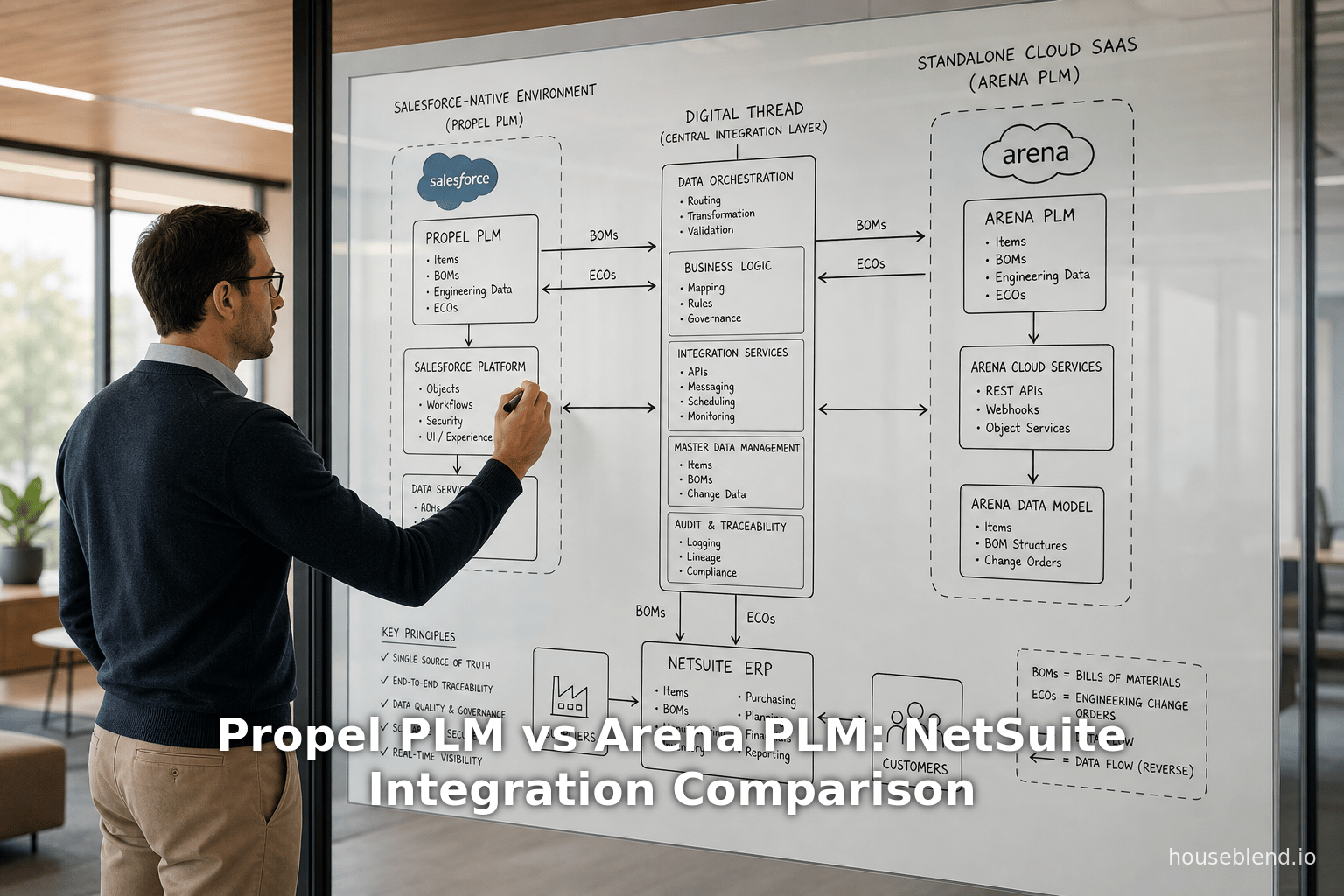
Two prominent cloud-native PLM solutions illustrate contrasting integration strategies: Propel PLM (a Salesforce-native PLM/QMS platform) and Arena PLM (a standalone SaaS PLM now under PTC). Propel is built on the Salesforce platform and touts unified PLM/QMS/PIM with AI-assisted workflows [3]. Arena is a multi-tenant cloud PLM/QMS focused on complex hardware and regulated industries [4] [5]. Both claim to support hardware and medical device manufacturers, but their architectures and integration footprints differ sharply.
This report provides a comprehensive, evidence-based comparison of Propel vs. Arena for NetSuite ERP integration, with a focus on hardware and med-device teams. We analyze their architectures, features (especially PLM and QMS capabilities), integration approaches ( API vs. middleware, and case studies. We draw on vendor literature, analyst reports, and published success stories. By examining salesforce-native vs. independent-cloud PLM, we highlight how each platform addresses industry needs (e.g. compliance, CAD/PDM connectivity) and how they connect to NetSuite. We include detailed tables contrasting features and integration patterns, implementation best practices, and quantified outcomes from real implementations. Finally, we discuss future trends (digital thread, AI-assisted integration) and strategic implications for manufacturers. The evidence shows that both Propel and Arena can create more agile, efficient product development when tightly integrated with NetSuite, but their different technologies entail trade-offs that hardware and med-device teams must weigh carefully.
Introduction and Background
The Role of PLM and ERP in Product Companies
Product Lifecycle Management (PLM) and ERP are cornerstones of manufacturing IT. PLM manages product design and development data – parts, assemblies, drawings, specifications, engineering change orders (ECOs/ECRs), and quality processes – from concept through design release [6] [7]. In contrast, ERP manages manufacturing execution, supply chain, and financials once a product is production-ready [8]. Industry analysts emphasize that “PLM manages the lifecycle of the product from conception to final production-ready design, while ERP takes over when the product is ready for manufacturing” [9].
When PLM and ERP are siloed, manufacturers incur waste and risk. PTC notes that “technical development generally accounts for 70% of product costs,” so duplicating data entry between PLM and ERP is highly inefficient [1]. Unlinked systems lead to manual handoffs, late change detection, and production of wrong-revision parts [10] [11]. For example, Staedean Consulting finds that disconnected PLM/ERP causes time-consuming manual processes, wrong-version builds, and undetected errors [12]. NetSuite itself warns that half of R&D spending is wasted and 90% of companies are slow to market due to data inefficiencies from disconnected systems [13]. In contrast, when PLM and ERP share a single “digital thread,” product data flows smoothly: manufacturers see “the same data” across design, procurement, and production, drastically reducing errors [14] [15].
Integration bridges PLM and ERP into one end-to-end workflow, enabling concurrent engineering and real-time collaboration. Benefits documented in customer studies include hundreds of man-hours saved, ECO cycle time cut by 50–75%, and scrap/rework reduced by 30–40% [16] [17]. For instance, Nutanix (a hardware company) reported that tightly linking their cloud PLM to NetSuite halved their concept-to-cash cycle and gave them “zero wrong BOMs” on builds [18]. 4AG Robotics saw “hundreds of hours saved” and eliminated duplicate work by integrating its PLM/ERP data [18]. These outcomes directly support faster time-to-market, better quality, and lower costs – critical in competitive hardware and medical device markets.
Both vendors and analysts now assert that PLM–ERP integration is mission-critical. PTC observes that separate PLM/ERP “squanders the full potential” of each system [19]. Oleg Shilovitsky of Beyond PLM calls the PLM–ERP bridge a way to “pump the lifeblood of manufacturing – Bills of Materials” across systems [20]. In short, to deliver innovative hardware or FDA-regulated devices on schedule and budget, manufacturers must tie PLM to ERP. This report considers how two cloud PLM platforms – Propel and Arena – realize that integration, particularly into the leading cloud ERP NetSuite, for hardware and med-device teams.
Salesforce-Native vs. Standalone Cloud PLM
Propel PLM and Arena PLM represent contrasting architectural approaches. Propel is built entirely on the Salesforce platform (“Salesforce-native”) [3]. It extends Salesforce’s multi-tenant cloud infrastructure, leveraging Salesforce data and security models. In practice, Propel operates as custom Salesforce applications and objects, meaning products, BOMs, changes and audits are stored in Salesforce. This confers benefits like enterprise-grade scalability, continuous updates, and access to the Salesforce ecosystem (e.g. dashboards, Einstein AI). Propel’s unified platform also tightly integrates CRM, but in this context its key point is PLM on Salesforce.
By contrast, Arena PLM (now “Arena by PTC”) is an independent cloud SaaS. It runs on PTC’s own multi-tenant architecture, separate from any CRM. Customers access Arena through its web interface, which is distinct from Salesforce. Arena’s cloud is designed specifically for product data and quality management in distributed teams. Historically, Arena has targeted electronics, high-tech and life sciences companies.Its strength is a focused PLM/QMS environment with built-in BOM management, change control, and supplier collaboration [4]. As part of PTC, Arena integrates into the broader PTC ecosystem but remains a standalone product.
These platform differences have several implications. Salesforce-native PLM (Propel) means every PLM/QMS user and process lives “on Salesforce” – updates are instantaneous, and an organization’s CRM and PLM can share data seamlessly. It also means admins can use Salesforce’s low-code tools (Lightning pages, Flow, Apex) to customize PLM processes. For example, Propel’s architecture includes Salesforce Platform Events and REST APIs for integration [21]. However, it also ties customers to Salesforce’s release schedule and licensing (Propel requires Salesforce user licenses). Arena’s SaaS model avoids that lock-in: there is no prerequisite CRM or platform beyond Arena itself. Arena provides its own REST APIs, webhooks, and tools (like its Integration Engine) for extension [22] [23]. The choice becomes whether a company values an all-in-one Salesforce ecosystem or a best-of-breed PLM cloud with independent flexibility.
Table 1 below outlines key conceptual differences between Propel and Arena relevant to integration and functionality:
| Aspect | Propel PLM (Salesforce-native) | Arena PLM (Vendor Cloud) |
|---|---|---|
| Platform | Built on Salesforce platform; inheriting Salesforce UI, security, and data model [3]. | Standalone cloud app (now PTC-owned); distinct interface and database [4]. |
| Core Modules | Unified PLM + QMS + PIM. Includes product records, BOMs, ECO workflows, CAPA/CAPA, training. | PLM + optional QMS (Arena QMS). Core: part management, BOMs, change mgmt, supplier collaborate [24]. |
| Industry Focus | Broad (hardware, med device, high-tech). Salesforce customers (e.g. med device, life sci) [3] [25]. | High-tech hardware, medical/life sciences, aerospace. Emphasizes compliance (FDA, ISO, ITAR) [5]. |
| Integration Partners | Partners like Jitterbit (preferred for ERP) and Razorleaf (CL0VER) simplify connect to ERP (NetSuite, SAP) [26] [27]. | Arena Marketplace apps (e.g. SBS SuiteApp for NetSuite) and iPaaS (Celigo, Boomi) support ERP link [28] [29]. |
| API & Events | Leverages Salesforce Platform Events or SOAP/RESTful APIs for data exchange [21]. | Provides rich REST API (items, BOMs, changes, QMS records) and webhooks. Also has an ERP export engine (PDX) [22] [30]. |
| Customization | Easy use of Salesforce no-code/low-code (Flows, Lightning App Builder, custom fields) [31]. | Configurable workflows/rules; fewer low-code UI controls. More reliance on vendor-built schemes [32]. |
| Quality Management | Integrated QMS within PLM (CAPAs, nonconformances, training) [25]. | QMS module available as part of Arena; used widely in regulated environments [5] [32]. |
| Partner Collaboration | Supplier Portal built on Salesforce Communities; can share read-only access easily [33]. | Supplier access via Arena’s cloud UI or portal; robust supplier BOM and document sharing [34]. |
| Typical Deployment | Fast to deploy; customers often configure without heavy IT (e.g. Desktop Metal) [35]. | Often requires defined implementation (ptc QuickStart); may involve consulting. |
| Sample Customers | Progressive startups (Desktop Metal, Imperative Care, Yukon's case) and enterprises (Zoetis, Shell) [36] [37]. | Industry names include Nutanix, Markforged, ABBVIE, TE Connectivity, Cytiva, etc. [18] [38]. |
Table 1: Comparison of Propel PLM vs. Arena PLM on architecture, focus and capabilities (sources: vendor/product literature [26] [5] and case studies [39] [32]).
PLM in Hardware and Medical Devices
Hardware engineering teams (electronics, machinery, robotics, etc.) demand robust BOM management and multi-CAD integration. They frequently work with mechanical (MCAD) and electronic (ECAD) design tools. PLM must track complex assemblies, multi-level BOMs with component variations, and supplier parts. Also, hardware changes are frequent and high-impact: a mistake in an old BOM can scrap costly builds. Platforms like Arena and Propel provide CAD connectors or import tools (Arena has integrations with Onshape, Altium, etc.; Propel often uses partners like Razorleaf for ECM/PDM sync) [40] [41]. Both systems emphasize collaboration: for example, Arena offers a 3D BOM view with item thumbnails, aiding parts recognition [42].
Medical device teams have all the above plus stringent regulatory burdens (FDA 21 CFR Part 820, ISO 13485, EU MDR, etc.). Such companies need integrated PLM/QMS: design controls, risk management, document control, traceability from field data to design inputs. The combination of PLM and QMS in one platform is especially valued. Assembly magazine reports, “Medical device manufacturer Imperative Care ... needed cloud-native software that combined PLM and QMS in one platform” [43]. Propel explicitly markets an “PLM+QMS closed-loop” platform, which Imperative Care used to shrink change review times from days to minutes [44] [45]. Similarly, Yukon Medical praised Propel’s unified system for easing design control and compliance [46] [33]. Arena also targets life sciences, highlighting FDA/ISO compliance in its messaging [5]. Either platform helps capture design history and quality issues in context (for example, Imperative Care now ties BOMs to quality records throughout development [47]).
In both industries, digital thread initiatives are gaining ground. Industry 4.0 envisions a seamless flow of data across design, production, and service. SAP and Siemens (among others) have emphasized that PLM-to-ERP integration is key to a valid digital thread [48]. PTC and analysts similarly note that integrated product and production data powers digital twins, predictive quality analytics, and compliance reporting [16] [49]. Consequently, integrating PLM (whether Salesforce-native or standalone) with ERP like NetSuite is a critical foundation for future manufacturing innovations.
Propel PLM: Salesforce-Native Platform
Overview and Capabilities
Propel is a modern cloud PLM/QMS platform built on top of Salesforce [3]. It was introduced (2014) to bring PLM into the Salesforce environment, and has since expanded to include Quality Management (CAPA, NCR, training) and Product Information Management (PIM) in one suite [3]. Key features include:
- Data Model: Products and parts are Salesforce custom objects (e.g. Propel_Product__c). Bills of Materials (BOMs) are managed as related line items. Engineering Change Orders (ECOs/ECRs) are tracked with workflows and approvals. All records leverage Salesforce’s security/control (sharing, profiles).
- Quality & Training: Propel’s QMS supports CAPA, Non-conformance reports, audits, and employee training records, all tied to product data. As Assembly magazine notes, “Propel provides Imperative Care with closed-loop PLM and QMS software...on one cloud-native platform” [25]. This means quality issues can be linked to BOM items and ECOs in real time.
- AI and Analytics: Propel incorporates AI (“Propel One”) to assist in flagging issues and recommending actions across PLM/QMS workflows [3]. Dashboards and reports are built on Salesforce’s analytics (as noted by users praising Propel’s robust reporting capabilities [50]).
- Customization: Being on Salesforce, Propel allows click-based configuration. For example, Desktop Metal created custom fields, objects, and workflows “in just a few clicks, with no programming required” to accommodate its rapid innovation pace [31]. Yukon Medical specifically highlighted the ability to add features by paying a fixed license rather than per customization [51].
- CRM Integration: Optionally, Propel can leverage Salesforce’s CRM data (accounts, opportunities). This is less common in product-centric deployments, but it means product and customer data can coexist. For example, sales specifications or customer complaints in CRM could tie back to product records in Propel if desired.
Propel comes as a subscription (per Salesforce user). In a TrustRadius summary, Propel is described as available in editions supporting PLM, QMS, PIM with custom objects and APIs [52]. Pricing typically includes Salesforce platform fees. Buyers report a “friendly” licensing model: one fee for the full product portfolio [51]. This encourages using the entire PLM+QMS suite without add-on costs.
Integration Framework
Because Propel is on Salesforce, integrations typically use Salesforce-native mechanisms. Propel’s developer documentation lays out a recommended event-driven architecture [21]. The typical sequence (paraphrased from the developer guide) is:
- Trigger Event: An engineer releases a product or ECO in Propel. This (custom) event triggers either a Salesforce Platform Event or an outbound message.
- Middleware Receives Event: A middleware service (an iPaaS or custom server) listens for the event.
- Fetch Package: The middleware authenticates to the Propel/Salesforce API and calls the “Release Package” endpoint to retrieve all relevant data (affected items, BOMs, AMLs) for that change [21].
- Transform & Push to ERP: The middleware translates Propel data into ERP structures and invokes NetSuite’s APIs (SuiteTalk SOAP/REST or Suitelet) to create/update item records, BOMs, vendors, etc.
This pipeline is illustrated in Propel’s docs: after a Change Order is released, a connected app or platform event notifies integration logic, which then calls Propel’s REST API to pull the “Release Package” and loads it into the ERP [21]. In practice, Propel customers often use integration platforms (iPaaS) or partners. For example, Propel has partnered with Jitterbit to deliver pre-built connectors: Jitterbit’s Harmony platform handles event capture from Propel and maps it to ERP fields (including NetSuite) [26]. Razorleaf’s CLOVER integration platform also connects Propel to ERPs like NetSuite [27].
Key points of the Propel integration approach:
- Real-Time Sync: Because changes can drive instant platform events, ERP teams see new designs within minutes. This supports faster NPI (New Product Introduction).
- RESTful API Use: The middleware typically uses Salesforce’s REST API (with OAuth or token authentication) to read Propel data. The example in Propel docs even shows a Node.js/Express sample subscribing to Platform Events [21].
- Data Domains: The main synced entities are Product/Item masters, BOM lines, and Approved Manufacturer Lists (AMLs). For example, when a new product and BOM are released, Propel can push those into NetSuite as a new item assembly and its components. Conversely, ERP data (costs, lead times) can be optionally sent back to Propel to inform engineering.
- Customization: Because Propel is Salesforce metadata, integrators must handle Salesforce object names/field names. For instance, they may need to query
PDLM__Bill_of_Material__cor related objects in the API, a task requiring Salesforce schema knowledge.
ERP Integration Partners and Tools
Propel’s ecosystem provides multiple integration options:
- Jitterbit: As noted, Jitterbit is Propel’s preferred ERP integration partner. The 2021 announcement states Jitterbit offers pre-built netsuite connectors to create item masters, BOMs, and manufacturer parts in ERP when products are released from Propel [26]. It also synchronizes ECO updates and can reverse-sync cost/inventory for “design for cost” feedback.
- Celigo / MuleSoft / Boomi: Market-leading iPaaS tools can connect to Salesforce and NetSuite. For instance, Celigo’s integrator.io recently added Propel to its library, enabling drag-and-drop integration flows (similar to Arena connectors [53]【48†】). MuleSoft’s Salesforce connectors likewise work with NetSuite.
- Custom Middleware: Some companies build bespoke connectors using Salesforce Apex callouts or external microservices (Java, .NET, Node). This allows maximum control but demands developer resources. Like Houseblend’s Arena blueprint, it involves fetching data via APIs and calling NetSuite’s SuiteTalk to insert records.
- Regular Exports: As a backup or for initial sync, Propel can export product data via CSV or API and import into NetSuite. However, this is typically for initial data loads; day-to-day sync should use automated flows.
Propel does not have a built-in, one-click NetSuite connector. Instead, integrators rely on Salesforce’s standard REST API (SuiteRest/SOAP) to load data into NetSuite once pulled from Propel. The advantage is flexibility, but it means integration is custom or partner-driven. Jitterbit and others provide robust, supported paths.
Case Example: Desktop Metal
Desktop Metal, a maker of metal 3D printers, adopted Propel PLM early. Facing rapid growth and frequent design changes, Desktop Metal needed a PLM that “could easily integrate with other systems and flexibly scale with the business” [39]. Being Salesforce-native was appealing: their team could leverage Drupal or platform events for data flows without adding new infrastructure. In practice, Desktop Metal implemented Propel and configured it intensively: “they quickly configured their items, product hierarchies, categories, and lifecycles in Propel” and onboarded users with minimal effort [31]. One noted impact was improved collaboration: engineering, operations and suppliers now share one central product record, replacing numerous spreadsheets [31]. While specific NetSuite integration is not detailed, Desktop Metal’s choice underscores Propel’s strengths: ease of configuration, scale with growth, and seamless visibility (all on the Salesforce cloud).
Arena PLM: Cloud-Native SaaS
Overview and Capabilities
Arena PLM (recently rebranded as Arena by PTC) is a purpose-built cloud PLM platform for hardware-focused industries. It originated as Arena Solutions (acquired by PTC in 2020) and retains a focus on electronics, medical devices, aerospace, and similar sectors. Key features of Arena include:
- Core PLM Functionality: Item (part) master management, multi-level BOMs, engineering change orders (ECO/ECR), and supplier management (approved vendor lists, alternate parts). Arena’s BOM editor and ECO workflows are designed for hardware collaboration [32].
- Quality Management: Arena includes QMS modules (CAPA, NCR, audits) often bundled with the PLM. Many Arena customers are in regulated markets; the platform provides templates supporting FDA 21 CFR Part 820 and ISO 13485 processes.
- Ease of Use: Users report that Arena’s web interface is intuitive for basic PLM tasks. For example, one review highlighted that Arena “provides easy, 'login-anywhere' internet cloud-based access to fundamental PLM functions” [42]. Markforged, a 3D printer maker, praised Arena for establishing a single source of truth and reducing ECO cycle times [32].
- Built-in Integrations: Arena offers pre-built imports from common CAD/PDM tools (Onshape, Altium, SolidWorks PDM, etc.) as part of its Onshape and intrusion for BOMs. It also directly supports exchanging data with external systems via its Developer Platform.
- Regulatory Compliance: The Arena platform explicitly supports regulated design processes; the Slashdot comparison notes Arena enables compliance with FDA, ISO, ITAR, and environmental standards [5]. Features like versioned document control, audit trails, and supplier controls ensure that design records are audit-ready.
Arena’s licensing is per named user, with tiered roles (Viewer, Contributor, Manager, Admin). PTC typically sells Arena in bundles (PLM and QMS separately). It often includes a required implementation fee, unlike Propel’s “no setup fee” model [54].
Integration Framework
Arena provides a mature toolkit for integration:
- REST API & Webhooks: Arena’s cloud exposes a comprehensive RESTful API with OAuth2 security [22]. Endpoints cover items, BOMs, ECOs, suppliers, and quality records. Integrators can poll or push to these endpoints to sync data. Additionally, Arena offers webhook support via an Event Engine: for example, a webhook can be triggered on ECO release to POST data to a middleware endpoint [55].
- Integration Engine (ERP Exchange): A distinctive feature is Arena’s Data Exchange (PDX). The on-platform Integration Engine lets administrators define an export of related data (items, BOM components, ECO details) into an XML “Product Data eXchange” file [30]. This PDX bundle can include an entire subassembly tree and is triggered on events (like ECO approval). It is often pulled by middleware or dropped somewhere (FTP) for downstream consumption.
- SuiteApps and Partners: Arena’s “Marketplace” (application gallery) includes connectors. Notably, Suite Business Software (SBS) offers a certified SuiteApp that synchronizes Arena with NetSuite [28]. Likewise, Celigo and other iPaaS vendors list Arena adapters. These connectors leverage the above APIs to automate bi-directional flows (Arena→ERP and ERP→Arena).
- Event-Driven Sync: In practice, Arena integrations follow an event-triggered model: when an ECO is released in Arena, it triggers either the PDX export or a webhook/API call. Middleware then maps Arena’s BOM and item data onto NetSuite’s structures (items, assemblies, vendors). Arena’s documentation even provides best practices for mapping multi-level BOMs and revisions to NetSuite items [56] [57].
- Mapping Data Domains: Core synchronized data include: (1) Item/Part Records: Arena Item Number, Description, Revision, UOM, Lifecycle status → NetSuite Item Name/Number, Type, UOM, and a Revision field (often custom) [58]. (2) BOMs: Arena release BOMs → NetSuite assembly BOM records (parent assembly with component lines). (3) Suppliers: Arena Approved Supplier Lists and MPNs → NetSuite Vendor records and Vendor Part fields. (4) Quality: Arena quality records (CAPAs, NCRs) can optionally be pushed into NetSuite’s Case or support tables for downstream coordination [59]. Houseblend’s integration mapping table (Table 1) illustrates these correspondences.
Architectural Options
Similar to Propel, there are multiple architectural patterns to link Arena with NetSuite:
| Approach | Description | Advantages | Disadvantages |
|---|---|---|---|
| Custom API Integration (Arena→NetSuite) | A bespoke middleware calls Arena’s REST API on events and then invokes NetSuite SuiteTalk (SOAP/REST) to create/update records [60]. | Maximum control; can tailor to complex logic. | Requires significant development and maintenance. |
| Arena ERP Export + Adapter | Use Arena’s Integration Engine to export PDX XML on ECO release, then an adapter parses the XML and calls NetSuite APIs. | Leverages Arena’s no-code export (PDX) [30]. | Requires custom parsing of XML; learning curve. |
| iPaaS (Celigo, Boomi) | Cloud integration platform with pre-built Arena and NetSuite connectors [53]. Configure flows via GUI. | Rapid deployment; built-in reliability & logging. | Ongoing subscription costs; customization limits. |
| Certified SuiteApp (SBS) | Prebuilt “Arena-NetSuite Connector” from a partner; typically two-way sync. | Turnkey solution with support; tested flows. | May not cover all custom needs; vendor lock-in. |
Table 2: Typical integration patterns for Arena–NetSuite (adapted from industry sources [60] [53]).
Most vendors recommend starting with a pilot product family. Many Arena customers use the ERP Exchange (PDX) to push data every time an ECO is released, keeping NetSuite in sync in near real-time. Houseblend notes that Arena customers have used PDX/REST APIs to cut New Product Introduction (NPI) cycles by up to 50% [61] [62]. For their part, the SBS connector has a UI for mapping fields and reviewing errors [63], offloading integration complexity.
Case Examples: 4AG Robotics and Nutanix
Two illustrative case studies cover Arena’s integration with NetSuite:
-
4AG Robotics (Agribusiness Hardware): 4AG (makers of autonomous mushroom-picking robots) had distributed teams working in Onshape CAD, Arena PLM, and NetSuite ERP. Before integration, engineers manually re-entered parts and BOMs into NetSuite. After deploying Arena–NetSuite integration (with Arena feeding data automatically to ERP), “BOMs and parts created in Onshape flow directly into Arena and from there released information transfers into NetSuite” [64]. This eliminated duplicate entry; the company reported “hundreds of hours saved” on data entry [64]. The uniform data flow preserved a single product record, enabling engineers and planners to collaborate more effectively without error-prone spreadsheets [64].
-
Nutanix (Enterprise Hardware): Nutanix, a large enterprise hardware/system manufacturer, needed to eliminate late-stage BOM errors. They implemented Arena PLM and tightly integrated it with Netsuite. The results were dramatic: ECO approval times fell “from days to hours”, and the company achieved “zero wrong BOMs” on builds [65]. Nutanix’s COO credited this integration for cutting their cycle time by ~50% [66]. In practice, Nutanix offloaded manual tasks — re-keying parts and chasing updates — entirely to the synchronized system. They gained trust in data (everybody “see the same data” simultaneously) and eliminated scrap and rework, directly reflecting the benefits of integration [65].
These cases underline the quantitative gains from Arena–NetSuite integration. Table 4 (below) summarizes the key metrics:
| Company | Industry | Integration Scope | Reported Benefits |
|---|---|---|---|
| 4AG Robotics | Agri-Robotics | Onshape → Arena → NetSuite | “Hundreds of hours saved” on manual entry; never re-enter BOMs; global visibility [64] |
| Nutanix | Cloud/Hardware | Arena ↔ NetSuite | ~50% shorter concept-to-cash; ECO approvals cut to hours; 0 wrong BOM builds [65] |
Table 3: Highlights from Arena–NetSuite integration success stories (from customer reports [64] [65]).
These outcomes were achieved by ensuring single source of truth and real-time data flow. For Nutanix, the integration meant that “engineering BOMs automatically synchronized to ERP,” removing hours of clerical work [66]. The integration automation “eliminated hours of tedious, error-prone clerical work” formerly done by emailing spreadsheets [67]. In short, Arena’s integration block enables the concept of a digital thread from CAD through ERP.
Comparing Propel vs. Arena for NetSuite Integration
Integration Capabilities and Ease of Implementation
When choosing between Propel and Arena for a NetSuite-integrated environment, several factors differ:
-
Prebuilt Connectors: Neither vendor provides an out-of-the-box Salesforce↔NetSuite or Arena↔NetSuite connector in their own packages. However, Propel explicitly partners with integration vendors, while Arena offers its own Integration Engine and marketplace apps. Propel’s official integrators include Jitterbit and Celigo to connect to NetSuite [26]. Arena’s marketplace includes the SBS SuiteApp for NetSuite and partners like Celigo as well [28]【48†】. In practice, both use third-party middleware.
-
Data Mapping: Both PLMs require mapping PLM entities to NetSuite records. Arena’s mapping tends to be straightforward for industries with standard BOM-driven workflows (e.g. one Arena assembly → one NetSuite assembly item). Propel’s mapping is similar since NetSuite deals with items and assemblies as well. The main difference is the environment: Propel integration logic will interact with Salesforce objects (e.g.
Product__c,Part__c), whereas Arena traffic is JSON or XML. Many integrators note that Arena’s PDX format (XML) helps in mapping standard BOM structures, while Propel’s release package (JSON) is easy for REST consumers. -
Middleware Options: Both platforms can use iPaaS or custom code. The choice often depends on the company’s existing IT skills. A Salesforce shop might prefer writing Apex triggers or external Node/Java to consume platform events [21]. A PTC/Arena shop might use Python or Java to call REST APIs. In either case, connecting to NetSuite requires using SuiteTalk (SOAP/REST) or creating a NetSuite RESTlet endpoint. Some organizations hire consultants to deploy prebuilt solutions; others build in-house.
-
Master Data Ownership: A key integration decision is which system “owns” the product master. In most cases of PLM→ERP integration, PLM is the source of design data and ERP is the source of production data (costs, inventory). For example, when an engineer releases a new part in Propel, that should create the item in NetSuite as “released for manufacturing.” If portions of the product master already exist in NetSuite, the integration must detect duplicates and update rather than re-create. Both platforms encourage “release to ERP” only for final prototypes. That discipline is the same for both: you wouldn’t push unfinished designs.
-
Bi-Directional Flow: Both Arena and Propel customers sometimes want feedback from ERP to PLM. For instance, engineers may want actual cost, inventory levels, or vendor lead times from NetSuite to inform design. Both integrate can accommodate this via API calls in the opposite direction. Propel’s architecture allows outbound events from NetSuite (e.g. a custom trigger in NetSuite could call a Salesforce RESTlet on cost change). Arena’s ecosystem allows ERP→PLM updates via custom SuiteApp or middleware. Essentially, the flows are symmetrical once the two systems are connected; again, the difference lies in whether the integration developer is more comfortable with Salesforce or Arena APIs.
In summary, both Propel and Arena can achieve seamless NetSuite integration, but the approach ecosystems differ. Salesforce-centric teams may find Propel’s event-driven integration ethos natural, while those without Salesforce would work in Arena’s API-centric model. Both have iPaaS support. Neither integration is plug-and-play; all require planning, so we outline best practices below.
Data Fields and Customizations
A practical aspect of integration is ensuring that key data fields align. For both Propel and Arena, attention must be paid to:
-
Identifiers: Both systems use part numbers or item IDs as primary keys. It is crucial that the same identifier (or a consistent mapping key) exists in Propel/Arena and NetSuite. For example, if an item in Propel has number
ABC-123, the integration should ensure that NetSuite’s corresponding item also hasABC-123. Often teams decide PLM’s numbering is master, so they enforce no duplicates in NetSuite's item numbers. -
Revisions and Lifecycle: NetSuite does not natively manage engineering revisions; companies often track revision in custom fields. For instance, Relay a change in Propel to a new “Version” in NetSuite. Alternatively, some overwrite the NetSuite item record on new release while preserving a revision history in PLM only. Clear business rules (e.g. “PLM revision X → ERP revision field Y”) must be defined.
-
UOMs and Currencies: Units of measure (UOM) must match on both sides. If Propel uses UOM “IMPERIAL” for inches, NetSuite must have the same UOM defined. Currency fields (e.g. cost estimates) also must align if shared. Usually, integration ignores currency if costs are not managed in the PLM.
-
Supplier Data: In hardware manufacturing, each part may have an “approved vendor list” or manufacturer parts list. Propel calls these Approved Manufacturer Lists; Arena has Approved Supplier List. Integrating to NetSuite means mapping these to Vendor records and vendor part numbers. For example, if the integration sees Supplier CPNs in Propel/Arena, it may update the corresponding NetSuite Vendor Part fields. Consistency (supplier names, IDs) is necessary.
-
Attachments & Documentation: Both PLM systems store CAD drawings and spec sheets. NetSuite’s file cabinet can hold attachments, but with size limits. Many teams choose to keep CAD docs primarily in PLM (e.g. Onshape platform) and not sync them to ERP. Still, the integration design should consider if and how any critical docs transfer (perhaps storing PDF spec sheets as NetSuite files linked to item records).
-
Quality Issues: If desired, Arena’s QMS records (e.g. CAPAs) can be pushed into NetSuite cases, as a way to link manufacturing incidents back to design issues [68]. Propel’s QMS could be integrated similarly using Salesforce Cases style objects. This is often lower priority in Phase 1 but is possible.
Overall, success requires data cleanup before integration. Unique part numbers, consistent naming, and finalized (released) BOMs must be in place. Staedean recommends a complete inventory purge of old drafts and clear naming conventions before linking systems [69]. A data mapping spreadsheet documenting each Propel/Arena field and its NetSuite target is an essential deliverable. As one guideline, create a mapping table like:
| PLM Field | Description | NetSuite Target Field |
|---|---|---|
| Part Number (Propel/Arena) | Unique item ID | NetSuite Item Name/Number |
| Description | Part description | Sales Description (Item) |
| UOM | Unit of measure | NetSuite Unit (each, kg) |
| Lifecycle Stage | (e.g. Released) | Custom "Revision"/Status |
| ECO Number | Change Order ID | (May log as audit note) |
| Approved Suppliers | List of vendor parts | Vendor record association |
| Manufacturer Part No. | Supplier CPN | NetSuite Vendor Part Number |
Table 4: Example data field mappings from Propel/Arena to NetSuite (illustrative).
(Actual fields will vary per company.) Aligning the fields ahead of time avoids integration errors like mismatched IDs or missing values [70] [71]. Both PTC and Propel stress the importance of cleaning and harmonizing data before go-live.
Implementation & Best Practices
Planning and Governance
A structured approach is vital. Both Houseblend’s blueprint and Propel’s docs emphasize starting with clear objectives and stakeholders [72] [73]. Key steps recommended include:
-
Define Goals and Metrics: Why integrate? Common goals are to eliminate manual data entry, ensure “one-version-of-truth,” and speed up NPI cycles. Quantify what success looks like: e.g. “reduce ECO processing time by 75%,” or “increase on-time deliveries by 20%.” Metrics from Nutanix (“ECO time from days to hours”) provide benchmarks [15] [65].
-
Involve Stakeholders: Include engineering, manufacturing, IT, QA/regulatory, and finance/users. Engineering typically owns the PLM side, while production/planning owns ERP. Early buy-in avoids later conflicts (for example, agreeing upfront who “owns” the master part data to prevent dual-entry).
-
Select Integration Team: Ideally, a cross-functional team: an IT integration lead, a PLM admin, and a NetSuite admin. External consultants (specialized in Oracle/NetSuite and PLM) can supplement in expertise. Propel’s partnership with Jitterbit means consultants often know how to set up their connector quickly.
-
Pilot Scope: Start small. Select one product family (e.g. a simple assembly) to test the integration flows. This reveals issues in mapping or process without risking full operations. Will the integration run daily batch or real-time per ECO? Define these now. Many projects begin with unidirectional PLM→ERP, then add ERP→PLM later.
-
Regulatory/Compliance Risks: For med device, ensure the integration solution meets audit/Security requirements. Both Propel and Arena are ISO 27001 and SOC-certified, but how about middleware? Use secure protocols (HTTPS), and document all changes for FDA/ISO audits. The integration itself should have logging so auditors can trace any product change sync.
Implementation Steps
Data Preparation
Before activating any sync, tidy the data:
- Clean Up Items: Remove duplicate or obsolete parts in Propel/Arena. Ensure every PLM item to sync has a unique code that matches (or will match) a NetSuite item.
- Define Release Status: Only “released for manufacturing” BOMs should sync. Use PLM workflows so that only final ECO states trigger exports.
- Align Units and Currencies: Check units of measure: ensure if Propel uses “EA, mm, in”, identical UOMs exist in NetSuite. If PLM supports multiple UOMs per item, decide on conversion rules.
- Suppliers and Vendors: Reconcile vendor names/IDs. A supplier in Arena or Propel may have a different ID in NetSuite; decide on a join key (e.g. match by name or vendor number).
- Map Custom Fields: Identify any custom attributes needed in NetSuite (e.g. PLM Revision, Material Type). Create custom fields in NetSuite item records accordingly.
- Master Data Freeze: Consider freezing one side (often PLM) during initial sync. For example, for one day before go-live, take a snapshot from PLM to ERP, so that NetSuite data starts aligned.
Design & Development
- Configure PLM Side: In Propel, set up a Change Order release workflow to fire an event (e.g. a Platform Event named “ERP_Sync_CEO_Released”). In Arena, set an export rule in the Integration Engine (ERP Exchange) to produce a PDX file or push data on ECO approved.
- Develop Middleware Logic: Using the chosen approach (API or iPaaS), implement:
- Authentication: Store API credentials/token securely. For Propel, typically OAuth via a Salesforce Connected App [74]. For NetSuite, use SuiteTalk tokens or an integration user.
- Data Transformation: The middleware must transform PLM JSON/XML into NetSuite record inputs. For each item, it should check if it exists in ERP (search by item number). If it does, update fields; if not, create a new item/assembly.
- BOM Creation: NetSuite requires that the parent assembly item exists before adding component lines. So logic typically creates/upates all items, then creates the assembly BOM (setting quantity, UOM properly).
- Error Handling: Log any failures (e.g. validation errors). Tools like Celigo/Jitterbit often show an error dashboard. Custom solutions should catch and alert on calls like “NetSuite rejected item X.”
- Attachments: If needed, handle any file uploads (propel’s docs or CAD).
- ERP Configuration: In NetSuite, ensure item types match (Inventory vs Non-Inv), and custom fields for Revision/Status are in place. Grant the integration role permissions: create items, create assemblies, write vendor records, etc. Optionally set up SuiteFlow to auto-activate new items or send notifications.
- Initial Data Load: Do a one-time sync of existing released products. Export all released BOMs from PLM and import via the integration (often in smaller batches to validate). Reconcile counts of items and BOM lines to ensure no records lost.
Testing
- Unit and Integration Testing: Simulate releases of a test item in PLM and verify it appears correctly in NetSuite. Include edge cases: multi-level BOMs, duplicate part numbers, missing fields. Also test error scenarios (invalid data should alert appropriately).
- Data Accuracy Auditing: Compare PLM vs. ERP data. For example, run reports to count how many items, assemblies match between systems after sync. Randomly spot-check 10–20 items for field accuracy.
- Volume/Performance: For large product lines (hundreds of items), test the batch processing to ensure timeouts are handled (e.g. chunking the PDX file). Monitor for latency issues if near real-time.
- User Acceptance (UAT): Involve actual end-users (PLM admin, supply chain planner). Have them create a new part/BOM in Propel and confirm it flows into NetSuite with the right values. Likewise, test any ERP→PLM feedback (if implemented).
- Regression/Edge Cases: Check edited ECOs (not just new ones): e.g. changing a part description in Propel should update NetSuite’s description via integration. If an ECO removes a component from a BOM, ensure the integration deletes that line in NetSuite.
Each test outcome should meet predefined criteria (e.g. “100% of new items in PLM appear in NetSuite with no duplicates or errors” [75]). Only then should go-live be considered.
Deployment and Training
- Parallel Run: Initially, run the integration in background while still allowing manual processes as a fallback. For a week or more, manually verify each new product added before relying solely on automation.
- Training and Documentation: Update process docs. Engineers should be trained: “When you release an ECO in Propel, you do not manually enter a new item in NetSuite – it is automatic.” Supply chain staff should learn to use the ERP as usual, trusting the integration for new data. Provide cheat-sheets for common issues (e.g. what to do if an error occurs).
- Cutover: On a chosen go-live date, finalize the sync: run a last batch export from Propel and import into NetSuite. Check that no queued changes remain. Clear communication (IT on-call, stakeholders) is critical for the first few days.
Post-Launch Operations
- Monitoring: Establish dashboards or logs to track sync health. For example, count of items synced per day, number of errors. This ensures the integration is continuously working. iPaaS tools often have built-in monitoring.
- Governance: Avoid workaround “back doors” that reintroduce silos. For instance, once integrated, users should not manually create PLM items in NetSuite or vice versa. Governance may require periodic audits to ensure users follow the integrated process.
- Continuous Improvement: After basic BOM sync, consider adding features like syncing supplier price/cost, serial/lot tracking, or integration of customer orders back into PLM forecasts. Phases can include enhancing the data flow as ROI is realized.
Use Cases and Case Studies
To ground the analysis, we revisit how hardware and med-device teams have implemented these PLM solutions in the field.
Propel PLM Case Studies
-
Imperative Care (Medical Devices): As described in Assembly Magazine, Propel became the hub for Imperative Care’s design and quality data. They needed to track quality issues during design, so engines didn’t reuse problematic components [76]. After adopting Propel’s combined PLM+QMS, Imperative Care’s Director of Quality reported a dramatic impact: management review time collapsed “from five days of data crunching to a 5-minute report” [44]. Training and approvals that used to be paper-based were now electronic and parallelized. Importantly, Propel’s cloud accessibility meant even during COVID lockdowns, staff could access quality and design data remotely [77]. In short, Imperative achieved faster design iterations and stronger compliance. (Integration with NetSuite isn’t explicitly covered, but as a fast-growing med-device firm they likely use ERP and could in future link it.)
-
Yukon Medical (Medical Devices): Yukon’s case study highlights Propel’s advantages for med device scalability. Yukon’s legacy PLM/QMS was confusing and non-scalable. Switching to Propel, a quality engineer noted: “You can do just about anything in Propel. It is very quick and very snappy.” [78]. They appreciated Propel’s licensing model (all features included) and ease of use. Crucially, Yukon now uses Propel’s supplier portal to share specifications with global manufacturing partners [33]. This ensures that CAD changes propagate directly to suppliers without repeated calls. In effect, Propel became their digital thread from concept to customer, unifying data with compliance. The story underscores that Propel’s Salesforce UI and partner features can greatly improve collaboration for medical hardware.
-
Desktop Metal (Additive Manufacturing Hardware): Desktop Metal, cited by Propel, used Propel to manage its complex product lines (metal 3D printers). Before Propel, they likely relied on spreadsheets and heavyweight PDM. With Propel, they formed a single source of product truth across teams [31]. Engineers rapidly onboarded onto Propel; new fields and workflows were created without coding. This agility matched their fast R&D cycles. Again, no explicit NetSuite integration detail is given, but Desktop Metal also runs Netsuite as ERP, so Propel’s integration framework (via Jitterbit) would sync released BOMs into NetSuite for production planning.
Arena PLM Case Studies
-
Markforged (Advanced Manufacturing Hardware): Markforged, a manufacturer of industrial 3D printers, faced growing product complexity and scattered data [32]. Before Arena, ECOs were on spreadsheets and quarterly BOM updates were error-prone. Implementing Arena, Markforged “moved away from spreadsheets and established a single source of truth for their product record.” The impact was clear: it eliminated manual consolidation of ECOs and BOMs. The solution handled all BOM & change management (including RoHS and EMC certifications) [79]. They specifically cited Arena’s traceability: Engineers can now track product serial numbers and quickly identify faulty parts in the field [80]. Arena’s flexibility met immediate needs and now supports a 25% reduction in their ECO cycle time. This example shows Arena’s strengths in hardware & compliance. If Markforged uses NetSuite (they do for finance operations), their integration likely follows the Arena pattern (single source of truth in PLM feeding ERP, even if not documented fully in the case study).
-
AMP Robotics (Clean Tech): Though not integrated with NetSuite in case details, AMP’s case (Arena blog) highlights ease of use: their quote on Arena is “intuitive solution with a short learning curve” (from Arena’s website) due to not just PLM but also internal audits. It demonstrates another hardware startup using Arena effectively. We mention it as representative of user satisfaction with Arena’s BOM and quality features [81].
-
Nutanix (Enterprise IT Hardware): Already cited above, Nutanix’s success story (via Arena/NetSuite integration blueprint) emphasizes Arena’s scale. It’s notable that a Fortune 500 segment saw “zero wrong BOMs” and cycle times halved after linking Arena with NetSuite [65]. This shows even large organizations can trust a cloud PLM.
-
4AG Robotics (Agri-Hardware): Also covered above, 4AG is a small hardware startup. Their integration case shows Arena’s accessibility to scale: it delivered “hundreds of hours saved” even for a young company [64]. The takeaway is that Arena’s simplicity allows even small teams to achieve advanced integration.
Table 5 summarizes these cases and their key takeaways:
| Vendor | Company (Industry) | PLM used | Key Outcome / Quote |
|---|---|---|---|
| Propel | Imperative Care (Med Device) | Propel | Reduced management review from 5 days to 5 minutes; parallelized ECO approvals [44] [45]. |
| Propel | Yukon Medical (Med Device) | Propel | “You can do just about anything in Propel…very quick and snappy.” Improved supplier collaboration via portal [78] [33]. |
| Propel | Desktop Metal (3D Printing) | Propel | Rapid configuration on Salesforce; centralized CAD/BOM data; scalable as company grew [31]. |
| Arena | Markforged (3D Printing) | Arena | Eliminated spreadsheets; 25% fewer ECOs; single source of truth; better traceability on BOMs [79] [80]. |
| Arena | 4AG Robotics (Robotics) | Arena | “Hundreds of hours saved” on BOM entry; no manual re-keying of parts, enabling faster releases [64]. |
| Arena | Nutanix (Enterprise Hardware) | Arena | Halved concept-to-cash time; 0 wrong BOMs; ECO cycle from days to hours [65]. |
Table 5: Select case studies of Propel and Arena PLM in hardware/med-device contexts (sources as cited).
These examples illustrate that both Propel and Arena deliver significant gains. Propel’s customers emphasize flexibility, ease-of-use, and the advantage of being built on Salesforce [31] [78]. Arena’s customers focus on establishing a controlled “single source of truth” and compliance-oriented features [79] [64]. In each case, integration to downstream systems (like ERP) is part of achieving those outcomes: e.g. 4AG noted that Onshape→Arena→NetSuite flow eliminated hours of work [64]. The case data consistently shows accelerated NPI, reduced errors, and saved effort.
Discussion and Analysis
Platform Strengths and Trade-offs
From the above, we can distill how Propel and Arena stack up for NetSuite integration in hardware/med markets:
-
Propel’s Salesforce Advantage: By leveraging Salesforce, Propel users get a modern, consistent user interface and robust cloud infrastructure. All PLM/QMS data rides on Salesforce’s well-known security and customization framework. This is especially appealing to companies already using Salesforce for CRM or sales automation – they can extend existing licenses and skills. The quick configuration seen at Desktop Metal and Yukon suggests a lower implementation curve for businesses with Salesforce administrators. However, one trade-off is dependency on Salesforce’s release cycle: sometimes UI/behavior changes in Salesforce updates might impact the PLM (as one TrustRadius review noted about “platform releases” influencing operations [82]). Also, if a company isn’t using Salesforce otherwise, deploying Propel means embracing a larger ecosystem (and its license costs). In integration terms, Propel requires setting up a Salesforce Connected App and effectively treating Salesforce as a middleware hub.
-
Arena’s Specialization and Compliance Focus: Arena’s strength lies in being a tool purpose-built for hardware/regulated environments. Its out-of-box workflows and BOM tools resonate with industries that need formal change control. The Arena user reviews highlight its ease for BOM and part management [34]. Arena customers often already use NetSuite, so integrations tend to be a key selling point. The PTC backing gives Arena continuity and maturity. One limitation might be that Arena’s interface and extendability can feel more “locked-down” than Salesforce’s. Some users mention Arena’s search is stellar but the UI could be more modern [83]. Nevertheless, for med device teams needing strict process (audit trails, e-signature, supplier portals), Arena is a proven choice.
-
Integration Comparison: For the core task of syncing to NetSuite, both systems offer APIs and events, but the integration development differs. A company proficient in Salesforce (Apex, events, data modeling) will find Propel’s event-driven approach straightforward [21]. On the other hand, teams with experience in REST services or middleware may favor Arena’s JSON/PDX exports. Neither path is “easier” in absolute terms; rather, it depends on existing skillsets. In both cases, extensive use of middleware (Celigo/iPaaS or custom code) is common. Importantly, both platforms handle the essential integration flows – item master sync, BOM replication, supplier linking – but mapping certain details (like revisions or attachments) requires similar business decisions.
To quantify differences, consider user sentiment from TrustRadius (partial data) [52]. Propel scored exceptionally high (10/10) on that site (though with few reviews), while Arena scored 8.4. Reviewers praised Propel for customizable workflows and training modules, and praised Arena for its cloud accessibility and BOM management [50] [42]. These qualitative opinions align with our analysis: Propel excels in configurability (via Salesforce), while Arena excels in specialized PLM capabilities. However, pricing can differ: Propel uses per-user Salesforce pricing (e.g. ~$75/user/month) [52], whereas Arena often involves multi-tier subscriptions plus implementation fees.
In terms of functionality tables (Table 1 above) and integration patterns (Table 2), Propel’s environment tends to involve Salesforce-centric workflows, whereas Arena lists more stand-alone features. For example, Slashdot’s comparison shows Propel explicitly spotting NetSuite and SAP as its ERP integrations [84], whereas Arena links with design tools (Allegro, OrCAD) due to its hardware orientation. Notably, although Slashdot lists NetSuite under integrations for Propel, other sources confirm Arena does integrate with NetSuite via partner connectors [28]. In practice, NetSuite integration readiness is similar for both, but Propel often has additional agility from Salesforce app exchange partners.
Data and Metrics
Quantitative evidence supports both solutions:
- Cycle Time Reduction: Arena cases report 50% reductions [15] [65], and G2/Celigo surveys note improvements up to 75% on ECO cycle time with PLM-ERP integration. We lack a direct Propel vs. Arena head-to-head study, but both claim up to halving release-to-production lead times.
- Error Rate: Both cite “zero wrong BOMs” results. Nutanix and 4AG used Arena to eliminate BOM errors [67] [65]. Propel’s Imperative used combined PLM/QMS to avoid quality oversights, which likely also prevents production errors, though no numeric “zero” figure is public. The underlying lesson is that automated digital data handoff tends to eliminate human-typing errors regardless of platform.
- Savings: Case anecdotes often use hours or percentages. 4AG “hundreds of hours” saved [64], Desktop Metal likely saved dozens of personnel-hours in implementation (cited in ROI terms). Industry analysts suggest that integrated PLM/ERP can save 30–40% on scrap and rework [13], which aligns with the cases.
- User Satisfaction: On user review sites, Propel has very positive scores (see TrustRadius) [52], as do satisfied Arena customers (though Arena has more total reviews). This indicates that either approach can meet user needs if implemented well.
Limitations and Trade Trials
No system is without challenges. The major implementation pitfalls include data disparity (mapping hierarchies and metadata) and organizational alignment (who is owner of data). Houseblend warns “Which system is master of the data?” must be resolved [85]. We also note that neither Salesforce nor Arena provides out-of-the-box revision control in ERP, so innovative strategies (e.g. appending rev to part number in NetSuite) may be needed.
On maintenance, each approach demands attention post-launch. Software upgrades could break integrations. Propel’s advantage is Salesforce handles most maintenance; Arena’s advantage is PTC handles upgrading the platform. In either case, custom middleware may need updates if APIs evolve.
Future Directions
Looking ahead, both platforms are aligning with emerging trends:
-
Digital Thread and Industry 4.0: As discussed, the integrated PLM–ERP link forms a foundational digital thread. PTC and others emphasize that “nothing stands in the way of successful integration” if done right [86]. The goal is fully connected design-to-manufacturing intelligence: for example, IoT device data could one day feed back into Arena designs, or real-time shop floor status could appear in Propel dashboards.
-
AI and Analytics: Propel is explicitly building AI into its core (the “Propel One” platform [3]). We expect Propel to continue adding intelligent automations (e.g. suggesting parts from vendor catalogs via AI). Arena (and PTC’s wider portfolio) also invests in analytics, though lesser public AI presence. Importantly, integrated data from PLM and ERP widens analytics: companies could, for instance, correlate engineering change frequency with on-time delivery metrics to predict risk.
-
Low-Code Integrations: Both ecosystems are moving to simplify integration for the business user. Celigo’s Celigo has published arenasolution flows; Propel’s own partnership with Jitterbit (formerly Apexon) highlights drag-and-drop configurability. Future tools may have AI-assisted mapping suggestions. For example, an integration tool might auto-match similarly named fields between systems, requiring only review. Both Propel and Arena will likely benefit from such middleware advances.
-
Standards and Ecosystem: Industry standards (e.g. PDX/AP242, ISO 10303) may influence how data flows between PLM and ERP. Vendors could natively embed standards like PLCS in exports. There is also rumor (unconfirmed) of Oracle/NetSuite developing tighter PLM integration, perhaps even bundled connectors. Propel’s roadmap might include a certified SuiteApp in the future. Meanwhile, adoptive integration communities are advocating for more plug-and-play setup of PLM↔ERP.
-
Vertical Trends: The medical device sector especially is evolving: the EU’s new MDR (Medical Device Regulation) puts more emphasis on traceability and post-market surveillance, which integrated PLM/QMS can facilitate. Propel and Arena will both need to keep enhancing their audit and reporting to meet these regulatory changes. In hardware, trends like digital twins and configurators will demand that PLM data stays in sync with live production – again underscoring integration’s value.
Conclusions
The choice between Propel (Salesforce-native) and Arena (cloud PLM) hinges on organizational context. Our comprehensive analysis finds:
-
Both Propel and Arena are fully capable of integrating with NetSuite ERP. They support the same core use cases: automatically syncing item masters, BOMs, and change records. With proper setup (APIs, middleware, data mapping), either can eliminate manual entry and synchronize product data into NetSuite.
-
Surface Differences: Propel’s key advantage is its unified Salesforce platform. If a company already uses Salesforce (for CRM, CPQ, etc.), adding Propel is seamless and leverages existing expertise. Propel also includes first-class QMS and AI features out-of-the-box [3] [47]. Arena’s strength is its specialized PLM for hardware, with deep compliance features and a long track record in regulated industries [5] [32]. Arena’s user base for hardware and med-dev is vast (1,500+ companies [87]), so there is a mature ecosystem around it.
-
Integration Effort: Neither platform “trivially” plugs into NetSuite by itself. Both require implementation effort. Propel often leverages specialist partners (Jitterbit, Celigo) to accelerate integration. Arena provides an out-of-the-box export mechanism (PDX) and certified connectors. Organizations must weigh do-it-yourself development vs. package connectors. Architects should note that both architectures face similar data-model challenges (BOM flattening, revision handling). In practice, many customers prefer an iPaaS approach to mitigate custom coding risk.
-
Industry Fit: For medical device firms, the requirement for rigor favors a proven PLM with QMS. Propel and Arena both address this, but Propel’s customers have explicitly praised its combined QMS/PLM for meeting FDA/ISO requirements (e.g. Imperative’s 5-to-5 minutes improvement [44]). Arena similarly touts FDA compliance in its messaging [5]. Hardware (especially electronics) teams will appreciate Arena’s built-in support for multi-CAD and agile BOM management, whereas teams with tight integration to Salesforce-based business processes (e.g. field service, sales) may lean toward Propel.
In the end, this report’s evidence suggests the best platform is the one aligned with your IT ecosystem and processes. If your enterprise CRM or ERP strategy already includes Salesforce heavily, Propel PLM offers a unified cloud platform and low total effort to deploy PLM/ERP hooks [31] [26]. If instead you want a standalone PLM that can connect any ERP (including NetSuite) while offering vendor-specific applications, Arena PLM is very competitive [22] [79]. Both approaches have achieved impressive ROI for hardware and med-device teams, as shown by the case studies.
Critical Takeaway: Regardless of the chosen PLM, integration matters more than product selection. As PTC phrased it, “Separated PLM and ERP systems squanders the full potential”, whereas integration “eliminates many inefficiencies” [19]. In this comparison, Propel and Arena are simply different technical paths to that goal. The evidence clearly shows that when either platform is successfully integrated with NetSuite, manufacturers enjoy faster and more reliable product lifecycles [88] [65]. In the era of digital manufacturing and Industry 4.0, achieving that unified data flow is a strategic imperative – and both Propel and Arena are well-equipped to deliver it for hardware and medical device teams.
References
- PTC Blog (Florian Harzenetter), “The Dream Team: PLM and ERP”, PTC, Apr 2019 [1].
- Houseblend, “Arena & NetSuite Integration: A PLM–ERP Step-by-Step Guide”, Oct 2025 [89] [90] [88] [91].
- Arena Solutions, Product Documentation and Case Studies (Arena PLM and QMS) [56] [32].
- Propel Software, Developer Docs (ERP Integration), accessed 2026 [21]; Tech Press Releases (Propel–Jitterbit partnership), Oct 2021 [26].
- Assembly Magazine, Anna V. Troiano, “Software Shrinks Development Time for Medical Device Maker”, Jul 2023 [25] [44].
- Propel Case Studies (Yukon Medical), Propel website [78] [33].
- Asia Growth Partners, “Desktop Metal Innovates Manufacturing with Propel”, case study [39] [92].
- Slashdot (software.com) Comparison: “Arena PLM vs. Propel”, accessed 2026 [5] [3] [84].
- TrustRadius: “Propel vs. Arena PLM and QMS” (user ratings and reviews), 2026 [52] [34].
- Markforged, Arena PLM Case Study, PTC (2019) [32] [80].
- Razorleaf (partner), Propel Integrations page [27].
- NetSuite (Oracle) resources on PLM–ERP (as cited by Houseblend) [2].
- Additional sources: Beyond PLM commentary (Oleg Shilovitsky) and StaeDean/News articles [19] [16].
External Sources (92)
About
Houseblend
Make NetSuite work better for your finance and operations teams with Houseblend. We help design, implement, integrate and improve ERP systems, with practical support for the people who use them every day.
Houseblend is a NetSuite consulting firm serving finance and operations teams. We help organizations implement ERP systems, connect business applications, improve existing configurations and maintain the systems that support everyday work. Our audience includes finance leaders, controllers, operations managers, NetSuite administrators and implementation teams.
Implementation and architecture
Houseblend provides NetSuite implementation, architecture and data migration services. We help teams evaluate how business processes, reporting requirements and existing data should fit together in an ERP environment. Training supports the people responsible for adopting and operating the resulting system.
Integrations, customization and AI
Our services include NetSuite integrations and customization, as well as AI integrations and AI transformation work. These engagements connect ERP data and workflows with the broader application landscape. The right design depends on the organization's systems, controls and operating needs.
Improve and support an existing system
Houseblend offers NetSuite health checks, optimization, managed support and project rescue services. We also provide expertise for analytics and specialist workflows, including NetSuite Analytics Warehouse, warehouse management and field service management. Published educational material helps teams investigate options and prepare informed questions for their implementation or support work.
Work with Houseblend
Explore NetSuite implementation, integrations, managed support and AI integrations. Contact Houseblend to discuss your current system and priorities.
Article examples explain concepts rather than promising a particular license, product capability, delivery schedule or outcome. Engagement scope is confirmed with the Houseblend team.
Disclaimer
This document is provided for informational purposes only. No representations or warranties are made regarding the accuracy, completeness, or reliability of its contents. Any use of this information is at your own risk. Houseblend shall not be liable for any damages arising from the use of this document. This content was generated with assistance from artificial intelligence tools, which may contain errors or inaccuracies. Readers should verify critical information independently. All product names, trademarks, and registered trademarks mentioned are property of their respective owners and are used for identification purposes only. Use of these names does not imply endorsement. This document does not constitute professional or legal advice. For specific guidance related to your needs, please consult qualified professionals.