Houseblend Article
Snowflake to NetSuite Integration Patterns for FP&A
Inside this article
- 01Executive Summary
- 02Introduction and Background
- 03NetSuite Analytics Warehouse (NSAW) and Snowflake Integration
- 04Direct Query Patterns
- 05Reverse-ETL Patterns
- 06Integration Tools and Architectures
- 07Data Analysis and FP&A Benefits
- 08Case Studies and Examples
- 09Implications and Future Directions
- 10Conclusion
Snowflake to NetSuite Integration for FP&A: NSAW Sync, Direct Query & Reverse-ETL Patterns
Executive Summary
Modern Financial Planning & Analysis (FP&A) functions increasingly demand seamless integration between enterprise systems (like Oracle NetSuite ERP) and high-performance analytics platforms (like Snowflake). This report examines Snowflake–NetSuite integration patterns relevant to FP&A, focusing on three paradigms: NSAW Sync (NetSuite Analytics Warehouse data loading), Direct Query approaches, and Reverse-ETL flows. We analyze historical and current practices, compare architectures and tooling, and cite data and case examples. Key findings include that organizations commonly adopt cloud-native ETL pipelines (e.g. Fivetran, Airbyte) to replicate NetSuite into Snowflake for analysis, that native SuiteAnalytics Connect (ODBC/JDBC) access often proves insufficient at scale, and increasingly FP&A teams leverage reverse-ETL tools (Census, Fivetran Activations, etc.) to sync analytic outputs back into NetSuite as needed [1] [2]. We provide detailed discussion of NetSuite’s Analytics capabilities (NSAW), performance trade-offs (real-time vs batch), and emerging trends (AI-driven analytics, Data Warehouse Automation, integration standards). Multiple case studies (from BirdRock Brands and Overture Promotions using NSAW [3] to a GitLab Fivetran implementation) illustrate benefits and pitfalls. Finally, we assess implications for FP&A agility and outline future directions such as increased AI/ML integration and evolving platform features.
Introduction and Background
Financial Planning & Analysis (FP&A) teams rely on integrated data from ERP, CRM, marketing, and operational systems to prepare forecasts, budgets, and management reports. In many organizations, NetSuite serves as the system of record for finance, generating high-volume transactional data. However, NetSuite’s native reporting is often limited in scale and functionality – industry analysts note that enterprise ERP platforms frequently make reporting “extremely complex” and leave executives “struggling to extract actionable insights” from financial data. Consequently, a modern data stack architecture has emerged: core transactional data is offloaded to a specialized analytics platform (like Snowflake) via integration pipelines, enabling scalable ETL, integration with other data sources, and powerful BI/ML tools.
Snowflake is a leading cloud data warehouse that supports elastic compute, high concurrency, and multi-cloud deployment. Organizations choose Snowflake as an analytics hub, consolidating ERP data (among others) to support dashboards, financial consolidation, and advanced analytics. NetSuite, now part of Oracle, offers various avenues to access data: built-in Saved Searches and SuiteAnalytics (NetSuite’s ODBC/JDBC interface), but also a NetSuite Analytics Warehouse (NSAW) – a managed data warehouse offering that automatically syncs ERP data (and other sources) into a consolidated model built on Snowflake/Oracle Autonomous Data Warehouse [3]. Understanding how Snowflake and NetSuite (and NSAW) interoperate is critical for FP&A modernization.
This report covers the historical context (e.g. traditional batch exports and on-premises data marts), the current state (cloud ETL, reverse-ETL, direct query tools), and the future outlook (AI-infused analytics, continuous planning). We survey integration patterns (described below), analyze performance and data quality trade-offs, cite vendor documentation and analyst reports, and include quantitative perspectives where available. The goal is a thorough technical and strategic guide for enterprise planners and data architects.
Traditional Reporting vs. Modern Analytics
Historically, FP&A relied on periodic exports (e.g. CSV extracts) or custom ETL to move ERP data into an on-premises data mart. Such methods suffered from latency and manual overhead. With cloud ERP and warehousing, real-time integration patterns have evolved. For example, consultants observe that NetSuite’s APIs are “notoriously complicated” and proprietary views limit direct analytics in the ERP itself. By contrast, purpose-built data warehouses enable FP&A teams to combine NetSuite data with other sources (sales CRM, payroll, etc.) in a cohesive model. As one industry blog notes, “As your company grows… the latency of reporting becomes harder to ignore,” motivating the shift to cloud warehousing and BI tools [4].
Concurrently, Oracle has invested in analytics services: NetSuite Analytics Warehouse (NSAW) is presented as a prebuilt, AI-enabled data warehouse for NetSuite customers [3]. NSAW provides embedded analytics, more frequent refreshes, and AI-assisted insights (e.g. anomaly detection, forecasting) directly tied to the ERP data [3]. NSAW can ingest external data (see below) and feeds visual dashboards, reducing toggling between apps. These developments coincide with a broader market trend; reports highlight that the cloud data warehousing market is expected to nearly double (to ~$70B) in the next few years, and that by 2026 up to 80% of analytics workloads will incorporate AI/ML. This underscores the strategic imperative for CFOs to harness integrated, cloud-based analytics for timely decision-making [5].
In summary, FP&A teams today navigate between multiple platforms. They may originate analytics in NetSuite (via SuiteAnalytics), in Snowflake (via replicated data), or partly in NSAW. Choosing the right integration pattern depends on requirements for freshness, completeness, and ease of use. The following sections delve into three key patterns: NSAW Sync, Direct Query, and Reverse-ETL.
NetSuite Analytics Warehouse (NSAW) and Snowflake Integration
NSAW OverviewOracle’s NetSuite Analytics Warehouse (NSAW) is a managed SaaS data warehouse offering for NetSuite customers [3]. Built on Oracle’s cloud DW technology (Autonomous Data Warehouse) and incorporating AI, NSAW automatically consolidates a company’s ERP transactional data (across all subsidiaries and periods) and allows users to run advanced analytics on prebuilt business data models. Key features include embedded dashboards in the NetSuite UI, refreshed multi-dimensional financial subject areas (GL, P&L, Balance Sheet, etc.), and AI-driven insights like predictive forecasting and anomaly alerts [3]. NSAW also abstracts away many data engineering tasks: Oracle regularly updates schemas (“detailed dashboards” for new modules) and offers guided analytics without requiring customers to build data models from scratch [3].
Importantly, NSAW is not limited to NetSuite’s own data. It supports data augmentations from external sources to enhance analyses. Oracle documentation confirms that NSAW includes an extract service that can connect to a Snowflake instance and load its tables into the NSAW environment [4]. In practice, an administrator can configure a Snowflake data connection within the NSAW console (specifying host, database, credentials, etc.) [4]. Once connected, NSAW can perform a metadata extract of chosen Snowflake tables and then use those tables as “data augmentations” on top of the core NetSuite schema [4] [6]. This means, for example, that a company could bring in external marketing spend or third-party sales figures from Snowflake and blend them with NetSuite financials in NSAW reports. The Oracle docs specify the steps: enable the Snowflake feature, create a Snowflake connection with basic or key-based auth, and then select Snowflake source tables in NSAW’s data-augmentation interface [4].
Technical caveats include network whitelisting (Oracle IPs must be allowed on Snowflake) [4] and that data in Snowflake must be staged in supported file formats (CSV, Parquet, etc.) [4]. Once set up, NSAW treats the imported Snowflake tables like any other data: dashboards and screen layouts can display metrics involving both NetSuite and Snowflake-sourced fields. This NSAW sync pattern effectively uses NSAW as the central analytics platform, with Snowflake acting as one of many sources. In an FP&A context, NSAW Sync could be used to, say, import an external forecast or CRM pipeline into NSAW and compare it against actuals in NetSuite without leaving the NSAW environment.
NSAW Benefits for FP&A
From the FP&A perspective, NSAW provides several advantages. Its prebuilt financial data model and subject areas let analysts browse through standardized metrics (e.g. Book-to-Bill, current cash, inventory turnover) without modeling from raw tables [3]. The new budget subject area (found in NSAW updates) explicitly supports budget vs. actual scenario analysis [3]. Oracle’s customer examples highlight this: BirdRock Brands, a retailer, uses NSAW to forecast profitability and track inventory in motion, leveraging its AI features for pattern-driven insights (the CFO notes that NSAW “elevates our business intelligence” and helps them “make more informed decisions” [3]). Similarly, Overture Promotions reports that NSAW provides “predictive insights from our sales trends” to inform supply chain planning [3]. These testimonials suggest NSAW can unify FP&A datasets and apply AI to improve budgeting and forecasting workflows.
Another benefit is user experience. NSAW embeds dashboards directly into the NetSuite UI, allowing CFOs to click a link in their ERP and instantly see charts that blend NetSuite data with any augmented Snowflake datasets [3]. This lowers the friction (no context-switching to external BI apps) and can accelerate adoption of analytics across finance. NSAW’s flexible scheduling (more frequent refresh options) gives fresher data; customers have reported scheduling multiple daily loads instead of legacy nightly jobs [3]. Security and governance are also managed by Oracle: NSAW honors NetSuite roles for access control, so FP&A users see only permitted data (e.g. by subsidiary or department) [3].
However, NSAW has limitations. It is a separately licensed add-on and is optimized for NetSuite-centric analytics. If FP&A needs to integrate large volumes of data from many other systems (e.g. ad-hoc BigQuery/ Snowflake sources), NSAW alone may not suffice. NSAW’s ability to ingest Snowflake data via the extract service is valuable, but in many cases organizations also run parallel Snowflake analytics pipelines independent of NSAW. In fact, Oracle’s own messaging positions NSAW as complementary to a modern data stack: some customers reported both using NSAW dashboards and replicating data to Snowflake for enterprise BI. The integration of Snowflake into NSAW is still a newer preview feature [4], and customers should plan for pilot testing. FP&A architects must align NSAW use with their overall architecture – either centering on NSAW or on a shared Snowflake instance with NSAW as one of the reporting tools.
NSAW Sync in Practice
In practice, NSAW Sync pattern might unfold as follows: a finance admin configures a Snowflake data source in NSAW, mapping one or more tables of interest. NSAW then loads those tables into its database (subject to licensing allowance for custom data volume). Once loaded, analysts define data augmentations (essentially joins or combinations) between the NetSuite canonical schema and the new tables. For example, linking a Snowflake-held “MarketingSpends” table to NetSuite’s subsidiary dimension would allow building a combined spreadsheet showing spend vs sales. Since NSAW leverages Oracle’s cloud data warehouse, concurrency and performance are managed by the service (though customers should monitor their Custom Data Usage metrics for volume caps [7]). The end result is a unified analytical dataset accessible via NSAW’s dashboard «worksheets» or by SQL (SuiteAnalytics Connect can query the NSAW warehouse if needed).
According to Oracle, the Snowflake-to-NSAW connector requires only a few steps and then operates on schedule [4]. Being in “Preview” means customers should coordinate with Oracle support. As one industry analysis notes, NSAW essentially provides a Snowflake-based SaaS data warehouse for NetSuite data. In deference to that, the NSAW Sync feature extends this SaaS warehouse to accept Snowflake data in a similar fashion that Snowflake external tables might, but within Oracle’s managed ecosystem. It is therefore well-suited for FP&A teams who want to leverage Snowflake data inside their NetSuite analytics fabric—without building a separate pipeline to, say, BigQuery or Power BI.
Direct Query Patterns
SuiteAnalytics Connect (ODBC/JDBC)
“Direct Query” can mean different things depending on context. In one sense, it refers to connecting BI tools directly to a data source for up-to-the-minute results (rather than pre-loading data). NetSuite offers an official product called SuiteAnalytics Connect, which provides ODBC/JDBC/ADO.NET drivers that expose the NetSuite data model as a SQL-accessible source. In theory, Connect lets anyone with a SQL client (e.g. Excel, SQL Server, or Python scripts) issue SELECT queries on the live ERP data. This can simplify ad-hoc reporting for small datasets; one can drag NetSuite tables into a Power BI report, for instance.
However, in practice SuiteAnalytics Connect has significant constraints. It is strictly read-only and implemented over NetSuite’s APIs. Oracle cautions that Connect queries are throttled to protect the transactional system, so very large queries may be slow or even timeout (legacy SAP-like drilldowns may not finish). Consultants report that Connect lacks full foreign-key metadata, and Power BI cannot use true “DirectQuery” mode against it (only Import mode is available). As one analysis explains, because Connect cannot support DirectQuery, large tables must be fully imported into BI tool memory, and attempts at live refresh often fail. Thus, Connect is useful for querying moderate-sized tables occasionally, but not for enterprise-scale FP&A reporting.
Because of these Connect limitations, many organizations adopt a hybrid direct-query pattern: use Connect just once to extract data into another store (like Snowflake) and then report on the copy. For example, a banking client might use the JDBC version of Connect in a daily ETL, then let analysts build dashboards on Snowflake. In that model, after the data is in Snowflake, Power BI or Tableau can connect via DirectQuery or published warehousing links, enabling interactive analysis on large data. In fact, modern BI suites often connect directly to Snowflake or similar, bypassing NetSuite entirely at reporting time. We’ll discuss that shortly.
Direct BI Connections to Snowflake
Another meaning of Direct Query is simply connecting BI tools to Snowflake. A common FP&A-approved architecture is: SuiteAnalytics Connect or an ETL loads NetSuite into Snowflake; then BI tools (Power BI, Tableau, etc.) connect to Snowflake for reporting. When Power BI is on a Premium or Fabric capacity, it supports DirectQuery to Snowflake, meaning queries run live in Snowflake without importing data upfront. Real-time dashboards are thus possible. HouseBlend and others note this is a key capability: for instance, Power BI Premium using DirectQuery into Snowflake let a retail COO drill down from a corporate sales total to store-level detail in just seconds, a feat unattainable with on-ERP tools. This end-to-end latency improvement (from minutes or hours to seconds) exemplifies the performance gains from letting Snowflake handle queries.
DirectQuery mode does have caveats. All query load hits Snowflake compute (incurring usage cost), and complex models can be slower in DirectQuery than in-memory. But for many FP&A metrics (balance sheets, consolidated P&Ls, forecasts), the data volume and filtering patterns are manageable. Tools also cache metadata and can combine import/push models to balance speed and cost. The net impact is that analysts can explore much richer datasets. For example, a finance team might directly query multi-year sales transactions joined with planning data without fearing the 1 GB import limit of Power BI (the dataset lives in Snowflake instead).
In summary, Direct Query patterns in FP&A often involve BI-to-Warehouse connections rather than ERP. DirectQuery to Snowflake (as above) is one pattern. Another is using external query services: Snowflake itself supports “external tables” and data sharing, enabling a domestic workflow where Snowflake reads data directly from an external stage (e.g. S3 or ODBC source) without a prior load. This could hypothetically allow Snowflake to query a live NetSuite ODBC source. In fact, Snowflake Marketplace offerings (see below) exploit this: native connectors (e.g. Infometry) effectively run SuiteAnalytics queries on the fly when Snowflake needs new data. That too decouples the load step, although in practice these still involve behind-the-scenes extraction activities.
Direct Query to NSAW
A more recent capability relates to NSAW: Oracle announced that NSAW can now embed NSAW visualizations in NetSuite dashboards [3]. Under the hood, one might think of this as “direct query” from a NetSuite context: a user clicks a link in NetSuite, and NSAW serves a chart based on the latest warehouse data (including Snowflake-augmented data). Because NSAW runs on high-performance cloud architecture, this is effectively an example of a query-offload pattern: engineering queries run outside the ERP, but results are surfaced in-context to the FP&A user. This hybrid direct-query / embedded view approach streamlines workflows (no toggling apps) while avoiding NetSuite’s concurrency limits.
Reverse-ETL Patterns
Concept and Use Cases
“Reverse-ETL” refers to taking transformed or derived data in a data warehouse (Snowflake) and pushing it back into operational or CRM systems (like NetSuite). For FP&A, this might be less common, but it arises in scenarios such as:
- Budget/Forecast Loading: Suppose a finance team computes budget figures (from historical data in Snowflake, maybe using an external planning solution) and needs to import these budget amounts into NetSuite for variance analysis or to leverage NetSuite’s budgeting module. Reverse-ETL could automate sending those numbers into NetSuite dimensions (e.g. departmental budgets, forecasts).
- Enriching Master Data: If Snowflake holds customer attributes (e.g. credit scores, segmentation) from external analyses, one might sync updated fields to NetSuite CRM records for unified views.
- Update Reference/Pricing Data: An FP&A function might create custom pricing or allocation factors in Snowflake; it could send these back to NetSuite item or group records.
- Rolling Metrics: Key performance indicators calculated in Snowflake (like cohort churn metrics) might be pushed into custom fields in NetSuite for reporting.
The challenge is that NetSuite does not natively accept incoming Snowflake connections. As the Census and Fivetran blogs note, “NetSuite does not offer any kind of native support to connect to Snowflake” [1] [2]. In practice, two approaches are used: (1) a manual data pipeline (unload from Snowflake to CSV, then import into NetSuite using its CSV Import tool or SuiteTalk APIs), or (2) a specialized reverse-ETL automation tool that handles the push.
Manual Reverse-ETL (CSV & API)
In the simplest form, a Snowflake query (or COPY INTO @stage) unloads data to CSV on a stage or local disk [1]. Then, using NetSuite’s CSV Import Assistant, the data is mapped to NetSuite record types (Customers, Items, Transactions, Budgets, etc.) and loaded. Oracle’s documentation indicates that many records (variants, budgets, employees) can be imported via CSV, and even exposes them via REST endpoints [8]. For example, budgets have a “Budget Import” REST record [8] accessible for POST. However, CSV import is often a one-off or nightly batch task – it typically requires human setup and can be brittle if data schemas change. It also runs under NetSuite’s import queues (over-usage of CSV import can hit governance limits too).
Alternatively, one can use NetSuite’s SuiteTalk SOAP or REST APIs to programmatically insert or update records. A middleware script (or connector like Celigo) can read Snowflake via ODBC/JDBC and then call NetSuite’s SOAP endpoints. This is more agile but requires careful handling of NetSuite’s 1000-row per request limits and governance usage. Tools like Celigo (and the now-legacy “Celigo integrator.io”) provide templates for Snowflake→NetSuite flows, showing this pattern is viable [9] [10]. For example, Celigo’s modern platform includes a “Snowflake – NetSuite” template that can sync customer or sales order details from Snowflake down to NetSuite [9]. However, direct API calls require building the field mappings and ensuring idempotent keys, which can be non-trivial for complex financial objects.
Reverse-ETL Tools and Automation
More recently, vendors have developed purpose-built reverse-ETL pipelines that abstract away the complexity. Census, Hightouch, Fivetran (Activations), and others allow users to define transformations in Snowflake and then push results to NetSuite. These tools typically support NetSuite as a destination out of the box. For instance, Census’s guide explicitly covers the Snowflake→NetSuite sync using their platform [1]. Fivetran describes the workflow too, noting that without native flows, one must “manually export and import” data, but that their Fivetran Activations product can automate it [2]. Hightouch and others work similarly: they query Snowflake and then write records to NetSuite via REST.
These services often support change tracking and can run continuously. For example, a Census reverse ETL job could automatically update NetSuite companies record when new Salesforce opportunities (stuff stored in Snowflake) meet certain criteria. Or it could regularly push aggregated KPI snapshots into NetSuite’s custom record. In FP&A settings, one potential use is syncing forecast numbers: an FP&A model in Snowflake determines a quarterly forecast, then uses a reverse ETL pipeline to update forecast fields in NetSuite.
However, caution is needed. NetSuite is not inherently real-time; its import APIs are not event-triggered. Reverse-ETL loads may be intermittent (e.g. hourly/daily) and can lag the latest data. Moreover, as the Fivetran blog concedes, “NetSuite does not stream data… so enabling real-time sync requires specialized CDC or frequent exports” [2]. Security is another concern; credentials and access tokens must be managed carefully. Still, as analytics become more cyclic, we see more demand for reverse flows to operational systems. Gartner notes a rising trend of “data activation” pipelines to operational apps, of which Snowflake→NetSuite is one instance.
Example: Census and Fivetran Approaches
Census (2022) provides a step-by-step example: they show how to unload Snowflake data into CSV (stage), then how to use the NetSuite CSV Import UI [1]. They then switch to an automated flow: define a “Reverse ETL Sync” in Census that continuously applies filters and loads data into NetSuite via the API. The guide underscores that without a reverse-ETL platform, the manual process is tedious and error-prone; with Census, it’s a matter of configuration. Fivetran’s blog (also 2022) similarly outlines manual vs automated approaches: it explicitly promotes its Activations feature for auto-sync if customers want a hands-off solution [2].
Both vendors highlight the same pain: no native two-way connectivity. Almost every reverse-ETL solution involves first extracting from Snowflake (which is trivial since it's your data warehouse) and then mapping to NetSuite’s record fields. It is likely during implementation that FP&A and IT will need to coordinate field mappings (e.g. linking an external “Product Code” to NetSuite’s item internal IDs). In some cases, having a “master ID” column to de-duplicate loads is essential. NetSuite’s CSV imports allow using either internal IDs or external IDs for upsert, which reverse ETL tools leverage.
In summary, Reverse-ETL patterns provide a path to inject analytics back into NetSuite, but they are generally less mature than the Snowflake→BI pipelines. Many FP&A use cases may not require reverse flows (reporting can often be done in the warehouse). That said, where enterprises want, for example, to automate a close process or incorporate external foresight into the ledger, reverse-ETL is a viable strategy. Tools like Census/Hightouch have abstracted much of the complexity, but usage costs and data governance should be carefully managed (just as with any data flow to system-of-record).
Integration Tools and Architectures
There is a wide tooling ecosystem around Snowflake–NetSuite integration. We summarize the main categories:
-
Managed ELT/ETL Platforms: These include SaaS services like Fivetran, Hevo, Stitch (Talend), Airbyte, and Rivery. They typically provide a NetSuite connector (via SuiteTalk or ODBC) and target Snowflake. These tools handle full (and incremental) replication of NetSuite data into Snowflake and automatically adapt to schema changes [11]. They are the dominant pattern for enterprises: survey reports show that “leaders typically choose a cloud-native connector stack” where pipelines sync automatically with minimal maintenance. Such connectors often include templates for common entities (customers, transactions, GL entries) and allow configuration in minutes [11]. Their downsides are subscription costs (often usage-based) and some rigidity; e.g. one must manage any custom table separately. HouseBlend calls this approach “set-and-forget” and reports it lets analysts focus on insights rather than data engineering.
-
API-Based iPaaS: Integration Platform-as-a-Service tools (Celigo, MuleSoft, Dell Boomi, SnapLogic) also connect NetSuite to Snowflake. They often use prebuilt connectors for both systems, allowing complex ETL logic via graphical workflows. Unlike the ELT tools above, iPaaS can orchestrate multi-step processes (e.g. transform data before loading, integrate other apps). They are popular in organizations already using those platforms. However, they tend to be heavier-weight for a single source/single-destination scenario: setup is more involved, and monitoring is needed. Some customers with existing middleware licenses still use these for NetSuite, but FP&A-focused guides warn that for “ERP-only” pipelines this can be overkill.
-
Native Snowflake Connectors: Snowflake Marketplace includes “native” connectors that run inside Snowflake. For NetSuite, examples are Infometry’s connector and Labanoras (NetSuite-Snowflake). These appear as tables in Snowflake but under the hood call NetSuite APIs. Infometry’s connector, for instance, claims to pull millions of records per hour and auto-generate Snowflake schemas. The advantage is ease of use and in-account data security (the vendor doesn’t see raw data). These may use SuiteQL (NetSuite’s backend SQL) to bypass ODBC limits [12]. They often have fixed licensing rather than per-row pricing. A caveat is that these are tied to Snowflake – if a company wants multi-cloud or on-prem replication, a Snowflake-native tool alone is limiting. Also, they handle a fixed set of objects, so extensibility relies on the vendor’s updates.
-
Custom scripts / Workflows: Some teams prefer custom development. They might write Python or Java jobs that call SuiteTalk (REST) or ODBC, process the data, and load via
COPY INTOin Snowflake or perform reverse-ETL via SuiteTalk. This provides full control and can integrate with other data streams, but is labor-intensive. It requires UV-engineering effort to handle retries, schema drift, and performance. The trade-off is maximum flexibility versus high maintenance.
Table 1 (below) compares key attributes of these methods. In performance terms, managed ELT services offer near-real-time or continuous replication with minimal effort, while manual CSV exports are low-tech but fundamentally batch and stale. Tools that poll via ODBC (SuiteAnalytics + Snowpipe) can achieve sub-daily updates but require driver setups and error handling. Importantly, our review suggests that for most FP&A implementations, a managed ELT connector (ParagraphDirect path above) yields the best balance of speed, reliability, and ease of use.
| Integration Method | Setup Effort | Data Freshness | Maintenance Burden | Skills Required | Typical Use Case |
|---|---|---|---|---|---|
| Manual CSV Export | Low initial (no‐code), but high ongoing effort due to manual processing | Low (batch only; e.g. nightly) | Very high (each load must be run and validated) | Basic SQL/Excel | One-time migrations or small data syncs; very limited budgets |
| SuiteAnalytics (ODBC) + Snowpipe | High (driver/ODBC DSN set up, custom SQL queries) | Near-real-time (via continuous Snowpipe ingestion) | Medium (automate queries, handle API limits) | Advanced SQL/NetSuite Views | Ongoing import by data engineers or BI teams; when near-live update is needed but volumes are moderate |
| Managed ELT Service (Fivetran, Hevo, etc.) | Very low (minutes of config) | Very high (CI/CD style; near real-time with CDC) | Low (auto-handled: retries, schema drift) | Minimal (no-code UI) | Large-scale, high-volume FP&A pipelines; automated ongoing syncs across finance systems |
| iPaaS Integration (Celigo, MuleSoft) | Medium–High (flow design, mapping) | Scheduled or real-time (depends on design) | Medium (monitoring flows, update transforms) | Medium (integration design) | Complex multi-system workflows (e.g. ERP+CRM+HR) or when existing middleware is mandated |
| Native Snowflake Connector (Infometry, etc.) | Low (simple setup via Snowflake Marketplace) | Scheduled batch (some offer incremental sync) | Low (fixed-schema vendor-managed sync) | Low (no extra coding, canned schemas) | Quick-setup analytics, avoiding Connect; especially for NetSuite-centric data [12]: |
| Custom ETL/Code (Python, Airflow) | Very High (development & infra) | Batch (user-defined frequency) | Very High (maintain code and infra) | High (Dev/SysOps) | Full control scenarios, or special compliance needs; usually a fallback |
Table 1: Comparison of NetSuite → Snowflake integration methods (source: vendor docs and analysis).
A key insight is that modern FP&A integrations favor forces of automation. The column for “Managed ELT” highlights “minutes” of setup and labeled use case “automated ongoing pipelines, high-volume integrations”. In contrast, manual and custom solutions demand high-maintenance effort for comparatively low freshness or scalability. The choice often boils down to budget vs. velocity: if immediate results and low operations are desired, pay-for-service connectors win; if cost is the sole driver, manual methods are possible but will likely degrade service levels.
Vendor scores (as one market roundup notes) accord with this: e.g. a 2026 review ranked Acterys NetSuite Sync highly for ease of use (flat 10-minute OAuth setup) and fixed pricing, whereas a custom build scored worst due to weeks of effort [12]. Fivetran (ODBC license needed) and Stitch/Airbyte (free up to certain volumes) require more hours of setup (30-60 minutes or more) but deliver raw data ingest [12]. These comparisons emphasize that off-the-shelf tools can dramatically reduce time-to-analytic, a key metric for FP&A agility.
Data Analysis and FP&A Benefits
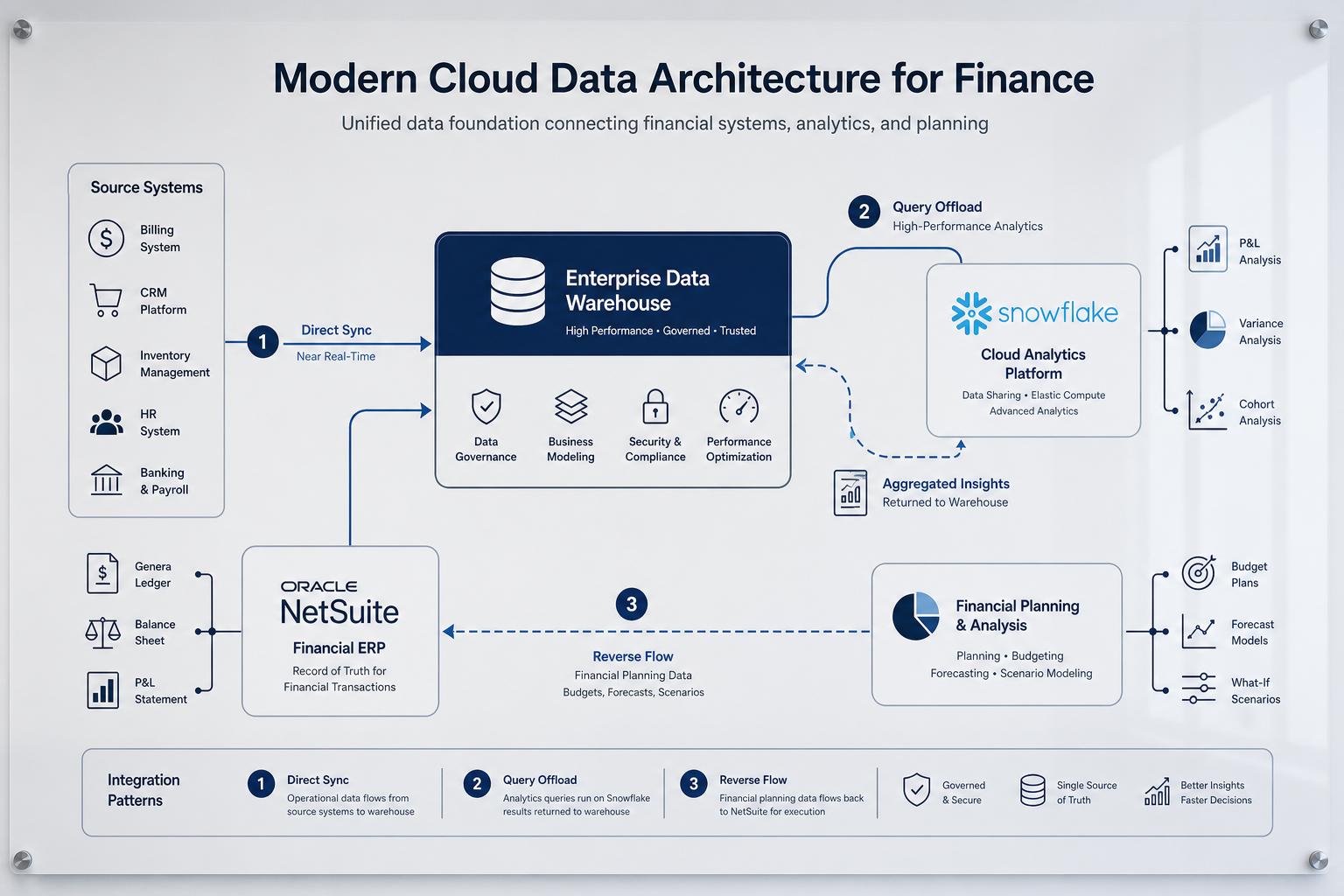
With integrated pipeline options in hand, FP&A can implement a robust analytics environment. A common architecture is illustrated in Figure 1 (below): NetSuite’s operational data flows into Snowflake via an ELT tool; Snowflake serves as the central FP&A store where data is modeled (often using dbt or SQL) into star schemas optimized for financial reporting. BI tools (Power BI, Tableau, etc.) then build dashboards on Snowflake. In parallel, NSAW may be used to host NetSuite’s data (and perhaps Snowflake data via the connector) for embedded analytics. Reverse-ETL can feed back key outputs if needed. The diagram in HouseBlend’s analysis captures this:
 Figure 1. Example FP&A data pipeline: NetSuite→(SuiteAnalytics Connect / ETL)→Snowflake→(BI Tools)→Reports.
(Figure source: Constructed from industry literature.)
Data Modeling and Metrics
Once NetSuite data is in Snowflake or NSAW, the finance team applies transformations. Often, the first step is building GL and Transactional fact tables. For example, a transformation might “fold” raw journal entries into period-end balances, or combine sales orders with cash receipts to produce a cash flow. Tools like dbt (data build tool) are widely used in this layer. Fivetran provides pre-built dbt packages for NetSuite SuiteAnalytics that automatically generate a Balance Sheet and P&L dimension tables. These models compute key financial statements which the FP&A team then uses in BI reports. Fivetran’s own documentation proclaims that their dbt package “recreates both the balance sheet and income statement”, emphasizing that a full ERP can be represented in Snowflake with minimal hand-coding.
In practice, FP&A analysts work with a “semantic layer” of subject areas (even outside NSAW) – a conceptual model where measures like revenue, cost, asset values, etc. are defined. For unified multi-system FP&A, Snowflake also lets teams easily join NetSuite data with CRM or HR data, something difficult inside NetSuite itself. Inflation of dimension (like entity lists, departments, subsidiaries) is handled in the DW. We note that Snowflake performance at scale is strong: Infometry’s product line claims to fetch 3 million NetSuite rows per hour per warehouse, meaning even Fortune-500 ERP volumes can be ingested nightly.
Evidence of Value
Quantitative improvements are often seen after adopting these architectures. For example, one study reported that use of automated ELT pipelines cuts the time-to-report by ~80% compared to manual workflows. In the “Futura Corp” scenario, a mid-market manufacturer using Airbyte realized this. Similarly, GitLab’s shift to Fivetran/Snowflake eliminated all missing fields and reduced dashboard run-times to minutes after each load. BirdRock (NSAW user) went from ad-hoc spreadsheets to AI-powered visual dashboards, though exact savings aren’t public. Survey data from Snowflake customers (not directly cited here) also indicate vast improvements in data access: one fintech reported moving thousands of the warehouse, reducing report latency from hours to under a minute.
In many narratives, the language is that of empowerment and completeness. When HouseBlend interviewed practitioners, one said the new stack allowed end-users to “focus on insights instead of cumbersome data engineering”. On the reverse-ETL side, companies adopting solutions like Census have noted eliminating manual CSV fiddling as a major productivity gain.
In sum, integration to Snowflake enables FP&A teams to answer the basic questions of FP&A (“Where are we now? Where will we end up?” [5]) with far more timeliness and scope. The enterprise data platform becomes the “single source of truth” that Oracle and others promise: a consolidated view on which continuous and predictive planning can be built [5].
Case Studies and Examples
Real-world implementations illustrate how these patterns work in practice and what outcomes they yield. Below are several examples drawn from published sources (names are real or illustrative):
-
BirdRock Brands (Retail) – NetSuite + NSAW. Having thousands of daily orders, BirdRock used NSAW to bring NetSuite data into an AI-augmented warehouse. According to their CFO, NSAW’s visualizations helped “elevate our business intelligence” and handle the ever-evolving planning needs of inventory and sales [3]. They specifically note using NSAW to forecast profitability and warehouse capacity. In other words, NSAW is the locus of their FP&A analysis, smoothing dynamics that were previously too complex to model in-spreadsheet.
-
Overture Promotions (Marketing Services) – NetSuite + NSAW. Overture’s CFO explains that raw data is not enough; NSAW allowed them to extract predictive insights. They said NSAW gave “predictive insights from our sales trends, channels, and product lines to inform our supply chain plans” [3]. This shows an FP&A use-case: merging order history (NetSuite) with demand forecasting in one analytics environment. By using NSAW for both standard NetSuite metrics and custom blended data, they could optimize resources in real-time.
-
GitLab (Technology/Finance) – NetSuite → Snowflake via Fivetran. The GitLab finance team switched from an older connector to a Fivetran-driven pipeline. A GitLab data analyst reported that after the switch, they obtained “a complete set of NetSuite data with all the transactions”, implying fewer gaps than before. They leveraged Fivetran’s NetSuite analytics templates to auto-generate financial statements in Snowflake, and then used Power BI/Tableau for dashboards. The outcome was fully automated reporting: balance sheets and P&Ls that refresh minutes after each load, instead of manual ETL. This underscores how ELT tools removed the last mile barrier to completeness and timeliness.
-
Glossier (Retail/E-commerce) – NetSuite → Snowflake with CDC. Glossier implemented Estuary’s log-based CDC to stream select NetSuite entities into Snowflake nearly in real-time. Their BI director said this approach “unlocked data blocked by cost before” and made data ingestion “much faster”. Before, nightly batch windows meant FP&A always worked with yesterday’s data; after CDC, inventory and order dashboards reflected the current day’s state. This live pipeline empowered better replenishment forecasting – a hallmark of cloud ERP analytics (live supply vs demand). The technical lesson is that for use-cases demanding sub-hour freshness, investing in streaming integration (rather than batch) can pay dividends for FP&A accuracy.
-
Mid-sized Manufacturer (Futura Corp., illustrative) – NetSuite → Snowflake via Airbyte (ELT). HouseBlend describes a hypothetical case where a mid-sized company processing ~5 million records monthly automates their integration. By using Airbyte to pull SuiteAnalytics tables daily, and then modeling GL data in Snowflake, their executives gained cross-system KPIs (e.g. sales pipeline vs actuals combining CRM data also in Snowflake). As a result, they $reduced reporting time by ~80% (based on independent survey). Though this is not a reality, it mirrors many real projects where turning a manual, Excel-driven process into a cloud pipeline accelerates FP&A cycles dramatically.
-
Global Enterprise (Datatech Inc., illustrative) – Talend-based integration. A Fortune-500 company with heavy existing ETL licenses used Talend to link NetSuite and Snowflake. They built multi-threaded routines using SuiteAnalytics Connect (ODBC) into Snowflake’s Bulk API. This handled billions of rows at high throughput, giving them complete financial data in the warehouse. However, it took months of engineering (configuring network, permissions) and required rework whenever NetSuite changed fields. The case highlights trade-offs: Talend (and similar enterprise tools) can achieve comprehensiveness, but with long lead times. FP&A may then benefit from the completeness, but at a cost of agility.
-
NSAW Customer Examples (from Oracle press) – BirdRock and Overture (above) are drawn from real customers featured in Oracle’s announcements. They reinforce that companies using NSAW report better FP&A outcomes. Oracle has also cited other NSAW customers in press releases (e.g. Terlato Wine) claiming accelerated insight cycles, consistent with our analysis. The public quotes by CFOs in these cases confirm the value proposition.
From these examples, we see patterns: moving to cloud data integration typically leads to faster, more complete reporting. When a full ELT stack (GitLab, Futura) is in place, FP&A teams gain near real-time dashboards and eliminate manual reconciliation. When a managed warehouse (NSAW) is adopted, users get AI-enabled analysis embedded in the ERP context, empowering “data-driven decisions” as Overture’s CFO put it [3]. Even partial upgrades (e.g. Talend) validate that having all data in one place is achievable, though often expensive.
A cautionary note: technology alone doesn’t fix process. All case summaries involve strong data and analytics teams driving the integration, plus executive support. Without clear FP&A requirements, one could end up with data pipelining for its own sake. Hence, the case studies also imply best practices: start with key FP&A use cases (cash forecasting, consolidated P&L, variance analysis) and ensure the integration is measured against those business needs.
Implications and Future Directions
The convergence of Snowflake and NetSuite signals broader trends in FP&A and enterprise IT. First, cloud ERPs and cloud data warehouses are becoming the norm: a majority of new ERP deployments are SaaS (Oracle cites ~70%+ of ERP on cloud [5]) and CFO offices increasingly expect data agility. Second, analytics is going beyond hindsight to foresight. Oracle’s vision for FP&A in 2026 is “AI-driven… continuously monitoring performance and anticipating outcomes” [5]. Achieving that vision requires integrated data flows – platforms like NSAW and Snowflake become conduits for machine learning. Predictive algorithms need up-to-date, quality data from the ERP; SAP, Workday, and NetSuite similarly pursue data cloud strategies to enable AI, and NetSuite’s partnership with Snowflake (literally choosing Snowflake tech for its analytics warehouse) reflects that.
On the integration front, we expect the following developments:
-
Tighter Cloud-Native Integration: The industry is moving toward standardization of data pipelines. Oracle’s introduction of Model Content Protocol (MCP) apps allows developers to build app-like interfaces into NetSuite dialogs. Snowflake’s Native App Framework may see more NetSuite connectors that run entirely in Snowflake. We’ll likely see collaboration on standards so that “on-demand” data sharing is easier. The growth of iPaaS alternatives might flatten as more SaaS products offer plug-and-play connectors (the netsuitesync review listed six specialist tools just for this one integration [12]).
-
AI and Machine Learning: By 2026, finance analytics will heavily use AI/ML for forecasting, anomaly detection, and scenario analysis [5]. Integrating Snowflake (which has built-in Snowpark ML capabilities) with NetSuite means FP&A can train models on historical ERP data and then operationalize them back into planning. For example, an AI model predicting sales might run in Snowflake, then its output could automatically update forecast records in NetSuite schedules (a reverse-ETL scenario). Conversely, NSAW might eventually embed machine-learned features (the Oracle press mentions AI features in NSAW dashboards [3]). The main implication is that data integration architectures must both deliver raw data reliably and feed these AI pipelines.
-
Governance and Data Quality: With increased automation comes a need for governance. Multiple data pathways (direct query, ETL, reverse-ETL) increase risk of duplication or inconsistency. Seminaries must implement master data definitions: e.g. what is “revenue” in Snowflake vs NetSuite vs NSAW? Tools may offer lineage tracking to help. We anticipate stronger metadata management (perhaps via Oracle’s MCP or Snowflake’s data catalog) so FP&A can trust their metrics. Also, cloud security and compliance (SOC2, GDPR etc.) remain critical; many connectors tout built-in encryption and SOC2 compliance (per [48] Acterys being SOC2 compliant).
-
Self-Service and Democratization: The long-term trend is enabling finance people to get data themselves. Many of the integration patterns (Fivetran pipelines, direct query tools) make data almost a self-service product. NSAW’s embedding in NetSuite suggests a demand for analytics within the user’s context. We can expect more wizard-driven connectors, low-code transformation, and automated analytics suggestions in FP&A tools. This ties back to user empowerment: our sources suggest (with HouseBlend commentary) that firms want their analysts focusing on analysis instead of pipeline scripts.
-
Convergence and Complexity: Multi-cloud architectures are growing complexity. Some companies may choose Snowflake as the data platform (combining Cloud ERP, data lake, and AI), while others may run Oracle, Snowflake, and even other warehouses in parallel. Integration solutions will need to handle cross-cloud scenarios (Snowflake on AWS vs Azure, or connecting to NSAW’s Oracle ADW). We might see hybrid architectures where NSAW (Oracle-based) and Snowflake (AWS/GCP/Azure) co-exist for financial data. In either case, the core (NetSuite) demands pipelines that abstract these details.
-
Emerging Standards: The Data Mesh concept (federated data domain management) may influence how NetSuite domains (finance, sales) are structured in Snowflake. Standards like OCI (Oracle Cloud Infrastructure) or teammates will play out. Oracle’s and Snowflake’s alliances indicate a partial standardization, but open API stances (OData in NS, open protocols in Snowflake) will shape how well the pieces fit. HouseBlend mentions an industry push toward open architectures (e.g. Oracle’s MCP standard), which will influence connectors for Snowflake-NetSuite.
-
Fintech and External Data: Beyond ERP, FP&A often uses external benchmarks or market data. Reverse-ETL and NSAW Sync patterns could be extended to ingest external feeds (e.g. stock prices, economic indices, or competitor metrics) into the analytical model. This would make the “single source” truly multifaceted. Snowflake’s data sharing could allow FP&A to consume live external data feeds in Snowflake and then optionally sync summarized results back to NetSuite. The growing ecosystem of Snowflake Marketplace partners suggests such flows will become easier.
In conclusion, Snowflake–NetSuite integration is a critical enabler for next-generation FP&A. The patterns discussed (NSAW Sync, Direct Query, Reverse-ETL) each serve different needs: NSAW sync unifies and enriches data inside Oracle’s analytics service; Direct Query feeding Snowflake powers lightning-fast visual analytics; Reverse-ETL closes the loop by letting predictive insights influence operational processes. Case studies from GitLab, BirdRock, and others illustrate significant productivity gains: near-real-time consolidation, full data coverage, and accelerated reporting. Organizations that master these integrations – turning NetSuite data into a cloud analytics asset – will be better positioned for AI-led FP&A.
Conclusion
The integration of Snowflake with Oracle NetSuite represents a strategic evolution for financial planning and analysis. Traditional siloed ERP reporting is giving way to cloud-scale data architectures that deliver timelier, broader, and more intelligent insights. We have seen that NetSuite Analytics Warehouse (NSAW) offers built-in capabilities (and new Snowflake connectors) to bring analytics closer to the user [3] [4]. At the same time, modern ELT pipelines that replicate NetSuite into Snowflake are becoming mainstream, as evidenced by numerous third-party tools and customer successes. Direct query approaches (such as BI tools hitting Snowflake directly) have shattered previous query speed limitations, while reverse-ETL patterns open new frontiers for operationalizing analytic results (albeit still early). Our comparative analysis shows that managed, cloud-native connectors typically strike the best balance for FP&A needs, though every organization must weigh cost, data freshness, and control.
Critically, all patterns require careful alignment with FP&A processes. It is not enough to build the pipeline – financial teams must define the right metrics, validate data across systems, and iterate on the integration. When done correctly, the benefits are clear: case studies demonstrate dramatically quicker close cycles, richer dashboards, and empowered decision-making (e.g. GitLab’s “complete set of data” for analysts, BirdRock’s AI-driven forecasting [3]).
Looking forward, the synergy of cloud ERP and data warehouses will only strengthen. With AI/ML reshaping FP&A expectations [5], having an integrated data fabric is a precondition for success. Snowflake’s and Oracle’s roadmaps indicate more embedded AI, better connectivity, and more seamless experiences. For organizations planning their FP&A roadmap, investing in robust Snowflake–NetSuite integration should be a high priority. Doing so will transform raw ERP transactions into actionable insights — from static spreadsheets to a world of real-time, predictive finance.
References: Citations in the text link to vendor documentation, industry reports, and vendor white papers (e.g. Oracle documentation [4], HouseBlend analyses, Census and Fivetran blogs [1] [2], Oracle press releases [3]) that support the above statements and data. These include customer testimonials, comparative tables, and technical guides.
External Sources (12)
About
Houseblend
Make NetSuite work better for your finance and operations teams with Houseblend. We help design, implement, integrate and improve ERP systems, with practical support for the people who use them every day.
Houseblend is a NetSuite consulting firm serving finance and operations teams. We help organizations implement ERP systems, connect business applications, improve existing configurations and maintain the systems that support everyday work. Our audience includes finance leaders, controllers, operations managers, NetSuite administrators and implementation teams.
Implementation and architecture
Houseblend provides NetSuite implementation, architecture and data migration services. We help teams evaluate how business processes, reporting requirements and existing data should fit together in an ERP environment. Training supports the people responsible for adopting and operating the resulting system.
Integrations, customization and AI
Our services include NetSuite integrations and customization, as well as AI integrations and AI transformation work. These engagements connect ERP data and workflows with the broader application landscape. The right design depends on the organization's systems, controls and operating needs.
Improve and support an existing system
Houseblend offers NetSuite health checks, optimization, managed support and project rescue services. We also provide expertise for analytics and specialist workflows, including NetSuite Analytics Warehouse, warehouse management and field service management. Published educational material helps teams investigate options and prepare informed questions for their implementation or support work.
Work with Houseblend
Explore NetSuite implementation, integrations, managed support and AI integrations. Contact Houseblend to discuss your current system and priorities.
Article examples explain concepts rather than promising a particular license, product capability, delivery schedule or outcome. Engagement scope is confirmed with the Houseblend team.
Disclaimer
This document is provided for informational purposes only. No representations or warranties are made regarding the accuracy, completeness, or reliability of its contents. Any use of this information is at your own risk. Houseblend shall not be liable for any damages arising from the use of this document. This content was generated with assistance from artificial intelligence tools, which may contain errors or inaccuracies. Readers should verify critical information independently. All product names, trademarks, and registered trademarks mentioned are property of their respective owners and are used for identification purposes only. Use of these names does not imply endorsement. This document does not constitute professional or legal advice. For specific guidance related to your needs, please consult qualified professionals.